


A bank can tell you there’s a message without saying what it contains. If you’re waiting for a claim update, that kind of email feels familiar.
The USAA notice in this case looks ordinary at first. The useful question isn’t what the message might say, but where you can read it.
Overview
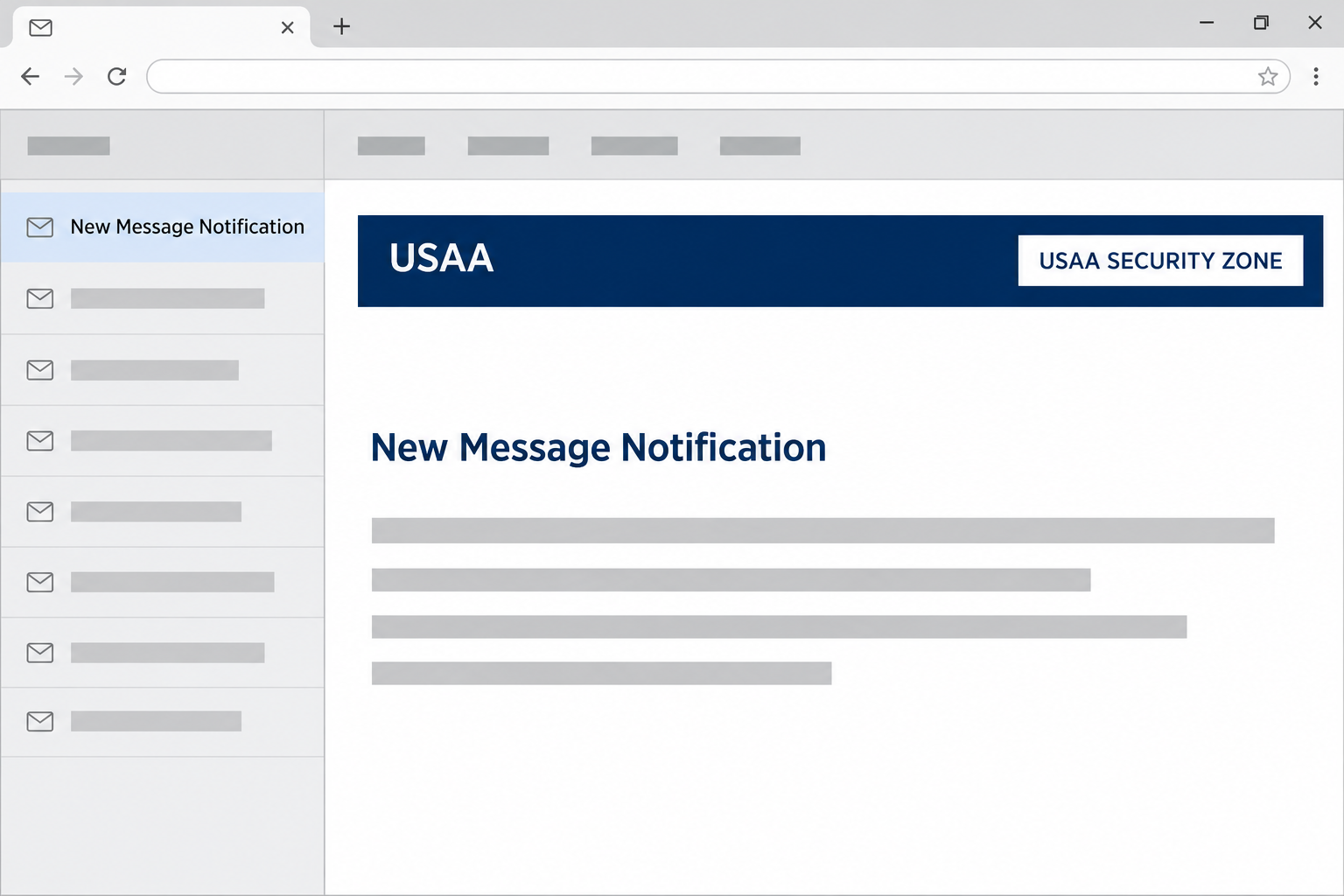
The email said a new USAA message was waiting
The USAA New Message Notification scam posed as an alert about a secure message. The sample used the subject “New Message Notification” and addressed the recipient as a USAA member.
The email did not set out a specific financial problem. It said USAA had posted something to the recipient’s account and encouraged them to follow the prominent message button.
That ordinary wording is part of the appeal. You might supply your own reason for checking, particularly if you’ve already been dealing with your bank or insurer.
The email’s footer even warned against handing over sensitive information by email. The warning sounded sensible, but it did not authenticate the link above it.
The security box looked familiar but didn’t verify the sender
A white box labeled “USAA SECURITY ZONE” appeared in the email header. USAA describes a personalized Security Zone among the ways it helps customers identify its messages.
It is the personalization and the rest of the evidence that matter, not a label alone.
An unrelated sender can place those words in a box without proving they are USAA.
The underlying sender address in the sample was not on usaa.com.
The email’s statement that you could read the message on USAA’s site did not match where its button went.
An unauthorized message can borrow genuine safety advice, a genuine brand, and a plausible layout at the same time. None makes an unrelated login page a safe place to type.
The login asked for both an Online ID and a password
The recorded destination resembled the USAA member login and displayed fields for an Online ID and password. The browser showed an origin under soroptimist-berne-arcadia[.]ch, not USAA.
The recorded address started with “blob:”, but the unfamiliar origin was still visible after it. That prefix does not authenticate the institution named in a page title.
This is a warning about the impersonating email and form.
The domain shown there does not identify a person behind the scam or establish what any unrelated organization knew about it.
- Check for a matching message after opening your usual USAA app independently.
- Compare the whole address, not just the account name in the browser tab.
- Treat a copied security label as artwork, not as confirmation from your bank.
- If the matter involves a recent claim, verify it through the existing claim record or contact.
How the USAA New Message Notification Scam Works
Step 1: The vague notification fills in a gap you already have
Perhaps you submitted insurance paperwork yesterday or recently changed a payment setting. The email doesn’t need to name either one for you to think it might be about your account.
Real companies do have reasons to keep account details out of an inbox.
The imitation borrows that habit by saying there’s a secure message and keeping its contents out of sight.
That leaves the email with a single job: get you to open the message. There is no invoice amount or alarming claim number to make you stop and check first.
An unexpected alert isn’t evidence that the sender knows anything about your real claim. You can open your account through its established app without deciding whether the email is genuine.
Step 2: The email reassures you before you have checked anything
The header, professional colors, and Security Zone label make the screen look familiar. The footer tells the reader not to send private information in an email.
Responding by email is not the same as following a button from it. The imitation can repeat a sensible security rule while directing you to a place that breaks it.
Look at the underlying sender information instead of relying on the display name. When the address or link looks unfamiliar, check with USAA through a route you already know.
Even a format that resembles other messages you’ve received cannot establish that this one came from the same system. Contrast the email with the actual account, not just another email.
Step 3: The message button leads away from USAA
The button did not take the visitor to a secure USAA inbox.
The recorded page instead looked like a login form and asked for the credentials used to enter the account.
A tab title can say it is a member login without being one. The strongest clue in this sample was the unrelated origin visible in the browser’s address bar.
If your password manager doesn’t recognize the destination, don’t fill the fields manually to get past the problem. Read the address and use your own app or bookmark.
An inbox link has no special authority because you are on a device you trust.
Your phone or computer can display a convincing fake page just as easily as a real one.
Step 4: The request shifts from reading a message to gaining account access
An Online ID paired with a password could help somebody attempt a real sign-in. A later request for a code or approval would raise the risk further.
The known sample shows the login fields. It doesn’t show a successful sign-in, a cleared transfer, or an infection on a person’s computer.
Different USAA customers have different products and account settings. The right follow-up is to check the services you actually use, rather than guessing which ones a stranger could reach.
Don’t wait to see whether the page accepts or rejects the password.
Its feedback doesn’t tell you who received what you typed or whether they will try to use it later.
What to Do if You Have Fallen Victim to This Scam
-
Start with what you did on the page. If you only saw the email, report it through the official channel and leave the link alone.
If you opened the form without entering anything, close it. Opening the page alone does not establish a compromised USAA account.
Save the subject, time, and underlying sender if you can do so safely. Do not send the working link to other members as a warning.
-
If you entered credentials, contact USAA promptly and independently. Use your existing app, a known bookmark, or the number on your card or policy documents.
Explain that the page requested an Online ID and password. Mention if you also gave a code, approved a prompt, or received a notice about changes to your account.
Use USAA’s account protection guidance to find its genuine security contact and change exposed credentials through the real service.
-
Check other places you used the same password. Change it wherever it was reused, especially on the email that receives financial notices or password resets.
Use a trusted device and make each replacement different. Review the email account for unfamiliar recovery contacts, forwarding rules, or sessions if you think it was also exposed.
Do not give a new verification code to someone who calls after the incident. Hang up and reopen the conversation through a verified number.
-
Review the account you actually hold, not just the fake message. Check recent transfers, purchases, contact changes, and alerts through your real account.
If you have insurance or a pending claim, confirm any unexpected payment destination with that team through the existing claim record. Do not share account details in ordinary email.
USAA’s Security Center has reporting information for suspicious messages and unauthorized transactions. Save the exact dates and amounts so the correct team can locate them.
-
Deal with any charge or transfer as a separate problem. Tell the bank which entries are unfamiliar and ask what it can stop or dispute based on the payment type.
Keep your reference numbers and original statements. A password reset can protect access without resolving money that already moved.
If identity documents or a Social Security number were also disclosed in a follow-up, use IdentityTheft.gov for a U.S. recovery plan suited to that exposure.
-
Report a download only if your encounter included one. The known USAA lookalike displayed a login form, not an installer needed to read a message.
If a different version asked you to install software, grant remote access, or add an extension, tell support before using that device to reset passwords.
Do not rely on a scan to reverse a transfer or close an account session. Those problems still need attention through your financial provider.
How to Verify a Secure Message Without Using the Notice
Check the actual account for a corresponding item
Open the app you normally use and look for messages or notices related to your products. You don’t have to install a new app to verify an old one.
If you were expecting a claim update, open the existing claim instead of assuming any arriving notification was about it.
A real status should have a record independent of the email.
If you cannot find the item, contact USAA from a number you already know.
Ask whether there is a real case or message, without repeating details from a suspected page as fact.
If a joint account or household policy is involved, have the other person check their own notifications separately.
You don’t need to exchange passwords to establish who received a real message.
Use the same approach if you get paper mail about the case. Compare any reference with the established account or support team before changing where a payment goes.
Don’t use the copied security box as a shortcut
The security area can be one clue when checked in context. A heading saying “USAA SECURITY ZONE” on its own is not the same as a personalized security element.
For this email, both the address that sent the note and the destination mattered.
It was safer to skip the link than to settle the authenticity debate from its graphic design.
Treat a real-looking disclaimer the same way. The question isn’t whether the advice is good, but whether the person giving it has any right to ask for your login.
Remember that a second contact may sound more personal
If someone already has parts of your contact information, a follow-up call can feel convincing even without proof that it came from the bank.
Suppose a caller says they saw your “failed login” and want a code to repair it. Don’t confirm that story by giving them the next thing they ask for.
Use a number you find independently, not a caller ID or callback provided during the conversation. Tell the bank how the email and call fit together, if both occurred.
Frequently Asked Questions
Is the USAA New Message Notification email always fake?
The generic subject alone can’t answer that. The scam documented here used a message button to open an imitation on a domain that did not belong to USAA.
To find out whether there is a real message, sign in from your normal app or bookmark. You don’t need to follow the email to check.
Does the USAA Security Zone label prove the message came from USAA?
No, anyone can copy those words onto a message. USAA describes a personalized Security Zone, not a rule that every graphic bearing its name is authentic.
Compare the sender and destination with the established service. If in doubt, check your actual account and report the notice through a verified channel.
Why was there a blob address in the browser?
A blob address is a browser reference that can still show the site it came from. In this case, the origin shown was unrelated to USAA.
Don’t use a temporary-looking address to decide a sign-in is private. Enter credentials only after opening your financial service through the normal route.
What if I entered an Online ID but not a password?
Tell USAA which field you filled in. An Online ID alone is different from a complete login, but it can help someone make a later request sound more credible.
If you think the browser filled a password automatically or you supplied a code, include that detail. The support team can advise based on the actual level of exposure.
What should I do if the email came right after a real claim?
Go directly to the claim you already have and check its status there. Timing alone does not establish any link between a real claim and a suspicious email.
If there’s a charge or change you cannot explain, contact the team through the existing record. Don’t let the email choose the contact route for you.
Did reading the email give someone access to my USAA account?
Seeing the notice isn’t the same as submitting the form. If all you did was read it, report it without assuming your bank account has been accessed.
If you entered a password or saw an unauthorized transaction, act on that separately. Tell USAA which of those events occurred when you get in touch.
The Bottom Line
Don’t use the button in this USAA notice. The real question, whether a secure message is waiting, is one you can answer through your existing account.
If you supplied an Online ID and password to the imitation, contact USAA through an established channel and secure the account.
Check real activity rather than trusting what the fake page displayed.

Join the discussion
0 commentsShare your experience or ask a question about this article.
Community experiences
Did this happen to you?
Your experience could help someone recognize the same scam. Submit a private report for our team to review.
I experienced this tooReports are reviewed before publication. Sharing publicly is always your choice.
Discussion
Start the conversation
Have a question or something useful to share? Add the first comment.