

Have you received a suspicious text message claiming to be from USPS about a package delivery failure? Watch out – it’s likely a scam designed to steal your personal and financial information.
In this article, we’ll take an in-depth look at how this USPS text message scam works and what you can do to protect yourself.
USPS Delivery Failure Notification Text Message Scam Overview
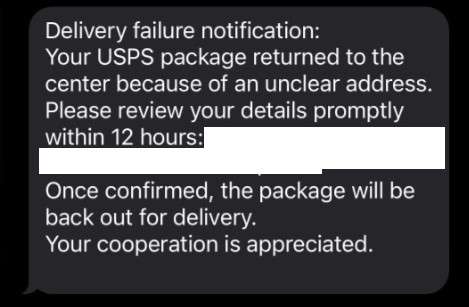
The USPS Delivery Failure Notification scam typically arrives as an unsolicited text message to your phone. The message claims to be from the United States Postal Service (USPS) and says something like:
“Delivery failure notification: Your USPS package returned to the center because of an unclear address. Please review your details promptly within 12 hours: [phishing link]. Once confirmed, the package will be back out for delivery. Your cooperation is appreciated.”
But this message is not actually from USPS at all. It’s a scam designed by cybercriminals to trick you into clicking on a malicious link. Their goal is to steal sensitive personal and financial data that they can use for identity theft, credit card fraud, and other nefarious purposes.
This scam preys on people expecting an important package delivery. The urgent wording pressures potential victims to act quickly without thinking. And the professional-sounding tone and USPS branding adds an air of legitimacy.
However, it’s important to know that USPS will never send unsolicited text messages requesting personal information or payment related to package delivery issues. Any unexpected text message making such requests is almost certainly a scam.
How the USPS Delivery Failure Notification Scam Works
Here’s a step-by-step breakdown of how scammers carry out the USPS Delivery Failure Notification scam:
Step 1: Scammers send fraudulent USPS text messages en masse
The scam begins when cybercriminals send out a batch of fraudulent text messages impersonating USPS. The messages are sent to random phone numbers rather than targeting specific individuals.
The scam texts usually claim a package delivery failed due to an incorrect or unverifiable address. They try to create a sense of urgency, stating that you must take action within a short time window to get your package redelivered.
Step 2: Victims click the phishing link
The scam text messages include a link for supposed “address verification” or “redelivery scheduling.” But this link doesn’t actually go to the real USPS website. Instead, it redirects to a fake site set up by the scammers.
The phishing site is designed to closely mimic the look of the legitimate USPS website. It may contain USPS logos, color scheme, terminology and other visual elements to trick victims into thinking it’s authentic.
Step 3: Phishing site steals personal info
Once on the fake USPS site, victims are prompted to enter an array of sensitive personal information under the guise of verifying their identity and address. Scammers may ask for:
- Full name
- Date of birth
- Phone number
- Email address
- Home address
- Social Security Number (SSN)
Scammers claim this data is required to authenticate the recipient before the package can be redelivered. In reality, any info submitted gets harvested by the cybercriminals behind the scam.
Step 4: Scam site requests payment
After collecting personal details, the phishing site typically requests a small “redelivery fee” to complete the process. This nominal payment, usually just $2-$5, makes the scam seem more credible.
However, the real purpose is to steal credit card numbers, expiration dates, and security codes when victims enter their payment info. The scammers can then use these financial details for fraudulent purchases and identity theft.
Step 5: Scammers exploit the stolen data
Cybercriminals quickly capitalize on the sensitive data stolen through the fake USPS site. Common consequences include:
- Unauthorized credit card charges and bank withdrawals
- Opening new accounts and lines of credit in the victim’s name
- Using personal info for other identity theft schemes
- Selling the data on the dark web cybercrime marketplaces
So in addition to a fraudulent credit card charge, victims of this scam face potentially long-term identity theft nightmares. It can take extensive time and effort to recover from such incidents.
What To Do If You’ve Fallen Victim to the USPS Text Scam
If you suspect you may have fallen for the USPS text message scam, quick action is critical to mitigate the damage. Here are key steps to take:
- Immediately contact your bank and credit card companies to alert them about the incident. They can cancel any compromised cards, reverse fraudulent charges, and issue you new account numbers.
- Place a fraud alert on your credit reports with the three main credit bureaus (Equifax, Experian, TransUnion). This makes it harder for scammers to open new accounts in your name. You can also consider a credit freeze for maximum protection.
- Change the passwords on any online accounts that may have been compromised, especially if you used the same password on multiple sites. Make sure to use strong, unique passwords for each account.
- Carefully monitor your credit card and bank statements over the coming months. Look out for any suspicious transactions and report them promptly.
- Consider signing up for identity theft monitoring services. These can help detect any misuse of your personal information across various databases and alert you to potential issues.
- Report the scam to authorities. File a complaint with the Federal Trade Commission (FTC) at ftc.gov/complaint and contact the USPS Inspection Service at 877-876-2455.
- Delete any suspicious text messages from your phone. Do not click on any links or respond to the scammer.
Frequently Asked Questions About the USPS Text Message Scam
Q1: What is the USPS Delivery Failure Notification scam?
A: The USPS Delivery Failure Notification scam is a fraudulent scheme where cybercriminals send fake text messages pretending to be from the United States Postal Service (USPS). These texts falsely claim that a package delivery failed due to an incorrect or unverifiable address. They urge recipients to click a link and provide personal information or payment to supposedly get their package redelivered. In reality, it’s a ploy to steal sensitive data and money.
Q2: How can I identify a USPS text message scam?
A: There are several red flags that can help you spot a fraudulent USPS text message:
- USPS will never send unsolicited text messages asking for personal information or payment related to package delivery issues.
- The message creates a false sense of urgency, pressuring you to act quickly.
- The text includes a suspicious link that doesn’t lead to an official USPS website.
- The message may contain spelling and grammar errors or use awkward language.
- You aren’t expecting a package delivery or the details don’t match your tracking info.
Q3: What happens if I click the link in a USPS scam text message?
A: Clicking on the link in a USPS scam text typically redirects you to a fraudulent website designed to look like a legitimate USPS site. This phishing site will prompt you to enter sensitive personal details like your full name, address, date of birth, and even Social Security Number under the guise of verifying your identity for package redelivery.
The fake site may also request a small “redelivery fee” to steal your credit card info. Any data you enter goes directly to the scammers behind the scheme.
Q4: What should I do if I receive a suspicious USPS text message?
A: If you receive a questionable text claiming to be from USPS, do not click on any links or provide personal information. Delete the message from your phone.
If you’re expecting a USPS package delivery and want to check its status, go directly to the official USPS website (www.usps.com) and use your tracking number. You can also contact USPS directly using official contact info from their site.
Q5: I think I fell for the USPS text scam. What should I do now?
A: If you suspect you’ve fallen victim to the USPS text scam, act quickly with these steps:
- Contact your bank and credit card companies to report the incident and cancel any compromised cards.
- Place fraud alerts on your credit reports with the three main credit bureaus.
- Change passwords on any accounts that may be at risk, using strong unique passwords.
- Carefully review financial statements for suspicious activity over the coming months.
- Consider enrolling in identity theft monitoring services for added protection.
- Report the scam to the FTC (ftc.gov/complaint) and USPS Inspection Service (877-876-2455).
Q6: How can I protect myself from delivery scams like the USPS text message con?
A: Here are some tips to avoid falling for delivery scams:
- Be wary of unsolicited texts, emails or calls claiming to be from delivery services, especially if they request personal info or payment.
- Go directly to official delivery service websites to check your package status and contact companies.
- Keep your tracking numbers handy to identify legitimate delivery communications.
- Avoid clicking links or downloading attachments from unknown/suspicious sources.
- Use strong, unique passwords for your online accounts and enable two-factor authentication when available.
- Regularly monitor your financial statements and credit reports for any signs of fraud.
By staying alert to potential red flags and taking proactive measures to secure your data, you can significantly reduce your risk of becoming a delivery scam victim. Remember, if a message seems suspicious, trust your instincts and verify through official channels before taking any action.
The Bottom Line on USPS Text Scams
The USPS Delivery Failure Notification scam is a devious ploy designed to steal your sensitive data and money. By impersonating official USPS communications, scammers hope to trick you into clicking malicious links and unwittingly handing over personal and financial information.
Remember, USPS will never send unsolicited text messages demanding personal details or payments. If you receive a questionable text claiming to be from USPS, do not engage with it. When in doubt, contact USPS directly using official contact info from their website to inquire about your package delivery status.
If you think you may have fallen victim to this scam, swift action is vital. Promptly notify financial institutions, place credit freezes/fraud alerts, change compromised passwords, and consider identity theft monitoring. Reporting the scam to the FTC and USPS can also help combat these schemes.
Ultimately, awareness is key to thwarting delivery scams like this USPS text ruse. By recognizing the red flags and knowing how to respond, you can avoid becoming another victim of these increasingly prevalent cons. Stay alert and think before you click to keep your data and dollars safe from scammers.








