

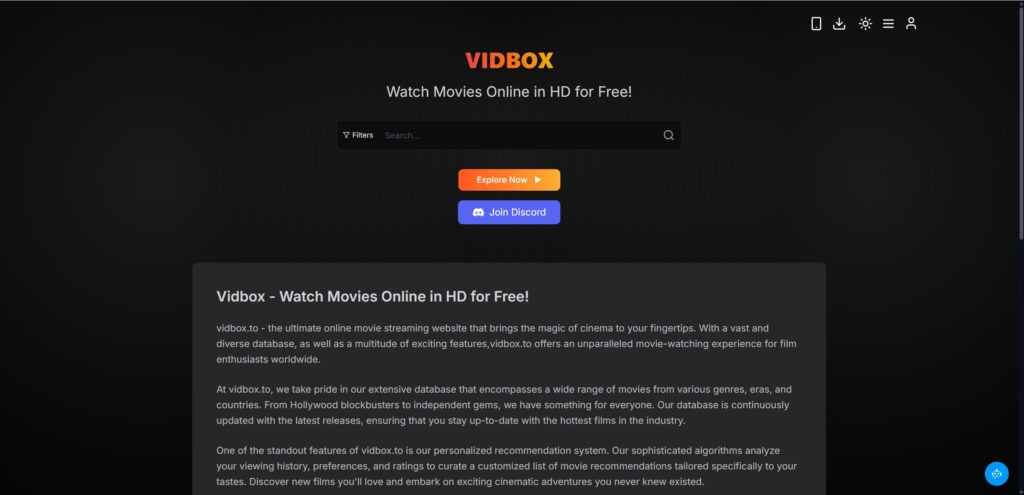
Vidbox.dev is a free movie streaming website that promotes itself as a place to watch movies, TV shows, and anime online without registration. The site looks simple, modern, and easy to use, which is exactly why many users may be tempted to click around and start watching.
But free streaming sites like Vidbox.dev come with a tradeoff. The biggest concern is not always the website itself. The real risk often comes from aggressive ads, pop-ups, redirects, fake buttons, and third-party pages that appear once users start interacting with the site.
Vidbox.dev may not be malicious by itself, but the advertising ecosystem around sites like this can expose users to scams, misleading downloads, browser notification spam, and unsafe pages.
What Is Vidbox.dev?
Vidbox.dev presents itself as a free online streaming site for movies, TV shows, and anime. The homepage describes it as a place where users can watch movies online in HD for free and browse entertainment content without needing a paid subscription.
The site also includes a familiar streaming layout with categories, search features, movie listings, and links for TV shows, anime, favorites, FAQs, contact pages, and policies.
One important detail is that Vidbox.dev states it does not store files on its own server and only links to media hosted on third-party services. That type of disclaimer is common on unofficial streaming websites. It means the site may act more like a streaming index or access point rather than a direct host of the content.
That does not automatically make it safe. It simply changes where the risk may appear.
Is Vidbox.dev Legit?
Vidbox.dev should not be treated like a legitimate streaming service such as Netflix, Hulu, Max, Disney+, Prime Video, Apple TV+, Peacock, or Crunchyroll.
A legitimate streaming platform normally has clear licensing agreements, company ownership, official apps, customer support, subscription terms, privacy protections, and legal rights to distribute the content it offers.
Vidbox.dev does not appear to operate with that same level of transparency. It offers free access to entertainment content and says the media is hosted on third-party services. That places it closer to the unofficial streaming ecosystem than to licensed platforms.
The site may work. A page may load. A movie may appear available. But working does not mean safe, legal, or trustworthy.
Is Vidbox.dev a Scam?
Vidbox.dev is best described as a risky free streaming site rather than a classic scam.
A classic scam usually has a direct goal: stealing money, collecting passwords, selling a fake product, or tricking users into calling a fake support number. Vidbox.dev may not behave that way directly.
The more realistic concern is indirect risk.
Free streaming sites often make money through aggressive ad networks. These networks may display pop-ups, open new tabs, redirect users to unrelated websites, and show misleading buttons that look like real video controls.
Some ads may only be annoying. Others may lead to unsafe pages.
That is where users can get into trouble.
The Real Risk: Pop-Ups, Redirects, and Aggressive Ads
The main danger with Vidbox.dev is not simply opening the homepage. The real risk begins when users start clicking.
A user may click a movie poster and see a new tab open. Another click may trigger a pop-up. A large “Play” button may not be the real video player. A “Download” button may send the user to a suspicious installer. A page may ask the user to click “Allow” to continue watching.
These are common tactics on free streaming sites.
Users may be redirected to pages showing:
- Fake virus warnings
- Suspicious VPN offers
- Adult ads
- Gambling promotions
- Fake giveaways
- Scam subscription pages
- Browser extension prompts
- Fake software updates
- Push notification traps
- Misleading download pages
This does not always mean Vidbox.dev directly controls every ad or redirect. Many of these pages may come from third-party ad networks. But for the user, the practical risk is the same: one wrong click can lead somewhere unsafe.
Why Free Streaming Sites Use These Ads
Free streaming websites need money to operate. Since users are not paying a subscription, many of these sites rely on ad revenue.
Mainstream advertisers usually avoid unofficial streaming sites, especially when there are copyright concerns. As a result, these websites may work with lower-quality ad networks that allow more aggressive campaigns.
Those networks may pay for:
- Pop-up impressions
- Redirect traffic
- Clicks on fake buttons
- Push notification subscriptions
- App installs
- Browser extension installs
- Visits to gambling or adult websites
- Leads for questionable offers
That is why users may see multiple pop-ups before reaching the content. Every extra tab or redirect can generate revenue.
The problem is that this model creates a bad and sometimes dangerous user experience.
Browser Notification Prompts Are a Red Flag
One of the most common tricks used by shady ad networks is the browser notification prompt.
A page may ask users to click “Allow” to:
- Start the movie
- Continue watching
- Verify they are not a robot
- Confirm their age
- Unlock HD playback
- Pass a fake CAPTCHA
- Download a file
Do not click “Allow.”
If you allow notifications from a suspicious website, your browser may start showing spam alerts even after you leave the page. These notifications can promote fake virus warnings, adult content, gambling pages, crypto scams, phishing links, or suspicious software.
Many users think these alerts are coming from their computer or antivirus program. In reality, they are often just browser notifications from a website they accidentally allowed.
Fake Play and Download Buttons
Another major issue with Vidbox.dev and similar sites is the fake button problem.
Free streaming pages often include ads designed to look like normal site controls. A fake “Play” button may open a pop-up. A fake “Download” button may lead to a suspicious file. A fake “Continue” button may redirect the user through several unrelated domains.
This design is intentionally confusing. It makes users click more, and more clicks often mean more ad revenue.
You should be especially careful with any page that asks you to install something. A normal browser should not need a special player, codec, extension, or APK file just to watch a movie. If a site says you must install software to continue, close the page.
Can Vidbox.dev Infect Your Device?
Simply visiting Vidbox.dev does not automatically mean your device is infected. The site itself should not be automatically labeled as malware.
The higher risk comes from interaction. Problems are more likely if you clicked pop-ups, allowed notifications, downloaded a file, installed an extension, or followed fake warning messages.
Your risk is higher if you:
- Clicked suspicious ads
- Allowed browser notifications
- Downloaded a file
- Installed a browser extension
- Installed an app or APK
- Entered your email address
- Entered a password
- Entered payment details
- Followed a fake virus warning
- Reused a password on a suspicious page
If you only opened the site and closed it, your risk is probably lower. If you interacted with ads or downloads, take cleanup steps.
What To Do If You Used Vidbox.dev
If you visited Vidbox.dev and are worried, start by closing all suspicious tabs and browser windows. Do not click fake warnings, download prompts, prize offers, or security alerts shown inside the browser.
Next, clear your browser cookies and site data. This helps remove stored data from Vidbox.dev and related redirect pages.
Then check your browser notification permissions. Remove Vidbox.dev and any unfamiliar domains from the allowed list. This is especially important if you started seeing strange alerts, adult notifications, gambling ads, or fake virus warnings.
After that, review your browser extensions. Remove anything you do not recognize, especially extensions that appeared recently.
You should also scan your device with Malwarebytes. Malwarebytes can help detect adware, browser hijackers, potentially unwanted programs, suspicious installers, and other threats that may come from misleading ads or unsafe downloads.
For future protection, consider using AdGuard or another trusted ad blocker. AdGuard can reduce pop-ups, redirect chains, intrusive ads, and tracking scripts. It will not make unofficial streaming sites completely safe, but it can reduce exposure to the aggressive ads that make them risky.
What Not To Do on Vidbox.dev
If you visit Vidbox.dev or a similar free streaming site, avoid these actions:
- Do not click random pop-ups.
- Do not allow browser notifications.
- Do not install browser extensions.
- Do not download video players or codecs.
- Do not install APK files.
- Do not enter payment details.
- Do not reuse passwords.
- Do not trust fake virus warnings.
- Do not call phone numbers shown in pop-ups.
- Do not click “Download,” “Continue,” or “Unlock HD” buttons unless you are sure they are real.
The safest rule is simple: if a page tries to scare you, rush you, or make you install something, leave.
Safer Alternatives
The safest way to watch movies and TV shows is through official platforms. Depending on your location and the content you want, safer options include Netflix, Hulu, Disney+, Max, Prime Video, Apple TV+, Peacock, Paramount+, YouTube, Tubi, Pluto TV, The Roku Channel, and official broadcaster apps.
Some are paid, while others are free and ad-supported. The difference is that legitimate services operate with licensing, clearer policies, better security standards, and more accountable advertising.
Final Verdict: Is Vidbox.dev Scam or Legit?
Vidbox.dev should be treated as risky. The site itself may not be malicious in the traditional sense, but the aggressive ads, pop-ups, redirects, and third-party pages around it can expose users to scams, fake warnings, misleading downloads, browser notification spam, and unsafe websites.
The real danger is not simply opening the site. The real danger is clicking the wrong ad, allowing notifications, installing a fake player, or following a redirect to a malicious page.
Avoid interacting with pop-ups, block notification requests, do not download anything, and never enter personal or payment information on suspicious pages. If you already clicked something or downloaded a file, scan your device with Malwarebytes and consider using AdGuard to reduce future exposure to intrusive ads and redirects.

Join the discussion
0 commentsShare your experience or ask a question about this article.
Discussion
Start the conversation
Have a question or something useful to share? Add the first comment.