VINClarity Exposed: $1 VIN Report Can Trigger $24.99 Monthly Membership
Written by: Lapain Epuran
Published on:
A used-car search can turn urgent quickly. One promising listing appears, another buyer is interested, and a vehicle history report suddenly feels essential.
VINClarity advertises a low-cost path to that information. The important question is what the small initial payment may authorize afterward.
Overview
What VINClarity offers
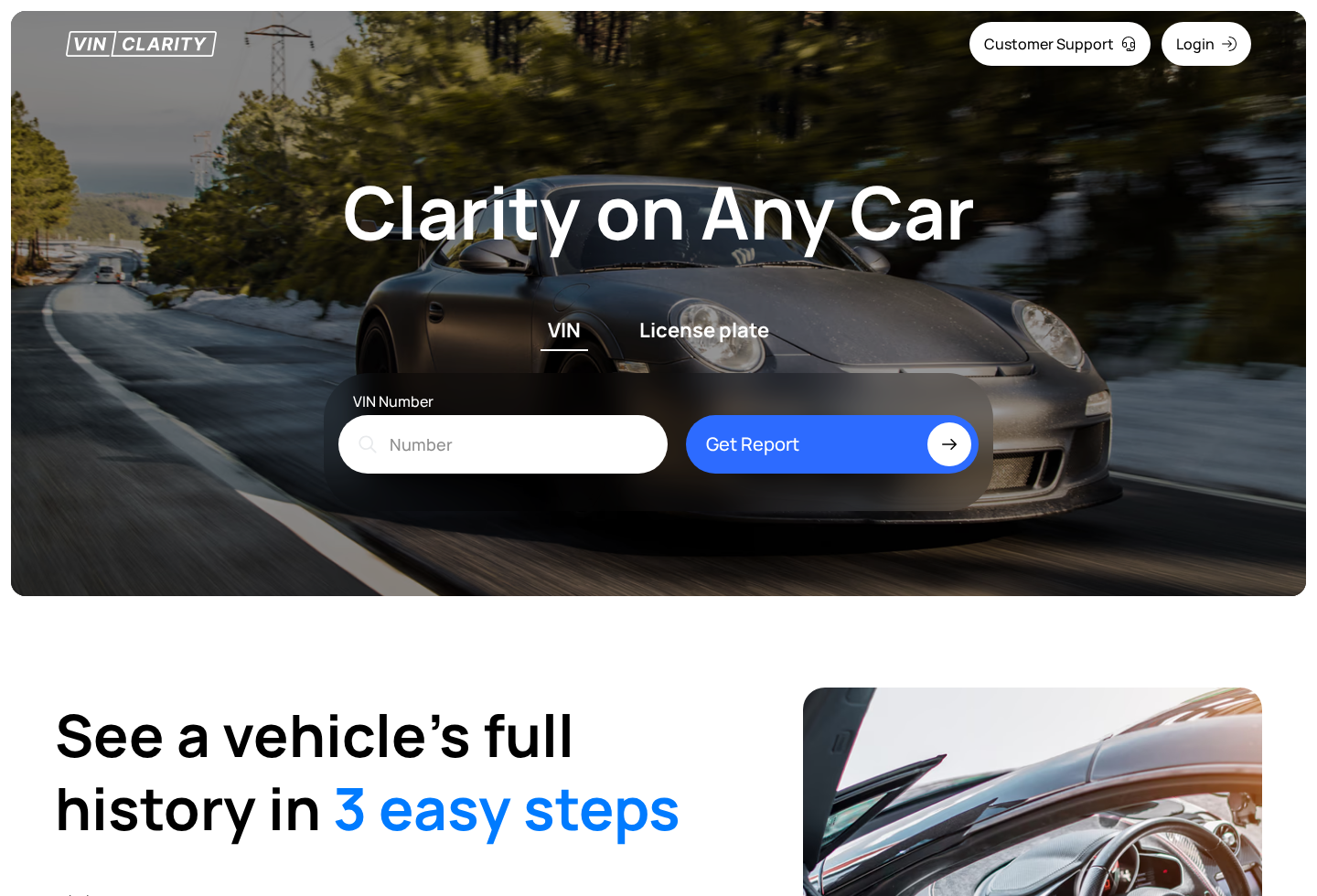
VINClarity sells online reports connected to a vehicle identification number. The service promises access to records that may help a shopper evaluate a used vehicle.
A VIN report can contain useful clues about title history, odometer entries, previous damage, theft records, or other events, depending on available databases.
No commercial report is automatically complete. Missing data does not guarantee that a vehicle was never damaged, repaired privately, or driven under a different record.
Why the $1 price causes confusion
Consumer complaints describe paying approximately $1 for an initial report and later discovering a $24.99 monthly membership charge.
DataX Group LLC, the company identified with the service, has responded that the membership terms are presented during checkout.
Those two positions can exist together. A seller may place renewal language on a page while a customer still misunderstands the transaction as a one-time report.
The real test is whether the recurring commitment is prominent, understandable, and affirmatively accepted before card details are submitted.
What the current records show
VINClarity is an active service rather than a fabricated website with no identifiable operator. Its privacy policy names DataX Group LLC.
The same policy lists an address in Sheridan, Wyoming, and provides support@vinclarity.com. Public review and complaint profiles also exist.
The introductory transaction may be followed by a $24.99 monthly membership.
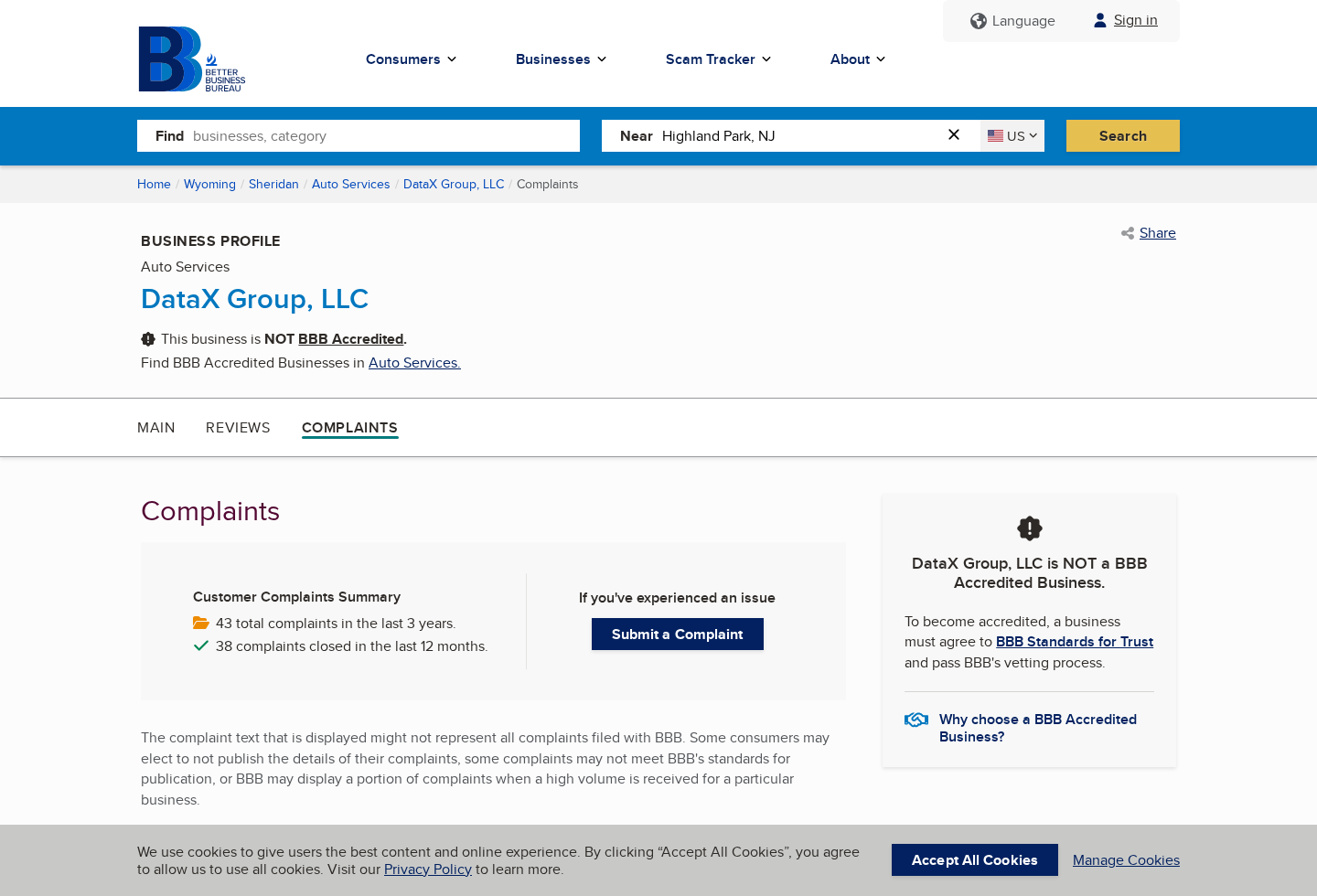
BBB currently lists DataX Group LLC as not accredited.
The BBB profile shows 43 complaints during the previous three years.
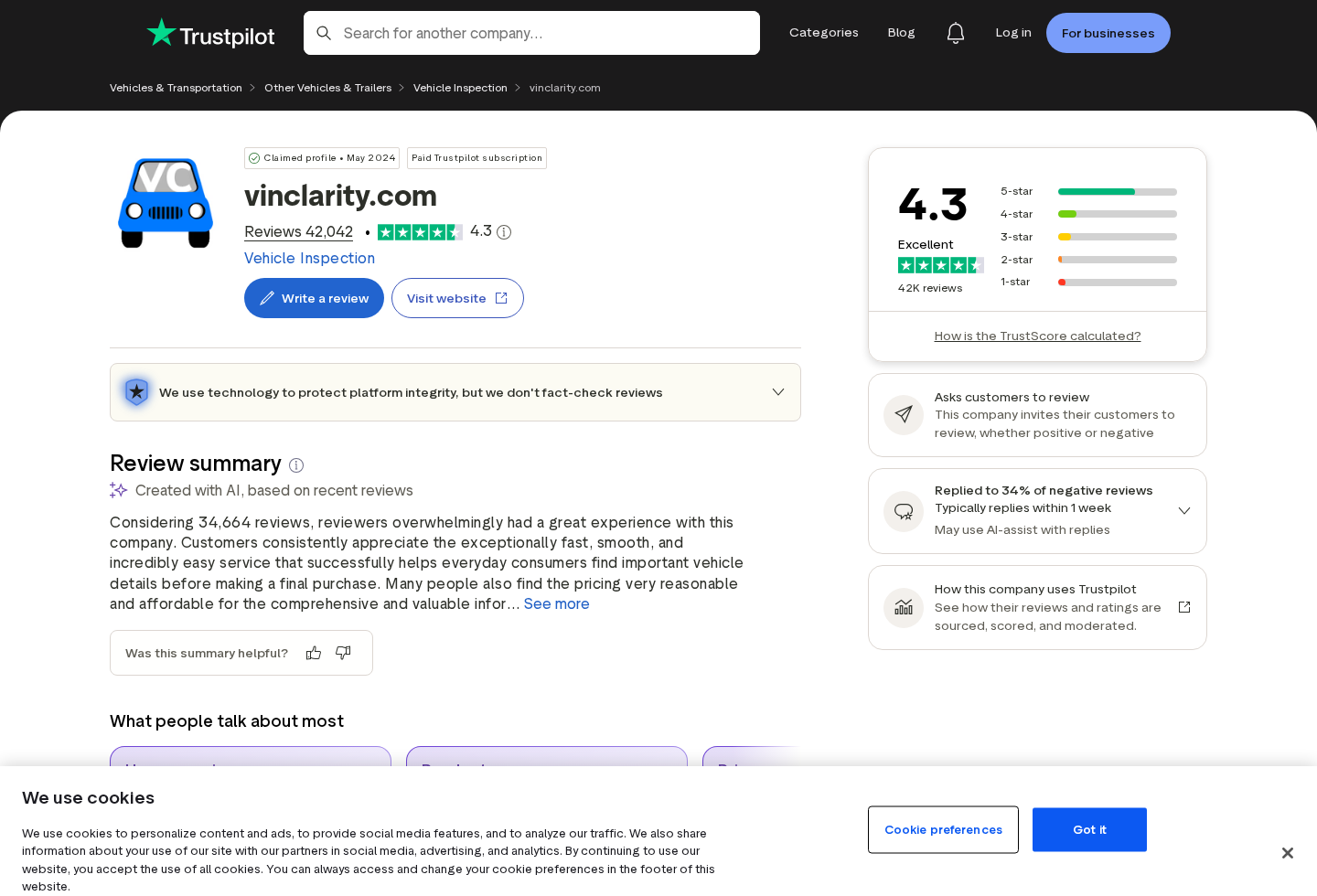
Trustpilot displays a large review volume and identifies the profile as claimed.
VIN reports should be compared with inspections, title documents, and approved data providers.
These facts do not prove every charge was unauthorized. They show why a buyer should treat the initial price as part of a larger agreement.
Is VINClarity a Scam?
VINClarity appears to provide a real online service. We did not find a sound basis to describe the website itself as wholly fictitious.
The concern is the conversion from a very small report payment into a recurring membership that some buyers say they did not expect.
That pattern is sometimes called a negative-option offer. Unless the customer cancels, the seller interprets silence as permission to continue billing.
A negative option is not automatically unlawful. Problems arise when material terms are hidden, confusing, contradicted, difficult to cancel, or charged without informed consent.
Complaint counts also need perspective. They identify repeated friction, but they do not reveal total sales or establish that every customer had the same experience.
Likewise, a strong aggregate review score does not erase specific billing complaints. Review sites and complaint databases answer different questions.
Our conclusion is narrower: the $1 framing can create a costly misunderstanding, so customers must verify the membership before completing payment.
How the VINClarity Membership Funnel Works
Step 1: A time-sensitive car decision creates demand
The customer may be preparing to buy, sell, insure, or research a vehicle. Waiting feels risky when another person could take the deal.
That urgency makes a low-cost report appealing. The user is thinking about the car, not about joining an ongoing information service.
Scammers also exploit this situation by asking sellers to purchase reports from unfamiliar websites. Never assume a buyer’s preferred report provider is trustworthy.
Step 2: The low entry price anchors attention
A $1 amount feels too small to require extensive comparison. It reduces hesitation and makes entering a payment card seem harmless.
The amount also anchors the customer’s expectation. Later text about $24.99 can receive less attention because the transaction is mentally categorized as inexpensive.
Before paying, search the page for “membership,” “monthly,” “renews,” “trial,” and “cancel.” Read the sentence nearest the final purchase button.
Step 3: Checkout authorizes more than one report
The material issue is whether purchasing the report also enrolls the card in a continuing plan. The recurring amount should be stated before submission.
Take a full-page screenshot, not only the order total. Disclosures may sit beneath the button, beside a checkbox, or in linked terms.
If the agreement is unclear, do not proceed. A reputable report is not worth creating an ambiguous recurring payment obligation.
Step 4: The report arrives and the transaction feels finished
Once a result appears, the customer may close the page and return to the vehicle listing. The immediate need seems resolved.
A membership confirmation can be overlooked in promotional email or filtered into spam. That leaves the future charge detached from the original purchase.
Search the inbox immediately and save the receipt. It should identify the plan, renewal date, cancellation route, and statement descriptor.
Step 5: The monthly charge appears later
A $24.99 debit may arrive weeks after the $1 report. The customer might not recognize the merchant name displayed by the bank.
Some people notice after several billing cycles. Small recurring charges often survive because they do not disrupt the account dramatically.
Set a calendar reminder whenever a trial or introductory offer is accepted. Waiting for the next statement transfers control to the seller’s schedule.
Step 6: Cancellation becomes the decisive test
A fair membership should provide a straightforward way to stop renewal. The customer should receive dated confirmation and retain access only as promised.
Document every attempt, including account screenshots, emails, call times, representative names, and confirmation numbers. Do not rely on a verbal assurance alone.
If billing continues after confirmed cancellation, the records give the card issuer a precise timeline rather than a general complaint.
What Public Reviews and Complaints Tell Us
Trustpilot currently displays a 4.3 rating with more than 42,000 reviews. The profile indicates that VINClarity asks customers for reviews.
Invited reviews are not automatically unreliable. They may reflect genuine users, but the collection method can influence who responds and when.
The platform’s AI summary mentions both positive report experiences and complaints about unexpected subscriptions. Readers should inspect recent low-rated entries, not only the average.
Review totals can rise quickly, while cancellation practices or pricing can change. Sort by date and look for repeated descriptions of the same checkout behavior.
A single furious review proves little. A consistent sequence involving a $1 payment, delayed $24.99 billing, and cancellation trouble deserves attention.
Also notice company replies. Useful responses address the individual transaction and explain the remedy rather than repeating a generic policy defense.
Do not confuse popularity with accuracy. Thousands of reviews cannot guarantee that a specific vehicle report contains every accident or title event.
BBB Complaints Add Important Context
The Better Business Bureau profile names DataX Group LLC and shows the company as not BBB accredited. Accreditation is voluntary, so absence alone proves nothing.
The more useful information is the complaint narrative. Multiple customers describe a small initial purchase followed by recurring membership charges.
Company responses reported through the profile commonly state that renewal details were shown during checkout and that refunds or cancellations were handled according to policy.
That disagreement focuses the investigation on disclosure quality. Customers say their expectation was one report, while the operator cites the written enrollment.
A complaint database is not a court ruling. Entries are allegations and responses, and outcomes may depend on documents unavailable to outside readers.
Still, 43 complaints over three years, including 38 closed during the prior 12 months, indicate recent and recurring customer-service friction worth considering.
Before ordering, a careful buyer should assume the $1 offer may create a $24.99 membership unless the checkout clearly proves otherwise.
How to Check a Vehicle Without Creating New Risk
Start with the federal National Motor Vehicle Title Information System at vehiclehistory.gov. It links to approved providers rather than endorsing an unfamiliar page from an interested stranger.
Compare more than one source when the purchase is significant. Different databases receive different events, and reporting delays are possible.
Ask the seller for the title, maintenance records, ownership history, and permission for an independent inspection. Refusal is more informative than a clean-looking report.
Match the VIN on the dashboard, driver-side door, title, registration, and report. Inconsistent characters can signal an error or serious problem.
Use a trusted mechanic who is not connected to the seller. A report cannot reveal every mechanical defect, flood repair, or concealed collision.
For private sales, confirm the person offering the car is entitled to sell it. Verify identification and lien information through appropriate official channels.
Never purchase a report solely because an online buyer insists on one specific obscure website. That request can be a payment-card or affiliate trap.
What a Vehicle History Report Cannot Tell You
A database only reflects information submitted to its sources. Repairs paid privately may never create an insurance or police record.
Flood damage can be cosmetically hidden, especially when a vehicle crosses state lines. Examine odors, corrosion, wiring, carpets, and electronic faults.
Odometer entries may contain mistakes. Compare service invoices, inspection records, dashboard wear, tire dates, and mileage progression instead of trusting one number.
A clean title does not guarantee clean ownership history. Title washing and administrative gaps can make a troubled vehicle appear less risky.
Reports also cannot measure engine compression, brake condition, battery health, frame alignment, or the quality of a recent repair.
An experienced mechanic can inspect those areas and identify inconsistencies between the car’s physical condition and its documented story.
Recall information should be checked by VIN through the manufacturer or official government database. Confirm whether each repair was actually completed.
Finally, verify liens directly through appropriate state channels. Paying a seller does not automatically remove another party’s financial interest in the vehicle.
The report is a screening tool, not a warranty. Its best use is generating questions that documents and inspections can answer.
Company, Address, and Fulfillment Checks
Identify the operating entity
VINClarity’s privacy policy names DataX Group LLC. The same legal name should appear consistently across terms, receipts, cancellation messages, and dispute correspondence.
Save those pages with dates. Corporate information and service terms can be revised after the transaction that created the disagreement.
Understand the Wyoming address
The policy lists 1309 Coffeen Avenue, Suite 10296, Sheridan, Wyoming 82801. A suite address can serve administrative or registered-mail functions.
Its presence does not establish a staffed customer-service office, a data center, or the location where reports are assembled.
Test the support channel early
The published email is support@vinclarity.com. Ask for the complete membership price, next billing date, cancellation instructions, and refund conditions before purchasing.
A precise written answer is more useful than a vague promise that the service is cheap, risk-free, or easy to stop.
Verify the statement descriptor
Request the exact name that will appear on the card account. Customers often lose time because the billing descriptor differs from the website brand.
Knowing that label makes it easier to monitor renewals and explain the transaction accurately during a bank dispute.
Red Flags Around Cheap VIN Report Offers
An introductory price dominates the page while the recurring fee appears in smaller text.
The purchase button does not plainly state that clicking creates a paid monthly membership.
A stranger refuses recognized reports and insists on a particular unfamiliar provider.
The service suggests its database is complete or that a clean result guarantees the vehicle.
Cancellation requires obscure steps that were not visible during enrollment.
Support discusses policy without answering whether a specific account has been canceled.
A buyer does not need to prove intentional deception before walking away. Unclear recurring billing is enough reason to choose another provider.
Vehicle research should reduce uncertainty about the car, not create uncertainty about the payment account.
What to Do if VINClarity Charged You $24.99
Locate the original receipt. Search email and browser history for the $1 report, membership wording, renewal date, and any cancellation instructions.
Cancel through the available account controls. Capture the confirmation screen and retain the email showing the effective cancellation date.
Send a clear written request. Identify the disputed billing dates, explain your understanding of the offer, and request the specific refund sought.
Review every statement. Calculate all related charges, including months that may use a different descriptor from the initial report.
Contact the card issuer promptly. Distinguish between the authorized $1 purchase and any renewal you believe lacked informed permission.
Do not make false fraud claims. Give the bank an exact timeline and provide checkout, cancellation, and support records.
Replace the card only when advised. A new number may help, but account-updater services can transfer some recurring payments automatically.
Clean up suspicious browsing activity. Use Malwarebytes if the journey involved redirects or downloads, and AdGuard to block deceptive advertising chains.
File an evidence-based complaint. Report unresolved negative-option billing to consumer authorities with receipts, screenshots, and the company’s response attached.
Is Your Device Infected? Run a Free Malware Scan
Slow performance, constant pop-ups, or strange behavior? These are classic signs of a malware infection. The fastest way to find out is to scan your device with Malwarebytes Anti-Malware Free — one of the most trusted malware removal tools available.
The free version detects and removes the most common threats, including:
Adware — the cause of those annoying pop-ups
Browser hijackers — unwanted redirects and changed homepages
Trojans and spyware — hidden programs stealing your data
Potentially unwanted programs (PUPs) — software you never asked for
👉 Select your device below — Windows, Mac, or Android — then follow the simple steps to download Malwarebytes, scan your system, and remove any threats it finds. The whole process takes about 5 minutes.
Malwarebytes for WindowsMalwarebytes for MacMalwarebytes for Android
Run a Malware Scan with Malwarebytes for Windows
Malwarebytes is one of the most popular and trusted anti-malware tools for Windows — and it’s completely free for removing infections. It catches threats that many antivirus programs miss, including adware, browser hijackers, and trojans. Follow the steps below to scan and clean your PC in just a few minutes.
Download Malwarebytes
Click the button below to download the latest version of Malwarebytes for Windows from the official source. The free version is all you need — it will scan your computer and remove adware, browser hijackers, and other malicious software at no cost.
(The link opens in a new page where your download will start)
Install Malwarebytes
When the download finishes, open your Downloads folder and double-click the MBSetup file. If Windows shows a User Account Control pop-up, click “Yes” to allow the installation.
Follow the On-Screen Prompts to Install Malwarebytes
The setup wizard will walk you through a few quick screens:
Choose where you’re installing the program — “Personal Computer” or “Work Computer” — then click Next.
Malwarebytes will now install on your device. This usually takes under a minute.
When installation is complete, the “Welcome to Malwarebytes” screen will open automatically.
On the final screen, click Open Malwarebytes to launch the program.
Enable “Scan for Rootkits”
Before scanning, turn on rootkit detection so Malwarebytes can find even the most hidden threats. Click the Settings gear icon on the left side of the screen.
In the settings menu, find “Scan for rootkits” and click the toggle so it turns blue.
Done? Click “Dashboard” in the left pane to return to the main screen.
Start the Scan
Click the blue Scan button. Malwarebytes will automatically update its virus database and start checking your computer for malware.
Wait for the Scan to Finish
The scan checks your entire system for browser hijackers and other malicious programs, so it can take several minutes. Feel free to do something else — just check back occasionally to see the progress.
Quarantine the Detected Threats
When the scan is done, you’ll see a list of everything Malwarebytes found — malware, adware, and potentially unwanted programs. Click the “Quarantine” button to remove all of them at once.
Malwarebytes will now remove the malicious files and registry entries and move them safely into quarantine.
Restart Your Computer
Some threats can only be fully removed after a reboot. If Malwarebytes asks you to restart, click Yes. Once you’re logged back in, your PC is clean and you can continue with the next steps in this guide.
When the scan finishes, click Quarantine to remove everything Malwarebytes found. That’s it — your Windows PC is now clean of trojans, adware, and other malware, and should be back to running smoothly.
If your current antivirus allowed this malicious program on your computer, you may want to consider purchasing Malwarebytes Premium to protect against these types of threats in the future. If you are still having problems with your computer after completing these instructions, then please follow one of the steps:
Malwarebytes for Mac is a free on-demand scanner that removes the malware other security software tends to miss — adware, browser hijackers, and unwanted programs included. Cleaning an infected Mac with Malwarebytes has always been completely free, and it’s our go-to recommendation. Follow the steps below to scan and clean your Mac in just a few minutes.
Download Malwarebytes for Mac
Click the button below to download the latest version of Malwarebytes for Mac.
When the download finishes, open your Downloads folder and double-click the setup file to begin the installation.
Follow the On-Screen Prompts to Install Malwarebytes
The Malwarebytes for Mac Installer will guide you through a few quick screens. Click “Continue” and keep following the prompts until the installation completes.
When the installation is complete, Malwarebytes opens to the Welcome to Malwarebytes screen. Click “Get started“.
Select “Personal Computer” or “Work Computer”
Malwarebytes will ask what type of computer you’re installing it on. Click either Personal Computer or Work Computer, whichever applies.
Start the Scan
Click the “Scan” button. Malwarebytes will automatically update its detection database and begin checking your Mac for malware.
Wait for the Scan to Finish
Malwarebytes will scan your Mac for adware, browser hijackers, and other malicious programs. This can take a few minutes, so feel free to do something else — just check back occasionally to see the progress.
Quarantine the Detected Threats
When the scan is done, you’ll see a list of everything Malwarebytes found. Click the “Quarantine” button to remove all the threats at once.
Restart Your Mac
Malwarebytes will now remove all the malicious files it found. Some threats can only be fully removed after a reboot — if Malwarebytes asks you to restart, allow it. Once you’re logged back in, your Mac is clean.
Once the scan is done, remove every threat it detected. Your Mac is now free of adware, rogue browser extensions, and other potentially harmful software.
If your current antivirus allowed a malicious program on your computer, you might want to consider purchasing the full-featured version of Malwarebytes Anti-Malware to protect against these types of threats in the future. If you are still experiencing problems while trying to remove a malicious program from your computer, please ask for help in our Mac Malware Removal Help & Support forum.
Run a Malware Scan with Malwarebytes for Android
Malwarebytes for Android automatically detects and removes dangerous threats like malware and ransomware so you don’t have to worry about your most-used device being compromised. Aggressive detection of adware and potentially unwanted programs keeps your Android phone or tablet running smooth.
Download Malwarebytes for Android.
You can download Malwarebytes for Android by clicking the link below.
In the Google Play Store, tap “Install” to install Malwarebytes for Android on your device.
When the installation process has finished, tap “Open” to begin using Malwarebytes for Android. You can also open Malwarebytes by tapping on its icon in your phone menu or home screen.
Follow the on-screen prompts to complete the setup process
When Malwarebytes will open, you will see the Malwarebytes Setup Wizard which will guide you through a series of permissions and other setup options. This is the first of two screens that explain the difference between the Premium and Free versions. Swipe this screen to continue. Tap on “Got it” to proceed to the next step. Malwarebytes for Android will now ask for a set of permissions that are required to scan your device and protect it from malware. Tap on “Give permission” to continue. Tap on “Allow” to permit Malwarebytes to access the files on your phone.
Update database and run a scan with Malwarebytes for Android
You will now be prompted to update the Malwarebytes database and run a full system scan.
Click on “Update database” to update the Malwarebytes for Android definitions to the latest version, then click on “Run full scan” to perform a system scan.
Wait for the Malwarebytes scan to complete.
Malwarebytes will now start scanning your phone for adware and other malicious apps. This process can take a few minutes, so we suggest you do something else and periodically check on the status of the scan to see when it is finished.
Click on “Remove Selected”.
When the scan has been completed, you will be presented with a screen showing the malware infections that Malwarebytes for Android has detected. To remove the malicious apps that Malwarebytes has found, tap on the “Remove Selected” button.
Restart your phone.
Malwarebytes for Android will now remove all the malicious apps that it has found. To complete the malware removal process, Malwarebytes may ask you to restart your device.
After the scan, tap Remove Selected to delete all detected threats. Your Android phone is now clean — no more malicious apps, adware, or browser redirects.
If your current antivirus allowed a malicious app on your phone, you may want to consider purchasing the full-featured version of Malwarebytes to protect against these types of threats in the future. If you are still having problems with your phone after completing these instructions, then please follow one of the steps:
Restore your phone to factory settings by going to Settings > General management > Reset > Factory data reset.
Now that your device is clean, keep it that way. Most infections start with a malicious ad or a fake download button — so blocking them at the source is your best defense.
We recommend AdGuard, which blocks malicious ads, phishing pages, and dangerous redirects before they can reach you.
Complaints and company responses indicate the low-cost report can enroll customers in a $24.99 monthly plan. Confirm the live checkout terms before payment.
Is VINClarity a fake website?
No evidence reviewed supports calling it entirely fake. The service operates, but its introductory pricing and recurring enrollment have generated substantial confusion.
Can a VIN report guarantee a good car?
No. Records may be incomplete or delayed. Combine any report with title verification, lien checks, document review, and an independent mechanical inspection.
What does BBB accreditation mean here?
DataX Group LLC is listed as not accredited. Since participation is voluntary, complaint patterns are more informative than accreditation status by itself.
Should I trust the Trustpilot score?
Treat it as one data point. Read recent positive and negative reviews, collection disclosures, company replies, and independent complaint records before deciding.
Where should I buy an official vehicle history report?
Begin at vehiclehistory.gov for providers approved through the federal NMVTIS program, then supplement the report with a professional vehicle inspection.
The Bottom Line
VINClarity offers actual reports, yet the $1 entry price can lead into a $24.99 monthly membership that some customers say they misunderstood.
Read the final checkout sentence, preserve the agreement, and monitor the next statement. The cheapest report is not economical when its renewal goes unnoticed.
10 Rules to Avoid Online Scams
Here are 10 practical safety rules to help you avoid malware, online shopping scams, crypto scams, and other online fraud. Each tip includes a quick “if you already got hit” action.
Stop and verify before you click, log in, download, or pay.
Most scams win by creating urgency. Verify using a trusted method: type the website address yourself, use the official app, or call a known number (not the one in the message).
If you already clicked: close the page, do not enter passwords, and run a malware scan.
Keep your operating system, browser, and apps updated.
Updates patch security holes used by malware and malicious ads. Turn on automatic updates where possible.
If you saw a scary “update now” pop-up: close it and update only through your device settings or the official app store.
Use layered protection: antivirus plus an ad blocker.
Antivirus helps block malware. An ad blocker reduces scam redirects, phishing pages, and malvertising.
If your browser is acting weird: remove unknown extensions, reset the browser, then run a full scan.
Install apps, software, and extensions only from official sources.
Avoid cracked software, “keygens,” and random downloads. During installs, choose Custom/Advanced and decline bundled offers you do not recognize.
If you already installed something suspicious: uninstall it, restart, and scan again.
Treat links and attachments as untrusted by default.
Phishing often impersonates delivery services, banks, and popular brands. If it is unexpected, do not open attachments or log in through the message.
If you entered credentials: change the password immediately and enable 2FA.
Shop safely: research the store, then pay with protection.
Be cautious with brand-new stores, “closing sale” stories, and prices that make no sense. Prefer credit cards or PayPal for dispute options. Avoid wire transfers, gift cards, and crypto payments.
If you already paid: contact your card issuer or PayPal quickly to dispute the transaction.
Crypto rule: never pay a “fee” to withdraw or recover money.
Common patterns include fake profits, then “tax,” “gas,” or “verification” fees. Another is a “recovery agent” who demands upfront crypto.
If you already sent crypto: stop paying, save evidence (wallet addresses, TXIDs, chats), and report the scam to the platform used.
Secure your accounts with unique passwords and 2FA (start with email).
Use a password manager and unique passwords for every account. Enable 2FA using an authenticator app when possible.
If you suspect an account takeover: change passwords, sign out of all devices, and review recent logins and recovery settings.
Back up important files and keep one backup offline.
Backups protect you from ransomware and device failure. Keep at least one backup on an external drive that is not always connected.
If you suspect infection: do not connect backup drives until the system is clean.
If you think you are a victim: stop losses, document evidence, and escalate fast.
Move quickly. Speed matters for disputes, account recovery, and limiting damage.
Stop payments and contact: do not send more money or respond to the scammer.
Call your bank or card issuer: block transactions, replace the card if needed, and start a dispute or chargeback.
Secure your email first: change the email password, enable 2FA, and remove unfamiliar recovery options.
Secure other accounts: change passwords, enable 2FA, and log out of all sessions.
Scan your device: remove suspicious apps or extensions, then run a full malware scan.
Save evidence: screenshots, emails, order pages, tracking pages, wallet addresses, TXIDs, and chat logs.
Report it: to the payment provider, marketplace, social platform, exchange, or wallet service involved.
These rules are intentionally simple. Most online losses happen when decisions are rushed. Slow down, verify independently, and use payment methods and account controls that give you recourse.
Hello! I'm Lapain Epuran, your go-to source for detailed and honest product reviews. From tech gadgets to miracle cures, I provide insights to help you make informed choices. Join me as we discover what's truly worth your time and money.