

If you received an email about the Walgreens Savings Club class action settlement, you may be wondering – is this real or some kind of scam? This comprehensive guide examines the details of this settlement and explains how to verify the legitimacy of the notice and claims process.
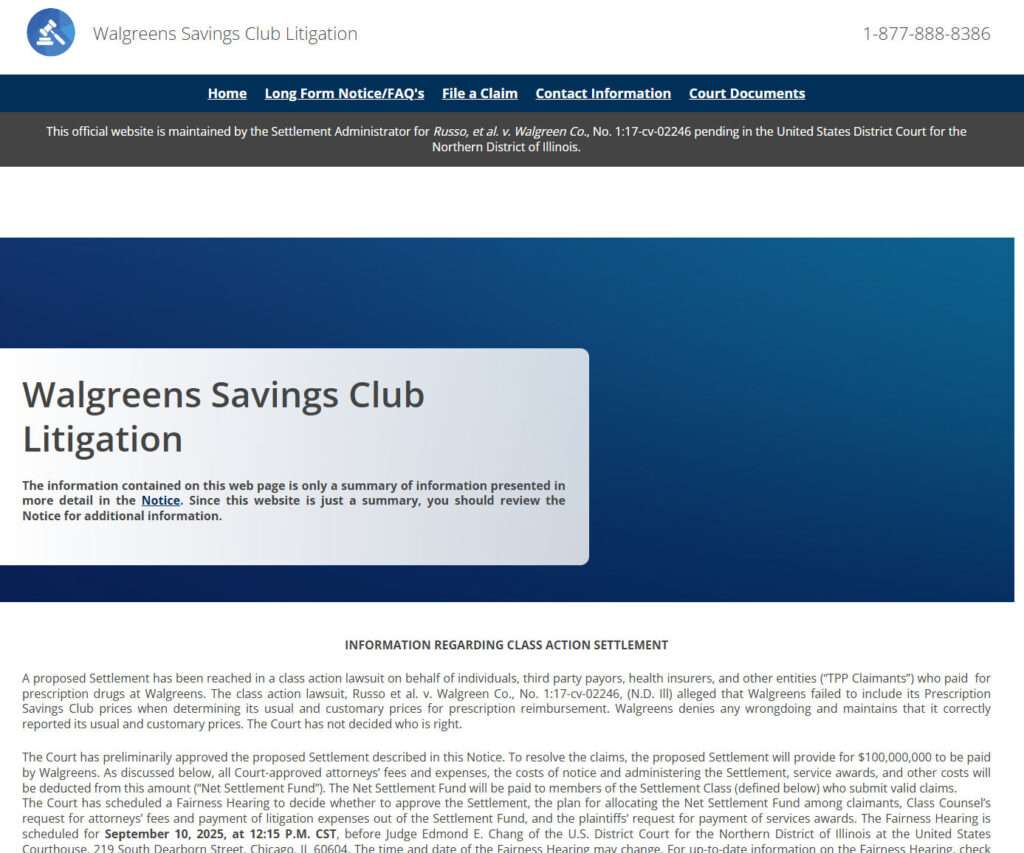
An Overview of the Walgreens Savings Club Lawsuit
In 2017, a class action lawsuit was filed against Walgreens, titled Russo, et al. v. Walgreen Co. (Case No. 1:17-cv-02246, N.D. Ill.). The plaintiffs alleged that when Walgreens reported its usual and customary (U&C) prescription drug prices for reimbursement claims, it failed to account for the discounted pricing available through its Prescription Savings Club program.
By not factoring these lower prices into the U&C calculations, the lawsuit argues that Walgreens overcharged health insurance companies, employers, and consumers. Walgreens denied any wrongdoing and maintains that it correctly calculated U&C prices.
Although the merits of the case have not been decided, Walgreens agreed to settle the lawsuit in 2022 for $100 million, providing a settlement fund for eligible claimants.
Who Is Eligible for the Walgreens Settlement?
The settlement class includes individuals, health insurers, and any other entities in the U.S. who paid for Walgreens prescriptions between January 1, 2007 and November 18, 2024 and used prescription insurance benefits.
Certain groups are excluded from the settlement, such as Walgreens employees, government entities, and those who have already settled lawsuits against Walgreens over prescription pricing issues.
Eligible claimants can submit claims to receive payment from the net settlement fund once court-approved fees and expenses are deducted. The amount each claimant receives depends on the total number of approved claims.
Official Settlement Administrator Communications
In early 2023, the court-appointed settlement administrator, A.B. Data, began sending emails to potential class members about the Walgreens settlement. The emails contain important information about eligibility, deadlines, and instructions for filing a claim.
The emails direct recipients to the official settlement website, www.SavingsClubSettlement.com. This site provides full details about the litigation and claims process. It also allows users to file a claim directly through the portal.
Below are examples of official administrator communications:
- Email subject line: Important Legal Notice of Class Action Settlement
- Sender domain: @abdataclassactionsettlement.com
- Website domain: savingsclubsettlement.com
Both domains were registered several years ago and are legitimate platforms run by A.B. Data Ltd., the appointed settlement administrator.
Verifying the Authenticity of Settlement Communications
If you are unsure about the validity of an email or letter concerning the Walgreens settlement, there are steps you can take to verify its authenticity:
- Check for an official case number – Authentic notices should mention the case name and number: Russo, et al. v. Walgreen Co., Case No. 1:17-cv-02246.
- Match domains – Emails, letters, and websites should come from the official domains listed above.
- Call the Settlement Administrator – You can call 1-877-888-8386 to speak with a representative who can confirm details.
- Cross-reference with other sources – Compare information to the official court documents available on the Settlement website’s “Court Documents” page. Details should align.
- WHOIS lookup – Use WHOIS to verify that settlement website domains were registered by legitimate parties years ago, not recently.
As long as communications match this criteria, you can be confident they are official and the settlement administrator is legitimate.
Settlement Details: Compensation, Exclusions, Objections
Now that we’ve verified this settlement is real, what are the key details class members should know? Here is an overview:
- Settlement Fund – Walgreens is paying $100 million into a settlement fund. After court-approved fees/costs, the remainder (the “Net Settlement Fund”) will be distributed to class members who file eligible claims.
- Claim Filing Deadline – Claims must be filed online or mailed by April 17, 2025. For details on required documentation and steps to file, visit www.SavingsClubSettlement.com.
- Exclusion (Opt-Out) Deadline – Class members who don’t want to be legally bound by the settlement must opt out by March 18, 2025. This is the only way to retain the right to pursue your own lawsuit against Walgreens over these claims.
- Objection Deadline – You can object to the settlement terms, attorneys’ fees, etc. in writing by March 18, 2025. The Court will consider objections at the Fairness Hearing.
- Fairness Hearing – On September 10, 2025, the Court will hold a hearing to make a final determination on the settlement’s approval.
Guide to Filing a Claim
Ready to file a claim? Here is a step-by-step walkthrough:
- Review eligibility – Verify you fit the class member definition before proceeding.
- Gather information – Have personal data, insurance ID numbers, and any details about Walgreens prescriptions handy.
- Visit www.SavingsClubSettlement.com – Access the official website.
- File a claim online – Locate the claim form page and provide all requested details. OR request a paper claim form mailed to you.
- Submit documentation (if required) – For claims over a certain amount, you must mail or upload confirming documentation showing your Walgreens prescription payments.
- Check status – Log into the website portal to check your claim status. Update any information if requested.
- Receiving payment – If approved, payment will be mailed to you. This could take months depending on the claim review process. Addresses cannot be changed after submission.
Don’t Get Scammed – Identify Fraudulent Claims Services
Unfortunately, class action settlements often attract fraudulent “claims services” who try to scam consumers out of money or personal information. If you come across any services offering help with the Walgreens settlement, be very cautious.
Here are red flags to watch for:
- Asks for upfront fees or gives the impression you must pay to file
- Uses terms like “reclaim” or “claim my share”
- Has a website domain registered recently or located outside the U.S.
- Calls, emails, or texts you out of the blue
- Claims you are “entitled to thousands” or “guaranteed money”
- Asks for personal information like Social Security numbers
Legitimate class action administrators will never cold contact you requesting fees, personal details, or banking information. Do not respond to or give information to any third-party service. Work directly and only through official channels – the Court-approved administrator A.B. Data.
Don’t Miss the Filing Deadline – Act Now
Now that you have all the information on this settlement, don’t wait to take action. With deadlines approaching in early 2025, evaluate your eligibility and file a claim as soon as possible.
This is a straightforward, legitimate settlement process handled through official channels. But it’s up to you to submit a timely claim in order to receive your share of the settlement fund.
Visit the Walgreens Savings Club Settlement website, verify your class membership, file a claim online, and don’t get scammed along the way. If you have any other questions about eligibility, documentation, deadlines, payments, or the legitimacy of any communications, call the Settlement Administrator at 1-877-888-8386.
Act now before the claim filing deadline of April 17, 2025 passes!

Join the discussion
0 commentsShare your experience or ask a question about this article.
Discussion
Start the conversation
Have a question or something useful to share? Add the first comment.