


Nobody wants to find an email saying their mailbox is about to disappear. The clock in this notice makes the decision feel even more immediate.
The best next step begins somewhere other than the message.
Overview
A notice about a cancellation you never requested
The webmail account termination request scam tells you somebody asked to close your email account. It then offers a quick way to stop that supposed request.
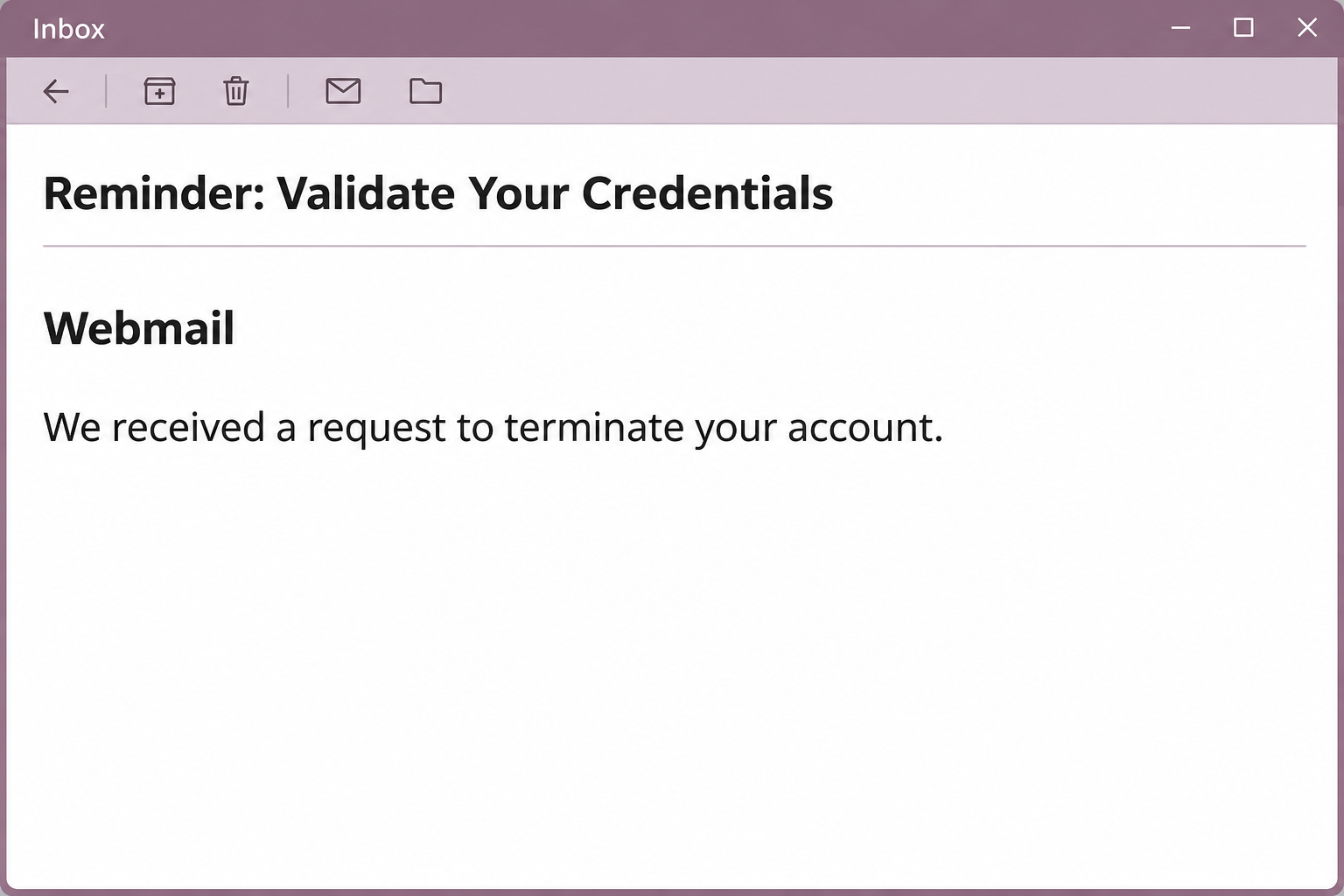
The reported subject starts with a reminder to validate credentials. In the body, the effective date includes a specific early-morning time on November 13, 2026.
The precision can be unsettling if you were asleep or not working then. It invites you to guess who made the request rather than ask whether one exists.
The wording and footer borrow the identity of a cPanel webmail service. cPanel is a legitimate product, but the notice does not come from a verified account management route.
The opening image recreates the wording without personal details or a way to interact with the fraudulent notice.
The cancellation process changes providers halfway through
The button offered to cancel the request. In the documented case, it went to an unrelated hosting page displaying a copy of Google’s sign-in screen.
The recipient’s address was already in the form. For someone who uses that address every day, the prefilled field can feel like the system has looked them up.
The form still wanted their password. Typing it would give the copied page access to something unrelated to whether a request actually existed.
Notice the change in identity: the claim arrives under cPanel webmail branding, while the apparent remedy asks the reader to take a Google-style sign-in screen on trust.
The sample does not establish that anybody deleted the mailbox. It provides a concrete reason to avoid the button, including when you need to check a genuine account concern.
Find the person who can actually close your account
A personal domain can have separate companies for registration, web hosting and email. At work, there may also be a help desk with authority over account changes.
Start by asking which of those groups manages the mailbox. A provider may handle account creation and deletion from a dashboard the ordinary mailbox user never sees.
The cPanel Email Accounts documentation explains which tasks belong in the hosting account. Your provider can confirm which options apply to your service.
- Check the mailbox from your established app or login page, not from the message.
- Ask a hosting administrator or workplace help desk whether a closure was actually requested.
- Mention a planned migration if you already knew about one, but do not treat it as validation of this email.
- If you entered a password, report the exposure even if the account is still available.
How the Webmail Account Termination Request Scam Works
Step 1: The email makes someone else’s decision your emergency
You are not asked whether you want to delete the mailbox. The notice presents someone else’s request as something already received and scheduled to take effect.
That design gives a busy recipient a first instinct: cancel whatever just happened. The reader has little reason to wonder who should be able to make such a decision.
The apparent timestamp does a lot of work. It resembles a notification pulled from a real system even though the recipient has no independent case record.
A mailbox matters beyond its unread count. Removing it can cut a small business off from order records, customer conversations and password resets.
Step 2: The message provides its own escape route
The offered button sounds like a reversal, not a new permission. A person trying to prevent harm may pay less attention than they would to a request for credentials.
There is no need to use an emailed button to preserve the account while checking. An administrator can look for a real change in the provider’s normal records.
If the account belongs to a workplace, a real offboarding or closure process may involve a manager or ticket. Check that process from the side you already know.
A genuine pending action should be investigated on its own facts. It would not turn an unrelated page into a safe place to try a password.
Step 3: A familiar sign-in page makes the switch feel routine
The reported destination did not match the apparent cPanel webmail service in the email. It showed an imitation of a Google account sign-in with the address already present.
A password prompt that follows a recognizable address can be mistaken for your usual next step. The correct name in the form proves only that the page can display it.
A company can genuinely use Google to authenticate employees, so a change in service name by itself is not the final test. The established sign-in route is what matters.
Close a page that you reached through an unverified cancellation message. Try the app, saved URL or corporate portal you used reliably before the alert arrived.
Step 4: There is no reliable cancellation after the form
The form presents a separate hazard from the notice’s deletion claim. If you entered a current password, act on the exposure rather than waiting for a result.
Whether the form gives an error, throws you back to a real portal or sits on the same page does not tell you who received the earlier entry.
The real provider can usually help confirm recent sign-ins and account changes. The copied form cannot provide a trustworthy status for an issue it introduced.
For a business, a mailbox that keeps receiving messages can still be compromised. An intruder may take advantage of the fact that the account appears to work.
Step 5: The next risk comes from what the address controls
An exposed mailbox can reveal customer conversations and stored files. It may also receive password resets for other services, including billing or domain administration.
If access changes hands, someone may set rules that move future messages out of view. A normal-looking inbox is not enough reason to stop checking.
Focus the incident response on the address and privileges involved. A shared sales or support inbox can reach many more contacts than a rarely used personal alias.
Check the accounts that actually depend on that address. Avoid assuming every online service needs a reset when there is no shared credential or recovery relationship.
What to Do if You Have Fallen Victim to This Scam
-
Move the account check outside the email.
Go straight to the provider or open your normal mail app. Do not try the cancellation button again to see whether the request is still active.
If a workplace manages your account, ask the help desk whether there is a pending closure. Mention the alleged date and your actual mailbox.
A working sign-in is useful but not conclusive. Only the appropriate administrator can check whether the system has a real instruction scheduled.
-
Tell support which information you submitted.
If you entered a password, report it as exposed and replace it through the established provider. If you approved an unexpected prompt, mention it separately.
Explain which address appeared in the form and whether it was your personal, company or shared address. Do not include the password or a code in the report.
If your password no longer works, use an alternate contact method. Avoid continuing the recovery conversation from the account you are trying to secure.
-
Protect shared access before returning to work.
Ask your administrator about active sessions, app passwords, recovery methods and other people who can access the box. Have them review any changes since the incident.
Inspect automatic forwarding and rules that move or delete incoming mail. A working reset may not remove every setting an intruder changed.
If several staff members share a mailbox, coordinate the change rather than having everyone reset it on their own. Confirm which mail clients now need reauthorization.
-
Decide which connected accounts need attention.
Start with services that use the same password or send critical recovery mail to the affected address. Pay particular attention to finance, domains and payroll.
Review unexpected password reset notices in those accounts through independent routes. A missing email may have been filtered, so look at the service’s own recent activity.
If you find an unfamiliar payment or payee change, tell the institution directly. Preserve the records before rejecting or reversing anything your provider still needs to investigate.
-
Save what can explain the sequence.
Record the subject, arrival time, device and the last thing you did. Keep the original message or a private copy if your employer needs it.
If you only visited the page and did not enter information, say that clearly. Keep any unexpected file or software event separate from the attempted login.
Report the message through your email provider or workplace security channel. Do not send the link to coworkers as a way of educating them.
-
Make the next account change easy to verify.
Ask your team where it announces genuine mailbox closures or moves. Agree on a backup contact for people who suddenly cannot reach company mail.
People who handle customer inboxes should know which team can check an unexpected closure. A short written process is easier to follow under time pressure.
If you manage your own domain, keep current provider and recovery details somewhere independent of the mailbox. That helps if you ever face a genuine outage.
If the Notice Reaches an Alias or Shared Inbox
A company address may be an alias that delivers to another mailbox rather than a separate login. That can make the phrase “your account” less meaningful than it sounds.
Ask an administrator what the address actually is. A change to an alias affects where incoming mail goes, whereas a mailbox closure can affect stored messages and sign-in.
For a shared inbox, agree on one person to coordinate the checks. This avoids multiple staff members opening the suspicious message or independently changing one set of settings.
If mail delivery is essential, test it through your usual accounts and have the provider check routing. Do not test delivery by replying to the sender.
What a Real Mailbox Change Might Look Like
A business may stop paying for an old account, transfer staff to a different address or retire an unused domain. Those actions are not inherently suspicious.
Before a planned change, an owner can verify who requested it and whether messages or aliases need to be preserved. None of that requires guessing where an email points.
If you were already expecting a migration, ask your usual contact for the agreed timeline. The reviewed message did not provide a trusted way to cancel an authorized request.
For a mailbox that really stopped working, try an independent support channel. The problem could be a password error, suspended hosting or a migration that needs support.
Frequently Asked Questions
Is the webmail account termination request email real?
The documented notice is a credential phishing attempt. Its cancellation button opens a copied Google sign-in page rather than the legitimate hosting account.
Ask your mail administrator whether anything is actually scheduled. You can check that without following the email or letting it choose the page where you sign in.
Why did the sign-in page already show my email address?
Showing a known address is different from verifying that the account exists or that you are already signed in. The copied page asked for a password after showing that address.
An email address can be known to someone who has no authority over the mailbox. Check the provider independently instead of treating the filled field as reassurance.
Does the exact time mean somebody made the request?
A time printed in an email does not constitute an administrative record. It can make a generic claim feel more immediate without proving an event happened.
Give the time to a trusted administrator to check if needed. The independent account record is more important than the precision of the wording.
If my mailbox still works, can I ignore a password disclosure?
An accessible inbox does not show that your password stayed private. Change a submitted password and ask the provider about sessions and configuration changes.
If you never submitted anything, your next step may be simply to report the notice. Work from what you actually did rather than what the email threatened.
Should I ask the sender to identify the person who requested closure?
Do not reply to the sender for verification. It already controls the story and can supply another convincing detail without accessing any genuine record.
Instead, ask a known administrator for the origin of any pending change. If that person cannot find one, leave the message out of your account management entirely.
What if I received it at an address I no longer use?
The email is not a reason to revive a dormant account through its button. If the address still matters for another service, check it through your old provider independently.
If you used its password elsewhere, the reuse matters only if that password may have been exposed. Replace a submitted password wherever it was shared.
The Bottom Line
Do not use this notice to cancel anything. It takes a claim about mailbox closure and turns it into a request for credentials on a copied page.
Check the account with your own provider or administrator. If you already typed your password, secure the mailbox and review the services that rely on it.

Join the discussion
0 commentsShare your experience or ask a question about this article.
Community experiences
Did this happen to you?
Your experience could help someone recognize the same scam. Submit a private report for our team to review.
I experienced this tooReports are reviewed before publication. Sharing publicly is always your choice.
Discussion
Start the conversation
Have a question or something useful to share? Add the first comment.