

WiggyDog keeps showing up in short, feel-good ads across Facebook, TikTok, and YouTube Shorts.
In the videos, it looks like a fluffy robot puppy with a personality. It seems responsive. It feels like the kind of gift that would instantly win a child over.
But when you slow down and look closely, the pitch starts to unravel.
The claims get bigger, the details stay vague, and the product buyers expect often is not the product that arrives.
Before you decide whether WiggyDog is worth your money, here is what to know about the operation behind it.
Scam Overview
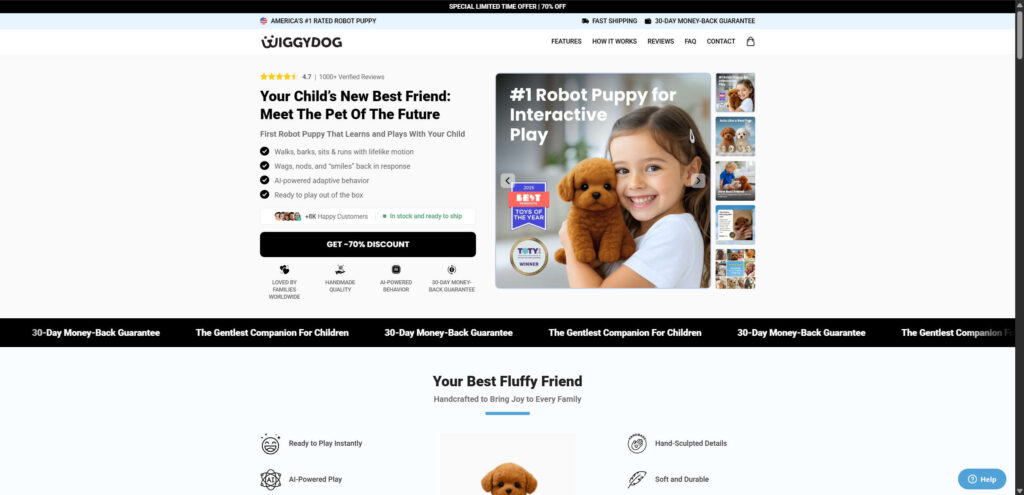
WiggyDog is presented as a high-tech robotic companion designed for children. The website typically claims it has “intelligent” behavior, sensor-driven reactions, emotional engagement, and lifelike movement.
The copy leans heavily on emotion. It suggests the toy teaches empathy, kindness, and bonding, not just play.
On many WiggyDog-style pages, you will also see trust boosters that look official but are not verifiable.
These often include:
- Shiny “award” badges with generic titles
- Big star ratings and large review counts that are not linked to any real platform
- A polished testimonial from a “kindergarten teacher” that cannot be confirmed
The images push an unrealistic expectation
The visuals are designed to imply features the product may not have.
Common examples include:
- A child holding a leash next to the toy, strongly suggesting the puppy can walk outdoors
- A “power button” press on the toy’s belly, implying a motor, sounds, and internal electronics
- Close-up shots that hide scale, materials, and build quality
This style of imagery is a repeated pattern across multiple “robot puppy” offers that circulate under new names.
The comparison chart is a classic persuasion tool
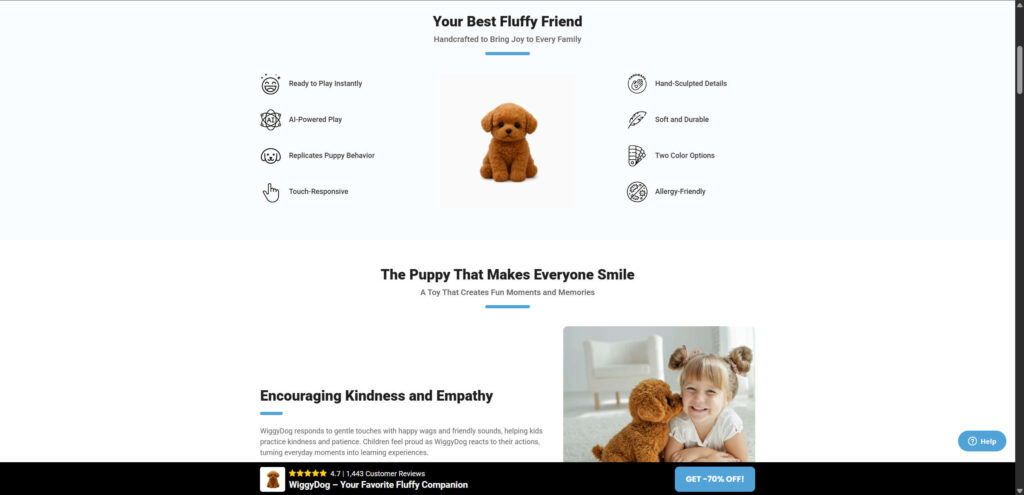
Many pages include a simple comparison table that positions WiggyDog against “other toys.”
It usually claims WiggyDog delivers:
- Realistic behavior
- Touch-responsive interactions
- Premium materials
- A true “companion” experience
The problem is not the chart itself. The problem is that it presents big promises as if they are proven facts, without showing technical specs, certifications, or credible third-party reviews.
The reviews often do not hold up
Another common red flag is the on-site review section.
It may show:
- Perfectly staged family photos
- Highly emotional, scripted review text
- Reviewer names that change depending on your location
In many cases, the photos look like stock imagery or heavily edited images. The goal is simple: create instant trust and reduce hesitation at checkout.
“German engineering” and “#1 rated” claims are usually empty
WiggyDog pages often repeat phrases like “German engineering excellence” or “America’s #1 rated robot puppy,” while providing no company details.
Look for what is missing:
- A real business name and registration
- A verifiable address
- Clear manufacturing information
- Certifications tied to a real entity, not a graphic badge
When those details are absent, the branding is doing the work that proof should be doing.
The videos are the strongest hook, and the easiest place to mislead
Some ads show smooth movement like walking, head turns, tail wagging, or lifelike reactions.
Those clips can be:
- Edited for effect
- Filmed using a different, higher-end product
- Animated or digitally enhanced
If a toy is being sold with massive discounts and vague specs, it is unlikely to contain the motors, joints, sensors, and control systems needed for the behavior shown in the ads.
The “guarantee” is often hard to use in real life
Many WiggyDog-style stores advertise a “30-day money-back guarantee” in bold text.
But the return policy often includes barriers such as:
- Return shipping to an international address
- High shipping costs that exceed the product’s value
- Slow or inconsistent support responses
That is how the guarantee becomes a conversion tool, not real buyer protection.
How the Scam Works
1. They build an emotional story first
The pitch is designed to appeal to parents, grandparents, and gift buyers.
It focuses on comfort, companionship, reduced screen time, and “empathy-building,” making the purchase feel meaningful instead of transactional.
2. They launch a polished storefront that looks legitimate
The store is usually built on a fast template, often with a clean design and confident language.
You will commonly see:
- Bold trust badges
- Limited-time discount banners like 70% off
- Simple benefit icons that sound technical but stay vague
- A “Why WiggyDog” section framed like a premium brand
3. They manufacture credibility with reviews and authority figures
Next comes the social proof.
The store adds:
- Five-star reviews that are not tied to any external platform
- Staged photos and overly perfect testimonials
- A fake “expert” endorsement, often a teacher or child specialist
It is designed to stop you from leaving the page to research.
4. They run aggressive short-form ads built for impulse buys
The ads are short, cute, and fast.
They target:
- Parents of young children
- Gift shoppers
- Pet lovers
- People interested in interactive toys
The goal is urgency. You buy first, verify later.
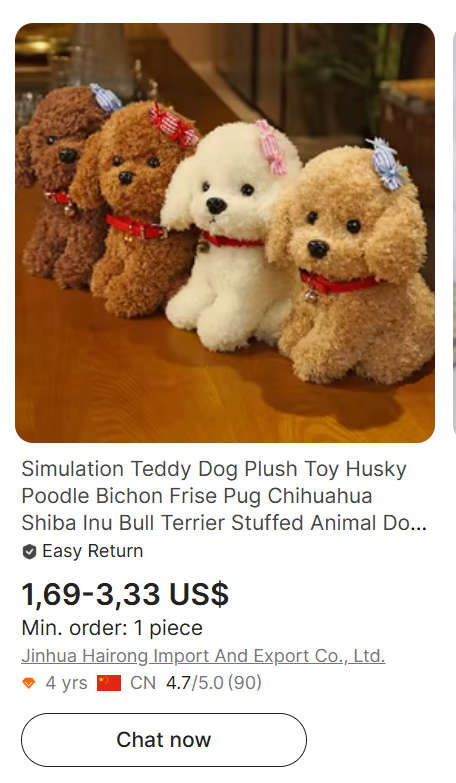
5. After payment, the buyer receives a basic plush toy
When this pattern plays out, the item that arrives is often a simple stuffed dog.
It may look cute, but it does not match the “robot puppy” expectations created by the ads.
Shipping times are often 2 to 4 weeks, which is typical for overseas fulfillment.
6. Refunds become difficult or expensive
If the buyer complains, the store may:
- Offer a partial refund to avoid a chargeback
- Require an international return
- Delay responses until the dispute window shrinks
Many people give up because the process is exhausting or the return cost is too high.
7. The brand disappears and reappears under a new name
Once complaints pile up, the store can shut down and rebrand.
The same offer returns under a different product name, with the same images, the same script, and the same tactics.
What To Do If You Fell Victim
If you bought WiggyDog and received something that does not match the ads, act quickly.
- Contact your bank or card issuer and request a chargeback for “item not as described.”
- Save evidence: screenshots of the product page, the ad, your order confirmation, and any emails.
- Take clear photos of what you received, including packaging and any labels.
- Do not mail an expensive international return unless your bank explicitly requires it for the dispute.
- Monitor your account for additional charges, including small “test” transactions.
- If you entered an account password on the store, change it anywhere you reused it.
- Turn on 2-factor authentication for your email and financial accounts.
- Report the ad to the platform where you saw it, and report the store domain to your consumer protection agency.
As a precaution, you can also run a reputable malware scan on the device you used to shop, especially if the site redirected you through multiple pages or pop-ups.
The Bottom Line
WiggyDog is marketed like a lifelike robot puppy with intelligence, sensors, and emotional engagement.
But the sales page relies on familiar deception patterns: unverified awards, manufactured reviews, vague technical claims, and videos that imply features the product likely cannot deliver.
If you want a real interactive robotic pet, you should only buy from established brands with clear specifications, independent reviews, and reliable return policies.
If you already bought WiggyDog and feel misled, focus on documentation and a chargeback. That is usually the most effective path to getting your money back.
FAQ
Is WiggyDog a real robot puppy?
In many cases, no. The marketing often suggests robotic behavior that the delivered item does not provide.
Why does WiggyDog look so advanced in the ads?
Short-form ads can be edited, staged, or digitally enhanced. Some clips may not reflect the actual item being sold.
What do buyers usually receive?
Often a basic plush toy that does not match the “AI robot puppy” expectations created by the ads.
Are the reviews on the WiggyDog site trustworthy?
Be skeptical. On-site reviews that are not linked to a real platform can be easily fabricated.
Can I get a refund from the seller?
Sometimes sellers offer partial refunds. Full refunds can be difficult, especially if the return policy requires costly international shipping.
What is the fastest way to get your money back?
Contact your card issuer and file a chargeback for misrepresentation or “item not as described,” supported with screenshots and photos.
How can I avoid this type of scam in the future?
Search the product name plus “scam” or “reviews,” check for real company details, avoid rushed discount timers, and prefer retailers with verified return policies.








