

Scammers are using the promise of government heating subsidies to trick people into handing over their personal information and payment details. This article provides an in-depth look at how the Winter Heating Subsidy scam texts operate, what to watch out for, and how to protect yourself.
An Overview of the Scam
The Winter Heating Subsidy scam involves recipients getting text messages that appear to be from the UK government regarding a heating subsidy program. The messages claim that the recipient is eligible for financial assistance to heat their home during winter.
To take advantage of this “offer”, the victim is instructed to click on a link and provide personal details like name, address, phone number, and payment information. The link goes to a fake government lookalike website where victims enter their data, which is harvested by scammers.
There are two common variants of the scam text:
Variant 1:
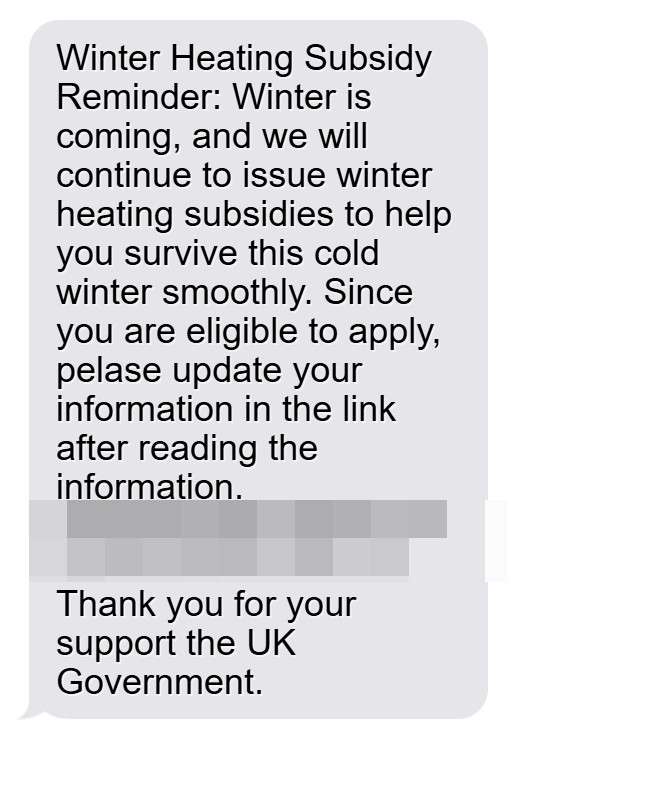
“Winter Heating Subsidy Reminder: Winter is coming, and we will continue to issue winter heating subsidies to help you survive this cold winter smoothly. Since you are eligible to apply, pelase update your information in the link after reading the information.
[Malicious Link]
Thank you for your support the UK Government.”
Variant 2:
“Winter Heating Subsidy Office Payment Notice: As the weather slowly turns colder recently, we will begin to issue winter heating subsidies to reduce heating costs. Because the parliament decided to reduce the number of people receiving winter heating subsidy benefits this year, and you have obtained the qualification to apply, if you need to, you can apply through the link. Once the number of applicants is enough, we will stop issuing winter heading subsidy benefits.
[Malicious Link]
Thank you for your support the UK Government.”
The scam tricks victims by claiming the government will provide financial help for heating bills. The texts take advantage of people’s need for assistance with rising energy costs.
While government heating schemes do exist, these texts are not legitimate. They are a phishing scam designed to steal personal and financial information. The scam is increasing as winter approaches and scammers exploit public concerns over heating affordability.
How the Winter Heating Subsidy Scam Works
The scammers behind the Winter Heating Subsidy scam employ clever psychological tricks and technological tactics to successfully deceive victims. Here is a step-by-step look at how the scam operates:
1. Victims Receive Unsolicited Texts
The scam begins with victims receiving an unsolicited text message claiming to be from the UK government regarding winter heating subsidies.
The messages are sent out randomly en masse, taking advantage of the wide reach of text messaging. Millions of messages can be sent using SMS technology, increasing the scammer’s chances of netting victims.
The texts are crafted to create urgency, pressuring the victim to act quickly by claiming funds are limited or deadlines are approaching. Phrases like “if you need to, you can apply through the link” encourage rapid response.
2. Victims Click on Links to Fake Government Websites
The scam texts contain links to fake government imposter websites using lookalike URLs. For example, a recent campaign used the domain “gov.winterpaymentstzh.top”.
These scam sites copy the visual design of official government websites, featuring the UK government logo and NHS branding. This tricks users into believing the sites are legitimate.
When victims click the link on their phones, they are taken to the fraudulent site which asks them to enter personal details to “apply” for the heating subsidy.
3. Victims Enter Personal and Financial Information
The fake subsidy application forms on the scam websites collect detailed personal information from victims, including:
- Full name
- Home address
- Phone number
- Email address
- Bank account details
- Credit/debit card numbers
Victims are asked to input this data to process their “claim”. The forms state the information is required to verify eligibility and facilitate subsidy payments.
In reality, the scammers harvest this data to commit identity fraud. Full names, addresses, emails, and phone numbers can all be used in follow-up phishing campaigns.
Bank account and payment card details enable scammers to steal money from victims. The average loss is around £500 per person.
4. Scammers Request Small “Processing Fees”
In addition to harvesting personal information, the fake subsidy sites also try to collect money directly from victims.
The application pages request a small upfront payment of £3 – £5 as an “administration” or “processing” fee to submit the subsidy request. Victims are led to believe this payment is part of the legitimate claims process.
In fact, it simply generates immediate revenue for the scammers. The number of victims paying the fee multiplies the earnings of the criminals behind the scam.
5. Criminals Disappear with the Stolen Data and Money
After victims submit their details and pay any requested fees, the scammers immediately gain access to the harvested information and payments.
With the stolen data and funds in hand, the criminals quickly take down the fake website and disappear. They block any further communication with the victims.
The victims never receive any heating subsidy, realize they have been scammed, and are left to deal with the consequences of stolen identities, compromised security, and lost money.
Warning Signs of the Winter Heating Subsidy Scam
While the texts and websites are sophisticated, there are warning signs that can help identify this scam:
- Unsolicited contact: Real government heating subsidy programs only contact people who applied directly and meet eligibility criteria. They never send unprompted texts.
- Sense of urgency: Pressuring language like “act quickly” or “limited benefits” tries to panic victims into responding without thinking. Legitimate programs don’t need such tactics.
- Spelling and grammatical errors: The texts often contain mistakes uncharacteristic of official government communications.
- Requests for financial information: The government does not need bank details or credit card numbers to provide heating grants. Payment should only happen after approval.
- Upfront fees: Having to pay an administration fee before getting any services or financial aid is atypical. This is a red flag for a scam.
- Short-lived scam sites: The fake websites quickly disappear after collecting victim data. Longstanding legitimate programs have permanent sites.
Staying alert to these signs can help protect you from being deceived. If you notice any of them, avoid taking action and do not provide the requested information.
What to Do if You Get a Winter Heating Subsidy Scam Text
If you receive one of these scam texts, take the following recommended steps:
- Don’t click any links: This avoids being directed to fake sites where your data can be stolen.
- Forward the text to 7726: This free reporting service alerts phone carriers to terminate scam text numbers.
- Report it to Action Fraud: Provide details to the UK’s national fraud reporting center online or by calling 0300 123 2040.
- Warn your friends and family: Make others aware of the scam texts so they can also stay vigilant.
- Watch for any suspicious activity: Monitor your accounts and credit reports for signs of misuse of your information over the following months.
- Change passwords: Update logins for your important accounts to protect your security. Avoid reusing the same credentials on multiple sites.
- Contact your phone provider: They may be able to block numbers linked to the scam texts.
Staying proactive helps restrict the spread of the scam and prevent you from becoming a victim.
What to Do if You Already Fell for the Scam
If you already clicked a link, provided data, paid a fee, or gave away your payment information, take these urgent steps:
Contact Your Bank
- Notify your bank if you shared any account logins or transactions were made without authorization. They can freeze your account, reverse payments, and issue new cards.
- Ask about fraud prevention measures and procedures to detect identity theft. Monitor closely for unauthorized activity.
Call Your Phone Provider
- Request they block the phone number that sent the scam text to avoid further risk.
- See if they can provide details on the scam texts like where they originated.
Update Payment Card Details
- Inform your credit card company of any unauthorized charges or if your card details were compromised. They can close the account and reissue a new card.
- Temporarily switch to using an alternative payment method until your new card arrives.
Reset All Account Passwords
- Change the passwords for any accounts where the login details were entered on the fake site. Use unique, complex passwords for each account.
- Turn on two-factor authentication where possible for an added layer of security.
Place Fraud Alerts
- Contact credit agencies to put a fraud alert on your name and Social Security number to detect any misuse.
- Check your credit reports frequently for any signs of identity theft.
- Sign-up for credit monitoring services to stay on top of suspicious activities.
File a Police Report
- Report the incident to your local police station. Provide details of the scam text, website, and information compromised.
- Get a copy of the police report to share with banks, creditors, and credit bureaus as proof of the scam.
- If money was stolen from your accounts, the police report can help recover those lost funds.
Watch for Other Scam Attempts
- Since scammers have your contact details, watch for follow-up phishing attempts via phone, text, email or mail.
- Use caution when receiving any unsolicited communications asking for personal or financial information.
- Don’t open links or attachments in suspicious emails in case they contain malware.
- Hang up on suspicious phone calls and never provide sensitive data over the phone to unknown callers.
Staying vigilant following a scam can help prevent further victimization through related schemes.
Frequently Asked Questions About the Winter Heating Subsidy Scam
1. What is the Winter Heating Subsidy scam?
The Winter Heating Subsidy scam is a phishing campaign where scammers send text messages pretending to be from the UK government offering financial assistance for winter heating bills. The texts contain links to fake government websites that harvest personal information and payment details from victims.
2. How do I recognize a Winter Heating Subsidy scam text?
These scam texts often begin with “Winter Heating Subsidy” and claim you are eligible for financial aid to heat your home. They encourage urgent action and provide a link to apply. Warning signs include spelling/grammar errors, requests for personal/financial data, and fees.
3. What happens if I click the link in the text?
The link goes to a fake website impersonating an official government site. You will be prompted to enter personal information like your name, address, contact details, bank account, and credit card numbers under the guise of a subsidy application.
4. What do the scammers do with my data?
Scammers harvest the personal and financial information to commit identity fraud. They may steal money from your accounts, apply for credit in your name, or sell your details in the dark web. Any data you enter is in the hands of criminals.
5. Are the scam websites easy to identify?
While designed to mimic legitimate sites, scam sites use lookalike URLs, have spelling errors, disappear quickly, and urgently request lots of sensitive data upfront. Real government sites are permanent and don’t need extensive personal details for heating grants.
6. What should I do if I get a Winter Heating Subsidy scam text?
Do not click any links. Forward the text to 7726 to report it. Notify Action Fraud and your friends/family about the scam. Watch for suspicious activity and reset account passwords if you shared any in the past.
7. What if I already entered my information or paid a fee?
Immediately contact your bank, phone provider, credit bureaus, and the police. Update account passwords, enable two-factor authentication, and monitor closely for fraud. Sign up for credit monitoring to detect any misuse of your identity.
8. How can I protect myself from this scam?
Be wary of unsolicited texts asking for data or money. Avoid clicking links or attachments. Never provide sensitive information over the phone/text to unknown parties. Use unique passwords and security measures like fraud alerts.
9. Are government heating subsidies real?
Yes, legitimate government heating grants are available, but they never request personal details or payments upfront unprompted. Apply directly through official channels based on eligibility criteria if interested in actual programs.
10. Who should I report this scam to?
Inform Action Fraud and forward texts to 7726. File a report with your local police station. Notify your phone provider, bank, credit card company, and creditors. Share scam warnings with family and friends.
The Bottom Line on the Winter Heating Subsidy Scam
The Winter Heating Subsidy scam exploits financial fears surrounding rising energy bills. By impersonating government assistance programs, scammers trick worried recipients into handing over valuable personal data and even payments.
If you receive an unsolicited text regarding heating subsidies this winter, exercise extreme caution. Look for warning signs like urgent demands, spelling errors, requests for financial details, and fees. Avoid clicking any links and report the messages to authorities.
Spread awareness so others don’t fall victim to this seasonal phishing campaign. If you already got scammed, take swift action by contacting banks, phone providers, credit bureaus, and the police to limit damages. Stay on guard for follow-up scams in the aftermath.
With vigilance, healthy skepticism, and good security habits, you can protect yourself from having your identity, money, and personal data stolen through this insidious scam. Don’t let your desire for financial aid put you at risk this winter.








