

Drivers across Washington State are increasingly receiving alarming texts stating their vehicle has unpaid Good To Go! toll invoices. The messages threaten penalties on outstanding balances and provide a link to WS-Dot.com to settle bills. However, WS-Dot.com is a scam designed to steal personal and financial data. This article will provide a comprehensive overview of how this toll invoice text scam operates, tips to avoid falling victim, and guidance if you entered information into the fraudulent website.
An In-Depth Look at the WS-Dot.com Toll Services Scam Unfolding in Washington
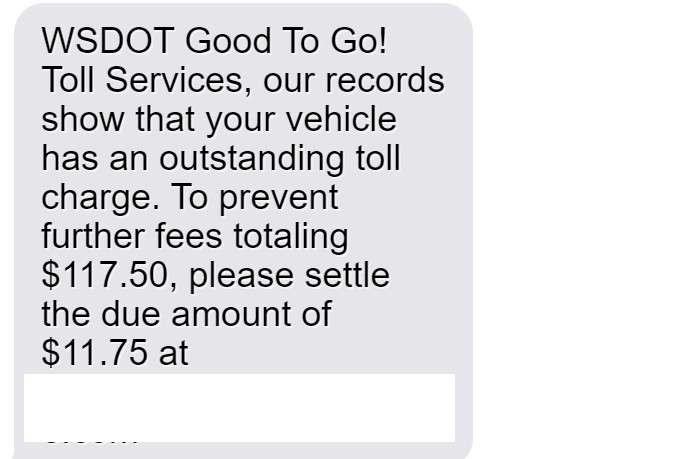
This incredibly deceptive scam targeting Washington drivers begins with an urgent text message stating the recipient has an unpaid Good To Go! toll bill on their vehicle. The text threatens steep penalties if immediate payment isn’t made through a provided link appearing to go to the official state toll portal.
However, the link in reality directs to the WS-Dot.com fake website controlled by scammers aimed at stealing drivers’ personal identity and financial details under the guise of paying off outstanding toll invoices. This phishing scam is growing rapidly and catching savvy Washingtonians off guard.
The fake WS-Dot.com website offers a sophisticated facsimile of the real state toll payment portal. It deceives visitors into believing they’ve arrived at the legitimate site to settle invoices and avoid fines over $100. In truth, any information entered is harvested directly by criminals to commit identity theft and financial fraud using victims’ stolen data.
This scam preys on two vulnerabilities. First, the relatively small $11.75 supposed unpaid toll bill appears a plausible oversight. Second, threatening imminent penalties over $100 sparks panic that short circuits critical thinking which would reveal the deception. This gets unsuspecting drivers to provide their information without scrutiny to avoid fines.
In reality, Washington’s Department of Transportation never contacts motorists via text, email or calls regarding unpaid toll bills. All communication is sent by mail. Additionally, toll payments can only be made through the official state website or authorized third-party providers – never through any unknown site.
But scammers are betting these safeguards are not known, and that the threat of fines on a small but credible unpaid bill amount will trigger hasty action. For many, this means hurriedly clicking the provided link and entering data on the fake website without realizing it is fraudulent until it is too late.
Once on the spoof site, victims are prompted to enter sensitive personal and financial details including:
- Full legal name
- Driver’s license number
- License plate number
- Home address
- Phone number
- Email address
- Credit card number
- Card expiration date
- CVV security code
This information allows criminals to open fake accounts online, gain access to existing accounts, file false tax returns, access medical services, make unauthorized purchases, and commit other identity theft and financial fraud at the victim’s expense.
After users enter details, the fraudulent site displays a confirmation that the outstanding toll invoice is paid. In reality, visitors have just provided all their personal data directly to scammers through a sophisticated fake portal mimicking the real state website.
Those duped now face a lengthy process of damage control to limit potential identity theft and financial fraud enabled by loss of their information. This includes contacting banks about unauthorized charges, placing fraud alerts on credit files, freezing credit reports while monitoring for suspicious new accounts, and remaining vigilant about additional misuse of any details obtained through the fake WS-Dot.com website.
Breaking Down the Tactics Used in the WS-Dot.com Toll Services Scam
This toll invoice phishing scam operates in distinct stages:
Stage 1: Victims Receive an Unsolicited Text Message
The scam starts with a text sent en masse to random Washington cell numbers stating:
“WS Dot Toll Services – Our records show your vehicle has an outstanding toll charge. To prevent further fees totaling $117.50, please settle the due amount of $11.75 at [fake URL]”
The small “unpaid” amount and steep penalty threat spark urgency.
Stage 2: The Text Includes a Link to a Fake Website
The URL within the message appears to direct to the official Good To Go! toll payments portal, but actually routes victims to the fraudulent website controlled by scammers.
If clicked, users are sent to the elaborate fake portal designed to directly harvest submitted personal details.
Stage 3: Victims Visit the Sophisticated Spoof Website
Victims who click the link are led to a fake toll payments portal dressed up to mirror the real state website.
This fools users into believing they’ve arrived at the legitimate site to pay and avoid menacing extra fines.
Stage 4: The Fake Site Requests Personal and Financial Details
The fraudulent toll website presents a form asking for private data to supposedly resolve unpaid invoices, including:
- Full legal name
- License plate number
- Vehicle registration data
- Home address
- Phone number
- Email address
- Credit card number
- CVV code
- Expiration date
This allows scammers to steal identities and financial account access.
Stage 5: Scammers Harvest All Information Entered
Once victims enter and submit their details, the data is directly captured by scammers who created the fake toll portal.
A confirmation screen states the invoice is paid. In reality, users just provided their information directly to criminals.
Stage 6: Stolen Data is Used to Commit Identity and Financial Theft
With users’ personal and financial information in hand, scammers can now perpetrate serious identity theft and account fraud.
Criminals can open accounts online, file fraudulent tax returns, access health services, make unauthorized purchases, drain accounts through cash advances, and commit other theft using the stolen details.
The Outcome: Dealing with Damages from Potential Identity and Financial Fraud
Those targeted now face correcting identity theft, disputing fraudulent charges, continuously checking credit reports, changing compromised account passwords, and ongoing monitoring for misuse of any details obtained through the fake toll invoice website.
This demonstrates the importance of exercising caution regarding texts related to tolls, instead of blindly clicking and providing information.
Steps to Take if You Entered Information on the Fake WS-Dot.com Website
If you entered any personal or financial details after receiving a suspicious toll invoice text, immediately take these steps:
- Contact your credit card issuer and bank to monitor statements for any unauthorized charges and report fraudulent transactions.
- Consider placing fraud alerts on your credit reports to be notified of any new accounts opened in your name.
- Address potential financial damages by changing passwords on accounts that could be compromised by lost credit card or identity information.
- Enable two-factor authentication on accounts whenever possible for an extra layer of security.
- Carefully review credit reports from Equifax, Experian, and TransUnion for any signs of fraudulent accounts opened using your identity information. Dispute any suspicious entries.
- Consider freezing credit reports while monitoring identity theft risks if sensitive personal data was provided to the fraudulent website. This will block new accounts from being opened without explicit approval.
- Continue monitoring financial statements and credit reports for several months for any evidence of misuse of your data obtained through the fake toll invoice website.
Being proactive protects against significant damages if scammers successfully harvested your details through the WS-Dot.com scam website.
How to Identify and Avoid the WS-Dot.com Toll Services Scam Texts
Here are key tips to recognize and steer clear of the WS-Dot.com phishing scam:
- Washington never contacts motorists by phone, email, text, social media or other unsolicited messages about unpaid Good To Go! toll invoices. Regard any such notifications as suspicious.
- Toll payments can only be made through official state websites or certified payment providers – never on third-party websites.
- Slow down and thoroughly read any texts demanding toll payment before clicking links or providing information. Scams create false urgency to override critical thinking.
- Carefully examine the full URL of any website before entering details to spot subtle fakes. Secure addresses should start with “https://” and show a lock icon.
- Verify the legitimacy of any toll notice directly with the state through official channels, not using contact information provided in suspect messages.
- No government agency will request sensitive financial information like credit cards, CVV codes or bank details via unsolicited texts or emails. This is a clear red flag.
- Configure text blocking through your wireless provider to filter out messages from unknown numbers to avoid scam exposure.
Staying vigilant protects against potentially significant damages of entering details on fake toll invoice scam websites sparked by a simple text.
Frequently Asked Questions About the WS-Dot.com Toll Services Text Scam
1. How can I identify the WS-Dot.com toll invoice text scam?
Red flags include getting an unprompted text about unpaid tolls and fines, threats of additional fees, and a link to an unknown third-party website rather than the official state toll payments portal. Washington never contacts drivers by text regarding toll bills.
2. What details are contained in the WS-Dot.com scam texts?
The scam texts reference a specific unpaid toll invoice around $11.75 and threaten extra charges over $117.50 if immediate payment is not made. They include a link to a fake website disguised as the real state toll payments portal.
3. What information does the fraudulent WS-Dot.com website ask for?
The fake toll portal prompts entry of personal identity details, contact information, vehicle data, and crucially full credit card information including card number, CVV, and expiration.
4. How can scammers use my personal details entered on the site?
Scammers can use your stolen identity information like full name, license number, and address to open fraudulent accounts, file fake tax returns, access medical services, and commit other identity fraud.
5. What can criminals do with my credit card information obtained through the site?
Scammers can make expensive unauthorized purchases with your card information or withdraw cash advances from associated bank accounts. They can resell card data or use it themselves to commit financial fraud at your expense.
6. Why do the scam texts create urgency with penalties threats?
Threatening immediate steep fines causes panic which overrides critical thinking that would otherwise identify the texts and website as fraudulent. This gets victims to provide data quickly without scrutiny.
7. How can I report the WS-Dot.com text scam?
Report scam texts to the WA Attorney General at www.atg.wa.gov/file-complaint, the FTC at www.reportfraud.ftc.gov, and forward to 7726 (SPAM) so your cell provider can potentially block the sender.
8. What should I do if I entered info into the fake WS-Dot.com site?
Contact your credit card company and bank to monitor for fraud. Place fraud alerts on credit files, change account passwords, and consider a credit freeze to prevent identity theft damages from stolen details.
9. How can I avoid the WS-Dot.com text scam in the future?
Carefully review any texts about unpaid tolls, verify directly with the state instead of using links/numbers provided, routinely monitor financial statements, and learn to spot signs of text invoice scams.
10. Who is responsible for sending the deceptive WS-Dot.com texts?
Washington officials confirm these scam texts are sent by cybercriminal groups aiming to steal personal data, not the state. Reporting scams aids law enforcement investigations.
The Bottom Line
This sophisticated scam leveraging fears of unpaid Good To Go! fines shows how a simple text can now serve as a gateway to largescale identity and financial theft. But understanding the detailed tactics used in toll invoice phishing attempts makes identifying and avoiding them much simpler. Those targeted still need to act fast to address any potential account misuse enabled by lost personal data. However, awareness of text invoice scams allows Washington drivers to confidently use state highways and bridges without diversion by fraudulent texts tied to fake payment portals.
Going forward, we must think twice before clicking texted links, verify messages independently, and identify subtle red flags before providing sensitive information. With knowledge and caution, we can steer clear of scams aiming to hijack our personal details through links sent directly to the phones in our pockets.








