

Washington drivers are being targeted by a deceptive text message scam regarding unpaid toll balances. But it’s a ruse to steal your personal information. This article provides the details you need to spot and avoid this phishing trap.
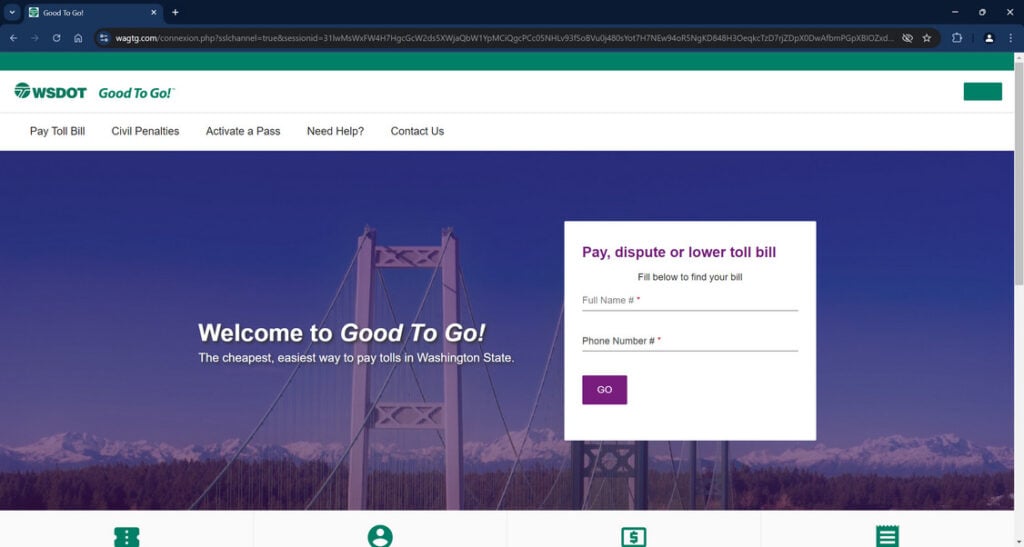
Overview of the WSDOT GoodToGo Scam
This scam starts with a text message stating you owe a small amount, usually $3 to $5, for using Washington state toll roads. The message claims to be from WSDOT GoodToGo, the state’s toll system. To spark urgency, it says you must pay promptly through the provided link or face additional fees.
However, the link actually takes you to a fake website designed purely to harvest your personal and financial information. By pretending to be a legitimate notice from WSDOT, the phony text tricks you into letting your guard down. But in reality, it’s a fraud aimed at stealing your data for financial crimes like identity theft.
Here is how the scam text message usually looks:
WSDOT GoodTo GO!
Your recent journey on the I-405 Express Toll Lanes has resulted in a charge of $4.14. Settle your balance promptly to prevent any additional fees.
To make your payment, visit de the following link:
Wagtg.com
(Enter link in your browser to securly access your fies).
Once scammers have your information like full name, address, and payment details, they can drain your bank account, make unauthorized purchases, and wreak all kinds of havoc. Unfortunately this toll payment scam has already duped many Washington drivers who didn’t realize the deception until it was too late.
How the WSDOT Toll Scam Unfolds
Here is exactly how cybercriminals carry out this sneaky phishing ruse:
1. You Receive an Urgent Text About Unpaid Tolls
You’ll get a text out of nowhere claiming WSDOT records show you have an outstanding toll balance of around $3 to $5 from a recent trip on the I-405 Express Lanes.
2. The Text Urges You to Pay Through a Link
The message emphasizes you need to promptly pay the toll charge through the provided link to avoid additional fees for late payment. This creates a sense of urgency.
3. The Link Goes to a Sophisticated Imposter Website
When clicked, the link in the text directs to an elaborate scam website dressed up to mimic the real WSDOT GoodToGo site. The fake UI and branding tricks you into entering personal data.
4. You’re Prompted to Enter a Lot of Sensitive Information
The website requests extensive personal and financial details to “access your account” and settle the urgent toll balance. Data collected includes full name, address, phone number, payment card info, driver’s license number, and more.
5. Scammers Steal Your Information for Financial Fraud
Once submitted, scammers take your sensitive data and use it maliciously. This may include making unauthorized purchases on your credit/debit card or stealing your identity to open fraudulent accounts in your name.
6. You Only Realize Later When You Notice Suspicious Activity
Often victims don’t find out what happened until much later when they spot fraudulent charges or accounts opened in their name on their bank statements or credit reports.
What to Do If You Fell for This Scam
If you clicked the link or entered information into the fake WSDOT site, take these steps right away:
- Contact your credit card company or bank to freeze your accounts vulnerable to fraud. Request replacement cards.
- Put a fraud alert and credit freeze on your credit reports to secure your credit from identity theft.
- Reset all account passwords, security questions, and pins compromised by the stolen data.
- Review statements closely for any unauthorized charges or activity and report anything suspicious.
- File a scam report with the FTC and your local police department to aid investigation efforts.
- Warn contacts about this phishing scam on social media or local news outlets to prevent others from falling victim.
Moving quickly helps limit the damage scammers can inflict with your personal information. But remain vigilant for any future phishing attempts using this toll payment trickery.
FAQ About the Fake WSDOT GoodToGo Text Scam
1. What is the WSDOT GoodToGo text message scam?
The WSDOT scam involves phony texts about owing unpaid tolls. They urge you to click a link to avoid fees but it leads to a fake website stealing your personal information.
2. How can I identify a fake WSDOT GoodToGo text?
Scam texts claim you owe a small toll balance, usually $3-$5, and must pay promptly through the provided link or face additional fees.
3. What happens if I click the link in the text?
The link goes to a convincing but fake website impersonating the real WSDOT toll payment site. You’ll be prompted to enter a lot of sensitive personal and financial details.
4. What are signs indicating the website is an imposter?
Watch for typos, grammatical errors, mismatched branding, and no contact information. But scam sites can appear very legitimate, so check the URL carefully.
5. How do scammers use my information obtained on the fake site?
They may make unauthorized purchases with your payment card info or steal your identity to open fraudulent accounts and commit financial fraud.
6. What should I do if I entered any information on the phony site?
Immediately contact your financial institutions to freeze accounts. Put fraud alerts on your credit reports. Reset all passwords and monitor closely for any suspicious activity.
7. How can I avoid becoming a victim of this scam?
Never click links in unsolicited texts. Independently verify supposed unpaid toll bills directly through the official WSDOT site before providing any payment or personal details.
8. Is this WSDOT GoodToGo scam widespread right now?
Yes, many Washington drivers have reported receiving these deceptive phishing texts about urgent unpaid toll balances if not addressed quickly.
9. Could this scam spread to target other state toll programs?
Absolutely. Scammers frequently adapt successful phishing scams to other brands. Be cautious about texts claiming urgent unpaid tolls regardless of the named agency.
10. What should I do if I receive a suspicious WSDOT GoodToGo text?
Do not click any links or provide information. Log into your official GoodToGo account to confirm if you actually have any outstanding toll charges. Report scam texts to help warn others.
The Bottom Line
This toll scam starts with a text insisting you owe a small WSDOT GoodToGo toll bill and must pay immediately. But the link actually goes to a fake website aimed at stealing your data for financial fraud. Now that you know the warning signs, you can avoid the phishing trap by independently verifying any payment notices through official channels before providing personal or financial information. Staying alert keeps you and your accounts protected.

Join the discussion
0 commentsShare your experience or ask a question about this article.
Discussion
Start the conversation
Have a question or something useful to share? Add the first comment.