

An unexpected call about an insurance policy can make anyone wonder where their personal information has traveled. The caller sounds prepared, and the document looks unusually specific.
What follows may feel like official help arriving at exactly the right moment. Before cooperating, there is one important chain of identities to examine.
Overview
What is the YouTrip and MAS jewelry handover scam?
The YouTrip and MAS jewelry handover scam is an impersonation scheme that turns a fabricated insurance problem into a frightening criminal investigation.
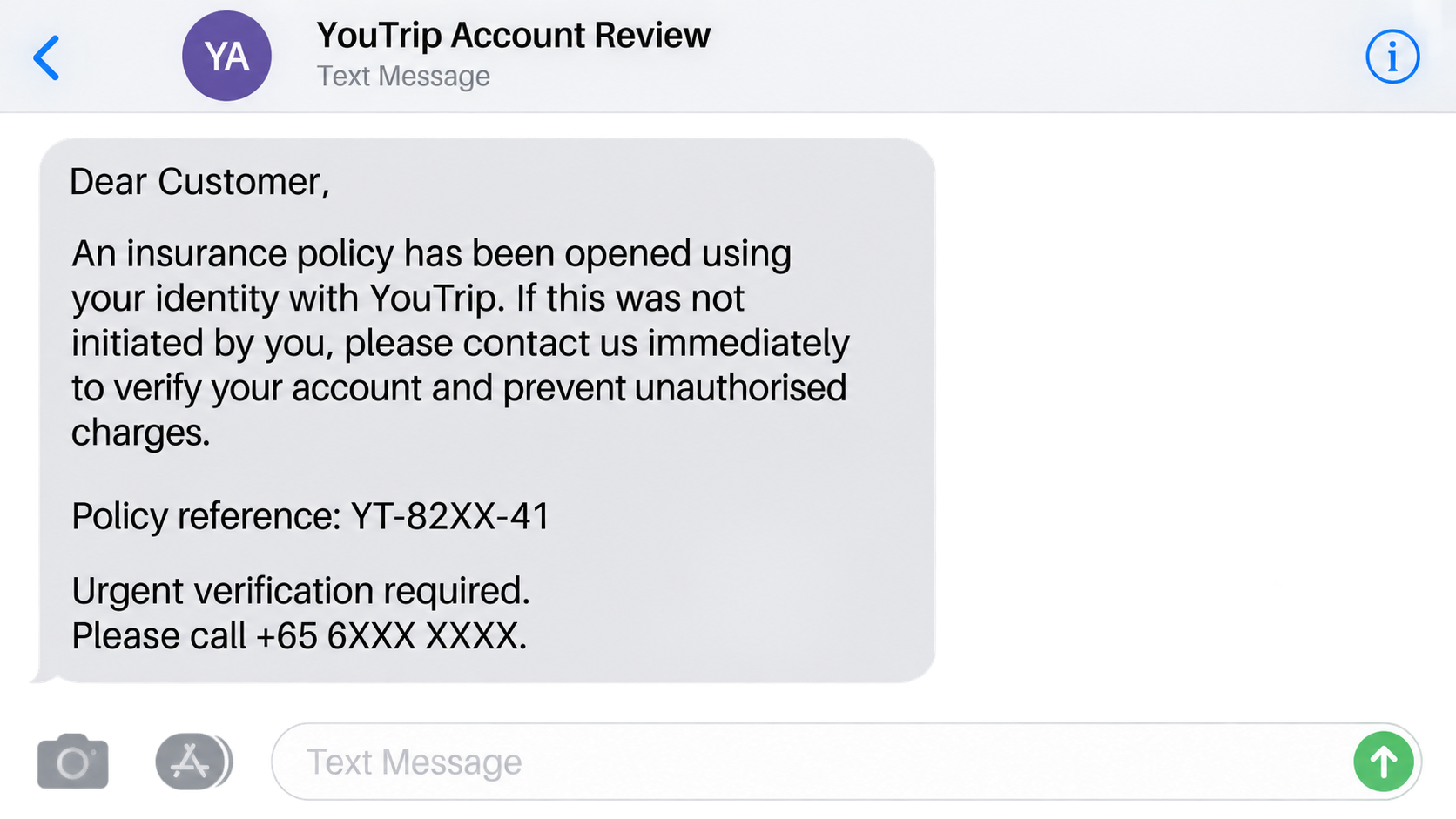
The first caller pretends to represent YouTrip and says an insurance policy was created with the victim’s identity.
A second impersonator then claims to represent the Monetary Authority of Singapore, commonly known as MAS.
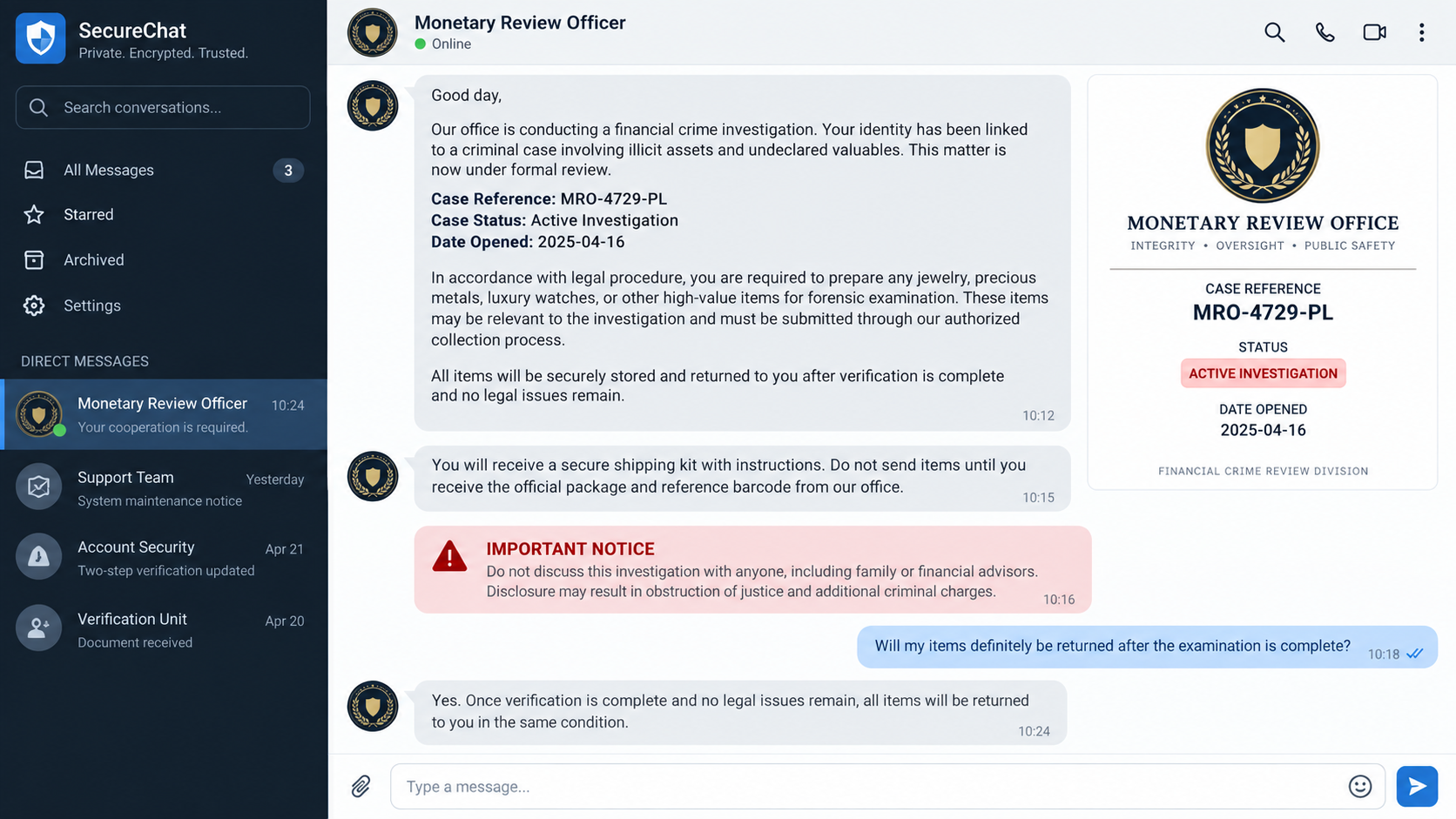
The supposed officer says the victim is connected to a crime and must surrender jewelry for forensic examination.
YouTrip and MAS are legitimate organizations whose names are being misused. Their appearance in the story does not make the request authentic.
The scheme replaces a money transfer with physical valuables
Many impersonation scams request bank transfers. This variation asks for jewelry, watches, precious metals, or other portable valuables instead.
The criminal may describe collection as evidence handling, safekeeping, asset verification, or a temporary forensic procedure.
A courier or collection agent meets the victim and carries the items away. The promised examination and return never occur.
Once property changes hands, the victim has no genuine evidence receipt, court order, or accountable agency holding it.
A documented case shows how serious the tactic can become
Singapore Police described a case reported on August 28, 2026, involving a caller who claimed to represent YouTrip.
The caller supplied a purported insurance policy bearing the victim’s full name and NRIC number, making the false account feel personal.
The victim was transferred to someone posing as an MAS officer and was told her particulars were linked to a criminal case.
Police said she handed jewelry worth about $20,000 to a collector for supposed forensic examination.
Investigators later arrested a 29-year-old man suspected of involvement. That enforcement action does not make every unidentified participant or contact detail legitimate.
- An unsolicited caller knows personal information and presents it as proof of authority.
- A fabricated policy, transaction, or account becomes the reason for urgent contact.
- The conversation moves from customer support to a supposed government investigation.
- The target is warned not to discuss the case with family, banks, or advisers.
- Jewelry or other valuables must be collected for examination or safekeeping.
- The collector cannot be verified through an independently reached government office.
- No authentic warrant, evidence process, or traceable institutional receipt exists.
Why the Two-Stage Impersonation Feels Official
The first caller does not immediately claim to be police. A familiar financial-service identity makes the opening sound like ordinary account support.
A policy carrying the correct name or identity number can create alarm. Victims naturally want the unexpected obligation canceled quickly.
The fake representative then introduces a more serious explanation: stolen particulars may have been used in financial crime.
That transition makes the second call appear to follow a legitimate escalation path rather than arriving from nowhere.
The impersonated authority supplies case numbers, officer names, legal terms, and confidentiality warnings. Each detail gives the victim another reason to keep listening.
Separate voices may play separate roles. One sounds concerned, while another sounds stern and procedural.
The helpful caller can say the government officer will resolve the problem. The supposed officer can claim the first caller already verified the identity.
Neither person independently confirms the other. They are two parts of the same controlled conversation.
A transferred call is especially deceptive because the victim never chooses a trusted number. The criminal decides who answers every stage.
Real verification requires ending the call and finding official contact details independently. Staying on the line keeps verification inside the scammer’s system.
Personal Information Is Not Proof of Authority
A caller may know a full name, address, identity number fragment, employer, or recent transaction. None of those details proves institutional employment.
Data can come from breaches, stolen documents, public records, compromised accounts, marketing databases, or information collected by earlier scammers.
The criminal uses accurate details to make an inaccurate conclusion feel credible. Knowing who you are does not establish who the caller is.
A document can also contain genuine-looking formatting without coming from the named organization. Logos and signatures are easy to copy.
Look beyond what the caller knows. Ask whether the requested action matches a lawful, independently verifiable process.
A financial service does not prove a criminal case by transferring a customer to an unknown mobile number.
A regulator does not establish custody of valuables through a private courier introduced during an unsolicited call.
Confidentiality does not prevent a person from contacting an institution through its published number or obtaining independent legal advice.
How the YouTrip and MAS Jewelry Handover Scam Works
Step 1: A caller invents an insurance or account problem
The target receives an unexpected call about a policy, charge, account, or financial product supposedly created in their name.
The caller may identify YouTrip or another recognizable service to give the concern a familiar setting.
A reference number and personal details encourage the victim to treat the problem as a real case requiring immediate attention.
Step 2: Cancellation becomes an identity-theft investigation
When the victim asks to cancel the policy, the caller claims the application contains suspicious information or links to unlawful activity.
What began as customer service is reframed as evidence that the victim’s identity has been misused.
This shift replaces skepticism with fear. The target becomes focused on clearing their name rather than verifying the caller.
Step 3: The call is handed to a fake authority
A second person poses as an MAS officer, police investigator, financial-crime official, or another government representative.
The transfer may occur directly, or the target receives a callback from a number selected by the first caller.
Caller ID can be spoofed. A displayed agency name or local number does not prove where the call originated.
Step 4: The fake officer creates legal pressure
The impersonator says the victim is under investigation, appears in a criminal file, or must prove that personal assets are legitimate.
Case documents, badge images, recorded messages, or video calls may be used to make the performance feel official.
The victim may be threatened with arrest, account freezing, prosecution, or obstruction allegations if instructions are questioned.
Step 5: Secrecy isolates the victim from help
The target is told that discussing the matter would compromise an investigation. Family members and financial professionals become off-limits.
This instruction protects the scam, not the victim. A trusted outsider would likely recognize the impossible procedure.
The caller may keep the line open for hours, monitor movements, and demand regular updates to prevent independent checks.
Step 6: Jewelry is prepared for a controlled handover
The criminal requests watches, gold, jewelry, cash, or other assets for supposed forensic testing, verification, or secure custody.
Collection details are framed as evidence protocol. A code, receipt number, courier name, or sealed package may be mentioned.
The victim is promised that everything will be returned when testing finishes or the case clears their identity.
Step 7: A collector takes the valuables and contact ends
A money mule or courier arrives at a home, lobby, street, or agreed meeting point and accepts the package.
The collector may know a reference code supplied by the caller. That only shows coordination with the scammer.
After collection, the supposed officers invent delays, demand more property, or disappear. No legitimate evidence system holds the valuables.
Why Jewelry Is Used Instead of a Bank Transfer
Large electronic transfers can trigger bank questions, cooling periods, transaction limits, and fraud warnings. Physical valuables avoid some of those controls.
Jewelry is portable, valuable, and easier to resell than many household goods. A small package can contain years of family savings.
The victim may not think of handing over property as a payment. The word evidence changes how the action feels.
That language is important. People often recognize requests for gift cards or cryptocurrency, but forensic collection sounds unfamiliar and procedural.
The criminals can also target sentimental items that have no simple replacement value. A later insurance claim may not restore inherited pieces.
Cash buyers, pawn channels, and informal resellers can quickly separate an item from the person who collected it.
A courier creates distance between the caller and the loss. The person speaking may operate abroad while a local recruit handles collection.
The collector may be another deceived participant, but that possibility does not make the handover safe or lawful.
Real investigators document seizures under defined legal authority. They do not arrange secret collections solely through unsolicited calls.
Before releasing valuables, contact police through an independently obtained number and ask whether any lawful process exists.
What a Real Investigation Would Not Ask You to Do
A genuine authority will not demand that you prove innocence by surrendering jewelry to a stranger introduced over the telephone.
It will not forbid you from contacting a lawyer, trusted relative, bank, or the agency’s public switchboard.
It will not require you to remain continuously connected while gathering assets or traveling to a handover point.
It will not treat an unverified messaging account as the only safe route for legal communication.
Legitimate evidence collection has accountable officers, legal grounds, documented custody, and procedures that can be confirmed outside the original contact.
An authentic case does not collapse because you pause, hang up, or ask local police to verify it.
If the caller says verification itself is illegal, that claim is a warning sign. Lawful authority can withstand independent confirmation.
Do not compare only logos and case numbers. Compare the requested behavior with how real institutions protect evidence and individual rights.
How to Verify the Call Without Following Its Instructions
End the call. Do not use a callback number, link, QR code, or extension supplied by the person who contacted you.
Open the organization’s official website by typing the known address yourself. Find its published customer-support or fraud-reporting route.
Ask whether the policy, account, employee, telephone number, and reference actually exist. Share no one-time code during this check.
Contact MAS through information published on its genuine website if someone claims to represent the authority.
For threats of arrest or asset seizure, call local police through their established number or visit a station.
Explain the entire sequence, including the first caller, transfer, documents, secrecy demand, and proposed handover.
Do not let an incoming caller supervise that conversation. Use a separate device if the original line may still be active.
Search the exact telephone number, document wording, email domain, and case phrase. Reports can expose recycled scripts.
However, an absence of complaints does not establish legitimacy. New numbers and accounts can be created rapidly.
Show the request to someone you trust. A person outside the pressure cycle can notice contradictions more easily.
If valuables are already packaged, keep them with you. No deadline should override independent verification.
If a collector is approaching, do not confront them alone. Contact police and follow safe official instructions.
Company, Address, and Fulfillment Checks
The named organizations must be reached independently
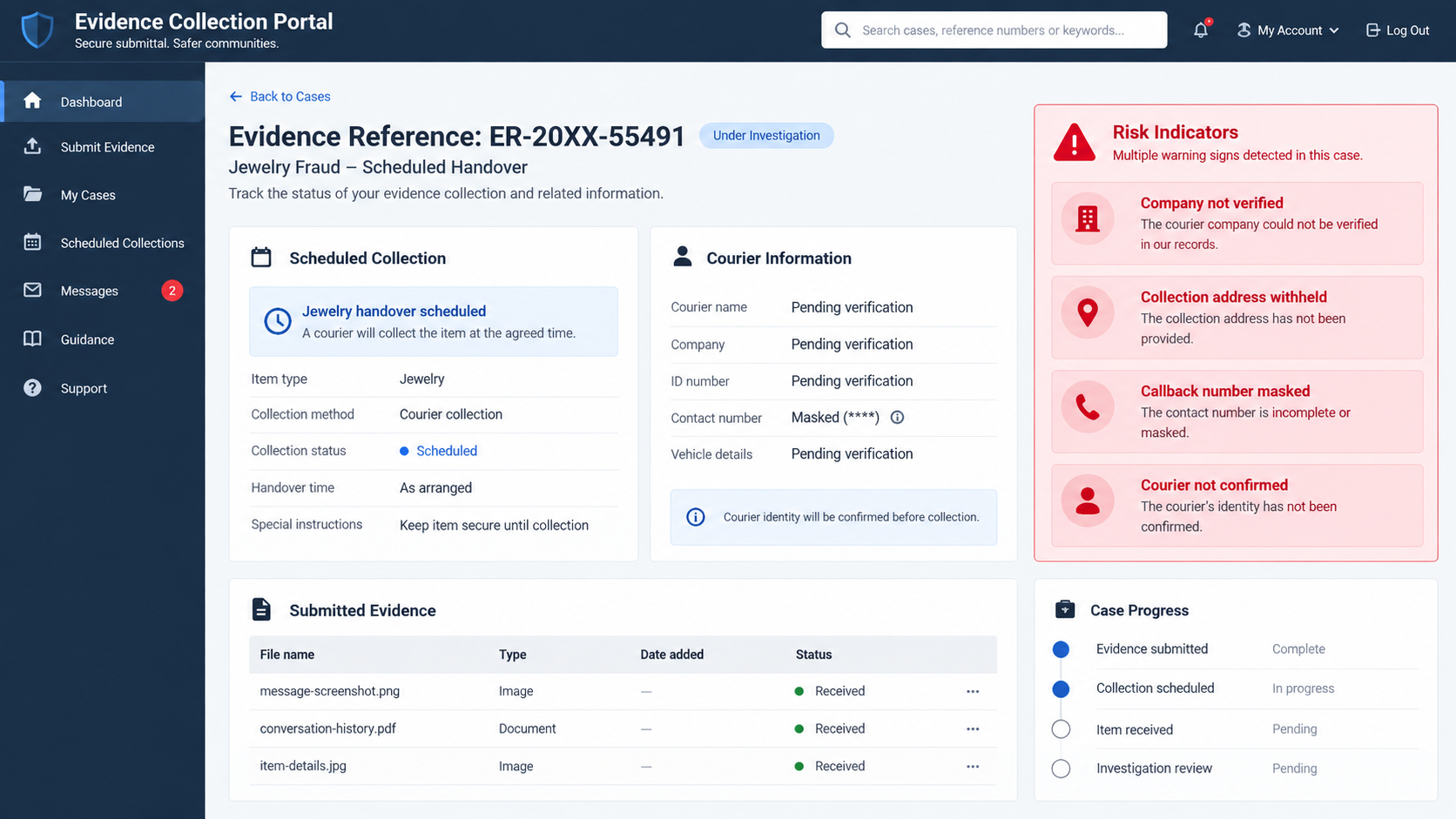
The caller’s display name, logo, document, and reference number all come from the same untrusted source.
Use YouTrip’s genuine support route and MAS’s published contact information. Ask each organization about the exact claim without using transferred calls.
If the caller resists independent contact, the supposed case is designed to avoid scrutiny.
The officer and collector identities must connect to real records
Ask for a full name, department, office number, and written legal basis, then verify them through the institution’s main switchboard.
A photograph of a badge or identity card can be stolen, altered, or fabricated. It is not independent confirmation.
A courier who knows your name or code may simply be following instructions from the criminal organizer.
The meeting address does not make the process official
A hotel lobby, residence, roadside location, or commercial building can be selected because it offers easy access and limited accountability.
Even a government building’s address can be copied into a message. Confirm the appointment with that office directly.
Do not mail or deliver assets to a warehouse, mailbox, apartment, or courier center for unexplained examination.
Real fulfillment means documented and lawful custody
A genuine evidence process identifies the authority, legal power, receiving officer, itemized property, custody trail, and procedure for challenge or return.
A chat message, private receipt, or verbal promise does not create that accountability.
If no independently verified institution accepts responsibility for the property, there is no safe fulfillment path.
Warning Signs That Require an Immediate Pause
The most revealing signs are not spelling mistakes. They are requests that remove independent oversight and transfer control of valuable property.
- The caller turns an account problem into a criminal allegation during one conversation.
- Personal data is presented as proof that the caller is genuine.
- You are transferred to an authority instead of told to contact it independently.
- A supposed officer threatens arrest unless you follow secret instructions.
- Family, lawyers, banks, or local police must not be told.
- The caller stays connected while you collect or transport valuables.
- Jewelry is described as evidence, security, or material for forensic testing.
- A private courier performs what is claimed to be an official seizure.
- The receipt cannot be confirmed through a public institutional channel.
- More assets are requested after the first collection is completed.
One unusual detail may have an explanation. Several of these features together describe a controlled extraction, not protective customer service.
Stopping is not noncooperation with a real investigation. It is the safest way to establish whether any investigation exists.
What to Do if You Have Fallen Victim to This Scam
- Contact police immediately. Report the handover location, time, collector description, vehicle, direction of travel, and every communication channel. Urgent reporting may help identify nearby footage.
- Do not arrange another collection. Scammers may claim a second handover is needed to release the first package. Keep remaining valuables secure and stop following their instructions.
- Preserve the complete conversation. Save call logs, recordings where lawful, messages, email headers, policy documents, case numbers, photographs, courier details, receipts, and meeting instructions.
- Create an itemized property record. List every missing piece, description, engraving, serial number, photograph, receipt, appraisal, and identifying mark. Give copies to investigators and insurers.
- Notify the impersonated organizations. Report the false YouTrip and MAS claims through their genuine contact channels. Include the numbers, accounts, and documents used by the criminals.
- Secure exposed financial accounts. Contact banks and payment providers if details were shared. Replace compromised cards, review beneficiaries, lower limits, and challenge unauthorized activity promptly.
- Protect identity credentials. Change affected passwords, enable multifactor authentication, review recovery settings, and contact the appropriate identity service if NRIC or passport data was exposed.
- Check every connected device. Remove remote-access tools or unknown apps installed at the caller’s direction. Run a complete Malwarebytes scan and review browser extensions.
- Reduce further malicious contact. Block reported numbers and accounts after preserving evidence. AdGuard can reduce exposure to malicious advertisements and known deceptive sites, but it cannot recover property.
- Prepare for recovery fraud. Ignore anyone promising guaranteed retrieval for an upfront payment. Give no seed phrase, one-time code, remote access, or additional valuables to a self-described recovery agent.
Is Your Device Infected? Run a Free Malware Scan
Slow performance, constant pop-ups, or strange behavior? These are classic signs of a malware infection. The fastest way to find out is to scan your device with Malwarebytes Free — one of the most trusted malware removal tools available.
The free version detects and removes the most common threats, including:
- Adware — the cause of those annoying pop-ups
- Browser hijackers — unwanted redirects and changed homepages
- Trojans and spyware — hidden programs stealing your data
- Potentially unwanted programs (PUPs) — software you never asked for
👉 Select your device below — Windows, Mac, or Android — then follow the simple steps to download Malwarebytes, scan your system, and remove any threats it finds. The scan usually takes 5 to 20 minutes.
Run a Malware Scan with Malwarebytes for Windows
Malwarebytes is one of the most popular and trusted anti-malware tools for Windows — and it’s completely free for removing infections. It catches threats that many antivirus programs miss, including adware, browser hijackers, and trojans. Follow the steps below to scan and clean your PC in just a few minutes.
Download Malwarebytes
Click the button below to download the latest version of Malwarebytes for Windows from the official source. The free version is all you need — it will scan your computer and remove adware, browser hijackers, and other malicious software at no cost.
Download MalwarebytesOfficial installer for Windows 11 and 10. Your download starts right away.Want real-time protection? See Malwarebytes Premium Malwarebytes Free for WindowsScans and removes malware at no cost
-
Install Malwarebytes
When the download finishes, open your Downloads folder and double-click the MBSetup file. If Windows shows a User Account Control pop-up, click “Yes” to allow the installation.

Follow the On-Screen Prompts to Install Malwarebytes
The setup wizard will walk you through a few quick screens:
-
Choose where you’re installing the program — “Personal Computer” or “Work Computer” — then click Next.

-
Malwarebytes will now install on your device. This usually takes under a minute.

-
When installation is complete, the “Welcome to Malwarebytes” screen will open automatically.

-
On the final screen, click Open Malwarebytes to launch the program.

-
Enable “Scan for Rootkits”
Before scanning, turn on rootkit detection so Malwarebytes can find even the most hidden threats. Click the Settings gear icon on the left side of the screen.

In the settings menu, find “Scan for rootkits” and click the toggle so it turns blue.

Done? Click “Dashboard” in the left pane to return to the main screen.
Start the Scan
Click the blue Scan button. Malwarebytes will automatically update its virus database and start checking your computer for malware.

-
Wait for the Scan to Finish
The scan checks your entire system for browser hijackers and other malicious programs, so it can take 5 to 20 minutes depending on your computer. Feel free to do something else — just check back occasionally to see the progress.

-
Quarantine the Detected Threats
When the scan is done, you’ll see a list of everything Malwarebytes found — malware, adware, and potentially unwanted programs. Click the “Quarantine” button to remove all of them at once.

Malwarebytes will now remove the malicious files and registry entries and move them safely into quarantine.

-
Restart Your Computer
Some threats can only be fully removed after a reboot. If Malwarebytes asks you to restart, click Yes. Once you’re logged back in, Malwarebytes has finished removing the threats it found.

That’s it — your Windows PC is now clean of trojans, adware, and other malware, and should be back to running smoothly.
If you are still having problems with your computer after completing these instructions, then please follow one of the steps:
- Run a computer scan with ESET Online Scanner
- Ask for help in our Windows Malware Removal Help & Support forum.
Run a Malware Scan with Malwarebytes for Mac
Malwarebytes for Mac is a free on-demand scanner that removes the malware other security software tends to miss — adware, browser hijackers, and unwanted programs included. Cleaning an infected Mac with Malwarebytes has always been completely free, and it’s our go-to recommendation. Follow the steps below to scan and clean your Mac in just a few minutes.
-
Download Malwarebytes for Mac
Click the button below to download the latest version of Malwarebytes for Mac.
Download MalwarebytesOfficial installer for macOS. Your download starts right away.Want real-time protection? See Malwarebytes PremiumMalwarebytes Free for MacScans and removes malware at no cost -
Open the Malwarebytes setup file
When the download finishes, open your Downloads folder and double-click the setup file to begin the installation.

-
Follow the On-Screen Prompts to Install Malwarebytes
The Malwarebytes for Mac Installer will guide you through a few quick screens. Click “Continue” and keep following the prompts until the installation completes.



When the installation is complete, Malwarebytes opens to the Welcome to Malwarebytes screen. Click “Get started“.
-
Select “Personal Computer” or “Work Computer”
Malwarebytes will ask what type of computer you’re installing it on. Click either Personal Computer or Work Computer, whichever applies.

-
Start the Scan
Click the “Scan” button. Malwarebytes will automatically update its detection database and begin checking your Mac for malware.

-
Wait for the Scan to Finish
Malwarebytes will scan your Mac for adware, browser hijackers, and other malicious programs. This can take a few minutes, so feel free to do something else — just check back occasionally to see the progress.

-
Quarantine the Detected Threats
When the scan is done, you’ll see a list of everything Malwarebytes found. Click the “Quarantine” button to remove all the threats at once.

-
Restart Your Mac
Malwarebytes will now remove all the malicious files it found. Some threats can only be fully removed after a reboot — if Malwarebytes asks you to restart, allow it. Once you’re logged back in, your Mac is clean.

That’s it — your Mac is now free of adware, rogue browser extensions, and other potentially harmful software.
If you are still experiencing problems while trying to remove a malicious program from your computer, please ask for help in our Mac Malware Removal Help & Support forum.
Run a Malware Scan with Malwarebytes for Android
Malwarebytes for Android automatically detects and removes dangerous threats like malware and ransomware so you don’t have to worry about your most-used device being compromised. Aggressive detection of adware and potentially unwanted programs keeps your Android phone or tablet running smooth.
-
Download Malwarebytes for Android.
You can download Malwarebytes for Android by clicking the link below.
Get Malwarebytes for AndroidOpens Google Play in a new tab.Want real-time protection? See Malwarebytes Premium for AndroidMalwarebytes for AndroidScans your phone and removes malware at no cost -
Install Malwarebytes for Android on your phone.
In the Google Play Store, tap “Install” to install Malwarebytes for Android on your device.

When the installation process has finished, tap “Open” to begin using Malwarebytes for Android. You can also open Malwarebytes by tapping on its icon in your phone menu or home screen.

-
Follow the on-screen prompts to complete the setup process
When Malwarebytes will open, you will see the Malwarebytes Setup Wizard which will guide you through a series of permissions and other setup options.
This is the first of two screens that explain the difference between the Premium and Free versions. Swipe this screen to continue.
Tap on “Got it” to proceed to the next step.
Malwarebytes for Android will now ask for a set of permissions that are required to scan your device and protect it from malware. Tap on “Give permission” to continue.
Tap on “Allow” to permit Malwarebytes to access the files on your phone.
-
Update database and run a scan with Malwarebytes for Android
You will now be prompted to update the Malwarebytes database and run a full system scan.

Click on “Update database” to update the Malwarebytes for Android definitions to the latest version, then click on “Run full scan” to perform a system scan.

-
Wait for the Malwarebytes scan to complete.
Malwarebytes will now start scanning your phone for adware and other malicious apps. This process can take a few minutes, so we suggest you do something else and periodically check on the status of the scan to see when it is finished.

-
Click on “Remove Selected”.
When the scan has been completed, you will be presented with a screen showing the malware infections that Malwarebytes for Android has detected. To remove the malicious apps that Malwarebytes has found, tap on the “Remove Selected” button.

-
Restart your phone.
Malwarebytes for Android will now remove all the malicious apps that it has found. To complete the malware removal process, Malwarebytes may ask you to restart your device.
That’s it — your Android phone is now clean — no more malicious apps, adware, or browser redirects.
If you are still having problems with your phone after completing these instructions, then please follow one of the steps:
- Restore your phone to factory settings by going to Settings > General management > Reset > Factory data reset.
- Ask for help in our Mobile Malware Removal Help & Support forum.
Stay Protected: Block Ads and Malicious Sites
Now that your device is clean, keep it that way. Most infections start with a malicious ad or a fake download button — so blocking them at the source is your best defense.
We recommend AdGuard, which blocks malicious ads, phishing pages, and dangerous redirects before they can reach you.
👉 Download AdGuard and browse safely
Frequently Asked Questions
Does YouTrip call customers about insurance policies?
Do not decide from the caller’s claim. End the call and ask YouTrip through its official support channel whether the exact policy and contact are genuine.
Would MAS collect jewelry for forensic examination?
An unsolicited caller should never be trusted to arrange such a handover. Verify any claimed authority through MAS and local police independently.
What if the caller knows my NRIC number?
Accurate personal data may come from earlier exposure. It proves the caller has information, not that the caller represents a legitimate institution.
Can a courier’s collection code prove the handover is official?
No. The caller and collector can share the same code. Confirmation must come from an independently reached authority with a lawful, documented process.
Should I warn the collector that police have been called?
Do not create a confrontation. Give police the details and follow their safety instructions, especially if a collection is imminent.
Can stolen jewelry be recovered?
Recovery is not guaranteed, but rapid reporting, photographs, serial numbers, appraisals, and meeting evidence can improve identification and investigative options.
The Bottom Line
The YouTrip and MAS jewelry handover scam uses a false policy, a staged authority transfer, and legal fear to separate victims from valuable property.
Neither personal information nor a convincing case file proves authority. End the contact and verify every organization through a channel you choose.
No legitimate investigation requires blind trust in a stranger’s courier. Keep the valuables, involve police, and preserve the entire trail.

Join the discussion
0 commentsShare your experience or ask a question about this article.
Discussion
Start the conversation
Have a question or something useful to share? Add the first comment.