

The video looks like a famous creator accidentally revealed a private way to earn from the platform. Rate a few advertisements, calibrate an algorithm, and money appears on the screen almost immediately.
The YouTube Pay Scam is built around that impossible speed. A fake Jake Paul presentation turns invented microtasks into a large balance, then asks the viewer to pay $24 before any supposed earnings can be withdrawn.
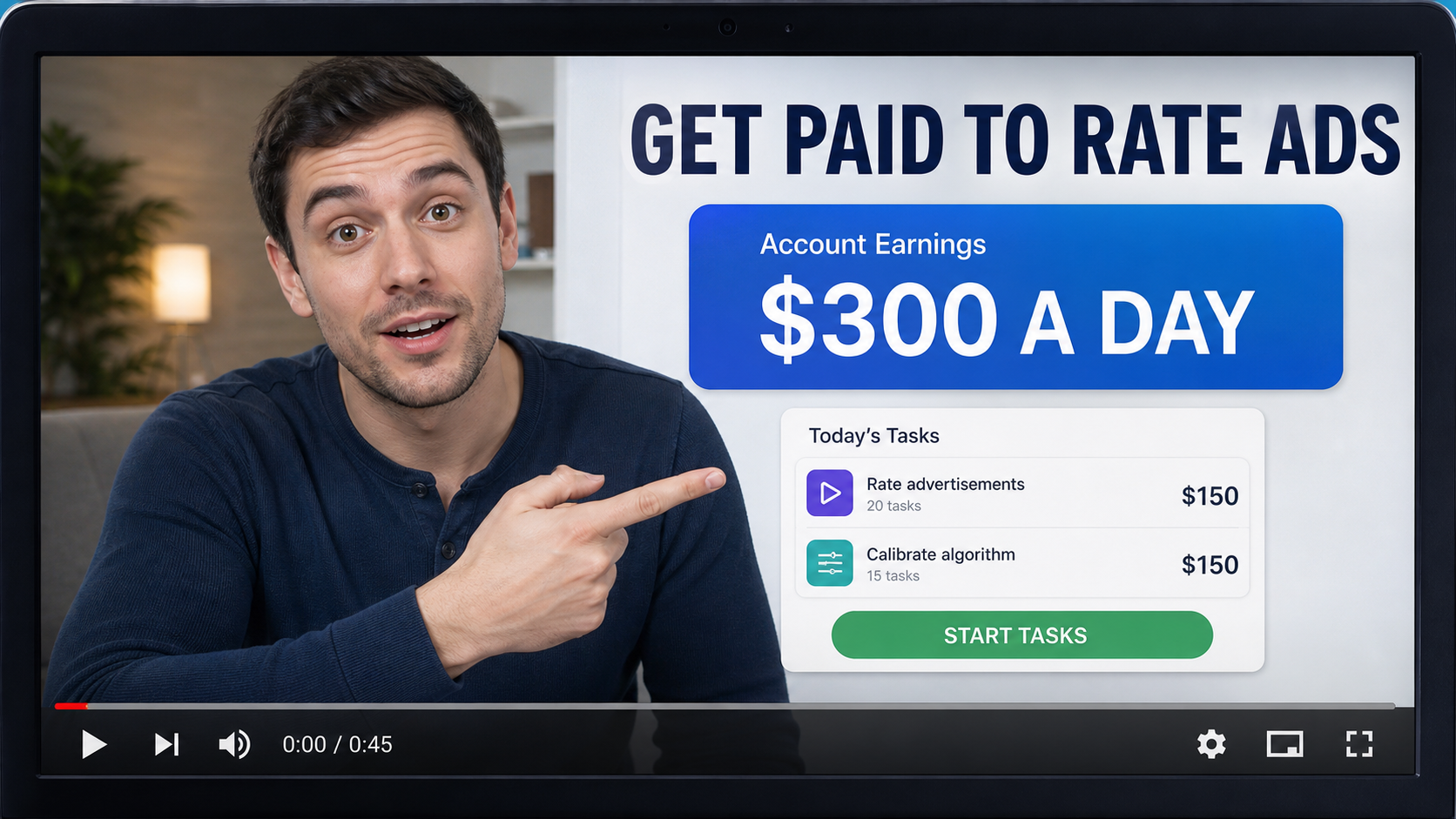
The first screen does not feel like a job application. It resembles a creator tip shared with followers, complete with a confident presenter, rapidly changing totals, and a dashboard that appears to react to each simple task.
Tasks such as rating ad relevance sound plausible because real platforms do measure advertising quality. The deception is the claim that random viewers can activate a secret public protocol and receive $150, $300, or $500 a day without a formal contract.
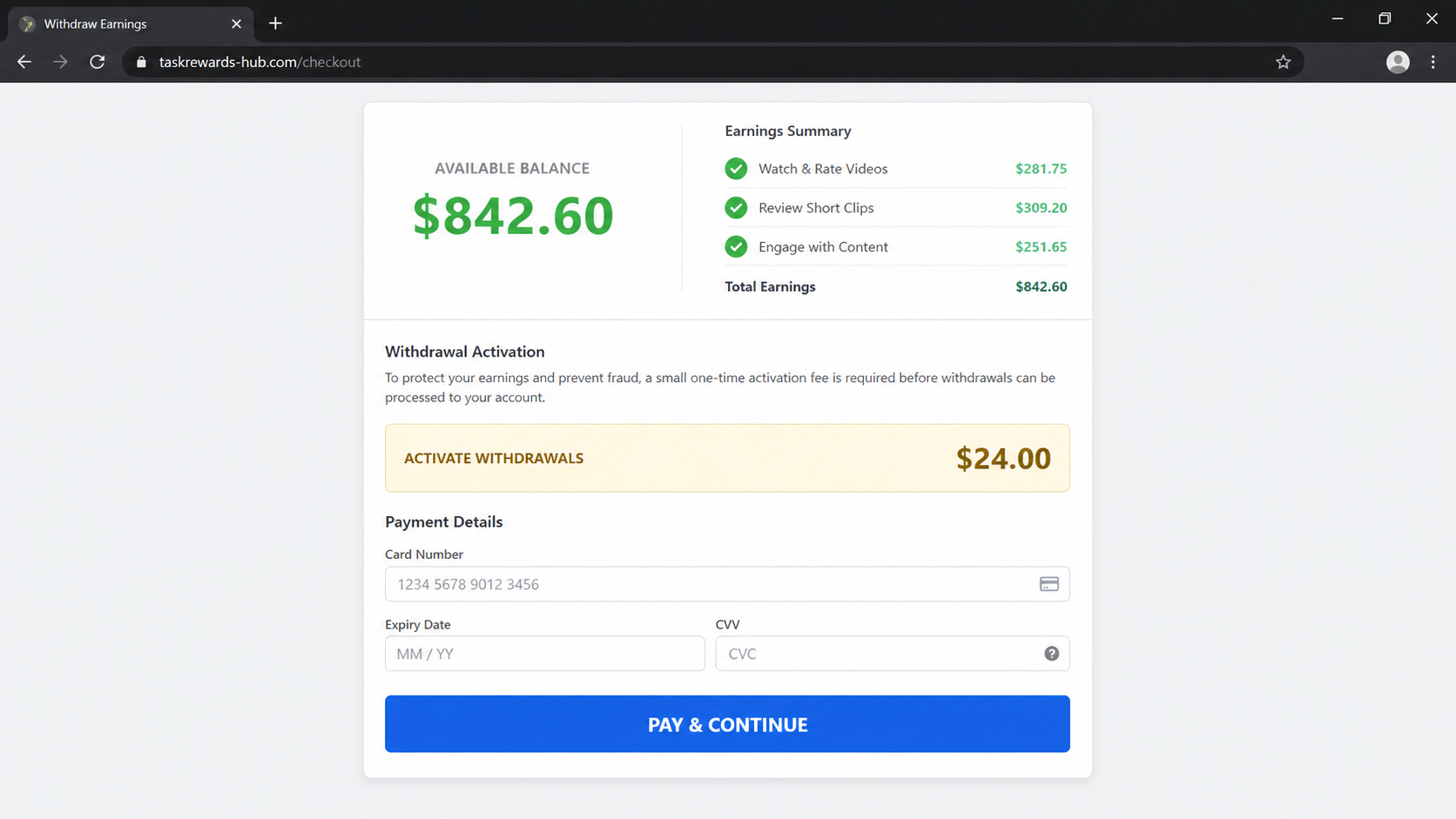
The commercial purpose becomes clear when the balance cannot be withdrawn. A $24 payment is introduced as activation, verification, or access, even though a genuine employer or platform would not charge a worker to release wages already earned.
Overview
The Jake Paul video is an unauthorized AI pitch
The campaign uses a fabricated depiction of Jake Paul and may show other well-known creators to make the method feel tested by people who understand online platforms. Recognition replaces evidence, while cloned speech supplies the exact sales claims the operator needs.
A genuine endorsement should be traceable to the person’s verified accounts and should point to a domain controlled by the advertised service. A video inside a paid ad, copied page, or long sales presentation is not independent proof that the person participated.
YouTube does not pay viewers through secret calibration tasks
YouTube’s official monetization system pays eligible creators through the YouTube Partner Program and AdSense for YouTube. It includes documented requirements, account review, tax details, and payment thresholds. It is not unlocked by buying a microtask app from an advertisement.
The platform does use algorithms to evaluate content and advertising suitability, but those systems do not create a hidden public job that pays anyone hundreds of $ for pressing relevance buttons. Technical vocabulary is being used to make a fictional opportunity sound operational.
The $24 payment reverses the direction of a real job
The pitch claims that the viewer has already generated money, then says a payment is necessary to activate withdrawals or complete access. That is an advance-fee structure. The person expecting income becomes the customer who pays the operator.
The exact downstream terms can change, and similar funnels may add memberships or higher-priced upsells. We confirmed the $24 request in the documented presentation, but did not find a stable public checkout that proves every later charge. Buyers should not assume $24 is the maximum possible exposure.
- The campaign uses an unauthorized AI depiction of Jake Paul.
- It promises instant or very rapid earnings for simple ratings.
- Daily income claims range from about $150 to $500.
- The tasks are called ad relevance or algorithm calibration.
- A fake dashboard turns button presses into a growing balance.
- The funnel eventually requests a $24 payment.
- The offer is not part of YouTube's documented creator program.
- No transparent employer, contract, or wage arrangement is shown.
Why the Secret Microtask Story Sounds Possible
People know that large technology companies train algorithms, review advertisements, and pay contractors for data work. The campaign borrows those true ideas, compresses them into a few taps, and removes every real-world requirement that would slow the promise down.
Legitimate data-labeling work normally involves an identified employer or platform, written terms, eligibility checks, quality controls, tax treatment, and payment rules. Rates vary, tasks can be repetitive, and work is not guaranteed. The scam skips that entire employment relationship.
The celebrity choice also feels natural. Jake Paul is associated with online entrepreneurship and attention-driven businesses, so a viewer may accept that he knows an unusual monetization trick. The story is designed around public image, not verifiable involvement.
The dashboard provides instant emotional proof. A balance that rises from $0 to several hundred $ feels more convincing than a paragraph promising future income. Yet numbers displayed by a website are not funds held in an account and do not create a debt owed to the visitor.
Small tasks generate commitment. After rating several cards, the user feels they performed work and deserves the shown balance. The later $24 fee can then be framed as a minor administrative step compared with the much larger amount supposedly waiting.
That comparison is artificial. The balance costs the operator nothing to display and cannot be independently withdrawn. The only real transfer in the documented funnel moves from the victim’s card to the seller.
What Our YouTube Pay Scam Investigation Found
The circulating promotion describes a YouTube Pay app, glitch, algorithm calibration protocol, or set of secret microtasks. The wording changes, but the promise remains the same: a beginner can produce large earnings almost immediately by rating advertisements or content.
The video reportedly shows a deepfake-style Jake Paul saying users can make $150, $300, or as much as $500 per day. Other recognizable internet personalities may appear in the wider presentation to make the opportunity look accepted by successful creators.
One version claims the process can generate more than $200 in seconds. That speed is not supported by an employer contract, a published rate card, audited payout evidence, or an official YouTube help page.
The presentation ultimately requests $24. The payment may be described as app access, activation, processing, training, or verification. Regardless of the label, the user is being asked to pay before receiving the advertised earnings.
YouTube’s official documentation describes how monetization actually works. Creators apply to the YouTube Partner Program, meet eligibility requirements, undergo review, link AdSense for YouTube, submit tax information, and earn from documented features such as advertising revenue, memberships, and Premium viewing.
Official YouTube pages do not describe a public secret-microtask lane where viewers pay a third party and then earn by calibrating advertisements. The word algorithm appears in legitimate help pages, but it concerns content and monetization systems, not an invitation to buy an earning shortcut.
The campaign did not present a clear legal employer, job location, manager, payroll method, worker classification, support address, or company registration. A creator’s face occupied the space where accountable business details should have appeared.
We could not preserve a stable live checkout or identify a verified company accepting the $24 across every version. That uncertainty is itself important. Rotating domains and disposable payment pages make refunds, reporting, and attribution much harder after the ad disappears.
How the YouTube Pay Scam Works
Step 1: A famous creator appears to reveal a glitch
The ad opens with a supposedly candid confession, leaked method, or discovery that was not meant for the general public. A familiar face tells the viewer that a recent platform change created an unusual earning opportunity.
AI-generated speech can be placed over edited video while captions keep attention on the claim. The presentation may sound conversational, but every line is engineered to move the viewer toward an outside site.
Step 2: Technical language disguises a simple sales pitch
The visitor hears terms such as algorithm calibration, ad relevance, hidden task protocol, or system glitch. These phrases imply that a complex platform problem has created paid work only a small group knows about.
No technical documentation explains who created the tasks, how answers are evaluated, or why the data is worth hundreds of $ per user. The vocabulary supplies atmosphere without a verifiable business process.
Step 3: A quiz declares the visitor eligible
The page may ask about age, device type, available time, or willingness to rate advertisements. The answers rarely create meaningful selection because the funnel earns only when visitors continue.
A message then says places are limited or the device is compatible. This manufactured approval makes the visitor feel accepted into a program before any legal employer has been identified.
Step 4: Tiny actions create a large fake balance
The user presses buttons to choose which ad is relevant, rate a video, or complete a practice calibration. Each click may add $20, $50, or more to an onscreen account.
The figures are controlled by page code. They are not deposits from YouTube, do not correspond to billable work, and cannot be verified through AdSense or YouTube Studio.
Step 5: Withdrawal is placed behind a $24 payment
Once the displayed balance feels worth protecting, the site says the account must be activated. The requested $24 looks small beside the invented earnings and may be framed as refundable.
Paying to release wages is the inversion at the heart of the scheme. A real platform subtracts disclosed fees from actual proceeds or pays through payroll. It does not require a card purchase to convert browser animation into income.
Step 6: The payment can lead to more offers or data collection
After the first transaction, the user may see training packages, upgrades, expedited payout options, or partner products. Even if no second payment appears, the checkout has collected valuable contact and card information.
The operator can also use the first purchase to identify someone responsive to income offers. Follow-up messages may promise account recovery, larger task limits, or another system that supposedly works better.
Step 7: The fake balance never becomes normal earnings
Withdrawal may remain pending, require another step, or redirect to unrelated content. Support can be difficult to reach because the creator in the video was never the employer and the domain can be replaced.
By the time the user realizes the balance was fictional, the $24 is real. Any added charges, personal-data exposure, or reused-password risk must then be handled separately.
Company, Address, and Fulfillment Checks
There is no identifiable employer behind the tasks
A real microtask service tells workers which legal entity runs the platform, where it is based, how compensation is calculated, and how disputes are handled. The documented YouTube Pay pitch did not establish those basics.
Jake Paul is not a substitute for a company name. Even a genuine endorsement would not explain who owes the wages, controls the dashboard, holds the payment data, or must respond when withdrawal fails.
The domain trail is designed to be replaceable
Advertisements can redirect through tracking pages, advertorials, and disposable landing sites. When one domain is reported, affiliates can change the destination while keeping the same video and $24 pitch.
Save every address from the browser history. A shortened link or secure padlock proves only that the connection was encrypted, not that the page belongs to YouTube or a legitimate employer.
Missing phone and address details matter
An email form or chat bubble cannot replace a legal notice, physical service address, and working support number. Without them, users cannot confirm jurisdiction or identify the party responsible for refunds.
If a number appears only after payment, call cautiously and never install remote-access software. An outsourced agent may sell another service without being able to explain the original microtask contract.
There is no product or payroll fulfillment to verify
The supposed deliverable is access to income, yet no verified task marketplace, client list, payment ledger, or worker agreement is shown. A members area containing videos would not prove that the advertised jobs exist.
Digital delivery is easy to fake because a login page can be provided instantly. The meaningful test is whether independent customers pay for completed work, not whether the buyer can open a dashboard after spending $24.
The Fake Balance Is the Most Important Piece of the Deception
People often focus on the deepfake because it is visually striking. The more decisive evidence is the money flow. The site can display any balance it wants, while the user must provide a real card and a real $24 payment.
A number on a private dashboard is not the same as money held by a regulated institution. Ask where the funds originated, which company owes them, what work record supports them, and how they appear in official platform reporting. The funnel cannot answer those questions.
The $24 amount is calibrated to avoid a long decision. It is low enough to feel recoverable but high enough to make a broad campaign profitable. Once the user pays, a second offer can exploit the desire not to lose the first fee.
Do not confuse the existence of legitimate online task work with the legitimacy of this page. Real employers can recruit remote evaluators, but they do not become genuine merely by mentioning an algorithm or placing a famous creator in the sales video.
YouTube’s documented payment system is available through official Help pages and YouTube Studio. If a supposed opportunity requires leaving that ecosystem, paying an unknown merchant, and trusting a balance no official account displays, it is not YouTube earnings.
The safest response is to close the page before entering a card. Someone who wants legitimate creator income should start with the official Partner Program requirements, while someone seeking contract work should verify the employer and never pay to unlock wages.
Warning Signs to Watch For
- A celebrity reveals a secret earning method only in an ad.
- The voice or lip movement looks artificially generated.
- The offer promises $150 to $500 per day for trivial actions.
- The phrase algorithm calibration is never explained technically.
- A quiz accepts nearly every visitor into the program.
- The onscreen balance rises much faster than credible wages.
- The money does not appear in YouTube Studio or AdSense.
- A $24 payment is required before withdrawal.
- No legal employer, worker agreement, phone, or address is visible.
- The destination domain has no official relationship with YouTube.
A legitimate platform pays for documented work through an accountable system. When the only verifiable transaction is a $24 card charge demanded to unlock an invented balance, the opportunity has already failed the basic test.
What to Do if You Have Fallen Victim to This Scam
- Contact the card issuer immediately. State that you paid $24 after a deceptive income claim and did not receive withdrawable earnings. Ask whether the card should be replaced and whether future charges from the merchant or related descriptors can be blocked.
- Dispute charges with a clear timeline. Show the fake creator ad, task sequence, displayed balance, payment page, receipt, and failed withdrawal. Explain that the fee was presented as the final step to receive earnings rather than an ordinary digital product purchase.
- Cancel any trial or membership in writing. Search the receipt and terms for recurring access, training, or partner offers. Tell support to close every plan tied to the order and request a written date when billing stops. Keep the full message thread.
- Change reused credentials. If the page asked you to create an account with a familiar password, replace that password everywhere it was reused. Turn on multifactor authentication for email, financial accounts, and the genuine Google account.
- Preserve domains and account evidence. Save the browser history, redirects, screenshots, order number, merchant descriptor, support contacts, and task dashboard. Do not keep revisiting the page from the same ad because it may collect more tracking data.
- Report the impersonation. Report the advertisement to the platform where it appeared and report the payment scheme to the FTC. Jake Paul's name and YouTube branding can also be reported through the relevant impersonation or trademark channels.
- Run a Malwarebytes scan. Use Malwarebytes if you installed an app, browser extension, remote tool, or downloaded file during the process. Remove detections and revoke notification permissions granted to unfamiliar task sites.
- Add AdGuard protection. AdGuard can block many malicious advertisements, tracking redirects, pop-ups, and known scam destinations. It cannot recover the $24, but it can reduce exposure to cloned versions of the same income lure.
Frequently Asked Questions
Is YouTube Pay a real way to earn money?
YouTube has real creator monetization through the YouTube Partner Program and AdSense for YouTube. The advertised secret microtask program and $24 activation flow are not part of that documented system.
Did Jake Paul promote the algorithm calibration method?
The circulating video uses an unauthorized AI-style depiction. A genuine promotion should be visible on his authenticated channels and point to an accountable official company.
Can I earn $300 a day by rating YouTube ads?
The campaign provides no verified employer, rate schedule, task client, or payout record supporting that claim. Pressing buttons on its dashboard does not create YouTube earnings.
Why does the dashboard show that I already earned money?
The page controls the number and can increase it automatically. Unless the funds appear in an independently verifiable account and are owed under a real work agreement, the balance is only a sales device.
Is the $24 fee refundable?
Do not rely on the sales video. Read the exact merchant terms and act quickly through the card issuer if the service was misrepresented or withdrawals remain impossible.
What if I paid but did not install anything?
Your main risks are the charge, possible recurring billing, and exposure of card and contact details. Contact the issuer, cancel in writing, monitor statements, and secure any password created on the site.
The Bottom Line
The YouTube Pay Scam combines a fake Jake Paul video, impressive-sounding algorithm language, trivial microtasks, and a balance that grows faster than any credible work arrangement.
YouTube’s real monetization programs are documented and account-based. They do not require viewers to pay an unknown seller $24 before receiving hundreds of $ supposedly earned in seconds.
Treat the payment request as the decisive warning. Close the funnel, verify opportunities through official platform pages, and contact the card issuer immediately if the only real money in the process came from you.

Join the discussion
0 commentsShare your experience or ask a question about this article.
Discussion
Start the conversation
Have a question or something useful to share? Add the first comment.