

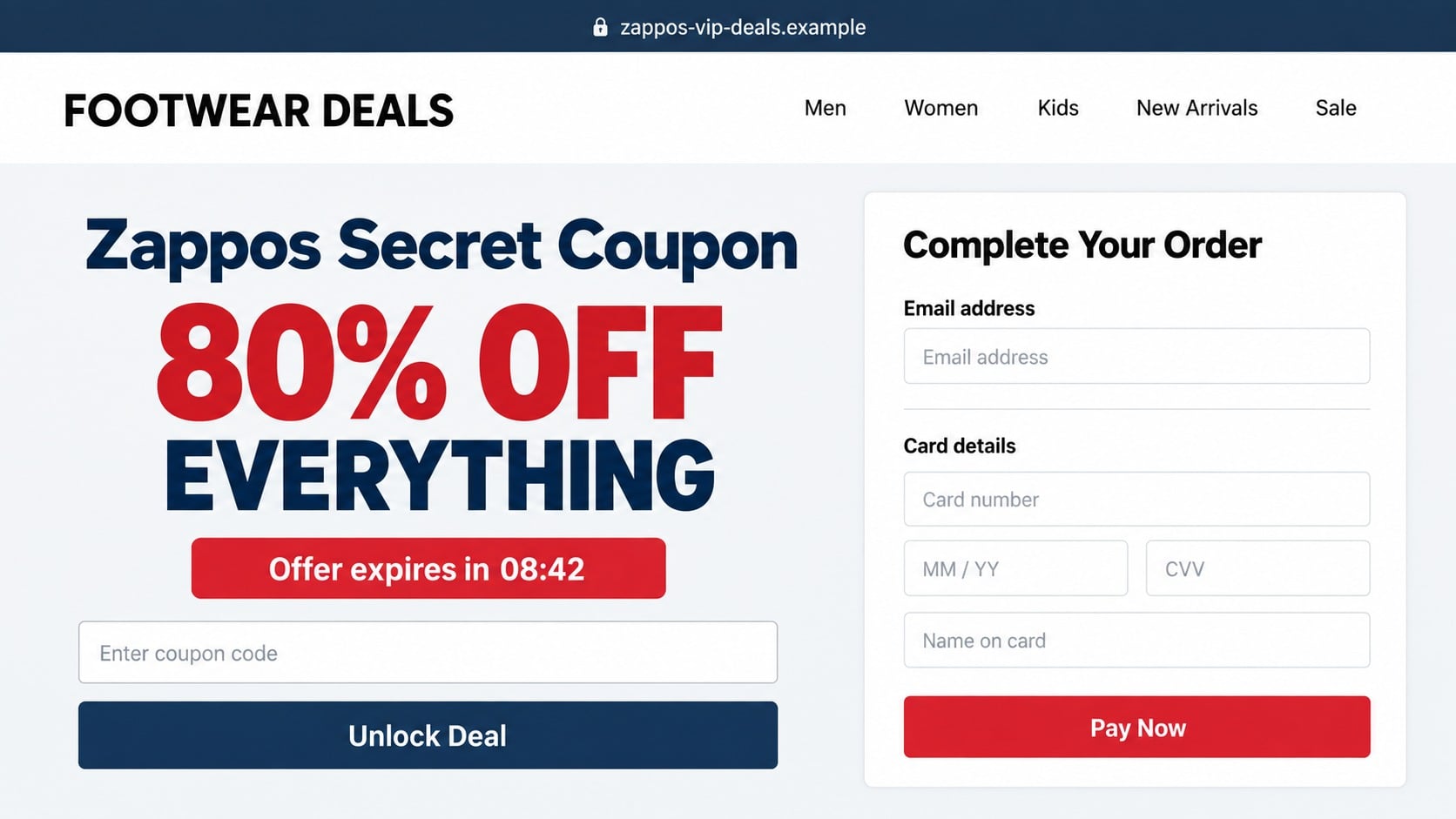
An 80% off Zappos coupon can feel like the kind of private sale you have to use before everyone else discovers it. The ad looks polished, the timer is already running, and the checkout appears ready to accept the code.
The bargain can disappear the moment you look at the address bar. Fake coupon pages borrow a trusted retailer’s name while sending shoppers somewhere the retailer does not control.
Overview
What the Zappos coupon scam promises
Zappos coupon scams advertise unusually large discounts, private clearance events, loyalty rewards, or codes that supposedly unlock hidden prices. They can appear in social media ads, search results, email, text messages, and coupon websites.
The landing page may copy product categories, colors, and customer-service language associated with a major footwear retailer. Some versions display a code but require the visitor to complete a survey, create an account, pay a small fee, or enter card details before the discount is revealed.
Zappos itself is a legitimate retailer. The scam is the unauthorized site, ad, or message using its name to collect money and information.
How genuine Zappos discounts are offered
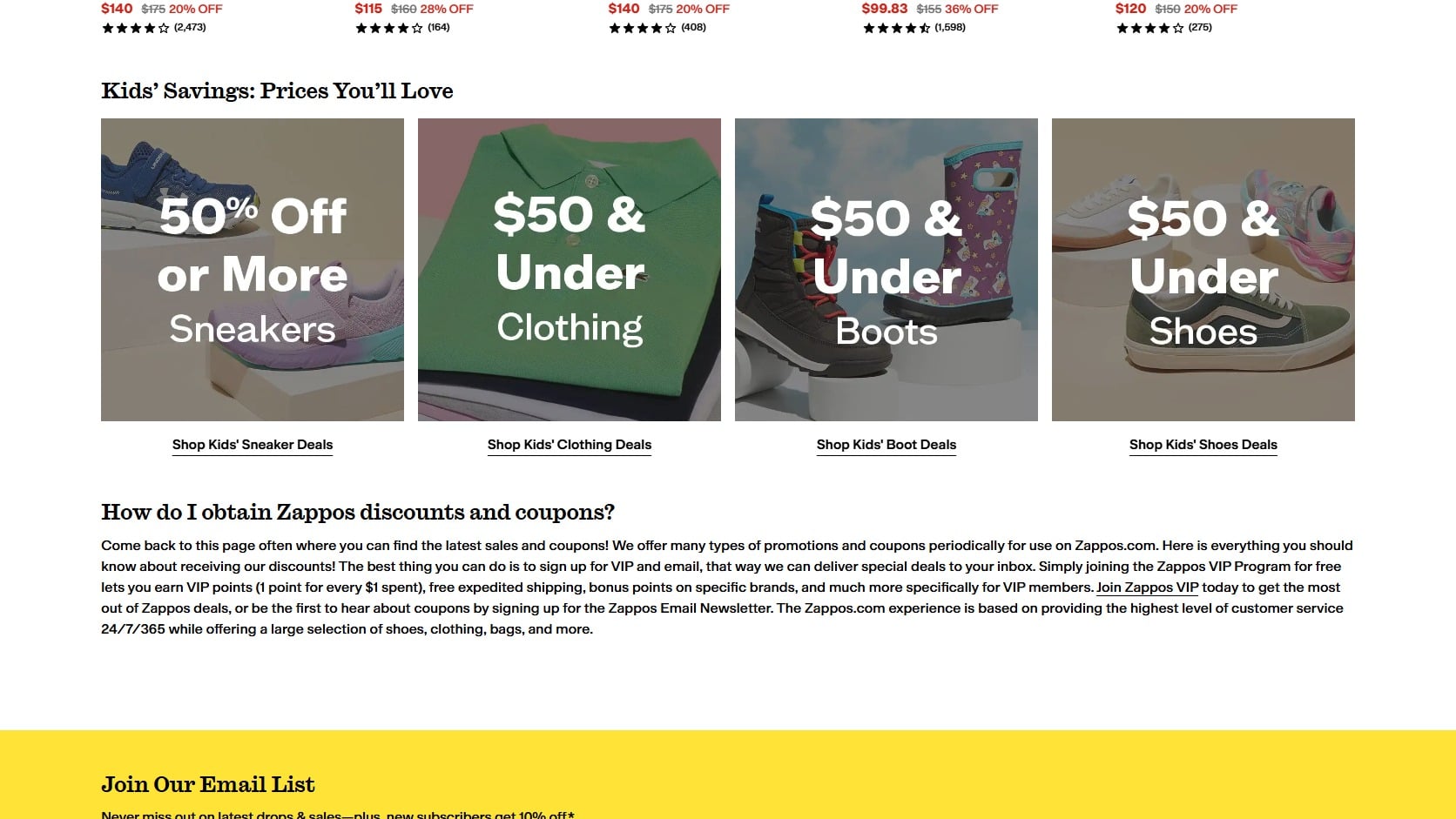
Zappos maintains an official coupons and promotions page on zappos.com. It describes current sales, email offers, and Zappos VIP benefits without requiring shoppers to move to an unrelated checkout domain.
Promotion terms can include account limits, excluded brands, expiration dates, and restrictions on combining codes. A real discount should apply inside the official Zappos website or application before payment is submitted.
A code found elsewhere may be expired or inaccurate without being malicious. The security problem begins when the offer leads to an imitation store, demands unrelated tasks, or asks for sensitive information outside zappos.com.
Warning signs of a fake 80% off deal
- The destination uses extra words, hyphens, unusual endings, or a domain that is not zappos.com.
- The offer promises 70%, 80%, or 90% off nearly every item with no meaningful exclusions.
- A timer restarts when the page reloads or always shows only a few minutes remaining.
- The site asks for card details before showing whether the coupon applies.
- A survey requires multiple paid offers, app installations, or subscription sign-ups.
- The page has copied reviews, broken policy links, or contact information that cannot be verified.
- Payment must be made through cryptocurrency, a person-to-person transfer, or gift cards.
- The seller prevents checkout through the official Zappos account or application.
A padlock symbol does not solve these problems. HTTPS encrypts the connection to a site, but it does not prove that the site is operated by Zappos.
How the Zappos Coupon Scam Works
Step 1: A high-discount ad finds deal hunters
The scheme usually begins with a sponsored post, short video, email, or coupon listing promising savings far beyond an ordinary sale. Phrases such as secret code, warehouse clearance, or customer appreciation event make the promotion sound limited.
Scammers know shoppers often search for a coupon immediately before checkout. That moment combines purchase intent with impatience, making an impressive discount especially effective.
The advertisement may use stolen product images and fabricated comments claiming the code worked. Engagement numbers can be purchased or generated, so popularity is not independent verification.
Step 2: The click opens a convincing lookalike page
The landing page imitates an online store or coupon portal. It may include familiar categories, return promises, star ratings, and badges designed to reduce hesitation.
The domain often contains the brand name plus words such as vip, outlet, coupon, rewards, or clearance. Those additions create familiarity while keeping the visitor outside the genuine zappos.com domain.
Mobile browsers can hide much of a long web address. Open the address details and read the registered domain carefully before entering any information.
Step 3: Urgency suppresses normal comparison
A countdown, low-stock warning, or claim that the code is reserved for one device pushes the shopper toward immediate action. The timer may reset indefinitely because its purpose is emotional, not logistical.
The page can also show a progress bar that says the discount is almost unlocked. Each completed step makes leaving feel like abandoning a reward that is already within reach.
Legitimate promotions can expire, but a real deadline should be stated in accessible terms. It should not require secrecy or prevent shoppers from checking the offer on the retailer’s official site.
Step 4: The coupon becomes a data-collection form
Instead of applying a code, the page asks for an email address, mobile number, shipping address, password, or payment information. A small verification charge may be presented as necessary to activate the deal.
Some funnels redirect through several survey and lead-generation pages. Personal information can be shared with marketers or criminals while the promised coupon remains perpetually one step away.
Reusing a Zappos or Amazon password on the fake page can create a broader account takeover. The attacker may try the same credentials on email, shopping, and payment services.
Step 5: The shopper pays a fake store or hidden subscription
A counterfeit storefront may accept a full order but send nothing, provide a low-quality substitute, or use the card for additional transactions. The checkout merchant can have no connection to Zappos.
Another version charges a small membership or reward activation fee. Fine print may attempt to enroll the shopper in recurring services unrelated to footwear.
Do not assume every failed coupon creates a subscription. Check the exact checkout, receipt, and statement because the outcome depends on the page used.
Step 6: Follow-up messages extend the scheme
After obtaining contact information, the operators may send fake order updates, delivery problems, refund offers, or additional private-sale links. Each message creates another chance to capture credentials or card information.
A fake support representative can claim the first charge failed and request a second payment method. Paying again rarely fixes the order because the original seller was never legitimate.
Victims may later hear from recovery services that guarantee a refund for an upfront fee. Those contacts often target people whose details were collected during the first scam.
Fake Coupon Page or Ordinary Bad Code?
An expired code on a legitimate retailer does not automatically indicate fraud. Coupon databases often retain promotions after they end, and exclusions can prevent a valid offer from applying to a particular brand or product.
The decisive question is where the offer sends you and what it requests. A harmless failed code stays inside the official checkout. A phishing funnel moves you to an imitation domain, requests credentials, or creates a separate payment.
When in doubt, close the coupon page and visit zappos.com directly. Search the official sale area or ask customer support whether the promotion exists.
Company, Address, and Fulfillment Checks
The Zappos name does not identify the seller
Read the legal name on the checkout, terms, receipt, and card statement. A page can display Zappos in large type while the payment goes to an unrelated entity.
The domain matters more than the page design
Look at the registered domain immediately before the first slash. Misspellings and added sale words are not official simply because they appear beside a lock icon.
Support must use independently verified channels
Do not trust a phone number or chat widget copied from the suspicious page. Reach Zappos through contact details found directly on zappos.com.
Real fulfillment creates traceable order records
A legitimate Zappos purchase should appear in the official account and produce an order record that customer service can locate. A confirmation email alone can be fabricated.
How to Test a Zappos Coupon Safely
- Copy the code without opening the checkout link supplied by the ad.
- Type zappos.com yourself or open the official application.
- Find the same product through the official catalog and add it to the cart.
- Enter the code only inside the genuine checkout.
- Read promotion terms for expiration, exclusions, and account requirements.
- Abandon the offer if it demands payment or personal data on another domain.
Search results can contain sponsored impostor ads, so typing the address is safer than searching for customer service or a coupon redemption page.
Use a credit card rather than a wire transfer, gift card, or cryptocurrency when shopping online. Credit cards generally provide stronger dispute procedures, although protections vary by issuer and location.
What Happens After Information Reaches a Fake Coupon Site
Email addresses become targets for follow-up phishing
An address submitted to unlock a coupon can be used for fake receipts, delivery failures, account warnings, and new clearance events. Later messages may look more convincing because they refer to the product category or brand from the first visit.
Mark those messages as junk and inspect links before opening them. A supposed order update cannot prove that a real order exists, especially when nothing appears in the official Zappos account.
Reused passwords expose unrelated accounts
Credential-stealing pages often test the same email and password against popular services. Email access is especially valuable because it can reset shopping, social, and financial accounts.
Changing only the fake-site password does nothing because that site was never protecting it. Replace the password everywhere it was reused, beginning with email and accounts that store payment information.
Card details can produce unfamiliar merchant names
The statement descriptor may not mention Zappos or the coupon page. Payment can be routed through an unrelated entity, subscription processor, or overseas merchant name that the shopper has never seen.
Give the issuer the complete sequence, including the ad, domain, submitted order, and resulting descriptor. That context is clearer than reporting only that a coupon did not work.
Shipping updates can conceal another payment request
A later message may claim the parcel needs insurance, customs fees, or address verification. The new charge is framed as the final step needed to release merchandise that was never actually shipped.
Do not keep paying to rescue the original purchase. Verify any tracking number on the carrier’s own website and dispute the first transaction when the seller cannot provide credible fulfillment records.
Keep the original advertisement as well as the checkout page. Social posts and domains can disappear quickly, while a saved screenshot preserves the exact discount, seller name, and promises that influenced the purchase.
Check the statement for several weeks after replacing a card. Some operators wait before testing captured details, and a second merchant descriptor may look unrelated to the coupon funnel.
What to Do if You Have Fallen Victim to This Scam
- Stop using the fake site. Close every related tab and do not return through order-status or refund links sent afterward.
- Contact the card issuer. Explain that the checkout impersonated a retailer, identify the amount and merchant descriptor, dispute unauthorized charges, and ask whether the card should be replaced.
- Change reused passwords. Start with email, Amazon, Zappos, and financial accounts. Use unique credentials and enable multifactor authentication through a trusted application where available.
- Review the real Zappos account. Confirm whether an order exists. If nothing appears, save that fact alongside the fake receipt and statement transaction.
- Cancel unwanted subscriptions separately. Inspect the receipt and card statement for a membership or recurring merchant. Send a dated cancellation request and retain the response.
- Check devices used during the funnel. If the page installed a browser extension, application, or file, remove it and run a full scan with Malwarebytes to look for malicious or unwanted software.
- Report the advertisement and domain. Use the social platform’s reporting tool, notify Zappos through its official support channel, and file the financial scam at ReportFraud.ftc.gov.
- Limit repeat exposure. AdGuard can block many deceptive ad networks and known phishing pages. It is an added filter, not permission to trust an unverified store.
- Ignore guaranteed recovery messages. A stranger who asks for money to retrieve your refund is not improving the chargeback process. Continue only with the issuer and verified merchant contacts.
Frequently Asked Questions
Are all Zappos coupon websites scams?
No. Some independent coupon sites list legitimate or expired codes. Treat any site as dangerous when it imitates checkout, requests sensitive data, or redirects payment away from zappos.com.
Does Zappos really offer coupon codes?
Yes. The official site describes periodic promotions, email offers, and VIP benefits. Availability, exclusions, and expiration dates can change.
Is an 80% off Zappos coupon automatically fake?
The size of the discount is a major warning sign, but verify the complete offer. If it cannot be reproduced on zappos.com, do not enter payment details.
Can a fake coupon steal my password?
Yes. A lookalike page may request account login details and reuse them on shopping, email, or payment services.
What if I only gave the page my email address?
Expect more phishing and promotional messages. Do not follow later refund or delivery links, and secure the email account if its password was also entered.
Will Zappos refund an order placed on another website?
Zappos generally cannot refund a payment processed by an unrelated seller. Contact the card issuer and report the impersonating domain to official Zappos support.
The Bottom Line
The Zappos coupon scam turns an oversized discount into a route toward an imitation checkout, credential form, or unwanted charge. The brand being copied is not the seller receiving your information.
Test every code inside zappos.com and leave when the offer requires another domain. A genuine bargain does not need you to ignore the address bar.

Join the discussion
0 commentsShare your experience or ask a question about this article.
Discussion
Start the conversation
Have a question or something useful to share? Add the first comment.