

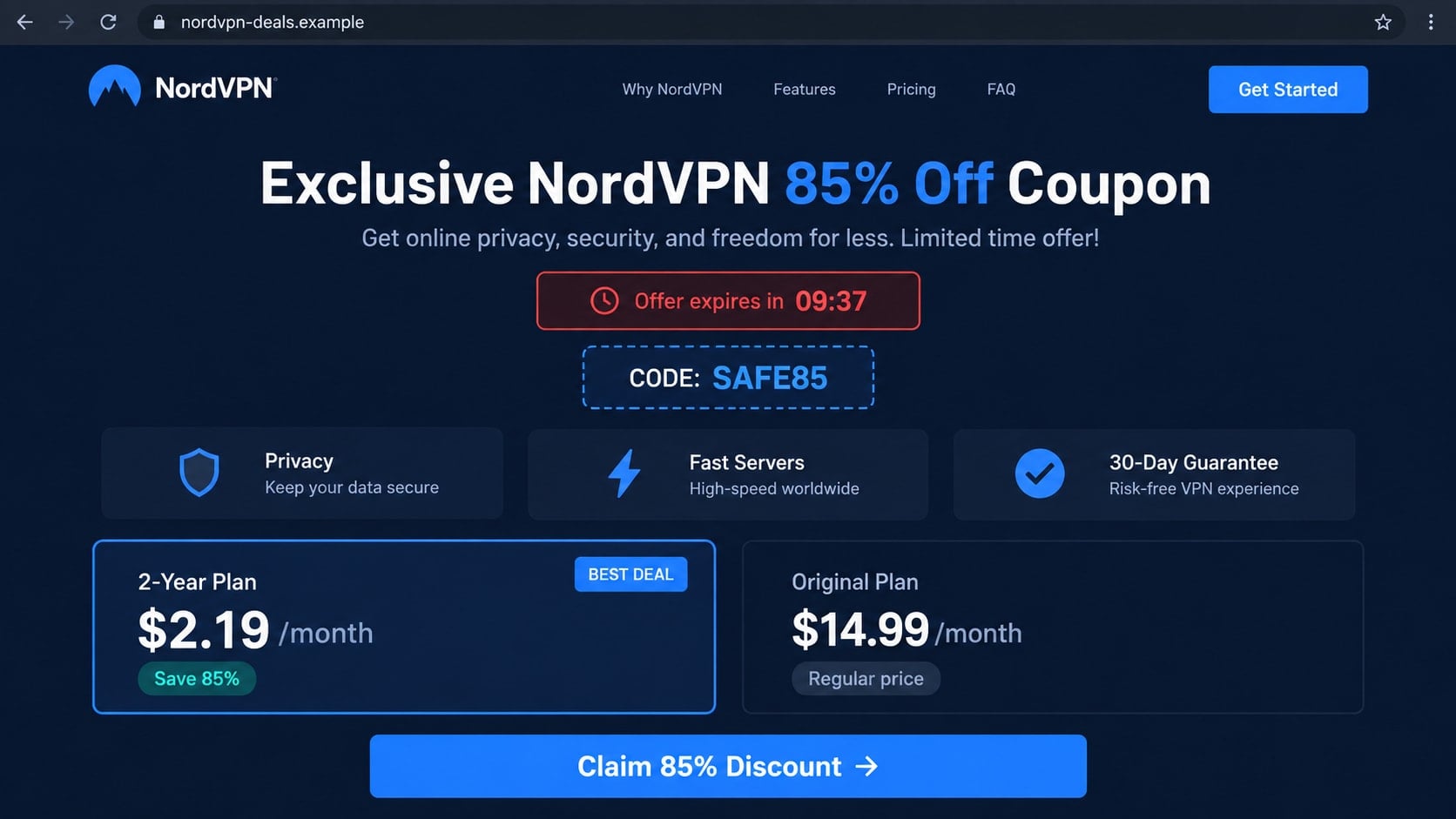
A deep NordVPN discount can look like a lucky find, especially when the countdown says the offer will disappear in minutes. The page may carry the familiar mountain logo, polished plan cards, and a coupon code that appears to work.
The important question is not how professional the offer looks. It is who built the page, where the checkout leads, and what happens after you enter your details.
Overview
The coupon is presented as a private or expiring promotion
The NordVPN coupon scam commonly appears through a sponsored ad, social post, unsolicited email, or coupon website. It promises a steep discount, bonus months, or a “lifetime” security package available only through a special link.
Some pages imitate NordVPN closely. Others act like independent deal sites and claim they found a hidden code. In both cases, the offer is meant to move the visitor away from normal comparison and toward a checkout controlled by someone else.
A copied design does not prove the checkout is genuine
Logos, app screenshots, reviews, security badges, plan descriptions, and brand colors can be copied in minutes. A browser padlock only shows that traffic to that particular site is encrypted. It does not prove the operator is NordVPN.
The safest clue is the complete domain in the address bar. NordVPN identifies nordvpn.com, nordvpn.org, nordauth.com, nordaccount.com, and support.nordvpn.com as official domains used for its service and account flows.
The real objective may be card theft, credential theft, or recurring charges
A fake checkout can collect a name, billing address, card number, expiration date, and security code. Another version asks the victim to “verify” an existing Nord Account by entering an email address, password, or one-time code.
Some deceptive sellers actually deliver a cheap key, unrelated software, or a short trial while enrolling the buyer in a recurring plan. Receiving something after payment does not make an undisclosed subscription or impersonation legitimate.
- The discount is available only through an unfamiliar domain.
- The page advertises a lifetime plan or an implausibly low one-time price.
- A timer resets after the page is refreshed.
- The checkout asks for a Nord Account password or email security code.
- The final amount, renewal price, seller name, or cancellation terms are hidden.
- Support exists only through a chat box, disposable email address, or messaging app.
Why Fake VPN Deals Are So Convincing
VPN services are frequently promoted with introductory savings, bonus months, and seasonal offers. That makes a discount believable at first glance. A criminal does not need to invent a completely new story; the scam only has to exaggerate a familiar marketing pattern.
Search results can add false credibility. A visitor who searches for “NordVPN coupon” may see advertisements, affiliate pages, coupon aggregators, forum posts, and cloned landing pages mixed together. Placement near the top of a page is not proof of authorization.
The scam also benefits from a technical subject. People buying a VPN want more privacy, but they may not know how Nord Account sign-in, activation, billing, and downloads normally work. A fake page can turn that uncertainty into instructions that sound routine.
Countdowns and low-stock notices then shorten the decision. A visitor who thinks a 75% discount ends in six minutes is less likely to inspect the domain, read renewal terms, or search the seller name separately.
How the NordVPN Coupon Scam Works
Step 1: A dramatic discount appears in an ad, email, or search result
The first message may promise an exclusive NordVPN coupon, a student deal, a holiday clearance, or a partner price. It often combines a large saving with extra months and a short deadline.
Scammers may use search ads that resemble an official result. On social media, they can copy a verified-looking profile image and purchase promotion for a post. In email, the visible sender name may say NordVPN even though the actual address belongs to another domain.
Step 2: The visitor reaches a copied deal page
The landing page displays familiar plan names, server counts, review stars, media logos, and refund language. These elements create the impression that the visitor is still within an official purchase journey.
Lookalike domains may swap letters, add words such as deal, secure, coupon, or premium, or place the brand name in a long subdomain. On a narrow mobile screen, the meaningful part of that address may be easy to miss.
Step 3: The fake coupon appears to activate successfully
The page may show an ordinary price first and then reveal a much lower total after the visitor enters a code. This little interaction makes the offer feel personalized and technically validated.
In reality, the “Apply” button can be simple page code. It does not communicate with NordVPN, reserve a plan, or confirm that the coupon exists.
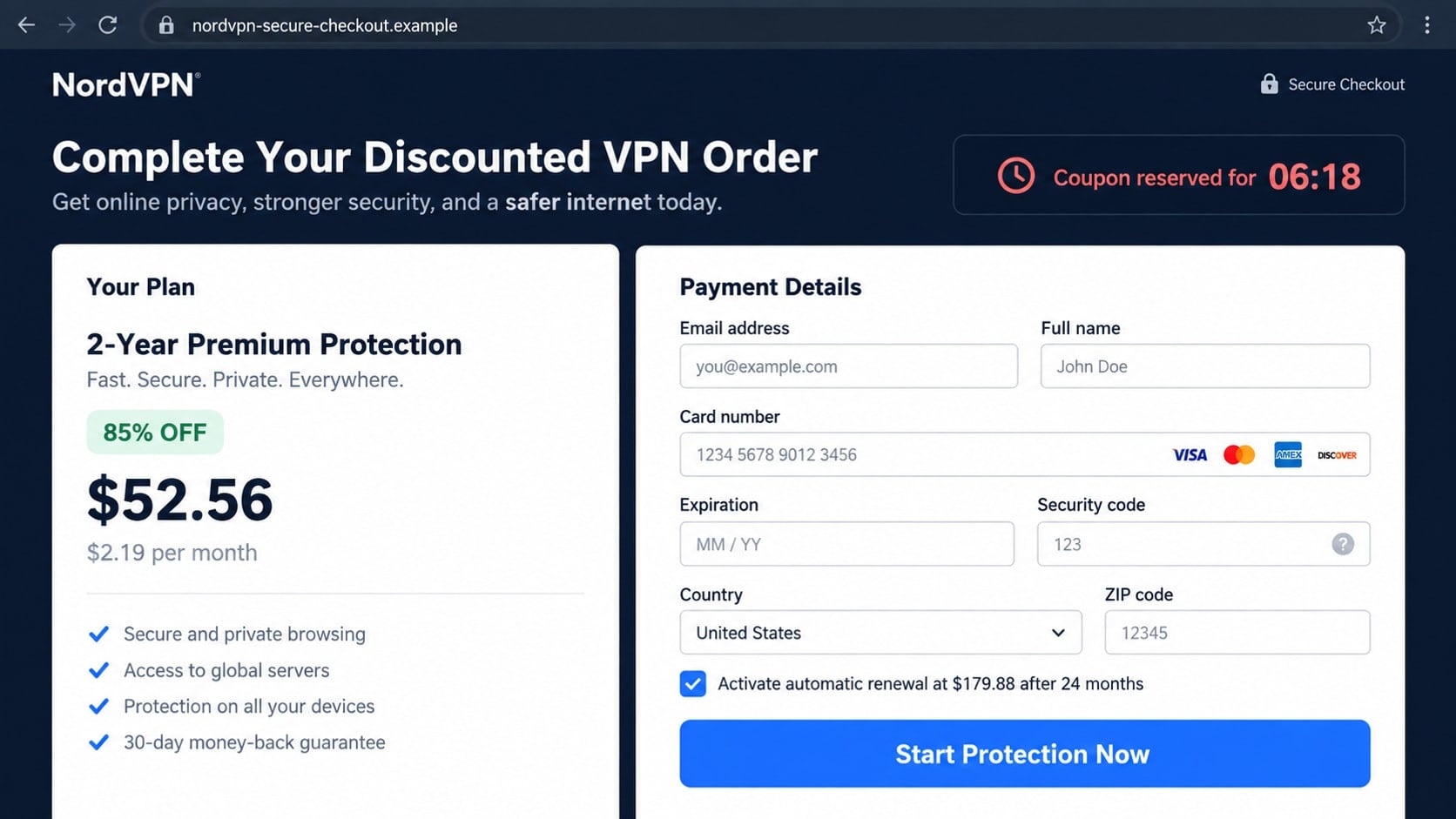
Step 4: A fake checkout collects payment and identity details
The visitor is asked for a full name, address, telephone number, and card details. A checkbox for renewal may be preselected, hidden below the payment button, or described in faint text.
A credential-harvesting version displays a Nord Account sign-in before payment. The criminal can relay those credentials to the real service, trigger a genuine security code, and ask the victim to enter that code on the fake page.
Step 5: The victim receives an error, a worthless key, or an unwanted plan
After submission, the page may report that the card failed and invite another attempt. Each attempt can give the operator another card number while the first payment is already pending.
Other victims receive a key that does not work, access to an unrelated application, or instructions to download a modified installer. A deceptive reseller may charge a small initial amount and later bill a larger recurring fee under an unfamiliar descriptor.
Step 6: Stolen information is used in follow-up attacks
Card details can be tested with small purchases and later used for larger transactions. Reused credentials may expose email, cloud storage, shopping, or financial accounts.
The operator may also call as a billing specialist and offer to “fix” the failed activation. That conversation can lead to a request for a one-time code, remote computer access, cryptocurrency, or gift cards.
Identity, Contact, and Payment Checks
Read the full domain before interacting with the offer
Ignore the logo and promotional headline for a moment. Expand the browser address bar and identify the registered domain, not merely a word that contains “nord” somewhere in a long address.
For a direct purchase, navigate independently to nordvpn.com rather than following the advertisement. Official sign-in and account activity should remain within NordVPN’s documented domains, including nordaccount.com and nordauth.com.
Compare the deal with the official pricing page
Open a separate browser tab and find the current plans from the official site. Compare the term length, introductory total, included products, refund conditions, and eventual renewal price.
A coupon page that promises a lifetime NordVPN license deserves particular suspicion. A realistic-looking initial amount is not enough if the seller conceals what will be charged later.
Inspect the seller and final checkout total
Before paying, identify the legal seller shown near the purchase button and in the terms. Check whether the same business appears on the card statement, invoice, cancellation policy, and support page.
Take a screenshot of the final total and renewal disclosure when making any legitimate subscription purchase. If the page will not show the complete price until after card submission, leave it.
Contact support through a separately opened page
Do not ask the chat widget on a suspicious coupon page whether that page is authentic. The same operator controls both the offer and the reassuring answer.
Open support.nordvpn.com independently and ask whether the promotion, domain, or reseller is recognized. Never provide a password or one-time code merely to have a coupon checked.
Warning Signs on a Fake Coupon Page
A permanent countdown is one of the easiest clues. Refresh the page or return later. If the “last chance” restarts, the deadline is a pressure device rather than a real promotion.
Pay attention to the relationship between the headline and the legal terms. A page may advertise a one-time deal while its small print describes monthly membership in a different service. The largest claim does not override the actual billing agreement.
Testimonials can also be manufactured. Generic portraits, first names, perfect ratings, and repeated phrases do not establish that real customers used the offer. Search exact sentences in quotation marks if a review looks unusually polished.
A legitimate security product should not require a cracked installer, browser extension from an unofficial store, configuration tool from a file-sharing site, or antivirus exclusions. Those instructions create a direct malware risk.
What a Legitimate NordVPN Purchase Should Look Like
A normal purchase clearly identifies the plan duration and the amount due. It also explains whether the subscription renews, what that renewal costs, and how the user can manage billing.
The account should be created or accessed through NordVPN’s documented account infrastructure. A third-party page has no reason to collect the password for an existing Nord Account or the one-time code sent to protect it.
Downloads should come from NordVPN’s official site or a recognized app store. Even if a reseller offer is genuine, software acquisition should not depend on disabling security controls or running an unknown activation program.
Finally, the transaction should create a clear receipt and visible subscription in the account. An unexplained descriptor, missing account entitlement, or seller that refuses to identify itself warrants an immediate payment dispute.
What to Do if You Have Fallen Victim to This Scam
- Stop using the page and preserve the details. Save the full URL, advertisement, confirmation screen, receipt, seller name, charge descriptor, and any messages. Do not submit the form again after an error.
- Call the card issuer through the number on the card. Explain that the card was entered on a suspected impersonation checkout. Ask about blocking the card, replacing it, disputing charges, and preventing merchant-initiated recurring payments.
- Secure the Nord Account from a trusted device. Change the password through the official site, sign out unfamiliar sessions, review subscription details, and enable available account protections.
- Change every reused password. If the fake page received credentials used anywhere else, begin with the email account. Use unique passwords and review recent logins, recovery addresses, and forwarding rules.
- Report one-time codes immediately. Tell the affected service and card issuer what the code message said. A code may have approved a login, digital wallet enrollment, password reset, or transaction.
- Remove untrusted downloads. Uninstall the coupon extension, modified VPN client, activation tool, or remote-support application supplied by the seller. Do not keep it installed merely because no warning appeared.
- Run a full Malwarebytes scan. Update Malwarebytes first, scan every drive, and quarantine confirmed threats. If credentials were entered after running an unknown installer, change them from a different clean device.
- Add AdGuard for phishing and redirect protection. AdGuard can block many malicious advertising domains, tracking chains, and known scam pages. It is an added layer, not a substitute for checking the registered domain.
- Report the advertisement and domain. Notify the platform that displayed the ad, NordVPN support, the hosting provider where appropriate, and the FTC or local fraud authority if money or identity information was lost.
- Monitor statements and account alerts. Watch for small test charges, new subscriptions, wallet enrollments, and password-reset attempts. Keep monitoring after the original charge is reversed because stolen details may be reused later.
Frequently Asked Questions
Are all NordVPN coupon websites scams?
No. Some independent sites publish ordinary affiliate links or public promotion information. The risk appears when a page impersonates NordVPN, hides the seller, collects credentials, or routes payment through an unrelated checkout.
Does NordVPN offer lifetime subscriptions?
Treat any supposed lifetime plan cautiously and compare it with the plans currently offered on the official site. A lifetime claim on an unfamiliar domain is not validated by a logo or coupon code.
Can a fake checkout have HTTPS and a padlock?
Yes. HTTPS encrypts the connection between the browser and that site. Scam operators can obtain certificates too, so the padlock does not verify the business behind the page.
What if the coupon actually activated a subscription?
Verify the entitlement inside the official Nord Account and inspect the card statement. A working subscription does not excuse hidden renewal terms, an unauthorized reseller, or later charges from another company.
Should I enter my Nord Account password to redeem a coupon?
Only sign in through a documented NordVPN account domain that you opened independently. A coupon aggregator or unknown checkout should never receive the password or security code for an existing account.
Can my bank recover money sent to a fake VPN seller?
Recovery depends on the payment method and timing. Contact the issuer immediately, describe the impersonation and any hidden subscription, preserve evidence, and follow the formal dispute process.
The Bottom Line
The NordVPN coupon scam turns a familiar software discount into a route for stealing card details, account credentials, or recurring payments. A polished page and working coupon animation cannot establish who receives the money.
Open the official site yourself, compare the complete plan and renewal terms, and keep passwords and security codes away from third-party coupon pages. If the domain, seller, or final price is unclear, leave the offer.

Join the discussion
0 commentsShare your experience or ask a question about this article.
Discussion
Start the conversation
Have a question or something useful to share? Add the first comment.