


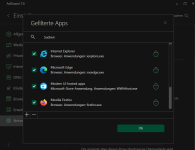
Adguard isn't filtering my Firefox after updating. Anyone experiencing the same or has a solution? I reinstalled the certificate and checked that Firefox is in the list of filtered applications. Still I didn't manage to get it fixed...

 ) left wondering why you'd have both the list & option ~ should you enable either/or/both?! Exactly the same url parameters are stripped.

Where is that setting please? Thanks. Oh, I found it, its the last one from the bottom.Adguard isn't filtering my Firefox after updating. Anyone experiencing the same or has a solution? I reinstalled the certificate and checked that Firefox is in the list of filtered applications. Still I didn't manage to get it fixed...
View attachment 257189
I have both enabled. Doesn't hurt plus i don't if one compliments the other or not.They've shifted AdGuard DNS filterlist from Ad Blocker section to DNS Protection section which makes sense. Also note they've introduced a new list 'AdGuard URL tracking filter' which seems to duplicate the option 'Strip URLs of tracking parameters' in the Stealth mode section ~ you would have thought selecting the option in Stealth Mode would enable the filterlist automatically but it doesn't. User (well this one at least
I've used update to trim filterlists anyway ~ gone are Online Malicious URL Blocklist (I use Quad9 which filters dodgy sites anyway), I don't care about cookies (because I really don't care about being asked) and the Adblock Warning Removal List.
Does anyone still recommend using Peter Lowe's Blocklist with AdGuard?

Where to find the AdGuard URL Tracking Filter in Adguard?I had a response to my AdGuard URL Tracking Filter point on the AdGuard forum:
Join discussions, like, and share | AdGuard
Join our community in social media and discuss AdGuard there.forum.adguard.com
To paraphrase AdGuard's response; the new filterlist will replace the separate parameter settings in the Stealth section.
Thanks. And I disabled 'Strip URL of tracking parameters' in Stealth ModeSettings > Ad-Blocker > + Add Filter (it's on the list).
(This doesn't yet apply to the AdGuard Ad-Blocker extension version)

One little bug. I have four filterlists activated and on the mainscreen are five listed.
View attachment 257199

Sorry, can't help out here, the update continued filtering Firefox on my system as before.Adguard isn't filtering my Firefox after updating. Anyone experiencing the same or has a solution? I reinstalled the certificate and checked that Firefox is in the list of filtered applications. Still I didn't manage to get it fixed...
View attachment 257189
Thanks, it was caused by Sophos as the exploit protection was preventing the filtering.Sorry, can't help out here, the update continued filtering Firefox on my system as before.
On another matter regarding the update - during the update process AdGuard shut down and did not automatically restart, so for those who haven't updated yet, watch out for that.
Not a bug, you probably forgetting about the user filter.One little bug. I have four filterlists activated and on the mainscreen are five listed.
View attachment 257199
No sir, see the solution in my post nr. 18.Not a bug, you probably forgetting about the user filter.
It is still in drafting stages, if its your production machine i suggest to switch back to either doh or dot. I tried Doq with nextdns ( nextdns allegedly supports the protocol) configuration but adguard doesn't accepts the nextdns address.I've just changed my DNS in AdGuard settings from D0H to DoQ, so far it seems to be working well. I was wondering if others here have any observations on changing over to DoQ, your thoughts wiil be appreciated.
I have similar problems with browser filtering. I hope it is not an issue with SHP. I can remember something from a while ago.Adguard isn't filtering my Firefox after updating. Anyone experiencing the same or has a solution? I reinstalled the certificate and checked that Firefox is in the list of filtered applications. Still I didn't manage to get it fixed...
View attachment 257189
It is caused by Sophos as I already said above. You have to turn off the exploit protection for your browser and also disable the FIrefox option in protected applications. I will ditch Sophos until this issue is resolved tho...I have similar problems with browser filtering. I hope it is not an issue with SHP. I can remember something from a while ago.


