Basic Security Jamies Security Config 2021

Last updated
Nov 3, 2021
How it's used?
For home and private use
Operating system
Windows 8.1 / 7 / Vista / XP
On-device encryption
Log-in security
    • Biometrics (Windows Hello PIN, TouchID, Face, Iris, Fingerprint)
Security updates
Allow security updates and latest features
User Access Control
Notify me only when programs try to make changes to my computer
Smart App Control
Network firewall
N/A
Real-time security
Avira Prime
Firewall security
About custom security
Windows Firewall
Periodic malware scanners
Hitman Pro
Malware sample testing
I do not participate in malware testing
Browser(s) and extensions
AdGuard Browser Assistant
Dashlane
IDM
Avira Browsing Security
Avira Safe Shopping
Avira Password Manager
Secure DNS
I dont use Secure DNS
Desktop VPN
Avira Phantom VPN
Password manager
Dashlane, Avira Password Manager
Maintenance tools
Glary Util
File and Photo backup
Google Drive
System recovery
Google Drive
Risk factors
    • Browsing to popular websites
    • Opening email attachments
    • Downloading software and files from reputable sites
    • Sharing and receiving files and torrents
    • Gaming
    • Streaming audio/video content from trusted sites or paid subscriptions
    • Streaming audio/video content from shady sites
Computer specs
Dell Optiplex 790
Intel Pentium G945
Intel HD Graphics
4GB
232GB or 250GB
Notable changes
Updates to my system
  1. CD Drive was taken out
What I'm looking for?

Looking for medium feedback.

JamieTech

Level 1
Thread author
Oct 2, 2021
28
118
33
Hello everyone 👋

Heres my Optiplex's security config for 2021! Feedback is always Welcome 🤗

Security Products - including Web Security and AV's
  1. Avira Prime
  2. AdGuard
  3. Avira Phantom VPN

Shall i update this with your guys suggestions

As always thanks!
 
Last edited:
Consider setting UAC to "Always Notify" and please specify the version of Kaspersky that you are using within your Config (Total Security, Internet Security etc.) and add the browser that you are using. :)

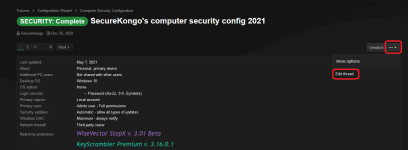
This can be done by pressing "Edit Thread" on your config page.

Example:
Unbenannt.PNG
 
@JamieTech: as already suggested previously, please edit Your config and reflect the missing data in the config.

Also, apart from setting UAC to Always Notify, complete browser section and NetWork Firewall: move Google Driver to Personal Files & Photos backup, and in Device recovery & backup, I would add a full image system backup solution: Macrium Reflect and/or AOMEI Backupper, bot are free and reliable.

In Secure DNS: You may use services such as CloudFlare NDS, NextDNS, AdGuard DNS, etc.

Thanks for sharing :)