


v.6.0 is free, v.6.2 is a trial onlyIt is free to use or trial version?
Known Problems with Most Common AV's
- Thread starter RoboMan
- Start date
You are using an out of date browser. It may not display this or other websites correctly.
You should upgrade or use an alternative browser.
You should upgrade or use an alternative browser.
- Status
- Not open for further replies.
How is it? Should i go for it(free version of course) over F Secure safe?It's free and there is still a download link for v6 on their website.

FortiClient Unified Agent for ZTNA, Secure Remote Access and Endpoint Protection | Fortinet
FortiClient Fabric Agent integrates endpoints into the Security Fabric and provides endpoint telemetry, including user identity, protection status, risk scores, unpatched vulnerabilities, security events, and more.www.forticlient.com

Norton:
1) Often fails to completely remove a malware. It leaves 0 KB file of the malware in the directory.
2) Less important problem: Signature & Heuristics somehow collide sometimes. Often while detecting two files of same malware, one will be detected by signature while other by heuristic. If a malware is repairable without deleting the whole file, the one that is detected by signature is repaired but the one detected by heuristic will be deleted. Very few malware is repairable nowadays so it's not a huge deal.
1) Often fails to completely remove a malware. It leaves 0 KB file of the malware in the directory.
2) Less important problem: Signature & Heuristics somehow collide sometimes. Often while detecting two files of same malware, one will be detected by signature while other by heuristic. If a malware is repairable without deleting the whole file, the one that is detected by signature is repaired but the one detected by heuristic will be deleted. Very few malware is repairable nowadays so it's not a huge deal.
I have never tried F-Secure, but I can say Forticlient is quite good.How is it? Should i go for it(free version of course) over F Secure safe?
But now I don't know how they will go on with the free version, you can try it and check if it matches your needs


This has been ongoing for a very long time when trying to log into My Norton account:
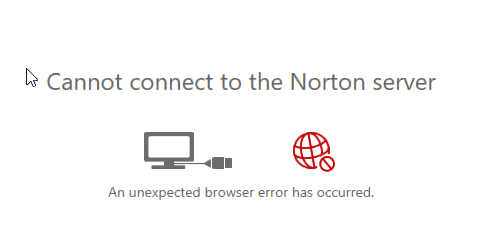
It's a known issue and ongoing bug!
It's a known issue and ongoing bug!

Kaspersky cannot use HW virtualization when Windows sandbox is running..applies only to Pro versions of windows!

- Apr 28, 2015
- 9,386
- 1
- 84,789
- 8,389
I think this is probably not a Kaspersky fault, I guess it's because only 1 hypervisor can be used in the systemKaspersky cannot use HW virtualization when Windows sandbox is running..applies only to Pro versions of windows!

Agereed!I think this is probably not a Kaspersky fault, I guess it's because only 1 hypervisor can be used in the system
It's more an inconvenience..

Agree, it's not as if there is just the safe web, there is the password thing and Norton search, it seems recently the option to say No (or even go & ....off) no has been taken away in most things its either yes or remind me later. I found install it then disable, not a ideal solution though.
After using KAV, I have found no issues at all, has anyone?
The only issue that I have noticed is avp.exe spiking the cpu when opening a new tab in chrome..This is with KTS v20(b).
At first I was just going to leave the topic as it is in the BD 2019 section, but something came up. After encountering an infected webpage earlier today and going to the notification center to investigate further, I found out that the ability to exclude a webpage through the notification center without requiring a password has returned. This had been fixed in 2019 version but made a comeback in 2020 version.
Password vulnerability

- Apr 28, 2015
- 9,386
- 1
- 84,789
- 8,389
That setting is inside Web Anti-Virus Module (Advanced Settings -> Configure Trusted URLs), since You are in KSCloud Free, You should have access to it...
Avast seems unable to deal with a threat on the desktop.The file is malicious and reported by avast on VT,yet no reaction from avast in real time.
Only when I right click scan with avast does it detect the threat...Is this a known issue or the way avast works!?
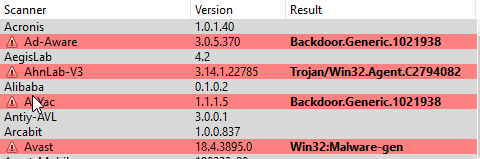
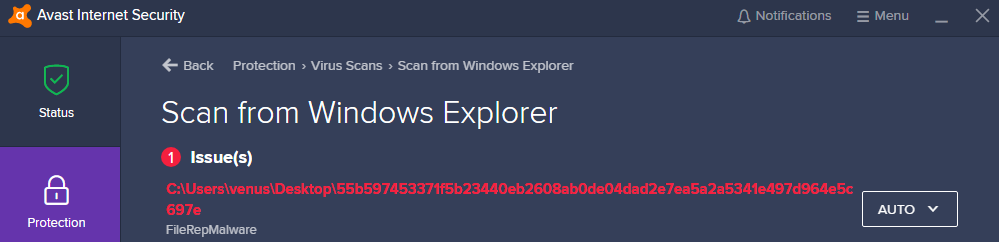
Only when I right click scan with avast does it detect the threat...Is this a known issue or the way avast works!?
Attachments

- Apr 18, 2016
- 3,676
- 28,872
- 4,599
which is extension of the file? Avast by default only scans certain extensions in realtime protection, if there is no extension or the extension is not in the list, it will be ignoredAvast seems unable to deal with a threat on the desktop.The file is malicious and reported by avast on VT,yet no reaction from avast in real time.
Only when I right click scan with avast does it detect the threat...Is this a known issue or the way avast works!?
View attachment 217520
View attachment 217521
On-demand scanner supports all extensions + heuristic level is set to High by default
you can enable avast to support all extension on realtime protection
Thanks!!which is extension of the file? Avast by default only scans certain extensions in realtime protection, if there is no extension or the extension is not in the list, it will be ignored
On-demand scanner supports all extensions + heuristic level is set to High by default
you can enable avast to support all extension on realtime protection
It's a .js extention.
Okay so I will change the settings you recommend.
Overall avast seems to be very good..What are your thoughts?
- Apr 18, 2016
- 3,676
- 28,872
- 4,599
I think avast is very good only with proper combination. In my test, I only combine hardened mode aggressive + syshardener exclusively, they will stop almost all malwares in the hub except for some malwares which has the extensions of .com, .bat, .cmd, .ps1Thanks!!
It's a .js extention.
Okay so I will change the settings you recommend.
Overall avast seems to be very good..What are your thoughts?
Signatures, cloud and BB are supportive. HM and SH are the main players
for this reason, I disable as many avast's components as possible to make it lighter
.bat, cmd: because we can't disable command prompt. It's crucial to windows => Chineserarypt-like malwares can infect my combo, in theory. However, you can dissociate them and only run cmd script by manual typing
.ps1: we can disable it because not many people use powershell
.com: you can dissociate it so it can't be executed
It's always a problem, I use Revo Uninstaller to scrub system, seems to do good job even removing register keys.For all 3rd party AVs except ESET. Stupid leftovers after uninstall that are not removed and keep running in background and uninstall can break components. For example KAV remover can break system restore.
- Status
- Not open for further replies.
You may also like...
-
 Serious Discussion Antivirus vs. Common Sense — What Really Keeps You Safe in 2025?
- Started by Bot
- Replies: 105
-
 Serious Discussion Questions events after infection
- Started by classicaran
- Replies: 2
-
 Malware News CrashFix Chrome Extension Delivers ModeloRAT Using ClickFix-Style Browser Crash Lures
- Started by Parkinsond
- Replies: 2