Troubleshoot memory could not be read

zikoeidos

Level 1
Thread author
Verified
Feb 25, 2014
20
24
30
31
Briefly explain your current issue(s)
the same
Steps taken to resolve, but have been unsuccessful
i scanned the system files
i scanned for malware infection but nothing found
when i launch any application or installer i get this error

YgGClHB.png
 
I guess u all did sfc/scannow check? Make sure run as it administrator. Try to update direct x/drivers, uninstall buggy softwares, update windows , it can be faulty ram stick, download memtest86 & check ur ram.
 
Upvote 0
Have you recently installed a new software?
Have you tried a system restore to an earlier restore point before this error?
This could be caused by a multitude of things from software,drivers,conflicts and hardware problems
 
  • Like
Reactions: frogboy
Upvote 0
What operating system are using? If Windows 8 or 8.1 try a refresh PC then observe.

Possible errors can be trace via Control Panel ------> Administrative Tools ----->Event Viewer then check from Application List (post here)

Are you experience BSOD (Blue Screen of Death)? Suggest to use a tool called BlueScreenView and check which may turn possible culprit.

http://www.nirsoft.net/utils/blue_screen_view.html
 
Upvote 0
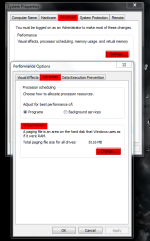
Have you tried to increase your Virtual Memory?
Right click My Computer > Properties > Advanced tab > Settings under Performance > Advanced tab > then change under Virtual memory
Ashampoo_Snap_2015.05.05_16h57m32s_001_.png
Older versions of JRE can cause this also. Sometimes when you update Java Runtime Environment older versions are leftover.If you have older versions try uninstalling them from Add/Remove Programs
This is a handy tool for removing older versions of JRE https://singularlabs.com/software/javara/

Then again this could be caused by other hardware problems than your RAM
 
Upvote 0
come on guys help me i've tryed a lot of things non of it worked
one thing left i think is to preform i clean windows install
 
Last edited:
Upvote 0
Have you recently installed a new software?
Have you tried a system restore to an earlier restore point before this error?
This could be caused by a multitude of things from software,drivers,conflicts and hardware problems
What operating system are using? If Windows 8 or 8.1 try a refresh PC then observe.
come on guys help me

How can we help, when you don't provide more details? You haven't replied to the questions quoted above.

Do you get similar error warnings for all applications?
upload_2015-9-14_15-31-59-png.71824


You can also try solving it yourself, by doing a Clean Boot, instructions here: Learn How To Clean Boot into Windows, for Troubleshooting and Software Conflicts

In my opinion, a clean install is the best solution if Windows is corrupt beyond repair.
 
  • Like
Reactions: zikoeidos
Upvote 0

You may also like...