SuperAntispyware Pro Vs Malwarebytes Premium

Product name
SuperAntispyware Pro
Pros
  • Found and cleared malware from my system which already had malwarebytes Premium.
CONS
Scanning takes a lot of resources.
BOTTOM LINE
Superantispyware has a better detection rate for sure.

trainbus120

Level 10
Thread author
Verified
Sep 12, 2013
454
808
867
41
New Delhi
I had Malwarebytes Premium installed on my system and full system scan done already. While reading across, I found about Superantispyware. Though this is not new, still thought of trying the same on my PC. My PC had the following realtime protections :

  • Bitdefender Security Suit
  • Malwarebytes Premium
  • Zemana Antilogger
  • Adguard 5 Premium.

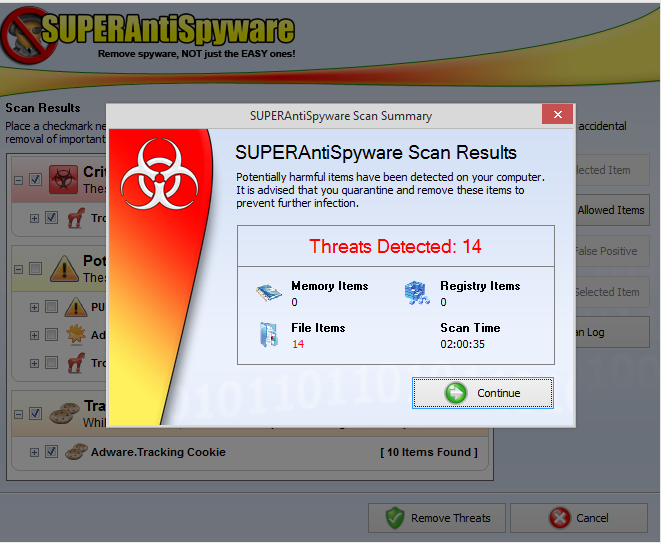
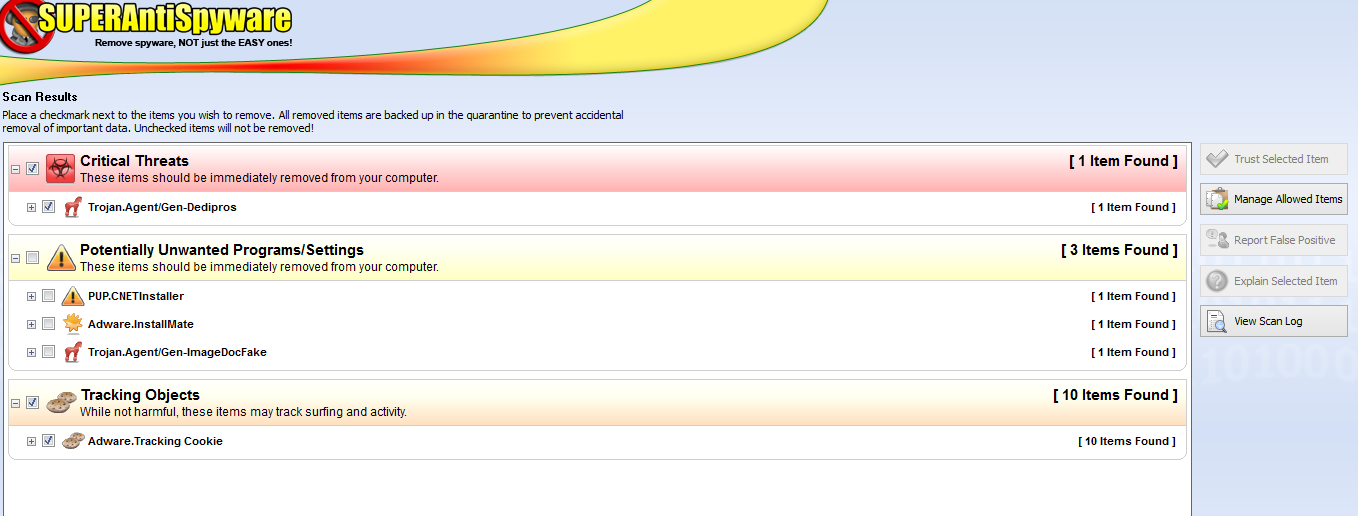
The screen shot below says it all.
Capture2.PNG
Capture3.PNG
Shocking? Can this be interpreted in any other way??? Calling all experts ::
 
Malwarebytes has a much better detection rate against real malware, not cookies. SAS isn't in the same league in my opinion having used both, and yes SAS has more false positives.
 
  • Like
Reactions: Ulikedat
A false positive is when a non malicious file is detected as malware and sometimes when you delete them it harms your computer because it is needed by the system or a certain program to function properly. I am not saying that what you had was a false positive but SAS is more likely to have more false positives than Malwarebytes, and as you can see SAS detects cookies and they are not malware. As always it is best to make sure the files that are detected are malicious or not so using more than one on demand scanner can help with this or send to Virus Total :)
 
A false positive is when a non malicious file is detected as malware and sometimes when you delete them it harms your computer because it is needed by the system or a certain program to function properly. I am not saying that what you had was a false positive but SAS is more likely to have more false positives than Malwarebytes, and as you can see SAS detects cookies and they are not malware. As always it is best to make sure the files that are detected are malicious or not so using more than one on demand scanner can help with this or send to Virus Total :)
Thanks, again what is virus total?
 
I have used SAS and while I would not purchase the application for the on demand support, I still think that it is a good and useful application to run periodically as it does a great job of cleaning out a lot of junk such as tracking cookies that most other cleaners leave behind, I was surprised by how much junk can be left on the system even after doing a sweep with other utilities like Ashampoo Winoptimize and Glary Utilities.
 
  • Like
Reactions: Ulikedat and juhful
I have used SAS and while I would not purchase the application for the on demand support, I still think that it is a good and useful application to run periodically as it does a great job of cleaning out a lot of junk such as tracking cookies that most other cleaners leave behind, I was surprised by how much junk can be left on the system even after doing a sweep with other utilities like Ashampoo Winoptimize and Glary Utilities.
Yes, you may also try ccleaner, smallest and fastest.
 
I have used SAS and while I would not purchase the application for the on demand support, I still think that it is a good and useful application to run periodically as it does a great job of cleaning out a lot of junk such as tracking cookies that most other cleaners leave behind, I was surprised by how much junk can be left on the system even after doing a sweep with other utilities like Ashampoo Winoptimize and Glary Utilities.
Reminds me of the first time I used Privazer, I was using Ccleaner and decided to try Privazer, it found gigs of stuff CC left behind lol