New Update Vivaldi Desktop Releases

@oldschool, if you're not using Vivaldi yourself, I definitely recommend giving it a try. Especially after yesterday's update which addresses a frequent complaint with speed users had. 😉 And if you have any questions let me know.
I tried it once again and indeed its speed is good, however trying to set up Vivaldi to my liking was a huge bust. Too many features, cumbersome settings. The virtual fusion of Firefox customization options and chromium settings is so jumbled that initial setup is not familiar to anyone who uses both FF and chromium variants, e.g. adding custom theme wouldn't work, extensions, etc. Some things that are simple in those browsers aren't in Vivaldi. No wonder Vivaldi has its own Help pages. It needs them. I've tried V several times and it's just not for me.
 
Last edited:
Vivaldi is fastest browser on android for me, on desktop it is as fast as edge, if not even faster

The speed update really made difference in ram usage and performance..great job (y)
Yeah you are right, overall speed improvement makes a huge difference 👍 this time we can give applause for all of Vivaldi Team 👏

Is it possible to drag or move extensions in Vivaldi, similar to Chrome or Edge? It appears this feature is not yet available in Vivaldi.
Confirmed that doesn't work by design since a long time. I have my own solution to install my favorite browser extension after each other in the order how do you like...

But maybe @JaneN would report this as feature request to developers of Vivaldi, let's see ;)
 
Confirmed that doesn't work by design since a long time. I have my own solution to install my favorite browser extension after each other in the order how do you like...

But maybe @JaneN would report this as feature request to developers of Vivaldi, let's see ;)
I turn off the extensions, then restart Vivaldi. After that, I turn on the extensions in the order I prefer. How do you do it?
 
I turn off the extensions, then restart Vivaldi. After that, I turn on the extensions in the order I prefer. How do you do it?
@Jan Willy kindly shared this link below from Vivaldi Forum, there someone mentioned this does the trick... Here for me it seems to work well 👍
Quote: You can simply press Ctrl+Drag with Mouse to arrange extensions order
 
Vivaldi Stable 6.2.3105.48
This update includes security improvements from the Chromium project.

The following improvements were made since the second 6.2 minor update:
  • [Chromium] Upgraded to 116.0.5845.195: fixes CVE-2023-4863 — Heap buffer overflow in WebP. Reported by Apple Security Engineering and Architecture (SEAR) and The Citizen Lab at The University of Torontoʼs Munk School on 2023-09-06
 
Last edited:
Vivaldi Stable 6.2.3105.51
This update includes various important fixes for Vivaldi 6.2.

The following improvements were made since the third 6.2 minor update:
  • [Crash] Hang on startup leaving the window with the grey background (VB-99982)
  • [Crash][Tabs] When opening and closing quickly (VB-97724)
  • [Feeds] Detect feeds dynamically on YouTube (VB-93235)
  • [Mail] Detect leading “<html” root signature in text/plain as text/html (VB-98336)
  • [Mail] First account doesn’t fetch messages initially (VB-99838)
  • [Mail] Ignore whitespace-only subparts of multipart messages (VB-98336)
  • [Panels] Auto-closing floated panel close button (VB-99169)
  • [macOS][Media] 1-pixel white line in full-screen videos (VB-99645)
 
Vivaldi Stable 6.2.3105.54
This update includes various important fixes for Vivaldi 6.2 and a security fix from Chromium upstream to handle CVE-2023-5217.

The following improvements were made since the fourth 6.2 minor update:
  • [Address bar] Can be blank/empty (VB-99745)
  • [Chromium] Upgraded to 116.0.5845.230: CVE-2023-5217
  • [Crash][Spatial Navigation] Crash while reloading a page (VB-100012)
  • [Crash][Workspaces] Closing window with an open workspace with hibernating tabs (VB-99800)
 
Vivaldi Stable 6.2.3105.58
This update includes a fix for a dubious looking recording icon that showed up on startup on MacOS 14 (Sonoma).

The following improvements were made since the sixth 6.2 minor update:
  • [macOS][Privacy][Sonoma] There is an unexpected notification of screen recording on start up on macOS 14.0 (VB-100516)
  • [Pop-up Blocker] List of blocked pop-ups can overflow the pop-out window and hide the buttons (VB-100216)
 
Vivaldi Stable 6.4.3160.34
Changelog 6.2 to 6.4

• [New][Calendar] Add default event templates (VB-100488)
• [New][Popout Video] Add volume controls (VB-63230)
• [New][Address Bar][Settings] Be able to order and show/hide all categories (VB-99661)
• [New][Direct Match][Speed Dial][Search] Suggestion integration (VB-96032)
• [Address bar] Dropdown wrong item activated when autocomplete is disabled (VB-99663)
• [Address bar][Bookmarks] Nickname not selected when exactly typing it (VB-100872)
• [Address bar][Bookmarks] Nickname quickly entered into address field launches search instead of opening the bookmark (VB-99254)
• [Address bar][Search Field] Provider keyword not stripped from suggestion query substitution (VB-99791)
• [Blocker] Text in privacy statistics is blurred (VB-91059)
• [Bookmarks] Shrink the Bookmarks file for existing users – move thumbnails to file (VB-100455)
• [Bookmarks][Keyboard] Focus lost in Bookmarks Panel search field on Ctrl+Backspace (VB-99994)
• [Calendar] Appointment series incomplete if created by another tool (VB-94014)
• [Calendar] Automatically enable template property when changing value (VB-99799)
• [Calendar] Changing the time in an entry in the panel, changes active pages zoom (VB-100459)
• [Calendar] Deleted event is resurrected (VB-100540)
• [Calendar] Don’t save Calendar Accounts unless a successful login is performed (VB-95517)
• [Calendar] ICS import progress is not correct (VB-98474)
• [Calendar] In the status logs the the Clear button often does nothing (VB-100001)
• [Calendar] Selector in the Popup editor too wide (VB-99699)
• [Calendar] Template is named after the type of action unless the “title” field is selected before saving (VB-100350)
• [Calendar] Use the email recipient address when accepting event invites (VB-97343)
• [Calendar][Keyboard] Support Alt + wheel scroll in Calendar Manger to jump views (VB-99803)
• [Commands][Tabs] Stack Tabs doesn’t work (VB-96867)
• [Crash] When opening the guest window (VB-100025)
• [Crash][Bookmarks] Adding Bookmarks (VB-99299)
• [Crash][Developer Tools] On undocking (VB-100361)
• [Crash][Extensions] Opening the extension options from the panel causes a crash (VB-99769)
• [Crash][Panels] Generating QR code from web panel (VB-100601)
• [Crash][Workspaces] Closing window with an open workspace with hibernating tabs (VB-99800)
• [Extensions] Popup appears shrunk (VB-99147)
• [Extensions] Privacy Badger options menu in a private window crashes the browser (VB-99589)
• [Feeds] Dropdown can display the name of a previous search term instead of the YouTube channel name (VB-100089)
• [Feeds] Duplicate feed from some sites (VB-100170)
• [Feeds] YouTube playlist feeds can show the name of a previously seen playlist (VB-100090)
• [Game] Link Vivaldia off the page displayed when the network is down(VB-99443)
• [History] Clear Browsing Data button wraps on a line of its own at certain panel widths (VB-98855)
• [History] Contains URLs after Clear Browser Data (VB-42540)
• [History][Keyboard] Ctrl+A followed by Ctrl+Click to unselect deletes all initially selected items (VB-91517)
• [Keyboard] Unassign the default shortcut for “Load Images” as it is confusing (VB-92932)
• [macOS] App menu in fullscreen video doesn’t show window controls (VB-99829)
• [macOS] Menu doesn’t change to “Hide Bookmarks Bar” (VB-91622)
• [macOS] Update Sparkle library to 2.5.0 (VB-100434)
• [macOS][Settings][Keyboard] “Show Quit Confirmation Dialog” option is broken (VB-99424)
• [Mail] Account status inaccurate in status and Panel (VB-100393)
• [Mail] Attachment icon is missing sometimes in the view (present in the mail) (VB-77629)
• [Mail] Attachment image shows up and overlaps mail view (VB-96239)
• [Mail] Avoid double highlight in composer autocomplete (VB-99995)
• [Mail] Connected to account message lingers in the status bar (VB-100485)
• [Mail] Connection attempts pending after hibernation trigger before the network is established (VB-100360)
• [Mail] Do not try to fetch the message twice on re-gaining network access (VB-100462)
• [Mail] Full/part body not shown in some messages (VB-83204)
• [Mail] IMAP accounts do not always reconnect after regaining network access (VB-100514)
• [Mail] Image rendering issue (VB-94214)
• [Mail] Incorrect rendering of attachment images and calendar invites (VB-100277)
• [Mail] Index failure key already exists (VB-99027)
• [Mail] Inline multiparts in messages from Spark Mail incorrectly believed to be attachments (VB-98592)
• [Mail] Logs in the status popup are strange when marked as spam (VB-98286)
• [Mail] Panel does not indicate a lack of network connection on startup (VB-100379)
• [Mail] Password changes not affecting the client (VB-100325)
• [Mail] Pops up a new oAuth dialog a few seconds after you close it (VB-97413)
• [Mail] Remove corner rounding in embedded videos
• [Mail] Replies are not indented correctly in the mail list (VB-99570)
• [Mail] Should not disconnect IMAP clients on losing network connection (VB-100630)
• [Mail] Top-level panel items lack spacing (VB-100321)
• [Mail] Wrong toolbar appears to restart [Compose instead of Mail Detail] (VB-100066)
• [Mail] multipart/mixed with HTML does not link to attached resources (VB-87381)
• [Mail][Performance] Caching UID list on startup is slow for big accounts (VB-99258)
• [Menus][Settings] Button in Native Window mode is not aligned when the window size is maxed (VB-100474)
• [Menus][Panels] Add ‘Close window’ as an option in Window Panel’s right-click menu (VB-93897)
• [Menus] Toolbar editor is narrower and not centered (VB-99394)
• [Notes] All blank lines removed (VB-99882)
• [Notes] Drag and drop may not be able to reorder them (VB-99802)
• [Performance][History] Avoid slowdown while resizing history manager (VB-99702)
• [Performance][History] Don’t animate in the history page if the tab is not visible (VB-99656)
• [Periodic Reload][Quick Commands] Support primes plus m and s suffixes for easier minute and second-time notations (VB-99313)
• [Privacy] Disable Privacy sandbox, and disable/remove Topics and Privacy Sandbox prefs pages (VB-99915)
• [Search] Add a “Thank You!” state if switch back from Google (VB-100267)
• [Search] Set Startpage as the default search for Private window in some countries (VB-100368)
• [Search][Address Bar][Search Field] There are no Yandex/Ecosia search engine icons (VB-94181)
• [Search][Address bar] Using a keyword search breaks the ability to search for the same thing in the default search engine (VB-100264)
• [Settings] When “User Native Windows” is checked the Windows Title and Windows Control Buttons become duplicated (VB-91670)
• [Spatial Navigation] Elements can not be focused with the zoomed page (VB-99170)
• [Speed Dial] Add navigation bar sorting (VB-41145)
• [Speed Dial] Bad view of the tiny thumbnails with title enabled (VB-79991)
• [Speed Dial] Navigation sorting update (VB-41145)
• [Speed Dial] Use ‘Open Graph (og) image’ or a higher quality image for the Speed dial size “icon” (VB-95956)
• [Speed Dial][Menus] Add undo/redo (VB-98410)
• [Speed Dial][Settings] Update the “Support Vivaldi” message for users that select Google Search Engine (VB-99651)
• [Sync] Account setup form rejects email from js2.so-net.ne.jp domain as invalid (VB-100453)
• [Sync][Settings] Make Use Native Window option non-syncable (VB-100293)
• [Tabs] Accordion tab stack selection overflows tab bar (VB-100621)
• [Tabs] Borders around the tiled website when in fullscreen mode (VB-94049)
• [Tabs] Dragging and Dropping a tab onto the title of the stack does not work (VB-99708)
• [Tabs] Stack on the left has the wrong outline (VB-99379)
• [Tabs] UI moves with side stacking and scrolling (VB-100660)
• [Tabs] Use recently viewed order when switching between related tabs after tab close (VB-99425)
• [Tabs] Visual tab cycler horizontally misaligned (VB-100674)
• [Tabs][Panels] The blur effect on the vertical background is not working (VB-98555)
• [Tabs][Sync] Show Cloud/Synced Tabs button on Tab Bar even when not logged in (VB-97074)
• [UI] Help link in type-squatter dialog points to Chrome help (VB-100730)
• [Web compatibility] Session store not shared with popups or new tabs (VB-98842)
• [Windows] Enabling native window removes window controls (VB-100623)
• [Windows] Vivaldi menu opens after selecting link text (VB-99856)
• [Windows][Settings] Wrong alignment of V-Menu button in “Native Window” mode (VB-98615)
• [Workspaces] Move singleton tabs to the active workspace (VB-99834)
• [Workspaces] Odd button rendering in Toolbar and Theme Icon editors (VB-99349)
• [Workspaces][Keyboard] Can not reach Workspaces button with keyboard (VB-96677)
• [Chromium] Upgraded to 118.0.5993.122
 
Vivaldi Stable 6.4.3160.41
This update contains fixes for two common crashes, along with security fixes from the Chromium project.

The following improvements were made since the initial 6.4 stable release:
  • [Bookmarks] Certain pages will not be bookmarked by any means (VB-101081)
  • [Bookmarks] Add Vivaldia 2 to the Speed Dial (VB-100731)
  • [Chromium] Upgraded to 118.0.5993.129
  • [Crash] Browser crashes randomly repeatable on various web pages (VB-96915)
  • [Crash] When trying to open Paypal window or something similar (VB-101025)
  • [Tabs] New tabs opened as a tab stack with a shift-click do not gain focus (VB-99916)
  • [UI] The Finnish language no longer works after the update (VB-101051)
 
Vivaldi Stable 6.4.3160.42
This update includes security improvements from the Chromium project and some key fixes from our side.

The following improvements were made since the first 6.4 minor update:
  • [Calendar] No scroll bar in template dialog (VB-101294)
  • [Crash] On speed Dial navigation (VB-101057)
  • [Chromium] Upgraded to 118.0.5993.138
  • [Quick Commands] Search results not highlighted after scrolling with a mouse (VB-101093)
  • [Tabs] %3D in favicon URLs breaks rendering (VB-101335)
 
Vivaldi Stable 6.5.3206.39
We are ringing in the Holidays with a powerful version of Vivaldi wrapped up with new features and improvements you’ll love.

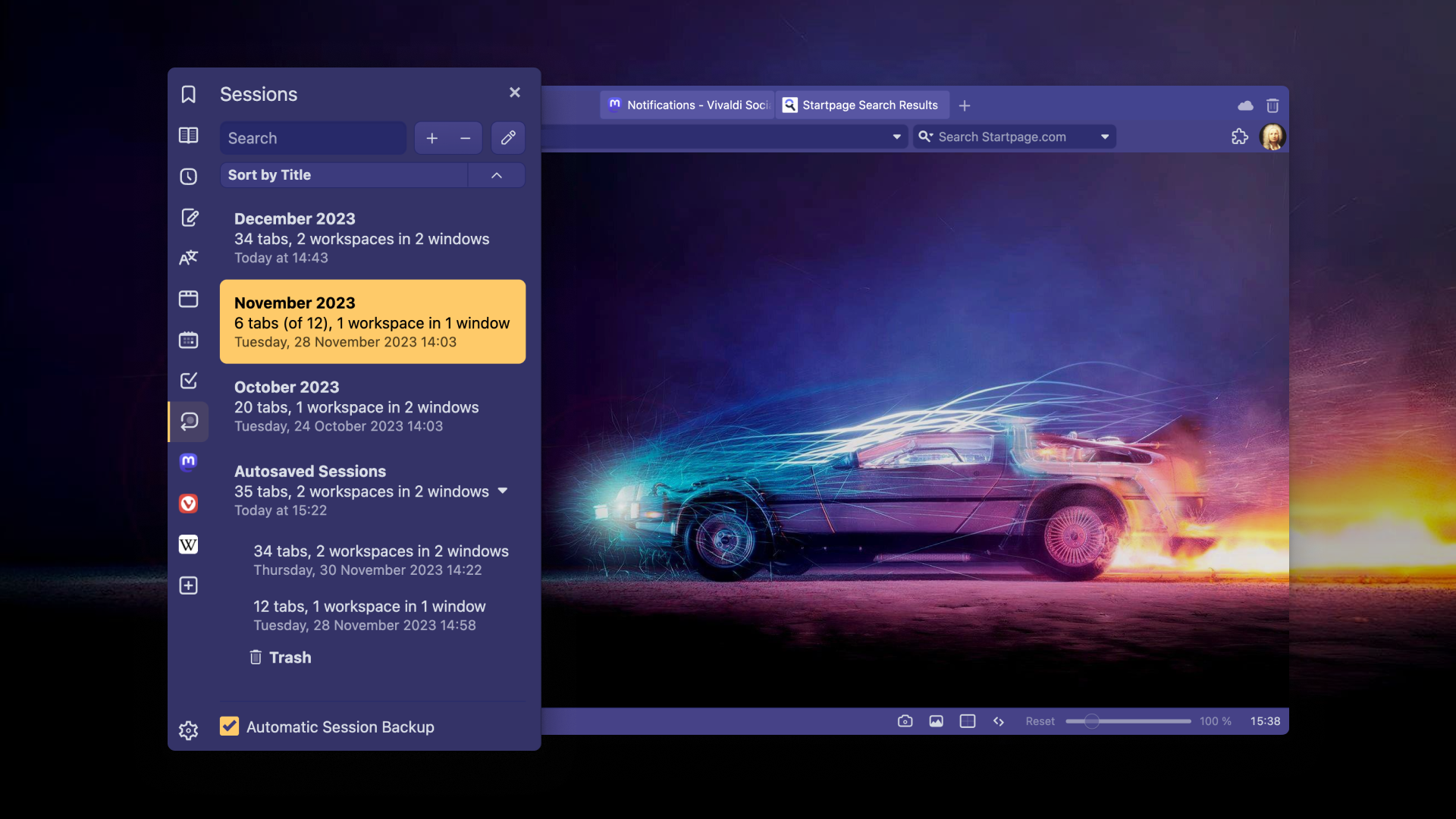
In our latest version, we are introducing the Sessions Panel, a new panel on the sidebar for managing saved sessions – your collections of organized tabs. With the Sessions Panel, you can view, reopen, and even edit your Sessions.

Our Sync (encrypted) functionality now makes your complete browsing history available on all your devices.

From this update onwards, you can find and open your synced tabs from the Address Field or Windows Panel on your current device.

Furthermore, you no longer need to manually move and organize tabs into the desired Workspace. The new Workspace Rules automatically moves tabs to a predefined Workspace based on your easy-to-configure rulesets.

Additionally, there’s a new option to the built-in Notes that helps you add more text to an existing note.

 

You may also like...