Hello,
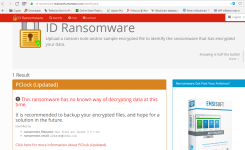
My PC got attacked by CryptoLocker ransomware. Once I got ransomware message after being attacked, I scaned my PC with Malwarebytes Anti-Malware and deleted ransomware. (then rescanned with hitman pro)
But even after that all my files (Doc, ppt, excel, pdf, zip, image, video, etc.) are still encrypted. Please help me decrypt them. For reference I have attached ransomware notes.
Looking forward for positive reply.
Thanks in advance.
Regards,
Abhishek
My PC got attacked by CryptoLocker ransomware. Once I got ransomware message after being attacked, I scaned my PC with Malwarebytes Anti-Malware and deleted ransomware. (then rescanned with hitman pro)
But even after that all my files (Doc, ppt, excel, pdf, zip, image, video, etc.) are still encrypted. Please help me decrypt them. For reference I have attached ransomware notes.
Looking forward for positive reply.
Thanks in advance.
Regards,
Abhishek