

why i cannot Enable push Notifications from my account preferences ?

DDE_Server

Level 23
Thread author
Verified
Top Poster
Well-known
Forum Veteran
Sep 5, 2017
1,248
6,571
2,169
Egypt
Hi gents
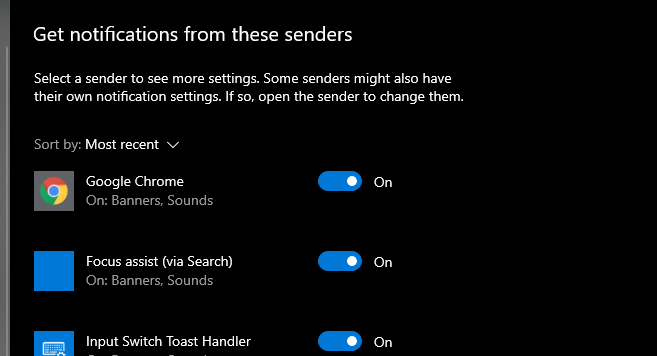
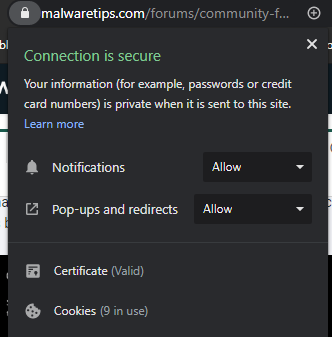
i cannot enable push notifications from malware tips site although Notification is enabled for both site settings and google chrome application in windows settings as below screen shots
1580544968380.png
1580545083761.png

also Enable push notifications is deemed in my preferences

1580545277993.png

anybody have any idea about the cause of this problem :unsure::unsure: ?
this problem appeared after fresh install f windows 10 may be i miss something in windows 10 settings
 
Hi gents
i cannot enable push notifications from malware tips site although Notification is enabled for both site settings and google chrome application in windows settings as below screen shots

View attachment 233123View attachment 233124
also Enable push notifications is deemed in my preferences
View attachment 233125
anybody have any idea about the cause of this problem :unsure::unsure: ?
this problem appeared after fresh install f windows 10 may be i miss something in windows 10 settings
Hey @DDE_Server
This has something to do with your browser settings or an extension that is installed.
If you go here: chrome://settings/content/notifications - Ask before sending (recommended) is enabled or disabled?
 
Hey @DDE_Server
This has something to do with your browser settings or an extension that is installed.
If you go here: chrome://settings/content/notifications - Ask before sending (recommended) is enabled or disabled?
i have already enabled notification for MalwareTips website in chrome settings as you see in my posted screen shots (it is allow not Ask )
 
  • Like
Reactions: [correlate]
i have already enabled notification for MalwareTips website in chrome settings as you see in my posted screen shots (it is allow not Ask )
The link @Jack provided also works in Opera. You should see something similar when you choose below Cookies in your screenshot, " Site settings " then " Messages ( Notifications ) ". Add MTs main link/url for allowed sites, unless it's already there. https://malwaretips.com then re-start your browser.

I can understand a point of view that it simply should work from the Key Pad/Key Lock icon, but sometime you might unknowingly have another setting somewhere that over ride/over rule what you wish for.
 
The link @Jack provided also works in Opera. You should see something similar when you choose below Cookies in your screenshot, " Site settings " then " Messages ( Notifications ) ". Add MTs main link/url for allowed sites, unless it's already there. https://malwaretips.com then re-start your browser.

I can understand a point of view that it simply should work from the Key Pad/Key Lock icon, but sometime you might unknowingly have another setting somewhere that over ride/over rule what you wish for.
Yes, this is what you need to do @DDE_Server.
Here's what's happening: in chrome://settings/content/notifications the Ask before sending (recommended) is disabled ( it says Blocked instead).
5.jpg


1.jpg


So because you've changed this setting, you need to scroll down on that page and in the "Allow" section add our site https://malwaretips.com/. It should work then.

3.jpg