

Align Technology—the maker of Invisalign—has agreed to a $31.75 million settlement in a class-action lawsuit claiming it colluded with SmileDirectClub to stifle competition and inflate prices for consumers. The settlement, if approved by the court, allows eligible individuals to claim a cash payment for aligner purchases made during a specified timeframe. Below is a full breakdown of who qualifies, how much you might get, how to file a claim, and more.
What Is This Lawsuit About?
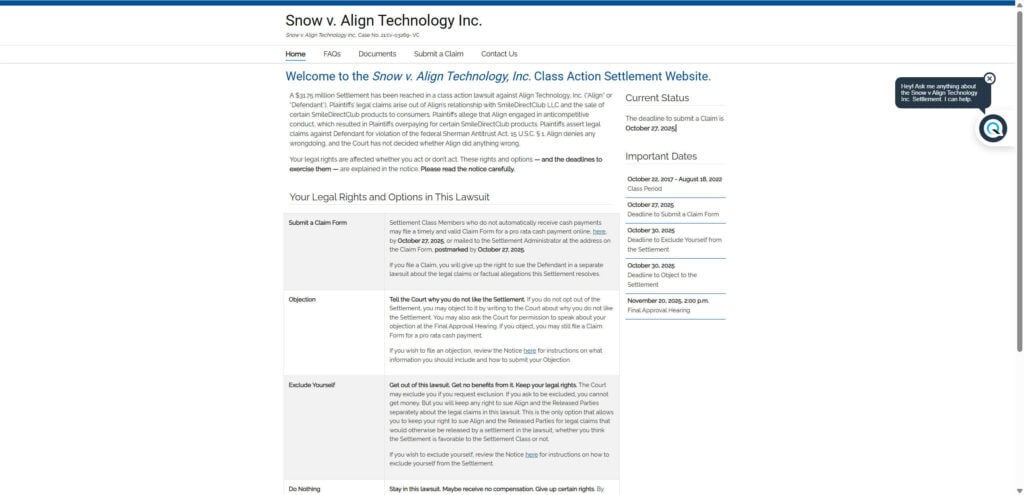
- The case is known as Snow v. Align Technology, Inc. (Case No. 3:21-cv-03269).
- Plaintiffs allege that Align entered into an anticompetitive agreement with SmileDirectClub that limited Align’s ability to compete in the direct-to-consumer aligner market. As a result, consumers overpaid for SmileDirectClub’s products.
- Align denies wrongdoing and says it acted within the law.
- The parties opted to settle rather than continue protracted litigation or risk a trial.
- Prior attempts at settlement that included coupons or other non-cash remedies were rejected by the court, largely because of concerns that they could reinforce Align’s market position.
- In May 2025, Judge Vince Chhabria granted preliminary approval for the current version of the settlement.
Who’s Eligible?
To be part of the settlement, you must be a “Settlement Class Member.” The criteria are:
- Timing: You purchased, paid for, or submitted reimbursement for SmileDirectClub aligners for personal use between October 22, 2017, and August 18, 2022.
- Type of purchase: The claim must relate to SmileDirectClub clear aligner products for personal (not commercial) use.
- Location (U.S.): The lawsuit targets purchasers in the United States. Claims outside the U.S. are generally not covered by this settlement.
Who is excluded?
- Employees, officers, or directors of Align or the law firms handling the case
- Government entities and agencies
- Anyone who opts out (requests exclusion) by the deadline
- People who already obtained a separate judgment or claim regarding the same legal issues
If you’re unsure whether you qualify, you can contact Class Counsel or the Settlement Administrator for assistance.
How Much Money Can You Get?
Estimated Payouts
- The settlement fund is $31.75 million.
- After legal fees, costs, and administrative expenses are deducted, the remaining “net” fund is distributed pro rata to all valid claims.
- The estimated payment per claimant is $40 to $60 under current projections.
- However, no payment will be less than $10 for valid claimants.
- One source mentions a slightly lower estimate ($25–$50) based on the claims process and number of participants.
What Reduces Your Payout?
- Attorneys’ fees and expense reimbursements (to be approved by the court)
- Costs of notice and administration of the settlement (e.g. mailing, claims processing)
- Incentive awards for the class representatives
Because the total payout is shared among all valid claims, your amount can shift depending on how many people file valid claims.
Automatic Payments vs. Claim-Filing
- If SmileDirectClub’s records already identify you as a purchaser, you’re presumed to have a valid claim and will receive an automatic payment — you don’t need to file a claim in that case.
- If you’re not in those records, you must file a timely and valid claim to receive payment.
How to File a Claim
If you were not identified in SmileDirectClub’s records but believe you qualify, here’s how to file:
Step-by-Step Instructions
- Gather documentation
- Receipts or proof of purchase (e.g. credit card statements) for your SmileDirectClub aligners.
- Date(s) of purchase
- Mailing address at time of purchase
- Email address associated with SmileDirectClub account (if any)
- Any Unique ID from a notice postcard or email (if you received one) — not required, but helps the process.
- File online (preferred)
- Go to the official settlement website at sdcalignersettlement.com
- Complete the online claim form, attach required supporting documents, and submit.
- After submission, you’ll get a confirmation code or email—keep it for your records.
- File by mail (if necessary)
- Download and print the provided Claim Form from the website
- Fill it out, attach your proof documents, sign and date it, and mail it to:
Snow v Align Class Action Settlement Administrator P.O. BOX 2830 PORTLAND, OR 97208-2830
Claim Deadline
All claims (online or mailed) must be submitted or postmarked by October 27, 2025.
Tips & Important Notes
- You can’t save and return later when filling the online form—complete it in one sitting.
- The submitted supporting documentation will not be returned, so keep copies for yourself.
- Your claim may be audited; be prepared to provide additional information if asked.
- If you lose your Unique ID, contact the Settlement Administrator for help.
When Will You Get Paid?
- Payments will be issued after the court approves the settlement and the claims process is complete.
- Automatic payments and approved filed claims are paid at the same time, once the settlement becomes final.
- The payment method may vary (e.g. electronic transfers or checks).
Key Dates & Deadlines
| Event | Date |
|---|---|
| Class Period (eligible purchases) | October 22, 2017 – August 18, 2022 |
| Deadline to Submit Claim | October 27, 2025 |
| Deadline to Exclude Yourself (“Opt Out”) | October 30, 2025 |
| Deadline to File an Objection | October 30, 2025 |
| Final Approval Hearing | November 20, 2025 (2:00 p.m.) |
Note: These dates could shift (e.g. hearing changes) — always check the official settlement site for updates.
Opting Out vs. Objecting
Opting Out (Exclusion)
- If you exclude yourself, you won’t receive any payment from this settlement.
- But by opting out, you preserve your right to pursue your own independent lawsuit against Align if you wish.
- To opt out, you must submit a written request (the “Request for Exclusion”) by October 30, 2025.
Objecting
- If you stay in the class (i.e. don’t opt out) but disagree with some aspect (e.g. attorneys’ fees, settlement terms), you can object to the court.
- Objections must be filed by October 30, 2025.
- You may also ask for permission to speak at the final approval hearing.
- Note: You cannot both opt out and object — they’re mutually exclusive.
Risks, Considerations & Caveats
- This settlement has not yet been fully approved by the court. There’s risk the court could reject or require changes.
- The payout estimate may change depending on how many valid claims are filed. If far more people file claims, the per-person payout might shrink; if fewer file, the payment might rise.
- The settlement involves only U.S. purchasers under U.S. law. International purchasers are not covered under the current terms.
- Because SmileDirectClub filed for bankruptcy and ceased operations in December 2023, there’s added complexity in distributing funds.
- This settlement releases you from future legal claims tied to the same allegations — unless you opt out.
What’s Next & What You Should Do
- Check if you’re automatically included
If you’ve received a notice or if SmileDirectClub’s records identified you as a purchaser, you may already be considered to have a valid claim. - Decide whether to opt out
If you believe your individual damages are higher or want to pursue separate litigation, consider excluding yourself (but act by the deadline). - Prepare your supporting documents
Gather receipts, statements, emails, and any proof that you purchased SmileDirectClub aligners during the eligible period. - Submit a claim (if needed) before the deadline
Go online or mail your completed claim (with supporting docs) by October 27, 2025. - Monitor the settlement website
Stay updated on the court’s final approval decision, payment timing, or any changes in schedule. - Keep your proof and confirmation
Save all your documentation, confirmation codes, and receipts in case your claim is audited or questioned.
FAQ
Q: How do I know if I’m included?
A: If you purchased or reimbursed SmileDirectClub aligners for personal use between Oct 2017 and Aug 2022 in the U.S., you likely qualify. Those in SmileDirectClub records are automatically included; others must file a claim.
Q: Do I need to submit proof?
A: Yes, especially if you weren’t identified in records. Acceptable proof includes receipts, credit card statements, or other documentation showing you paid for the aligners.
Q: What is the minimum I’ll get?
A: The settlement guarantees that nobody with a valid claim will receive less than $10.
Q: Why might the payout be less or more than $40–$60?
A: The final amount depends on how many valid claims are submitted and how much of the settlement fund is consumed by legal and administrative costs.
Q: What if I don’t file a claim?
A: If you’re not automatically included and don’t file a claim, you won’t receive any money. Also, by doing nothing, you waive your right to sue on the same claims later.
Q: When will I actually receive funds?
A: After the court approves the settlement and the claims are processed. Automatic and approved claims will be paid simultaneously.








