

If you are seeing a “Huomio! Selaimesi on lukittu” notification within Internet Explorer, Firefox, Safari or Chrome, then you have redirected to a web page that contains a malicious javascript code. The “Huomio! Selaimesi on lukittu” message is basically just a web page containing a malicious javascript that does not allow you to close the browser window or switch to a different web page.
![[Image: Huomio! Selaimesi on lukittu virus]](http://malwaretips.com/blogs/wp-content/uploads/2014/01/huomio-selaimesi-on-lukittu-virus.jpg "Huomio! Selaimesi on lukittu virus")
The “Huomio! Selaimesi on lukittu” virus will display a bogus notification that pretends to be from Poliisi (Finish Police) and states that your computer has been blocked due to it being involved with the distribution of pornographic material, spam and copyrighted content.
It goes on to say that you need to pay a ransom of 100 Euro in order to get access to your files and computer again. In order to pay this ransom you need purchase a Ukash or Paysafecard voucher and submit it in the web browser. The malware’s authors prefer these payment services because transactions made through them cannot be reversed and are hard to trace.
If your computer is infected with the “Huomio! Selaimesi on lukittu” browser hijacker, this infection will display a localized webpage that covers the entire web browser of the infected computer and demands payment for the supposed possession of illicit material. The message displayed by this ransomware infection can be localized depending on the user’s location, with text written in the appropriate language.
The text of the “Huomio! Selaimesi on lukittu” web page is:
HUOMIO!
Selaimesi on lukittu turvallisuuden vuoksi allamainittujen syiden takia.
Kaikki toiminta tässä tietokoneessa on kirjattu.
Kaikki tiedostot ovat salattuja.Sinut syytetään kielletyn pornograafisen aineiston (Lapsiporno/Zoofilia/Raiskaus jne.) katselusta/säilytyksestä ja/tai levityksestä. Sinä olet rikkoneet lapsipornografian levitystä vastaisen
yleismaailmallisen julistuksen ja sinut syytetään Suomen tasavallan rikoslain lakipykälän 161 edellyttämään rikokseen.Suomen tasavallan rikoslain lakipykälä 161 edellyttää rangaistuksena vapausrangaistusta 2-8 vuotta.
Sen lisäksi sinua epäillään Tekijänoikeuslakia rikoksesta (piraattimusiikin, -videon, luvattoman ohjelmiston tallentaminen) ja tekijänoikeuden suojassa olevan kontentin käytöstä ja/tai levityksestä. Sillä lailla sinua epäillään Suomen tasavallan lakipykälän 148 rikoksesta.
Suomen tasavallan lakipykälä 148 edellyttää 150-550 perusarvoa suuruista sakkoa tai vapausrangaistusta 3-7 vuotta.
Tietokoneesi avulla suoritettiin luvaton pääsy suljettuihin tietoihin ja valtakunnallisesti merkittäviin tietoihin tietoverko Internrtissä.
Luvaton pääsy sinä olet suorittanut tahallaan itsekkäistä syistä tai laiton pääsy yritettiin suorittaa tietokoneestasi sinun tietämättä ja ilman suostumustasi, koska tietikoneessasi on haittaohjelmia. Sillä lailla sinua epäillään ennen tutkinnan toimittamista Suomen tasavallan rikoslain lakipykälää 215 tahattomasta rikoksesta (Laki huolimattomasta ja leväperäisestä atk-laitteiden/tietokoneen käytöstä).
Suomen tasavallan rikoslain lakipykälä 215 edellyttää rangaistuksena €100.000 suuruista sakkoa ja/tai vapausrangaistusta 5-8 vuotta.
Sen lisäksi tietokoneessasi olevien tietojen analyysin aikana on todettu että tietokoneesi kautta jatkuvasti levitetään roskaposti, jonka sinä olet suorittanut tahallaan itsekkäistä syistä tai roskapostin levittäminen yritettiin suorittaa tietokoneestasi sinun tietämättä ja ilman suostumustasi, koska tietikoneessasi on haittaohjelmia. Tämä roskaposti levittää haittallista ohjelmistoa ja kellettyä pornograafista aineistoa. Sillä lailla sinut syytetään ennen tutkinnan toimittamista Suomen tasavallan rikoslain lakipykälän 301 tahattomasta rikkomisesta (Laki roskapostin ja haittallisen ohjelmiston (viiruksien) levittämisen taistelusta).
Suomen tasavallan rikoslain lakipykälä 301 edellyttää rangaistuksena €250.000 suuruista sakkoa ja/tai vapausrangaistusta 5 vuoteen asti.
Kiinnitämme huomiotasi siihen että tällä hetkellä sinun henkilöllisyytesi ja paikkasi selvitetään, 96 tunnin aikana sinua vastaan nostetaan rikosasia koskien edellä mainittuja rikoslain pykäliä. Rikosasian aineisto luovutetaan oikeuteen.
Mutta Suomen tasavallan rikoslain korjauksien (02. lokakuuta 2013) ja Ihmisoikeuksien julistuksen mukaan rikkomisesi voidaan pitää tahattomina (jos nämä rikkomiset on tehty ensimmäisen kerran) ja sinut ei saateta rikosvastuuseen. Tämä ehto on mahdollista toteuttaa jos sinä maksat sakon valtion kassaan (Internet-verkon kyberavaruuden sujausta koskevien hankkeiden kannatusta varten).
Sakot on maksattava 48 tunnin aikana rikoksen jälkeen. 48 tunnin kuluttua seuraavan 48 tunnin aikana on käynnissä automaattinen sinua koskevien tietojen keräily ja sinua vastaan nostetaan rikosasia.
Sakon määrä on €100. Sinä voit maksaa laskun voucherien PaySafeCard avulla.
Cyber criminals often updated the design of this lock screen, however you should always keep in mind that no law enforcement agency (eg: FBI, Department of Justice, Royal Canadian Mounted Police or Police Central e-crime Unit) will never lock down your computer or web browser.
The “Huomio! Selaimesi on lukittu” browser blocker is a scam, and you should ignore any alerts that this malicious software might generate.
Under no circumstance should you send a MoneyPak, Ukash or Paysafecard voucher to these cyber criminals, and if you have, you can should request a refund, stating that you are the victim of a computer virus and scam.
How to remove the “Huomio! Selaimesi on lukittu” virus (Removal Guide)
This page is a comprehensive guide, which will remove the “Huomio! Selaimesi on lukittu” infection from a Windows computer and an Apple Mac OS X machine. Please perform all the steps in the correct order. If you have any questions or doubt at any point, STOP and ask for our assistance.
How to Remove “Huomio! Selaimesi on lukittu” virus from a Windows PC
STEP 1: Remove “Huomio! Selaimesi on lukittu” browser hijacker from Internet Explorer, Firefox and Chrome
STEP 2: Remove “Huomio! Selaimesi on lukittu” virus with Malwarebytes Anti-Malware Free
STEP 3: Double-check for the “Huomio! Selaimesi on lukittu” infection with HitmanPro
STEP 1: Remove “Huomio! Selaimesi on lukittu” browser hijacker from Internet Explorer, Firefox and Chrome
- Open Task Manager by right-clicking the taskbar, and then clicking Start Task Manager. Alternatively to start the Windows Task Mager, you can press Ctrl+Alt+Del and click on Task Manager or simply press on Ctrl+Shift+Esc.
![[Image: Start Windows Task Manager]](data:image/gif;base64,R0lGODlhAQABAAAAACH5BAEKAAEALAAAAAABAAEAAAICTAEAOw== "Start Windows Task Manager")
- Click the Processes tab to see a list of all the processes that are currently running under your user account and a description of each process.
To view all of the processes currently running on the computer, click Show processes from all users. - Scroll through the list till you see your web browser’s process and left-click on it once so it becomes highlighted. Once you have selected the browser’s process, click on the End Process button as show in the picture below.
If you are using this browser: End this process: Internet Explorer iexplore.exe Chrome chrome.exe Safari Safari.exe SeaMonkey seamonkey.exe Opera opera.exe Firefox firefox.exe - When you click on the End Process button, Task Manager will ask you to confirm if you are sure you want to terminate it as shown in the image below.
At this point you should press the Yes button in order to kill the process. - Your browser window should now be closed. The next time you open your browser, do not allow the browser to open the last opened page.
![[Image: Start Windows Task Manager]](http://malwaretips.com/blogs/wp-content/uploads/2013/11/start-task-manager-windows-pc.jpg "Start Windows Task Manager")
![[Image: Select the Process tab]](http://malwaretips.com/blogs/wp-content/uploads/2013/11/show-processes-from-all-users-task-manager.jpg "Select the Process tab")
![[Image: Search for iexplorer.exe, firefox.exe or chrome.exe]](http://malwaretips.com/blogs/wp-content/uploads/2013/11/kill-malicious-process.jpg "Search for iexplorer.exe, firefox.exe or chrome.exe")
![[Image: Kill the malicious process in Windows PC]](http://malwaretips.com/blogs/wp-content/uploads/2013/11/end-malicious-process.jpg "Kill the malicious process in Windows PC")
STEP 2: Remove “Huomio! Selaimesi on lukittu” virus with Malwarebytes Anti-Malware Free
Malwarebytes Anti-Malware Free utilizes Malwarebytes powerful technology to detect and remove all traces of malware including worms, trojans, rootkits, rogues, dialers, spyware and more.
- You can download Malwarebytes Anti-Malware Free from the below link, then double-click on the icon named mbam-setup.exe to install this program.
MALWAREBYTES ANTI-MALWARE DOWNLOAD LINK(This link will open a download page in a new window from where you can download Malwarebytes Anti-Malware Free) - When the installation begins, keep following the prompts in order to continue with the setup process, then at the last screen click on the Finish button.
- On the Scanner tab, select Perform quick scan, and then click on the Scan button to start searching for “Huomio! Selaimesi on lukittu” malicious files.
- Malwarebytes’ Anti-Malware will now start scanning your computer for “Huomio! Selaimesi on lukittu” virus as shown below.
- When the Malwarebytes Anti-Malware scan has finished, click on the Show Results button.
- You will now be presented with a screen showing you the computer infections that Malwarebytes Anti-Malware has detected. Make sure that everything is Checked (ticked), then click on the Remove Selected button.
![[Image: Malwarebytes Anti-Malware final installation screen]](http://malwaretips.com/blogs/wp-content/uploads/2013/01/malwarebytes-installation.jpg "Malwarebytes Anti-Malware installation screen")
![[Image: Malwarebytes Anti-Malware Quick Scan]](http://malwaretips.com/blogs/wp-content/uploads/2013/01/malwarebytes-quick-scan.jpg "Run a Quick Scan with Malwarebytes Anti-Malware")
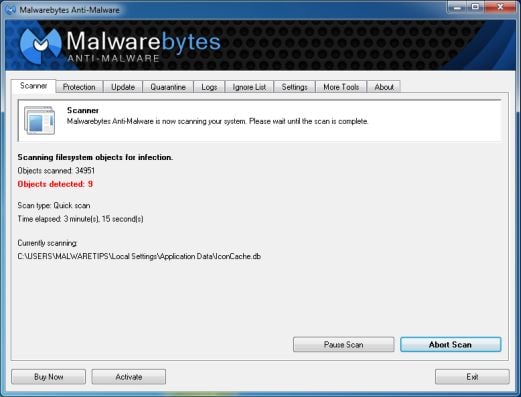
![[Image: Malwarebytes Anti-Malware scan results]](http://malwaretips.com/blogs/wp-content/uploads/2013/01/malwarebytes-scan-results.jpg "Malwarebytes when the system scan has completed")
![[Image: Malwarebytes Anti-Malwar removing Huomio! Selaimesi on lukittu virus]](http://malwaretips.com/blogs/wp-content/uploads/2013/01/malwarebytes-virus-removal.jpg "Malwarebytes Anti-Malwar removing Huomio! Selaimesi on lukittu virus")
STEP 3: Double-check for the “Huomio! Selaimesi on lukittu” infection with HitmanPro
HitmanPro is a second opinion scanner, designed to rescue your computer from malware (viruses, trojans, rootkits, etc.) that have infected your computer despite all the security measures you have taken (such as anti virus software, firewalls, etc.).
- You can download HitmanPro from the below link:
HITMANPRO DOWNLOAD LINK (This link will open a web page from where you can download HitmanPro) - Double-click on the file named HitmanPro.exe (for 32-bit versions of Windows) or HitmanPro_x64.exe (for 64-bit versions of Windows). When the program starts you will be presented with the start screen as shown below.
Click on the Next button, to install HitmanPro on your computer.
- HitmanPro will now begin to scan your computer for “Huomio! Selaimesi on lukittu” malicious files.
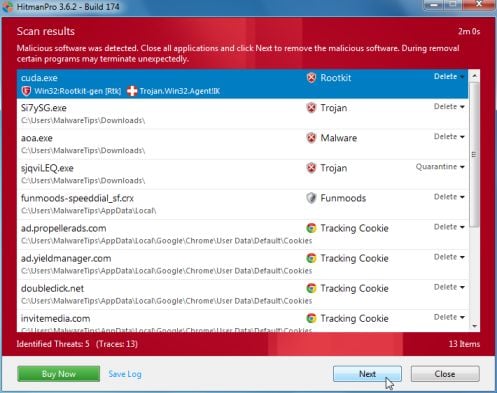
- When it has finished it will display a list of all the malware that the program found as shown in the image below. Click on the Next button, to remove the “Huomio! Selaimesi on lukittu” virus.
- Click on the Activate free license button to begin the free 30 days trial, and remove all the malicious files from your computer.
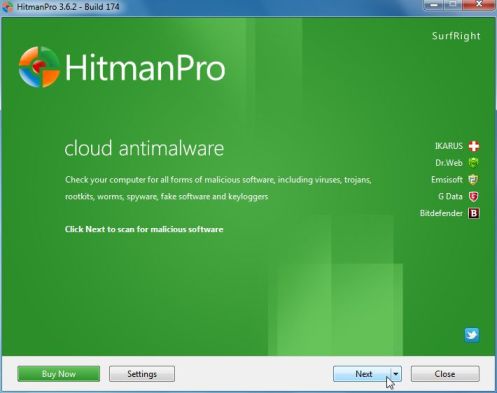 Click on the Next button, to install HitmanPro on your computer.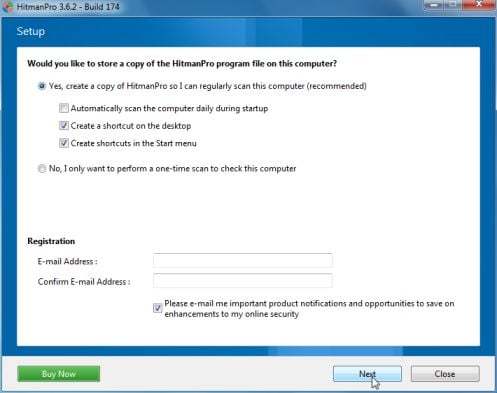
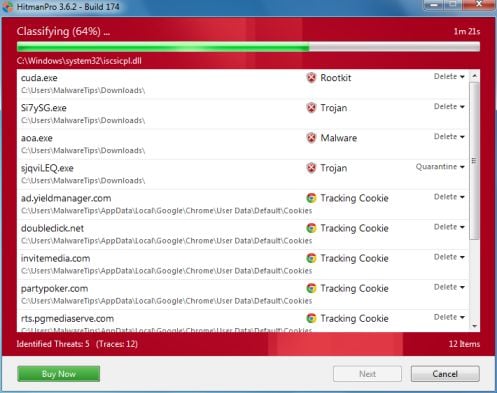
![[Image: HitmanPro 30 days activation button]](http://malwaretips.com/blogs/wp-content/uploads/2012/11/hitmanpro-activation.jpg "HitmanPro free 30 days trial")
Your computer should now be free of “Huomio! Selaimesi on lukittu” infection. If your current anti-virus solution let this infection through, you may want to consider purchasing the PRO version of Malwarebytes Anti-Malware to protect against these types of threats in the future, and perform regular computer scans with HitmanPro.
How to Remove “Huomio! Selaimesi on lukittu” virus from an Apple Mac OS X
For years, Windows users have been plagued by ransomware demanding several hundred dollars to unlock their computers.
The bad guys know there is a growing market of Apple consumers who, for the most part, feel pretty safe about browsing the Internet on a Mac without the need for any security product.
Cyber-criminals, well known for not re-inventing the wheel, have ‘ported’ the latest ransomware to OS X, not by using some complicated exploit but rather leveraging the browser and its ‘restore from crash’ feature. The “Huomio! Selaimesi on lukittu” ransomware page is being pushed onto unsuspecting users browsing regular sites but in particular when searching for popular keywords.
To remove “Huomio! Selaimesi on lukittu” from your Apple MAC OS X browser you can follow any of below options.
OPTION 1: Remove “Huomio! Selaimesi on lukittu” malicious web page from Apple Mac OS X by resetting Safari to its default settings
OPTION 2: Remove “Huomio! Selaimesi on lukittu” browser hijacker Apple Mac OS X virus using Force Quit for your browser
OPTION 1: Remove “Huomio! Selaimesi on lukittu” malicious web page from Apple Mac OS X by resetting Safari to its default settings
To remove the “Huomio! Selaimesi on lukittu” browser hijacker from Safari, we will need to reset your browser to its default settings.
- Click on the Safari menu and then choose Reset Safari
- In the new windows, make sure all items are marked and click on the Reset button.
![[Image: Select Reset Safari from the menu]](http://malwaretips.com/blogs/wp-content/uploads/2013/07/Reset-Safari.png "Select Reset Safari from the menu")
![[Image: Reset Safari to default settings]](http://malwaretips.com/blogs/wp-content/uploads/2013/07/Reset-Safari-to-default-settings.png "Reset Safari to default settings")
You can also watch this video on how to reset Safari to its default settings:
OPTION 2: Remove “Huomio! Selaimesi on lukittu” browser hijacker Apple Mac OS X virus using Force Quit for your browser
- Press Command + Option + Escape simultaneously. This will open the open the Force Quit Applications window.
- Select Safari, Chrome, Firefox or any other browser in which your are seeing the “Huomio! Selaimesi on lukittu” ransomware notification.
- Click the button that says “Force Quit“. This will forcefully end your browser program, thus removing the “Huomio! Selaimesi on lukittu” browser hijacker.
If you cannot switch from the unresponsive app, press Command + Option + Shift + Esc for three seconds to force it to quit. This key combination tells OS X to force quit the frontmost app.
![[Image: Press Command + Option + Escape to start Force Quit menu]](http://malwaretips.com/blogs/wp-content/uploads/2013/07/Force-Quit-an-Application-in-Mac-OS-X-Step-1.jpg "Press Command + Option + Escape to start Force Quit menu")
![[Image: Select Firefox, Chrome or Safari from Force Quit menu]](http://malwaretips.com/blogs/wp-content/uploads/2013/07/Force-Quit-an-Application-in-Mac-OS-X-Step-2.jpg "Select Firefox, Chrome or Safari from Force Quit menu")
![[Image: Click on the Force Quit button to remove Huomio! Selaimesi on lukittu virus]](http://malwaretips.com/blogs/wp-content/uploads/2013/07/Force-Quit-an-Application-in-Mac-OS-X-Step-3.jpg "Remove \"Huomio! Selaimesi on lukittu\" virus (Removal Guide) 1")
You can also watch this video on how to Force Quit a program on an Apple Mac OS X:
If you are still experiencing problems while trying to remove “Huomio! Selaimesi on lukittu” virus from your Windows or Apple MAC OS X machine, please start a new thread in our Malware Removal Assistance forum.








