Globalmart “Order Optimization” Scam: How It Works and Why You Keep Paying
Written by: Thomas Orsolya
Published on:
The message looks harmless. A “remote job” offer. A quick way to earn extra money. A friendly guide who promises you can cash out the same day.
Then you click the link and land on Globalmart, a polished site filled with deals, categories, and a shiny “My Wallet” section that makes everything feel official.
It only takes a few minutes to start. And that is the problem. Because Globalmart is not really paying you for tasks. It is building a path that leads in one direction only, right to your money.
If you have seen globemart.vip, globemart.org, globmtasia.com, or any of the related Globalmart domains, here is what is actually happening behind that clean storefront.
Scam Overview
The Globalmart task scam is part of a larger wave of “task” or “commission” scams that dress up financial theft as online work.
The pitch is designed to sound modern and believable: companies need “optimization,” “order processing,” “product boosting,” “data matching,” “merchant assistance,” or “rating tasks.” You “help” an e-commerce platform by completing assigned tasks, and you earn commission.
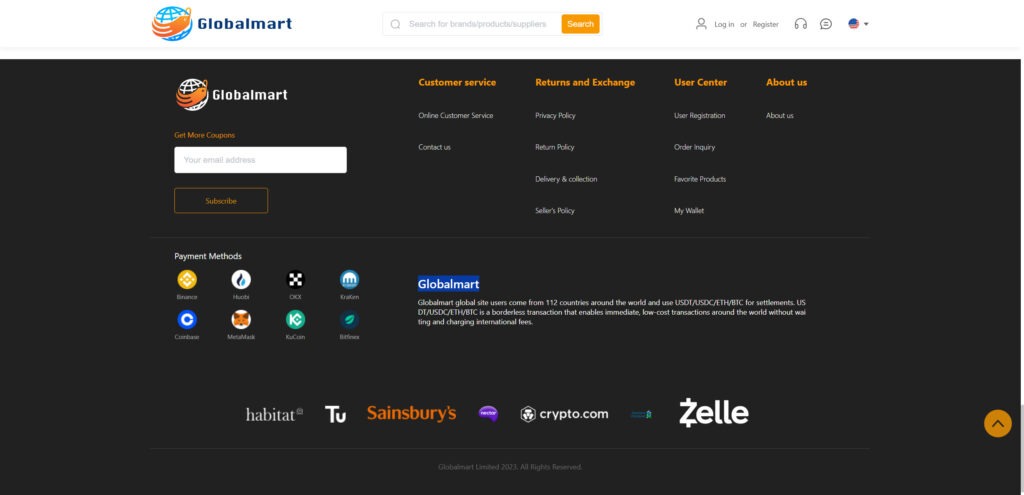
On the surface, the website looks like a cross-border marketplace.
It may show product tiles with prices, categories, and discount banners. You might see language selectors and a clean header with a search bar. Some versions promote coupons prominently, including flashy promotions like a $99 coupon “package” or “lucky gift” rewards.
The site often looks like it is trying to be a hybrid of an online store and a financial dashboard.
That is not an accident. Task scams use an e-commerce “skin” because it makes the tasks feel real. Clicking buttons on product pages feels like something a platform might pay for. It also lets scammers borrow the credibility of online shopping without needing to actually sell anything.
The real product is you.
Why this scam works so well
Task scams are not “dumb” scams. They are carefully engineered to exploit normal human reactions.
They use three powerful psychological levers:
Progress: You see tasks completed, levels unlocked, and rewards growing.
Trust: You receive small early payouts, which convinces you the system is real.
Pressure: When your money is “stuck,” you are pushed to deposit more to “finish” and withdraw.
This combination is devastating, even for smart, skeptical people.
A victim is rarely convinced by words alone. They are convinced by the experience of the system “working” at the beginning.
The Globalmart branding and what it signals
In the Globalmart variants circulating online, the website styling is consistent with many task scam templates.
Common elements include:
A polished header with a logo and shopping-style navigation
A search bar for “brands/products/suppliers”
Category and product sections that imitate a real store layout
Promotional banners emphasizing coupons and discounts
Links to “User Center” features such as “My Wallet”
Pages labeled “Customer service,” “Returns and Exchange,” and “About us”
At a quick glance, it looks like a normal commerce site.
But when you look closer, the structure starts to feel wrong. Real retailers emphasize checkout, shipping, and payment by card. These sites often emphasize internal wallets, settlement, and “tasks.”
In some Globalmart pages, you may even see language that highlights crypto settlement, such as USDT, USDC, ETH, or BTC, and a pitch about fast, low-cost cross-border transactions.
That is a huge tell.
Legitimate online stores may accept crypto sometimes, but they do not build their entire identity around crypto “settlements,” especially not in a way that resembles an investment platform.
The role of crypto in task scams
Crypto is the scammer’s dream payment method because:
Transactions can be difficult to reverse
The money can be moved instantly
Victims can be coached step by step
“Wallet” mechanics can be faked on a website with numbers that look real
This is why task scams so often steer victims toward crypto exchanges, stablecoins like USDT, or direct wallet transfers.
It is also why scammers love to show logos of well-known crypto brands. They want the victim to associate the platform with legitimacy and modern finance.
A site might display a row of recognizable icons and names, hoping you subconsciously think, “If those are there, this must be real.”
But a logo is not a partnership.
It is just a picture.
The rotating domain pattern
The Globalmart task scam is commonly tied to a cluster of domains that share the same look and flow.
These include:
bizglobal.vip
asiaglobal.club
bizglobal.shop
gmart.asia
mglobmartasia.com
gmasiavip.com
globmtasia.com
globemart.vip
globemart.org
globeclub.vip
globalmartt.com
globalmart.ltd
globalmall.me
globalmall.biz
globalmall.asia
globalclub.vip
globalasia.shop
globalasia.club
glmvipasia.com
glbamartasia.com
globalmall.cv
globalasia.me
soapmediapromo.com
handmadeals.com
Scammers rotate domains for a few reasons:
To dodge reports and takedowns
To outrun reputation systems and blacklists
To keep recruiting even if one site gets blocked
To reset the story when victims start posting warnings
If you were told “the company changed its domain,” “the system upgraded,” or “we moved to a new platform,” treat that as a major warning sign.
Real employers do not constantly hop domains to pay workers.
What makes it a “task scam” and not just a fake store
A fake store scam usually takes your payment for goods and then ships nothing, ships junk, or disappears.
A task scam is different. It is designed to extract money repeatedly.
It typically includes:
A “work” area where you complete tasks
A “wallet” area showing balances and commissions
A “training” phase with low-risk tasks
A forced deposit step disguised as “recharge,” “top-up,” or “fund matching”
A withdrawal process that becomes harder over time
In other words, the core is not shopping. The core is financial manipulation.
The shopping visuals are just stage props.
The typical victim journey
Most victims follow a similar path, even if the details vary.
Recruitment Someone contacts you about a job or side income opportunity.
Onboarding You create an account, often with minimal verification.
Training and small wins You complete easy tasks and see earnings.
First withdrawal You may be allowed to withdraw a small amount. This is critical for building trust.
Escalation You hit “special tasks” or “combo tasks” that require you to deposit funds.
Lock-in Your account shows a larger balance, but withdrawals fail unless you pay more.
Exit or collapse Eventually the scam ends, either because the victim stops paying or the platform disappears.
At every stage, the scam is designed to keep you emotionally invested.
Not just financially.
The red flags that show up again and again
Even when the website looks professional, the behavior pattern is the giveaway.
Here are common warning signs associated with Globalmart-style task scams:
You are paid for clicking, rating, or “optimizing” without any real skill involved
The pay seems unusually high for simple actions
You are pushed to use crypto, especially USDT
Your money becomes “stuck” mid-task and you must deposit to continue
Withdrawals are blocked by vague reasons and changing rules
Customer support uses scripted answers and urgent pressure
You are told not to talk to outsiders, or to keep it confidential
There is a “VIP” leveling system tied to larger deposits
The domain changes, or there are many similar domains in the same “brand family”
If you recognize even a few of these, you are likely dealing with a task scam.
And if you have already deposited money, the most important thing to understand is this:
The “balance” you see on the screen is not proof of money you own.
It is a number the scammers control.
How The Scam Works
Task scams can feel confusing from the inside because every step is presented as normal business.
A “recharge” is positioned as a temporary deposit. A fee is positioned as policy. A blocked withdrawal is positioned as compliance.
So let’s slow it down and walk through the Globalmart task scam step by step, in plain language, from first contact to the final squeeze.
Step 1: The hook and the friendly guide
Most Globalmart victims do not find the site randomly.
They are led to it.
Common entry points include:
WhatsApp, Telegram, or SMS messages from a “recruiter”
Social media DMs
Job posts that advertise remote work
“Referral” invitations from someone whose account was compromised
“Work from home” ads that redirect to chat conversations
The recruiter typically sounds supportive and calm. They may use casual language, ask about your day, and build rapport before talking money.
Then the pitch arrives: a platform needs people to help merchants. You can do tasks and earn commission.
They often say you can start with $30 or $50 and scale up later.
This is intentional. A small starting number lowers resistance.
Step 2: Creating an account on the platform
You are directed to a Globalmart-branded site.
The site looks like an e-commerce platform with product categories and deals. You can browse, which makes it feel legitimate.
You are asked to:
Register an account
Possibly add a phone number or email
Sometimes enter a referral code
Access a “User Center” where tasks and wallet features live
On the surface, it feels like a normal platform signup.
But it is not designed like a real employer portal.
There is usually no real identity verification, no contract, no tax paperwork, no genuine HR process, and no clear corporate details.
The “job” is just an excuse to get you into the funnel.
Step 3: The training tasks and dopamine loop
Next comes the training phase.
You complete simple actions that feel like work:
“Optimize” a product listing
“Boost” a product ranking
“Process” an order
“Match” products with buyers
“Rate” items or shops
The platform shows you earning commission for each completed set.
And importantly, it looks structured:
Task progress bars
Completed task counts
Daily targets
Small rewards that accumulate
This creates a feedback loop. You do a small action, you get a reward. You do another, you get another.
It feels like you are building momentum.
Step 4: The first payout to build trust
A well-run task scam usually allows at least one withdrawal early on.
It might be:
A small amount like $20 or $50
A partial payout that arrives quickly
A withdrawal that is “approved” by a handler
This step is extremely important.
When victims receive that first payout, their brain flips a switch: “It is real.”
From that point forward, they stop evaluating the platform as a stranger.
They evaluate it as something they already tested successfully.
Scammers know this, so they invest in early trust.
Step 5: The first “recharge” and the justification story
Soon after, the tone shifts.
The platform introduces something like:
A “special order”
A “combo task”
A “lucky order”
A “bundle”
A “high commission task”
This is where the money trap begins.
You are told you must “recharge” your account to complete the task, because the order amount exceeds your available balance.
The recruiter frames it as temporary.
They may say:
“You will get it back immediately after completion.”
“It is just to match the order value.”
“This is normal for merchants.”
“If you stop, your progress resets.”
The platform may even show a pending commission that looks larger than what you have seen before.
This is designed to make the deposit feel worthwhile.
Step 6: The payment method is pushed toward crypto
Now the scammers steer you toward the payment rails they prefer.
Common patterns:
You are told to buy USDT on a mainstream exchange
You are told to transfer USDT to a wallet address
You are told to use a specific blockchain network
You are warned to follow instructions precisely to “avoid losing funds”
Sometimes they will “help” you step by step, which feels like customer support.
In reality, they are coaching you through sending them money in a way that is hard to reverse.
If the site highlights settlement in USDT, USDC, ETH, or BTC, that lines up with this phase.
You are no longer doing “tasks.”
You are funding the scam.
Step 7: The “stuck” moment, where the trap closes
Once you deposit, the platform often lets you complete the task and shows your balance increasing.
Then it triggers a new problem.
This is the defining feature of task scams: your account gets stuck mid-flow.
Common “stuck” scenarios:
You receive another “combo task” immediately, requiring a bigger deposit
Your account is flagged for “risk control” and needs an “unlock” deposit
You must pay a “verification fee” to withdraw
You must pay “tax” before releasing funds
You must maintain a minimum balance to activate withdrawals
Your withdrawal is “processing” until a fee is paid
Each problem is presented as normal policy.
But the true purpose is simple: keep you paying.
Step 8: The escalation ladder
This is where victims lose the most money.
The scam becomes a staircase.
Each step is justified by the last step.
Here is how it often escalates:
You deposit $200 to finish a combo task.
You are told you are “one task away” from withdrawing.
A new combo task appears, now needing $600.
You deposit $600 because you do not want to lose the $200.
The platform shows your balance rising and rising.
Withdrawal fails because you need a $900 “unlock” or “margin.”
You deposit again to protect what you already put in.
Another barrier appears.
This is the sunk cost trap in action.
The system is designed to make stopping feel like losing everything, while continuing feels like the only way to get your money back.
Step 9: The social pressure layer
Many Globalmart-style task scams use human handlers.
You might deal with:
A “trainer” who guides you
A “customer service agent” who explains fees
A group chat with other “workers” who share success stories
Fake users posting withdrawals and screenshots
These chats are often staged.
Some members are real victims, but many are part of the operation.
They apply pressure in subtle ways:
“I just withdrew $1,200, you can do it too.”
“Do not stop halfway or the system locks.”
“This is your last step.”
“Everyone has to pay the fee.”
The goal is to normalize paying.
And to make you feel like the only person struggling.
Step 10: The final squeeze and the disappearing act
When the scammers sense you are reaching your limit, they often go for a final extraction.
This can look like:
A large “tax” payment, sometimes framed as mandatory before withdrawal
A claim that your account is under investigation
A demand for “identity verification” fees
A threat that funds will be frozen permanently if you do not pay immediately
If you pay, a new fee appears.
If you refuse, they may:
Become cold and aggressive
Blame you for “not following rules”
Block you from the platform
Remove you from the chat
Stop responding
Sometimes the site stays up and continues recruiting others.
Sometimes it vanishes and reappears under a new domain.
Either way, the outcome is the same: the money you sent is gone, and the “balance” on the screen was never yours to begin with.
Why the Globalmart site layout matters
The Globalmart design choices are not random.
They are chosen to support the scam story:
Coupons and discounts reinforce the shopping identity and make “orders” feel normal.
Product tiles create the illusion of a real marketplace.
“My Wallet” makes it feel like a financial account.
Return policy links create a false sense of legitimacy.
Crypto settlement language prepares you to accept crypto deposits as normal.
“Credit Loan Service” hints at borrowing, repayment, or account leverage, which fits the later “you must pay to unlock” pressure.
A real store wants you to buy products.
A task scam wants you to deposit into a controlled pipeline.
That is why these sites blend store visuals with wallet mechanics.
What To Do If You Have Fallen Victim to This Scam
If you have already interacted with Globalmart or a related domain, take a breath.
Scammers win when people panic, feel ashamed, and act quickly. You are going to do the opposite: calm, structured steps that protect you and improve your chances of damage control.
1) Stop sending money immediately
Do not pay another “fee.”
Not tax. Not unlock. Not verification. Not margin. Not risk deposit.
If the platform is demanding more money to release your funds, that is the scam working as designed.
The fastest way to reduce harm is to stop the flow of payments now.
2) Cut off contact with the handler and any group chats
Block the recruiter, trainer, and “support” accounts.
Leave any Telegram or WhatsApp groups connected to the scheme.
Do not argue or threaten. That often triggers more manipulation.
Just disconnect.
3) Document everything while you still can
Before the site changes or access disappears, collect evidence:
Screenshots of your account dashboard and “wallet” pages
Screenshots of tasks, deposits, and withdrawal errors
Chat logs with the recruiter or support
Any wallet addresses you sent money to
Transaction IDs (TXIDs) for crypto transfers
Dates, times, amounts, and the domains used
Put it all in one folder.
This matters for reporting, exchange complaints, and any investigation.
4) If you paid by card or bank, contact your bank right away
If any part of your payment involved:
Debit or credit card
Bank transfer
Payment apps linked to your bank
Call your bank’s fraud department.
Ask about:
Chargeback options
Blocking future transactions
Replacing your card
Freezing risky transfers
The earlier you report, the better your odds.
Even if the scam pushed crypto later, early payments sometimes happen through card purchases or transfers.
5) If you paid with crypto, contact the exchange you used
Crypto transfers are hard to reverse, but you still have options.
If you bought USDT or other crypto on an exchange and sent it out, contact that exchange immediately and provide:
The receiving wallet address
The transaction ID
The scam domains and chat accounts
Any proof that it was fraud
Ask if they can flag the address, freeze related accounts, or assist law enforcement requests.
Do not expect miracles, but do not skip this step.
Sometimes scammers cash out through centralized services that can be pressured to act.
6) Watch out for recovery scammers
After you post about being scammed or report it, a second scam often appears.
You may be contacted by someone claiming they can recover your funds for a fee.
They might claim to be:
A hacker
A recovery agent
A lawyer
A blockchain investigator
A special “chargeback service”
Be extremely cautious.
In most cases, anyone who demands upfront payment to “recover” crypto is running another scam.
A simple rule that protects you: if they want money first, walk away.
7) Secure your accounts and devices
Even if the main loss is financial, task scams can involve phishing and identity capture.
Do the basics:
Change passwords on your email and financial accounts
Enable 2FA where possible
Check your email for suspicious forwarding rules
Run a security scan on your computer and phone
Remove unknown apps, profiles, or browser extensions
Review your exchange account login history for strange access
If the recruiter guided you to install anything, treat that as a serious risk.
8) Report the scam to the right places
Reporting helps you and helps others.
Consider reporting to:
Your local consumer protection agency
Your national cybercrime or fraud reporting portal
The hosting provider or domain registrar (if you can identify it)
The platform where the recruiter contacted you (Telegram, WhatsApp, social media)
Crypto exchanges involved in the money path
If you run a scam reporting site or community, posting a warning with evidence can also stop more victims from joining.
9) Talk to someone you trust
This step is more important than people realize.
Task scams are designed to isolate victims. The secrecy, the urgency, and the shame keep people quiet.
Tell a trusted friend or family member what happened.
Not because you need permission.
Because you need support, clarity, and someone to help you resist the pressure if the scammers come back with new tactics.
10) If the losses are large, consider professional advice
If you lost a significant amount, it may be worth speaking to:
Your bank’s fraud specialists
A lawyer familiar with fraud cases in your region
Local law enforcement or cybercrime units
Bring your evidence folder. A clean timeline helps.
Even if recovery is unlikely, documentation can help link cases and improve the odds of future action.
Is Your Device Infected? Run a Free Malware Scan
Slow performance, constant pop-ups, or strange behavior? These are classic signs of a malware infection. The fastest way to find out is to scan your device with Malwarebytes Anti-Malware Free — one of the most trusted malware removal tools available.
The free version detects and removes the most common threats, including:
Adware — the cause of those annoying pop-ups
Browser hijackers — unwanted redirects and changed homepages
Trojans and spyware — hidden programs stealing your data
Potentially unwanted programs (PUPs) — software you never asked for
👉 Select your device below — Windows, Mac, or Android — then follow the simple steps to download Malwarebytes, scan your system, and remove any threats it finds. The whole process takes about 5 minutes.
Malwarebytes for WindowsMalwarebytes for MacMalwarebytes for Android
Run a Malware Scan with Malwarebytes for Windows
Malwarebytes is one of the most popular and trusted anti-malware tools for Windows — and it’s completely free for removing infections. It catches threats that many antivirus programs miss, including adware, browser hijackers, and trojans. Follow the steps below to scan and clean your PC in just a few minutes.
Download Malwarebytes
Click the button below to download the latest version of Malwarebytes for Windows from the official source. The free version is all you need — it will scan your computer and remove adware, browser hijackers, and other malicious software at no cost.
(The link opens in a new page where your download will start)
Install Malwarebytes
When the download finishes, open your Downloads folder and double-click the MBSetup file. If Windows shows a User Account Control pop-up, click “Yes” to allow the installation.
Follow the On-Screen Prompts to Install Malwarebytes
The setup wizard will walk you through a few quick screens:
Choose where you’re installing the program — “Personal Computer” or “Work Computer” — then click Next.
Malwarebytes will now install on your device. This usually takes under a minute.
When installation is complete, the “Welcome to Malwarebytes” screen will open automatically.
On the final screen, click Open Malwarebytes to launch the program.
Enable “Scan for Rootkits”
Before scanning, turn on rootkit detection so Malwarebytes can find even the most hidden threats. Click the Settings gear icon on the left side of the screen.
In the settings menu, find “Scan for rootkits” and click the toggle so it turns blue.
Done? Click “Dashboard” in the left pane to return to the main screen.
Start the Scan
Click the blue Scan button. Malwarebytes will automatically update its virus database and start checking your computer for malware.
Wait for the Scan to Finish
The scan checks your entire system for browser hijackers and other malicious programs, so it can take several minutes. Feel free to do something else — just check back occasionally to see the progress.
Quarantine the Detected Threats
When the scan is done, you’ll see a list of everything Malwarebytes found — malware, adware, and potentially unwanted programs. Click the “Quarantine” button to remove all of them at once.
Malwarebytes will now remove the malicious files and registry entries and move them safely into quarantine.
Restart Your Computer
Some threats can only be fully removed after a reboot. If Malwarebytes asks you to restart, click Yes. Once you’re logged back in, your PC is clean and you can continue with the next steps in this guide.
When the scan finishes, click Quarantine to remove everything Malwarebytes found. That’s it — your Windows PC is now clean of trojans, adware, and other malware, and should be back to running smoothly.
If your current antivirus allowed this malicious program on your computer, you may want to consider purchasing Malwarebytes Premium to protect against these types of threats in the future. If you are still having problems with your computer after completing these instructions, then please follow one of the steps:
Malwarebytes for Mac is a free on-demand scanner that removes the malware other security software tends to miss — adware, browser hijackers, and unwanted programs included. Cleaning an infected Mac with Malwarebytes has always been completely free, and it’s our go-to recommendation. Follow the steps below to scan and clean your Mac in just a few minutes.
Download Malwarebytes for Mac
Click the button below to download the latest version of Malwarebytes for Mac.
When the download finishes, open your Downloads folder and double-click the setup file to begin the installation.
Follow the On-Screen Prompts to Install Malwarebytes
The Malwarebytes for Mac Installer will guide you through a few quick screens. Click “Continue” and keep following the prompts until the installation completes.
When the installation is complete, Malwarebytes opens to the Welcome to Malwarebytes screen. Click “Get started“.
Select “Personal Computer” or “Work Computer”
Malwarebytes will ask what type of computer you’re installing it on. Click either Personal Computer or Work Computer, whichever applies.
Start the Scan
Click the “Scan” button. Malwarebytes will automatically update its detection database and begin checking your Mac for malware.
Wait for the Scan to Finish
Malwarebytes will scan your Mac for adware, browser hijackers, and other malicious programs. This can take a few minutes, so feel free to do something else — just check back occasionally to see the progress.
Quarantine the Detected Threats
When the scan is done, you’ll see a list of everything Malwarebytes found. Click the “Quarantine” button to remove all the threats at once.
Restart Your Mac
Malwarebytes will now remove all the malicious files it found. Some threats can only be fully removed after a reboot — if Malwarebytes asks you to restart, allow it. Once you’re logged back in, your Mac is clean.
Once the scan is done, remove every threat it detected. Your Mac is now free of adware, rogue browser extensions, and other potentially harmful software.
If your current antivirus allowed a malicious program on your computer, you might want to consider purchasing the full-featured version of Malwarebytes Anti-Malware to protect against these types of threats in the future. If you are still experiencing problems while trying to remove a malicious program from your computer, please ask for help in our Mac Malware Removal Help & Support forum.
Run a Malware Scan with Malwarebytes for Android
Malwarebytes for Android automatically detects and removes dangerous threats like malware and ransomware so you don’t have to worry about your most-used device being compromised. Aggressive detection of adware and potentially unwanted programs keeps your Android phone or tablet running smooth.
Download Malwarebytes for Android.
You can download Malwarebytes for Android by clicking the link below.
In the Google Play Store, tap “Install” to install Malwarebytes for Android on your device.
When the installation process has finished, tap “Open” to begin using Malwarebytes for Android. You can also open Malwarebytes by tapping on its icon in your phone menu or home screen.
Follow the on-screen prompts to complete the setup process
When Malwarebytes will open, you will see the Malwarebytes Setup Wizard which will guide you through a series of permissions and other setup options. This is the first of two screens that explain the difference between the Premium and Free versions. Swipe this screen to continue. Tap on “Got it” to proceed to the next step. Malwarebytes for Android will now ask for a set of permissions that are required to scan your device and protect it from malware. Tap on “Give permission” to continue. Tap on “Allow” to permit Malwarebytes to access the files on your phone.
Update database and run a scan with Malwarebytes for Android
You will now be prompted to update the Malwarebytes database and run a full system scan.
Click on “Update database” to update the Malwarebytes for Android definitions to the latest version, then click on “Run full scan” to perform a system scan.
Wait for the Malwarebytes scan to complete.
Malwarebytes will now start scanning your phone for adware and other malicious apps. This process can take a few minutes, so we suggest you do something else and periodically check on the status of the scan to see when it is finished.
Click on “Remove Selected”.
When the scan has been completed, you will be presented with a screen showing the malware infections that Malwarebytes for Android has detected. To remove the malicious apps that Malwarebytes has found, tap on the “Remove Selected” button.
Restart your phone.
Malwarebytes for Android will now remove all the malicious apps that it has found. To complete the malware removal process, Malwarebytes may ask you to restart your device.
After the scan, tap Remove Selected to delete all detected threats. Your Android phone is now clean — no more malicious apps, adware, or browser redirects.
If your current antivirus allowed a malicious app on your phone, you may want to consider purchasing the full-featured version of Malwarebytes to protect against these types of threats in the future. If you are still having problems with your phone after completing these instructions, then please follow one of the steps:
Restore your phone to factory settings by going to Settings > General management > Reset > Factory data reset.
Now that your device is clean, keep it that way. Most infections start with a malicious ad or a fake download button — so blocking them at the source is your best defense.
We recommend AdGuard, which blocks malicious ads, phishing pages, and dangerous redirects before they can reach you.
The Globalmart task scam is not a real job, not a real e-commerce opportunity, and not a legitimate platform.
It is a well-disguised deposit trap.
The storefront visuals, coupons, product tiles, and “wallet” balances are there to keep you comfortable while the real mechanism works behind the scenes: escalating deposits, blocked withdrawals, and endless fees.
If you have encountered globmtasia.com, globemart.vip, globemart.org, globeclub.vip, globalmartt.com, globalmart.ltd, globalmall.me, globalmall.biz, globalmall.asia, globalclub.vip, or globalasia.shop, treat it as a serious warning signal, especially if anyone is pushing you to send crypto to “complete tasks.”
If you are already involved, the most important move is also the hardest: stop paying, disconnect from the handlers, document everything, and focus on damage control.
You are not alone, and you are not the first person this has happened to.
These scams are built to feel believable.
The good news is that once you understand the pattern, it becomes much easier to spot, avoid, and warn others before they get pulled in.
Frequently Asked Questions About the Globalmart Task Scam
What is the Globalmart task scam?
The Globalmart task scam is a fake “online job” scheme that pretends you can earn commission by completing simple tasks on an e-commerce style platform. In reality, the platform is designed to pressure you into depositing money, usually in crypto, and then block withdrawals with endless “fees” and new requirements.
Is Globalmart a legitimate shopping site or company?
In the scam reports tied to Globalmart-style domains, the platform behaves like a task scam network, not a real retailer or employer. The site may look like a marketplace, but the “work” system, wallet mechanics, and deposit demands are the key warning signs.
Which Globalmart domains are linked to this scam cluster?
Domains commonly reported in this cluster include:
bizglobal.vip
asiaglobal.club
bizglobal.shop
gmart.asia
mglobmartasia.com
gmasiavip.com
globmtasia.com
globemart.vip
globemart.org
globeclub.vip
globalmartt.com
globalmart.ltd
globalmall.me
globalmall.biz
globalmall.asia
globalclub.vip
globalasia.shop
globalasia.club
glmvipasia.com
glbamartasia.com
globalmall.cv
globalasia.me
soapmediapromo.com
handmadeals.com
Scammers often rotate domains, so new variations can appear at any time.
How do people get recruited into the Globalmart task scam?
Most victims are approached through Telegram, WhatsApp, SMS, or social media DMs by someone claiming to be a recruiter or trainer. They may describe the work as “order optimization,” “merchant assistance,” “product boosting,” or “data tasks,” then send a link to register.
What do the “tasks” usually look like?
Tasks are usually repetitive actions like clicking buttons, “processing” orders, or completing sets of items to earn commission. The platform may show progress bars and earnings to make it feel like real work, but the tasks are just a setup for the deposit trap.
Why does Globalmart ask users to deposit money?
This is the core of the scam. The site typically claims you must “recharge” or “top up” to complete a task, cover an order amount, or unlock a higher commission level. Once you deposit, the system quickly escalates and demands more money to finish or withdraw.
Why are withdrawals blocked or stuck “in processing”?
Withdrawal blocks are intentional. Scammers use excuses like:
“Verification” or “authentication” required
“Tax” must be paid before release
“Risk control” flag on your account
“Minimum balance” required
“Unlock fee” or “margin” needed
“System audit” or “compliance review”
These reasons are designed to keep you paying until you stop.
Is the wallet balance on Globalmart real?
No. The wallet balance shown on a scam platform is just a number displayed on a screen. It can be increased or reduced at will by the scammers. It does not prove funds exist, and it is not a guarantee you can withdraw anything.
Why do some people receive a small payout early on?
Early payouts are often bait. Scammers may allow a small withdrawal at the start to build trust and reduce suspicion. Once you believe the system works, you are more likely to deposit larger amounts later.
What payment methods do Globalmart task scams usually push?
Most task scams prefer crypto, especially USDT, because it is difficult to reverse. Victims are often guided to buy crypto on an exchange and transfer it to a wallet address provided by the scammer or the platform.
If I sent crypto, can I get my money back?
Crypto transfers are difficult to recover, but you should still act quickly:
Save transaction IDs and wallet addresses
Contact the exchange you used to purchase or send crypto
Report the scam and ask if they can flag the destination address
File a report with your local cybercrime or fraud agency
Recovery is not guaranteed, but fast reporting gives you the best chance.
What should I do if I already deposited money and they demand more?
Stop sending money immediately. Any “final fee” is almost never final. The safest move is to cut contact, document everything, and focus on reporting and protecting your accounts.
How do I spot a Globalmart-style task scam quickly?
Watch for these high-confidence red flags:
A job that pays high commission for simple clicking tasks
A platform that uses “wallet,” “recharge,” or “settlement” language
Pressure to use USDT or other crypto
Withdrawals blocked until you pay extra fees
Sudden “combo tasks” that require bigger deposits
Multiple similar domains for the same “brand”
If you see these together, assume it is a task scam.
Are “recovery agents” who contact victims after a scam legitimate?
Most are not. Recovery scams are extremely common. Anyone promising to recover crypto for an upfront fee is a major red flag. If they ask for payment first, treat it as another scam attempt.
Who should I report the Globalmart task scam to?
You can report to:
The platform where you were contacted (Telegram, WhatsApp, social networks)
Your bank or card issuer (if any card payments were involved)
The crypto exchange used to buy or send funds
Local consumer protection and national fraud reporting portals
Cybercrime authorities, especially for larger losses
Include screenshots, chat logs, domains, wallet addresses, and transaction IDs.
What is the safest next step if I am unsure whether a site is part of this scam?
Do not deposit anything. Take screenshots, copy the domain, and compare it to known scam patterns such as task-based earnings and forced recharges. If you want, share the domain and any screenshots of the “task” or “wallet” pages, and I can help you identify specific red flags.
10 Rules to Avoid Online Scams
Here are 10 practical safety rules to help you avoid malware, online shopping scams, crypto scams, and other online fraud. Each tip includes a quick “if you already got hit” action.
Stop and verify before you click, log in, download, or pay.
Most scams win by creating urgency. Verify using a trusted method: type the website address yourself, use the official app, or call a known number (not the one in the message).
If you already clicked: close the page, do not enter passwords, and run a malware scan.
Keep your operating system, browser, and apps updated.
Updates patch security holes used by malware and malicious ads. Turn on automatic updates where possible.
If you saw a scary “update now” pop-up: close it and update only through your device settings or the official app store.
Use layered protection: antivirus plus an ad blocker.
Antivirus helps block malware. An ad blocker reduces scam redirects, phishing pages, and malvertising.
If your browser is acting weird: remove unknown extensions, reset the browser, then run a full scan.
Install apps, software, and extensions only from official sources.
Avoid cracked software, “keygens,” and random downloads. During installs, choose Custom/Advanced and decline bundled offers you do not recognize.
If you already installed something suspicious: uninstall it, restart, and scan again.
Treat links and attachments as untrusted by default.
Phishing often impersonates delivery services, banks, and popular brands. If it is unexpected, do not open attachments or log in through the message.
If you entered credentials: change the password immediately and enable 2FA.
Shop safely: research the store, then pay with protection.
Be cautious with brand-new stores, “closing sale” stories, and prices that make no sense. Prefer credit cards or PayPal for dispute options. Avoid wire transfers, gift cards, and crypto payments.
If you already paid: contact your card issuer or PayPal quickly to dispute the transaction.
Crypto rule: never pay a “fee” to withdraw or recover money.
Common patterns include fake profits, then “tax,” “gas,” or “verification” fees. Another is a “recovery agent” who demands upfront crypto.
If you already sent crypto: stop paying, save evidence (wallet addresses, TXIDs, chats), and report the scam to the platform used.
Secure your accounts with unique passwords and 2FA (start with email).
Use a password manager and unique passwords for every account. Enable 2FA using an authenticator app when possible.
If you suspect an account takeover: change passwords, sign out of all devices, and review recent logins and recovery settings.
Back up important files and keep one backup offline.
Backups protect you from ransomware and device failure. Keep at least one backup on an external drive that is not always connected.
If you suspect infection: do not connect backup drives until the system is clean.
If you think you are a victim: stop losses, document evidence, and escalate fast.
Move quickly. Speed matters for disputes, account recovery, and limiting damage.
Stop payments and contact: do not send more money or respond to the scammer.
Call your bank or card issuer: block transactions, replace the card if needed, and start a dispute or chargeback.
Secure your email first: change the email password, enable 2FA, and remove unfamiliar recovery options.
Secure other accounts: change passwords, enable 2FA, and log out of all sessions.
Scan your device: remove suspicious apps or extensions, then run a full malware scan.
Save evidence: screenshots, emails, order pages, tracking pages, wallet addresses, TXIDs, and chat logs.
Report it: to the payment provider, marketplace, social platform, exchange, or wallet service involved.
These rules are intentionally simple. Most online losses happen when decisions are rushed. Slow down, verify independently, and use payment methods and account controls that give you recourse.
Thomas is an expert at uncovering scams and providing in-depth reporting on cyber threats and online fraud. As an editor, he is dedicated to keeping readers informed on the latest developments in cybersecurity and tech.