

An email claiming that an “AI server” detected a security requirement may sound advanced and authoritative. Add a 24-hour deadline, and many recipients will feel that clicking the verification button is safer than risking an interrupted mailbox.
The “AI Detected That Your Email Account Requires” message is a phishing scam. The AI claim is invented, the deadline is artificial, and the linked cPanel Webmail page is a counterfeit form built to steal email credentials.
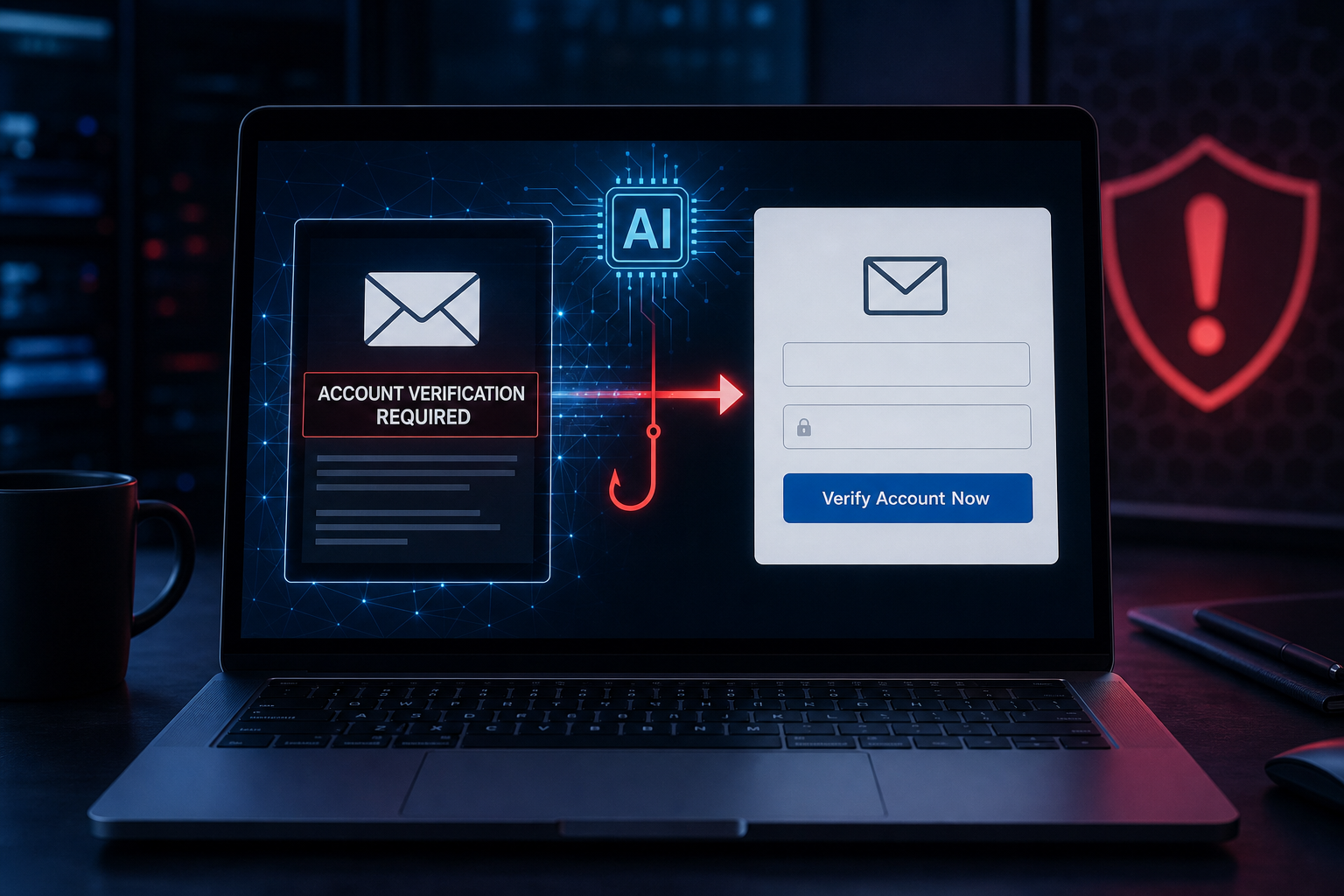
Overview
The “AI Detected That Your Email Account Requires” scam arrives with a subject such as “Account Verification Required.” It says an AI system has identified a need to verify the recipient’s email account so that all features remain available.
The message gives the recipient 24 hours to act and describes the request as part of newly updated security maintenance. It does not identify a real email provider, hosting company, administrator, or policy.
That vagueness is deliberate. A message that simply says “your email account” can be sent to Gmail, Outlook, Yahoo, cPanel, and private-domain users without the attacker knowing which service each person uses.
Clicking “Verify Account Now” leads to an IPFS-hosted phishing page that imitates cPanel Webmail. It requests the email address and password, then sends submitted credentials to the criminals controlling the campaign.
cPanel, L.L.C. is not connected to the message or fake page. Its name and interface are copied because many organizations use cPanel to manage domain-based email.
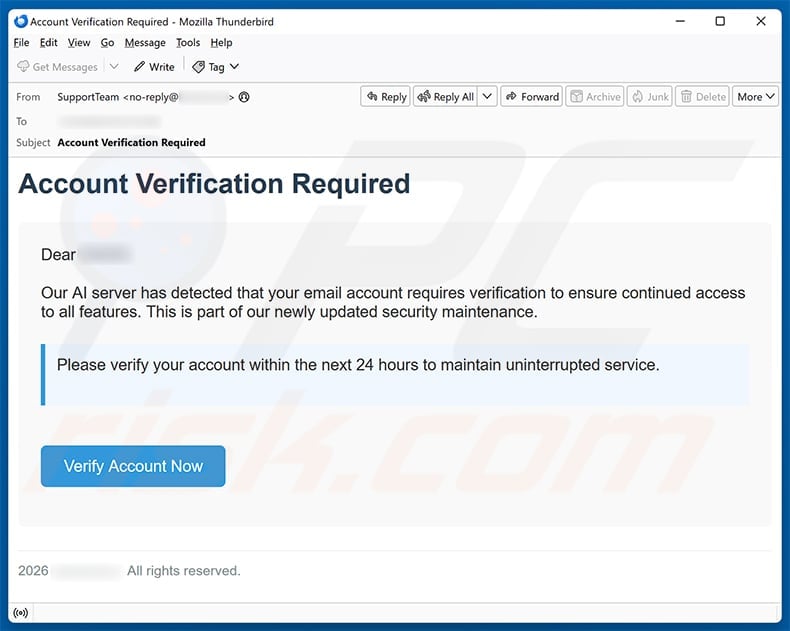
What the fake AI verification email says
The core message uses just enough technical language to sound like an automated security system. Its subject is “Account Verification Required,” and a key line says:
“Our AI server has detected that your email account requires verification.”
Verify Account Now
The rest of the email says verification is needed for continued access and must be completed within 24 hours. A generic sign-off and “all rights reserved” footer create the appearance of a formal notification without identifying who owns the rights or operates the service.
There is no scan result, account identifier, security-event number, provider name, or link to a public maintenance announcement. The term AI is being used as a credibility shortcut.
The fake cPanel Webmail destination
The linked page copies the appearance of cPanel Webmail and presents fields for an email address and password. The familiar logo and layout can distract from the actual domain in the browser’s address bar.
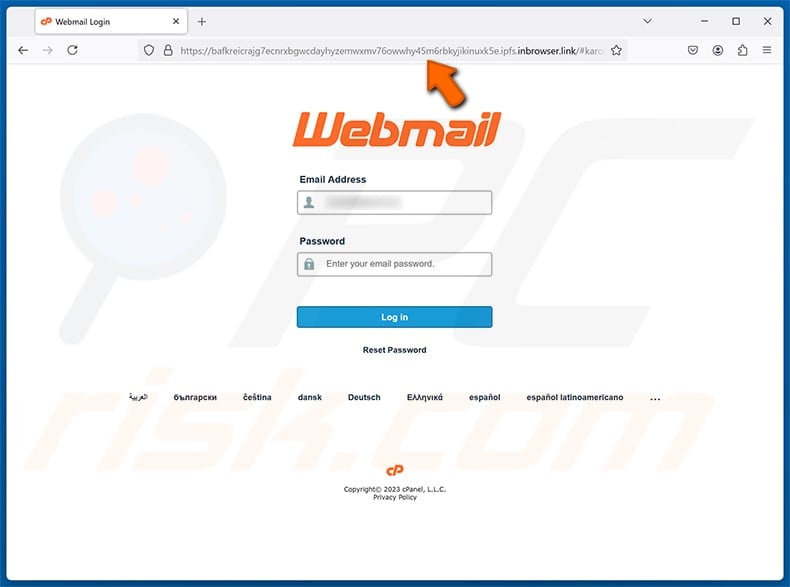
The observed page was distributed through an address ending in ipfs.inbrowser[.]link. This is not the recipient’s hosting provider, webmail server, or cPanel account domain.
IPFS is a legitimate decentralized content-sharing technology, but it can be abused to distribute phishing kits. Its presence does not make a page safe, official, or connected to the logo displayed inside it.
A genuine cPanel login normally belongs to the user’s hosting environment. cPanel’s support documentation advises customers to contact their hosting provider for access problems and says a typical secure cPanel interface listens on port 2083.
Why criminals add “AI” to old phishing tactics
The mechanics of this scam are not new. Attackers have long claimed that an automated system detected unusual activity, an expired password, a full mailbox, or a security violation.
Replacing “automated system” with “AI server” makes the message feel current. Many people assume an AI alert is based on sophisticated analysis that they cannot independently understand.
The term can also discourage questions. A recipient may think the provider changed its security process recently and that the unfamiliar request is part of a new technology rollout.
Real security systems can use machine learning, but a genuine provider should still identify itself, keep the user on its official domain, explain the event inside the authenticated account, and never need a password entered on an unrelated site.
The 24-hour deadline is a pressure tactic
The email says the recipient must verify within 24 hours to maintain uninterrupted service. This creates a fear of losing access to messages, work tools, and password recovery.
Urgency is especially effective against business users. A mailbox outage can affect customers and colleagues, so the recipient may prioritize speed over inspection.
A deadline does not prove an alert is genuine. If the account truly requires action, the same warning should appear after the user opens the official provider independently.
What happens after credentials are stolen
The attacker can attempt to enter webmail immediately. If the password also works for cPanel, hosting, cloud storage, or other services, the compromise may extend beyond the inbox.
Email access allows criminals to read private conversations, collect identity information, search invoices, and request password resets for connected accounts.
They may change recovery settings or create forwarding rules that silently send future messages to another address. This hidden access can survive a password change if the owner does not review the entire security configuration.
A compromised mailbox can then become the sender for a new wave of phishing. Messages from a real colleague, supplier, school, or customer are more likely to be trusted.
Red flags in the AI account-verification scam
- The email does not name the actual provider responsible for the account.
- An unexplained “AI server” is presented as the authority behind the request.
- The message gives a 24-hour deadline and threatens service interruption.
- The greeting and account description are generic.
- No verifiable security event, ticket number, or maintenance notice is provided.
- The verification button opens an IPFS gateway rather than the provider’s official domain.
- The destination copies cPanel branding without proving a relationship to the user’s host.
- The page asks for the existing mailbox password.
- The copyright footer does not identify a real company or support channel.
The page may use HTTPS, but the padlock only indicates that data is encrypted while traveling to that site. It does not tell you whether the recipient of the data is trustworthy.
How to verify a real security alert
Close the email and open the provider through a bookmark, official app, or address you already know. Look for a matching alert in the account’s security dashboard.
For a workplace or private-domain address, contact the administrator or hosting provider through an existing ticket system or known phone number. Do not call a number included only in the suspicious message.
Check the email’s full headers if needed. cPanel recommends reviewing the sending server and authentication results such as SPF, DKIM, and DMARC when deciding whether a cPanel-themed email is authentic.
Even passed authentication does not make every request safe. A genuine mailbox can be compromised and used to send phishing. Independent verification remains essential.
AI wording may change between campaigns
Attackers can replace the exact phrase while keeping the same fake login page. Future versions may say an AI security agent found suspicious behavior, detected an unverified mailbox, or requires a new authentication profile.
They may also change the deadline, sender, button text, and IPFS gateway. Blocking one URL is useful, but recognizing the workflow provides longer-lasting protection.
Any unexpected message that turns an AI claim into a request for a password should be treated as hostile until verified through the real service.
How The Scam Works
The campaign modernizes a familiar credential-theft sequence with AI terminology. Here is how the attack progresses from the initial email to possible account takeover.
1. The attacker sends a provider-neutral message
The email avoids naming Gmail, Microsoft, Yahoo, or a specific host. That allows one template to reach many users without accurate account data.
The attacker only needs a working email address. The generic text lets the recipient fill in the missing provider mentally.
2. The “AI server” claim creates authority
The phrase suggests that an advanced system analyzed the account and reached a technical conclusion. No evidence is supplied because the authority of the term is expected to carry the message.
This is social engineering, not an AI security report.
3. The email predicts interrupted service
The victim is told verification is necessary to retain every account feature. Fear of losing access makes the button feel like a protective action.
The message does not explain which feature is affected because specificity would make the lie easier to check.
4. A 24-hour deadline accelerates the click
The recipient is discouraged from waiting for an administrator or researching the sender. The shorter the decision, the less likely the domain and headers will be inspected.
Real security deserves prompt attention, but prompt attention means opening the genuine service independently, not obeying an unverified link.
5. The button opens an IPFS-hosted page
The destination is delivered through a public gateway. A long content identifier and unfamiliar hostname can hide the lack of any relationship to the email provider.
The page can remain visually identical even when criminals move it between gateways or campaigns.
6. cPanel branding supplies familiarity
The login form uses a logo and layout that private-domain email users may recognize. The page does not need access to a real cPanel server to copy those visual elements.
A logo is not an authentication method. The registered domain is the stronger clue.
7. The victim submits email credentials
The form requests the address and current password. It may label the action verification, but no legitimate account check occurs.
The submitted information is collected by the phishing operator.
8. The attacker attempts a rapid login
Credential-phishing kits can send new submissions to criminals in real time. The attacker may try webmail before the victim closes the fake page.
If multi-factor authentication is enabled, the criminal may trigger prompts or send another message asking for a verification code.
9. The mailbox becomes a recovery key
Once inside, the attacker can reset passwords on services tied to the email address. Security messages may be deleted or hidden with inbox rules.
The criminal can also search older mail for personal and financial information that strengthens future impersonation.
10. The stolen identity targets other people
Contacts may receive urgent documents, payment changes, or more verification links from the legitimate compromised address.
The original victim can therefore become the trusted face of the next phishing campaign without knowing it.
11. The campaign replaces its infrastructure
When one gateway or content identifier is blocked, the operator can publish a new copy and update the email link.
Organizations should block known indicators, but users should also be trained to reject password requests reached through unexpected messages.
What To Do If You Have Fallen Victim
A submitted password should be treated as compromised even if the page looked broken or displayed an error. Start recovery through the real provider immediately.
- Open the official email service from a trusted device. Use a saved bookmark, the official app, or an address confirmed by your administrator. Do not revisit the IPFS phishing link.
- Change the mailbox password. Choose a unique, long password. If the attacker already changed it, use the provider’s official recovery process or contact the hosting company.
- Change any reused credentials. Prioritize cPanel, hosting, domain registration, cloud storage, banking, workplace, and social accounts.
- Enable phishing-resistant multi-factor authentication. A passkey or hardware security key provides strong protection. An authenticator app is also preferable to password-only access.
- Revoke active sessions. Sign out all devices and remove unfamiliar trusted browsers, app passwords, connected applications, and authorization tokens.
- Review recovery information. Confirm the recovery address and phone number. Remove unknown entries and check whether the attacker changed security questions or backup codes.
- Inspect forwarding rules and mailbox delegates. Delete any rule that silently forwards, archives, marks as read, or removes security and financial messages.
- Check recent activity and message folders. Review sent mail, trash, drafts, login history, and password-reset emails. Preserve evidence before deleting suspicious items.
- Notify the hosting provider or IT team. Business accounts may require log analysis, organization-wide password resets, server inspection, and warnings to employees or customers.
- Warn contacts if the account was abused. Tell recipients to ignore recent links, attachments, invoice changes, and requests for credentials or money.
- Run a security scan when files were involved. The examined campaign uses a credential form, but related emails can include malware. Scan if you downloaded or opened anything else.
- Report the email and phishing destination. Use the provider’s “Report phishing” function, tell the organization’s security team, and submit the message to the appropriate anti-phishing reporting service.
- Expect a second approach. Criminals may send fake support messages or multi-factor prompts after a failed login. Never share codes or approve an unexpected request.
cPanel’s official phishing guidance says suspicious links and attachments should not be opened and explains how headers can help verify claimed cPanel messages.
If you only read the email, no password was exposed through that action alone. Mark the message as phishing and delete it. If you clicked but submitted nothing, close the tab, revoke any notification permission, and check for unexpected downloads.
The Bottom Line
The “AI Detected That Your Email Account Requires” email is a credential-phishing scam. Its AI claim, 24-hour deadline, and cPanel branding are persuasion tools leading to an unrelated IPFS-hosted login form.
Do not verify an account through the message. Open the real provider independently, check the browser’s domain before entering credentials, and change the password immediately if it was submitted to the fake page.








