

TikTroid.com looks like a new TikTok tool. It is not. Strip away the replacement name and what remains is the TikUnlocked funnel: the same username box, the same impossible feature menu, the same fake authorization sequence, the same “human verification” ambush, and the same affiliate offers waiting at the end.
This is not a new product inspired by an older idea. It is a renamed copy built to make an exhausted scam look fresh again. TikTroid cannot unlock anything on TikTok. Its real function is to push visitors through monetized tasks while a scripted interface pretends to connect to their accounts.
TikTroid.com Scam Overview
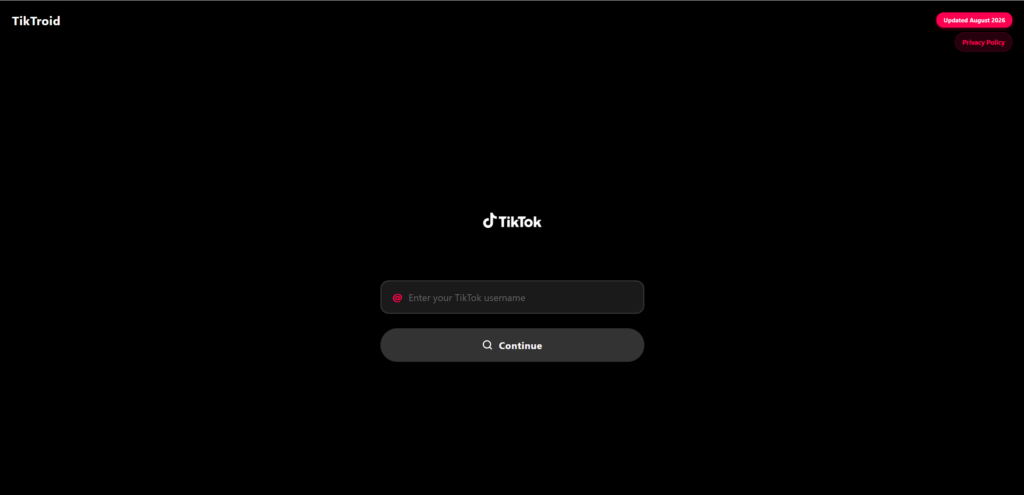
TikTroid.com is an unofficial website that uses TikTok-inspired branding, a TikTok-focused name, and a deliberately minimal interface to create the impression of a specialized account tool. The landing page asks visitors to enter a TikTok username and press “Continue.” It also displays an “Updated May 2026” label, a small detail that makes the page appear maintained, relevant, and compatible with the latest version of TikTok.
The most revealing fact about TikTroid is that its user journey is not original. It reproduces the TikUnlocked scam flow under a different name. After the username screen, users are shown an “Enable Features” menu offering “No Ads,” “Downloads,” and “Repost Views.” The descriptions claim that TikTroid can remove ads from the feed, remove restrictions or watermarks from downloads, and reveal who checked a user’s reposts. These are not broad promotional themes or vague interpretations. They are the same three options presented in the earlier TikUnlocked funnel.
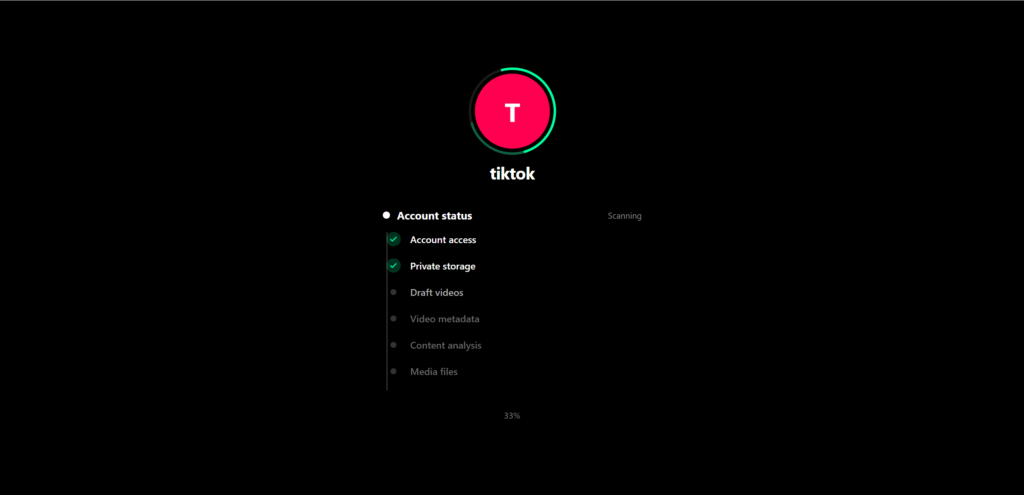
The copy continues after the feature menu. TikTroid stages a “Connecting” screen and walks through labels such as “Connecting to TikTok,” “Verifying @username,” “Authorizing No Ads,” “Authorizing Downloads,” “Authorizing Repost Views,” “Enabling features,” and “Syncing data.” Check marks appear as though TikTok has accepted each request. No official permission window appears, no account owner authenticates through TikTok, and no verifiable platform response is produced.
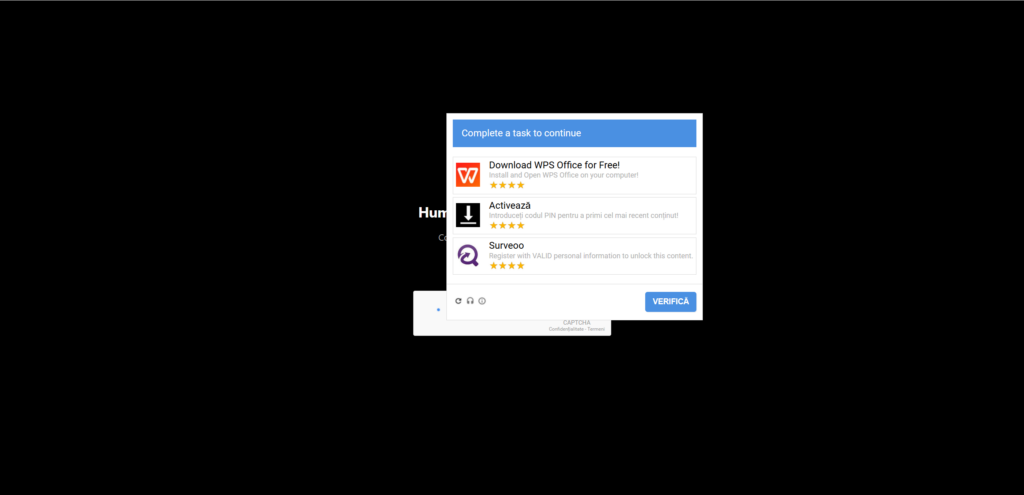
Then comes the same pivot used by TikUnlocked: a “Verify you’re human” screen that looks like a security checkpoint but opens a content locker. Instead of solving a normal CAPTCHA, the visitor is told to complete a task. Examples seen in this funnel include installing and opening WPS Office, entering a PIN to activate content, registering with personal information through a survey offer, or downloading and running the Opera GX browser. The selection can rotate by country, device, and available advertising inventory, but its purpose does not change.
Those recognizable products do not validate the TikTroid claim, and their appearance inside an advertising feed does not by itself show that their publishers created the deceptive landing page. The problem is the false connection TikTroid constructs between the offer and the alleged TikTok unlock. Installing office software or a browser cannot remove TikTok ads. Filling in a survey cannot reveal repost viewers. Entering a mobile PIN cannot authorize watermark-free downloads. The tasks matter to the funnel because they can generate affiliate revenue, not because they can change TikTok.
At first glance, there is very little to trigger immediate suspicion. The site does not begin with a long sales pitch, a payment form, or an obvious download. It starts with one piece of information that many users already consider public: their TikTok username. That low-friction opening is important because it lowers the visitor’s defenses and makes the next step feel like a normal profile lookup.
The username field also gives the funnel a sense of personalization. Once a visitor enters an account name, the site can repeat it on later screens, display a generic avatar, simulate a profile search, and produce status messages that appear to describe real technical work. None of that proves the website has authenticated the user, contacted TikTok in a meaningful way, or gained permission to change anything.
A TikTok username is an identifier, not a key. It can point to a public profile, but it cannot confirm that the person entering it owns the account. It does not grant access to private settings, allow a third party to remove advertising, create followers, reveal hidden viewers, change download permissions, or activate account features. If a username alone were enough, anyone could enter another person’s handle and manipulate that account without consent.

TikTroid exploits the gap between what a username can identify and what many users imagine a specialized tool might be able to do. The page creates the feeling that the account has been found and is ready to be modified, even though no legitimate authorization has occurred. A real third-party TikTok integration would need a transparent permission process controlled by TikTok, with the account owner signing in through an official interface and approving clearly defined access.
That legitimate process is absent from the TikTroid funnel. There is no credible reason for an outside site to request only a username, perform an animated “connection,” and then claim that a valuable account benefit can be released through an unrelated survey, app installation, trial, PIN activation, or promotional registration.
The final step exposes the purpose of the operation. Visitors are pushed toward affiliate offers under the pretext of human verification, anti-bot protection, account activation, or completion of a final security check. The tasks may vary by country and device, but the underlying arrangement remains the same: the visitor performs an action that can earn money for the promoter.
An offer may ask the user to install and open an application, create an account, complete a survey, enter contact details, subscribe to a service, request a quote, activate content through a mobile number, or begin a free trial that later renews. Affiliate networks can pay commissions for these actions because they generate customers, leads, installations, or subscriptions.
Affiliate marketing is not inherently fraudulent. A publisher can honestly recommend a product and disclose that a commission may be earned. TikTroid’s problem is the story used to produce the conversion. Visitors are not arriving because they independently want the products inside the offer wall. They are told, directly or through the structure of the funnel, that completing those offers is necessary to receive a TikTok-related reward.
That reward and the affiliate action are technically disconnected. An advertising network can confirm that an app was installed or that a survey form was submitted, but it cannot use that confirmation to change TikTok’s servers. Completing a mobile offer does not authorize TikTroid to alter an account. Registering for a trial does not unlock hidden TikTok features. Giving a lead-generation company a phone number cannot create legitimate engagement or reveal private platform data.
The offer wall is therefore not a bridge to the promised result. It is the destination. Everything before it—the TikTok-style branding, username lookup, progress messages, verification language, and countdown-like momentum—exists to make the visitor reach that monetized stage.
TikTroid is the clearest demonstration of how quickly this model can be cloned, renamed, and relaunched. TikUnlocked supplied the template; TikTroid replaces the identity while preserving the promise, screens, sequence, and monetized destination. A new domain and a new heading do not create a new service when the machinery underneath is unchanged.
This is why TikTroid should be understood as more than one questionable webpage. It represents a repeatable affiliate scam model. A social media ad creates curiosity, an unofficial website borrows the platform’s identity, a username makes the experience feel personal, simulated processing creates anticipation, and a last-minute verification wall converts that anticipation into affiliate revenue.
The user receives no credible evidence that the account was modified. The promoter, meanwhile, may earn money from every eligible installation, registration, subscription, or completed offer. If one domain begins attracting warnings, the same pages can be transferred to another name with minimal effort.
Is TikTroid.com Legit?
No, TikTroid.com should not be treated as a legitimate TikTok account tool. It is not hosted on TikTok’s official domain, does not show a valid TikTok authorization process, and cannot gain account-level control from a public username. Its funnel directs users toward affiliate actions rather than providing a verifiable TikTok service.
The word “official” in a search title, advertisement, page heading, or browser result does not establish an official relationship. Website operators can describe their own pages however they choose. TikTok’s name, logo, colors, and visual language can also be copied without permission. The only meaningful question is whether TikTok itself identifies the service, controls the authorization, and grants the precise capabilities being advertised.
TikTroid provides no persuasive answer to that question. It does not show who operates the alleged tool, what technical connection exists, which TikTok permissions are requested, how the promised result is delivered, or what a visitor can do if the account is not changed after completing the required tasks.
The lack of transparency becomes even more serious when the visitor reaches third-party offers. At that point, the user may be dealing with several different entities: the landing-page operator, the affiliate tracker, the offer-wall provider, the advertiser, a data broker, and possibly a mobile billing company. The simple promise at the beginning conceals a far more complicated commercial chain.
A legitimate product would explain that chain before asking the user to participate. It would describe the service honestly, identify its operator, disclose any affiliate relationship, present clear conditions, and avoid suggesting that unrelated advertising tasks can activate TikTok features. TikTroid instead relies on momentum and ambiguity.
The clearest verdict comes from comparing what the website can actually observe with what it claims or implies it can deliver. It can receive a username. It can display web animations. It can redirect a visitor. It can load offers selected by an advertising network. None of those functions gives it control over TikTok.
How the TikTroid.com Scam Works
Step 1: A Social Media Ad Sells the Shortcut
The TikTroid funnel usually begins before the visitor reaches the website. A social media advertisement, sponsored video, comment, or promotional post claims that a secret web tool can unlock extra TikTok abilities. The pitch works because the alleged benefits sound just plausible enough to tempt a quick test while still being valuable enough to earn the click.
The funnel centers on three specific promises carried over from TikUnlocked: removing ads, removing restrictions or watermarks from downloads, and revealing who viewed a user’s reposts. The advertisement may call the method free, secret, newly updated, limited, or known only to a small group of users. None of those labels explains how an unrelated website could obtain the necessary authority.
Calling the tool “secret” helps explain why the visitor has never heard of it. Calling it “updated” suggests that previous compatibility problems have been solved. Calling it “limited” pressures people to act before checking whether the claim makes technical sense.
The ad does not need to explain the affiliate offers waiting at the end. In fact, revealing them too early would weaken the conversion rate. The first objective is simply to generate the click by making the promised TikTok benefit feel immediate and attainable.
Step 2: The TikTroid Name Borrows Trust From TikTok
The domain name is carefully chosen. “TikTroid” sounds like a TikTok utility, Android application, growth engine, or technical extension. It is close enough to the platform’s identity to feel familiar while remaining different enough to exist on an unrelated domain.
This naming strategy does a great deal of work. Users arriving from a fast-moving social media ad may not stop to examine whether the address belongs to TikTok. They see “Tik,” recognize the color palette or visual style, and assume that the site is at least connected to the platform in some unofficial but functional way.
That assumption is exactly what the funnel needs. TikTroid does not have to convince visitors that it is owned by TikTok if it can persuade them that it has special access, a technical workaround, or a connection powerful enough to deliver the result.
The site’s clean presentation strengthens the impression. Scam pages are not always filled with spelling mistakes and flashing banners. Modern templates can be visually restrained, responsive, and convincing. A simple design may feel safer precisely because it does not resemble the chaotic scam pages users have been taught to avoid.
Step 3: The Username Field Lowers the Visitor’s Guard
TikTroid asks for a TikTok username and presents a Continue button. This request appears low-risk because usernames are usually visible to the public, yet the field serves several purposes inside the scam.
First, it creates participation. The user is no longer reading an advertisement; they have begun a personalized process. Second, it gives later screens a value they can repeat, making a generic page look connected to a specific account. Third, it establishes a small commitment that makes the next click easier.
The site may appear to search for the username, verify the profile, or establish a connection. Even if it can retrieve public information such as a display name or avatar, that does not prove account access. Public profile data can be viewed without permission and should never be confused with authentication.
TikTroid does not need the password at this stage because the goal is not to perform the advertised account modification. The username is enough to support the illusion. It lets the page say, in effect, “We found you,” without answering the more important question: “What authority do you have to change anything?”
Step 4: The Site Creates the Feeling of Account Recognition
After the username is submitted, the experience can become more personalized. The handle may be displayed beside a profile-style icon, a confirmation message, or a status indicator. The site may ask the visitor to confirm that the correct account was found.
This stage is persuasive because it contains a small amount of truth. A website may be able to identify a public TikTok profile. The deception begins when that ordinary lookup is presented as evidence of a deeper connection.
Finding a public account is not the same as authenticating its owner. Displaying a username is not the same as opening a secure session. Showing a profile picture is not the same as receiving permission to access private settings. The TikTroid funnel blurs these differences because most users do not think in terms of authorization scopes, platform APIs, or server-side permissions.
The interface only needs to feel technical enough that the visitor accepts the transition from “profile found” to “account ready.” Once that psychological jump has occurred, the promised feature begins to seem plausible.
Step 5: TikTroid Copies TikUnlocked’s Three “Features”
The next screen makes the copy unmistakable. Under “Enable Features,” TikTroid presents the same three selections used by TikUnlocked:
- No Ads, described as removing all ads from the TikTok feed.
- Downloads, described as removing restrictions or watermarks from downloads.
- Repost Views, described as showing who checked the user’s reposts.
These options are not evidence of hidden capabilities. They are buttons inside a webpage controlled by TikTroid. Selecting them changes only what the page displays next.
Choice is a powerful tool in deceptive interfaces. When users select a feature or quantity, they begin to think about how they will use the result rather than whether the site can deliver it. The question changes from “Is TikTroid real?” to “Which option should I choose?”
The selection also increases emotional investment. A visitor who has chosen a desired outcome, confirmed a username, and pressed several buttons feels closer to completion. Each step is simple, but together they create momentum that makes abandoning the process harder.
Nothing on this screen changes the technical reality. Clicking a card or moving a quantity slider only changes the state of the TikTroid webpage. It does not alter TikTok’s database or grant new permissions.
Step 6: Fake Processing Turns Waiting Into Proof
After the user presses “Enable Features,” TikTroid launches the same staged sequence seen on TikUnlocked. The page says it is “Connecting to TikTok,” “Verifying @username,” “Authorizing No Ads,” “Authorizing Downloads,” “Authorizing Repost Views,” “Enabling features,” and “Syncing data.” Check marks appear beside completed lines while a spinner advances to the next one.
This sequence is designed to look like evidence. The visitor sees activity and assumes that something must be happening behind the scenes. In reality, a webpage can run the same timed animation for any username, including one that does not exist.
The language is intentionally technical but vague. “Connecting to servers” does not identify which server responded. “Authorizing account” does not show who issued the authorization. “Applying changes” does not name an official platform endpoint or provide a transaction that can be verified.
Real account changes do not become legitimate because a progress bar reaches 100 percent. The page would need valid credentials, approved permissions, a supported TikTok capability, and a confirmed response from TikTok. TikTroid shows no credible evidence of that chain.
The animation has another purpose: it creates the impression that the difficult part is already finished. By the time the site introduces human verification, the user believes the reward has been prepared and only needs to be released.
Step 7: The “Human Verification” Appears at the Perfect Moment
The verification prompt does not usually appear at the beginning, where it might cause visitors to leave. It appears after the site has displayed progress, recognized the username, and suggested that the requested result is ready.
The message may explain that TikTroid needs to prevent bots, protect server capacity, confirm that the request came from a real person, or comply with security requirements. These explanations sound reasonable because genuine websites do use CAPTCHAs and anti-abuse systems.
However, a real CAPTCHA asks the user to complete a direct challenge: check a box, identify images, type characters, or perform another short test. It does not require the user to install multiple apps, subscribe to trials, provide extensive personal information, or activate mobile offers.
TikTroid replaces authentication with monetization. The “verification” label makes commercial tasks feel like a security requirement, even though the actions are valuable primarily because they can generate affiliate commissions.
Step 8: The Affiliate Offer Wall Becomes the Real Product
Once the visitor enters the verification stage, the clean TikTroid experience gives way to the same kind of affiliate content locker used by TikUnlocked. The available tasks can change based on location, operating system, browser, device type, and current advertising inventory.
Captured versions of the copied funnel have displayed an installation for WPS Office, a PIN-based content activation, a Surveoo registration requesting valid personal information, and an Opera GX download. Another visitor may receive a different survey, app, trial, browser download, mobile subscription, or phone-number request. The variation helps the funnel monetize users in different markets without changing the TikTroid landing page.
Each offer has a measurable action attached to it. Advertisers may pay for a valid lead, completed registration, first app launch, subscription, purchase, or qualified customer. Tracking parameters connect that action to the affiliate responsible for sending the traffic.
The operator does not need every visitor to complete the entire wall. Enough conversions across a large volume of social media traffic can make the funnel profitable. The promised TikTok reward is therefore a customer-acquisition device for unrelated offers.
This explains why the tasks can feel random. There is no logical relationship between a TikTok account feature and a survey about shopping habits, a mobile game, a browser installation, or a streaming trial. The relationship is financial, not technical.
Step 9: Completed Offers May Fail to Register
Visitors who complete an offer may discover that TikTroid still shows the verification as unfinished. This can happen because affiliate tracking depends on many conditions: cookies must remain active, the offer must be available in the user’s region, the person must qualify as a new customer, the app may need to be opened for a certain period, and every required field must match the advertiser’s rules.
An ad blocker, privacy setting, interrupted redirect, previously installed application, reused email address, or rejected survey profile can prevent credit. The user sees only a failed task, not the complex tracking logic behind it.
That failure creates an opportunity to display another offer. The visitor may be told to try a different task, complete additional deals, wait for verification, or repeat the process. Each new attempt creates another chance for the affiliate to earn money.
Even when a conversion registers successfully, TikTroid still lacks the authority to deliver the original promise. The offer wall can mark an advertising event as complete, but it cannot turn that event into a TikTok account modification.
Step 10: The Promised TikTok Benefit Never Arrives
At the end of the funnel, the user may encounter an endless verification loop, an error, another offer, a new waiting period, or a vague instruction to check the account later. What they do not receive is credible proof that TikTroid delivered the promised benefit.
The site may blame demand, server delays, an incomplete task, a tracking issue, or TikTok itself. These explanations keep the failure focused on the user or a technical problem rather than on the original claim.
This is the final asymmetry of the scam. The promoter’s reward can be recorded the moment an eligible offer is completed. The visitor’s reward remains conditional, unverifiable, and easy to postpone indefinitely.
The Technical Reason TikTroid Cannot Do What It Promises
TikTroid’s claims fail because the website does not establish the authority needed to modify a TikTok account. Modern platforms separate public identity from authenticated access. A username belongs to the first category; account control belongs to the second.
Public information can include a handle, profile image, biography, follower count, public videos, and engagement totals. Websites may retrieve or display some of that information without logging into the account. None of it gives the website permission to change settings or access private data.
Authenticated access requires the account owner to prove identity and approve a defined relationship. A legitimate third-party application does not simply announce that it is “connecting.” It redirects through an official authorization process, identifies itself, shows the permissions it wants, and gives the user a meaningful choice.
Even an authorized application is limited to capabilities the platform supports. It cannot invent a permission for removing all feed ads, revealing private repost viewers, bypassing download restrictions, stripping watermarks, or activating a hidden feature simply because its own landing page offers that option.
The “Repost Views” claim is especially revealing. A public username cannot expose private or unavailable viewer data. A progress animation cannot bypass privacy controls, and a completed survey cannot create a new permission. The “No Ads” and “Downloads” claims fail for the same reason: TikTroid is a website displaying choices in a browser, not an authorized controller of the TikTok app or its account settings.
The absence of a password does not make TikTroid trustworthy. “No password required” is often presented as proof of safety, but in this type of funnel it can simply mean the site never intended to perform the account-level action in the first place. The username is enough to personalize the deception, while the affiliate tasks generate the revenue.
TikTroid Is TikUnlocked With a Different Name
TikTroid is not merely similar to TikUnlocked. It is TikUnlocked repackaged. The landing screen still asks for a TikTok username. The next stage still offers “No Ads,” “Downloads,” and “Repost Views.” The connecting screen still performs the same fake authorizations. The alleged security check still turns into an affiliate offer wall. The product name changes; the conversion machinery does not.
That exact duplication matters. Two scams can independently use a username field or a fake CAPTCHA, because those devices are common. Reproducing the entire order of screens, the same unusual trio of benefits, the same authorization theater, and the same content-locker ending is far more specific. TikTroid is best understood as a renamed deployment of the TikUnlocked scam rather than a separate invention.
These networks are built for speed. A landing page can be copied, connected to a different domain, given a fresh brand, and promoted with new social media ads in a short period. The offer wall does not need to be rebuilt because it is supplied by a separate affiliate or content-locking system.
This modular structure makes the scam resilient. When one domain attracts negative reviews, loses its advertising account, or is blocked by a security provider, traffic can be shifted to another. The operators do not need to repair the reputation of the old name; they can launch a replacement before most users realize the previous version existed.
The “Troid” name gives the recycled page a different personality. It sounds technical, perhaps like an Android utility, an automation engine, or an advanced social media application. That surface-level change is enough to make a warning about TikUnlocked look irrelevant to someone who sees a TikTroid advertisement for the first time.
What TikTroid does not change is more important than what it does. It does not add a genuine TikTok login, an official authorization screen, a documented integration, a working feature, a transparent operator, or a technical explanation. It simply gives the same unsupported claims a fresh domain and sends the same kind of traffic toward monetized offers.
The same network model appears far beyond TikTok. Similar pages promise Instagram followers, Facebook profile viewers, game currency, premium app upgrades, gift cards, product giveaways, streaming access, and download tools. The emotional hook changes, but the visitor still ends up behind a verification wall filled with monetized tasks.
The identical funnel establishes a cloned operation, but it does not by itself identify the individual or legal entity behind every domain. Templates, scripts, advertising accounts, domains, and offer-wall services can be shared, sold, or redeployed. The defensible conclusion is operational: TikTroid reuses the TikUnlocked scam system and belongs to the same clone-driven ecosystem, regardless of how ownership is divided behind the scenes.
That distinction also prevents innocent advertisers from being misidentified as the operators. A legitimate app or service may appear inside an affiliate wall without knowing that a publisher used a fake TikTok promise to generate the click. The presence of a recognizable company does not validate TikTroid, and TikTroid’s deception does not automatically make every advertised company part of the scam.
Why the TikTroid Funnel Is So Convincing
TikTroid succeeds by asking for belief in small steps rather than one enormous leap. Entering a public username feels harmless. Confirming a profile feels normal. Watching a progress bar feels passive. Completing one final verification appears reasonable after everything else has supposedly succeeded.
Each step prepares the next. The visitor does not begin by agreeing to install apps or share personal information. They begin by chasing a TikTok benefit and gradually accept more intrusive requests because the reward appears closer.
The interface also uses the authority of technology. Most users cannot see what happens between a browser and TikTok’s servers, so animated status messages can fill that knowledge gap. The page tells a technical story, and the visitor has few visible signals with which to challenge it.
Social proof may add another layer. Ads or landing pages can show comments, testimonials, user counters, recent activity notifications, or claims that thousands of people have already completed the process. These elements are easy to fabricate and should not be treated as independent evidence.
Urgency makes verification less likely. A limited-time label, an “updated” date, a countdown, or a claim that only a certain number of requests remain encourages immediate action. The visitor is pushed to finish before checking the domain, searching for complaints, or asking whether the reward is technically possible.
The funnel also benefits from sunk-cost pressure. After spending ten minutes, completing a survey, or installing an app, users naturally want the effort to produce a result. That desire can make a second or third offer seem preferable to walking away, even though continuing only increases the potential loss.
Major Red Flags on TikTroid.com
The first red flag is the unrelated domain. TikTroid.com is not TikTok.com. A name that resembles a platform does not establish authorization, and the website offers no persuasive proof of an official partnership.
The second is the username-only entry point. A public handle cannot authenticate ownership or grant permission to alter an account. Any site that treats it as sufficient for an account-level change is misrepresenting what the information can do.
The third is vague technical language. Words such as connecting, syncing, generating, authorizing, or processing sound impressive but mean little without a real permission screen and a verifiable platform response.
The fourth is the last-minute verification barrier. Genuine anti-bot checks are short tests. They do not require visitors to become leads, customers, subscribers, or software installations.
The fifth is the absence of a logical relationship between the task and the reward. No mobile game, survey, shopping registration, browser download, or streaming trial can modify a TikTok account. When the required action has no technical connection to the promised result, the explanation is almost always financial.
The sixth is the rotating nature of the offers. A real TikTok feature activation would use a consistent, documented process. An affiliate wall changes according to advertising inventory because monetization, not account functionality, determines what appears.
The seventh is the lack of accountability. Visitors have no clear company to contact, no service guarantee, no transparent delivery method, and no meaningful remedy when the feature fails to appear.
The eighth is the most damning: the site is a renamed copy of TikUnlocked. A genuine new product would have its own functionality, documentation, permissions, and delivery mechanism. TikTroid inherits the earlier scam’s screens almost line for line, including the affiliate wall that exposes the real business model.
What Are the Risks of Using TikTroid.com?
Personal Information Harvesting
The username may be public, but later offers can request names, email addresses, phone numbers, postal codes, dates of birth, home addresses, employment details, and other information. Each completed form can place the user into another marketing database.
That data can lead to spam, telemarketing, targeted advertising, and phishing. A follow-up scam becomes more convincing when the sender already knows that the person uses TikTok and recently tried to claim a particular feature or reward.
Unwanted Subscriptions and Charges
Some offers use free or inexpensive trials that convert into recurring billing. The subscription terms may be presented in smaller text than the headline benefit, and users focused on TikTroid’s promised result may rush through the checkout.
Mobile offers can create charges through carrier billing or premium services. A PIN sent by text may appear to verify identity while actually confirming a paid subscription. These charges can be overlooked because they appear on a phone bill rather than a bank statement.
Unwanted Software
App-install offers can send users through several redirects before the final download. Even when the application is legitimate, the user is installing it for a misleading reason and may grant permissions without considering whether the app is actually wanted.
Browser extensions and desktop programs deserve particular caution because they may change search settings, notification permissions, startup behavior, or data collection. Downloads from unofficial sources can introduce more serious security risks.
Credential Theft
The visible TikTroid page may ask only for a username, but later pages can imitate TikTok or other services and request a password, one-time code, or email login. Visitors who believe the account is already connected may enter those credentials without realizing they have reached a different domain.
A stolen email password can be especially damaging because email controls password resets for many other accounts. Reused passwords can turn one deceptive form into multiple account takeovers.
Account Phishing and Impersonation
The copied funnel begins with a public username, but later redirects or follow-up messages can use that handle to make phishing more convincing. A fake support page may claim that the “unlock” failed and request a TikTok password, email login, recovery code, or one-time security code.
The original username entry does not authorize account access. The danger comes when a user, persuaded that TikTroid has already established a connection, trusts a later request for credentials. Any password or one-time code entered outside TikTok’s official sign-in flow should be treated as exposed.
More Scams After the First Scam
Victims may later be contacted by people claiming to provide support, release the missing feature, refund charges, or recover a compromised account. These recovery messages can demand another fee or request remote access to the device.
The safest response is to use official account-recovery, banking, carrier, and consumer-protection channels. Anyone who promises a guaranteed recovery in exchange for upfront payment should be treated with extreme caution.
What To Do If You Have Fallen Victim to the TikTroid Scam
- Stop the process and close every TikTroid-related page. Do not complete another offer because the site says you are one step away. The apparent progress is designed to keep you engaged, and another task only creates another opportunity for data collection, installation, or charges.
- Work out exactly what information you entered. Separate a public username from more sensitive data. Write down whether you provided an email address, phone number, password, one-time code, home address, card number, or identity information. The response should match the information that was actually exposed.
- Do not panic if you entered only a TikTok username. A username alone normally does not allow someone to log into the account. It can still help scammers personalize future messages, so remain cautious, but the handle itself is not equivalent to a password.
- Change your TikTok password immediately if you disclosed it. Open the official TikTok app or type the official address yourself. Create a new, unique password that has never been used on another site. Do not use a password-reset link sent by TikTroid or an offer provider.
- Change every reused or similar password. If the exposed password was also used for email, social media, shopping, cloud storage, or financial services, change those accounts as well. Start with email because it can be used to reset access elsewhere.
- Enable two-step verification. Add a second layer of protection to TikTok, email, and other important accounts. Review recent security activity and remove devices or sessions you do not recognize.
- Review third-party app permissions. In TikTok, open the security and permissions settings and inspect connected apps and services. Remove anything unfamiliar or no longer needed. Do the same for Google, Apple, Facebook, or other accounts used during the offers.
- Uninstall apps downloaded for verification. Check the installation date and publisher of every recent app, browser extension, and desktop program. Remove anything unwanted or unfamiliar. Deleting an application does not cancel a paid subscription, so handle billing separately.
- Run a trusted security scan. Update the operating system, browser, and security software before scanning. If a page instructed you to disable protection, paste commands, install a profile, or grant remote access, disconnect the device from the internet and seek qualified technical help.
- Check browser notification permissions. Scam and affiliate pages often ask permission to send notifications. Remove unfamiliar websites from the browser’s allowed-notification list, clear suspicious extensions, and restore search or homepage settings that changed.
- Inspect your phone bill. If you entered a mobile number, received a PIN, or activated content, contact the carrier and ask about premium SMS, carrier billing, or recurring third-party services. Request cancellation and consider blocking premium services.
- Cancel every trial or subscription individually. Review confirmation emails, app-store subscriptions, PayPal automatic payments, card statements, and mobile billing. Use each provider’s official cancellation process and keep screenshots or confirmation numbers.
- Contact your bank or card issuer if payment details were exposed. Use the official phone number printed on the card or available in the bank’s app. Explain that the details were submitted through a misleading online funnel and follow the bank’s advice about locking or replacing the card.
- Dispute charges you did not authorize. Report unknown transactions promptly. Do not wait for TikTroid to deliver the promised feature or for an unknown support agent to issue a refund.
- Prepare for phishing and spam. Treat messages about TikTok verification, prizes, refunds, deliveries, account warnings, or final activation as suspicious. Do not share passwords, security codes, or card details with anyone who contacts you unexpectedly.
- Save evidence. Keep screenshots of TikTroid, the social media advertisement, offer pages, receipts, subscription terms, text messages, and confirmation emails. Record the dates and web addresses while they are still available.
- Report the original advertisement. Use the social media platform’s reporting tools and choose the closest category for scam, fraud, impersonation, or misleading content. Reporting the ad can interrupt the traffic source even if the domain remains online.
- Report the website and any financial loss. Contact the appropriate consumer-protection, cybercrime, or fraud-reporting authority in your country. Provide the saved evidence, the amounts involved, and the names of any services that charged you.
- Ignore recovery scammers. People who claim they can hack the scammers, guarantee a refund, or restore the missing TikTok benefit for an upfront fee are likely attempting a second scam. Work only with your bank, carrier, official platform support, law enforcement, or established consumer-protection services.
How to Avoid the Next TikTroid Clone
Do not judge the next site only by its name. TikTroid may disappear while the same pages return under a new domain. Focus on the structure of the offer.
Ask whether the promised action requires real account authorization. If the site claims it can modify an account from a public username, the claim is already failing a basic security test.
Check the web address before interacting. TikTok features and account notices should be verified through TikTok’s official application or domain. A similar-sounding address is not enough.
Treat “human verification” offers as a stop sign. The moment a supposed CAPTCHA requires an app, trial, survey, phone number, PIN, purchase, or subscription, close the page.
Ignore animated proof. Progress bars, live counters, recent-user popups, and technical messages are elements of the website, not independent confirmation from TikTok.
Search for the exact domain and the word “scam” before submitting information. A new domain may not have many reports, so also search distinctive phrases from the page and compare the funnel with known content-locker scams.
Never enter a password or one-time code on a page reached through a social media ad. If an account genuinely needs attention, open the official app independently and check notifications there.
Evaluate each advertised offer on its own. If you would not install the app, join the trial, or provide the information without the promised TikTok reward, do not do it to satisfy a verification wall.
Frequently Asked Questions About the TikTroid.com Scam
What is TikTroid.com?
TikTroid.com is an unofficial TikTok-themed website that asks visitors to enter a TikTok username and continue through a process presented as an account tool. The funnel ultimately pushes users toward verification tasks and affiliate offers rather than delivering a credible TikTok feature.
Is TikTroid.com a scam?
Yes. TikTroid uses a misleading TikTok-related promise to drive users into monetized third-party offers. It cannot gain account-level authority from a public username, and completing unrelated advertising tasks cannot unlock or modify TikTok.
Is TikTroid owned by TikTok?
No evidence shows that TikTroid.com is owned, approved, or operated by TikTok. It is hosted on a separate domain and does not display a legitimate TikTok-controlled authorization process.
Why does TikTroid ask for my TikTok username?
The username personalizes the funnel. It allows the website to repeat the handle, simulate a profile lookup, and make later screens appear connected to a real account. A public username does not give TikTroid permission to change that account.
Can TikTroid hack my account with only a username?
A username alone is generally public and is not enough to log into an account. The danger increases if you later enter a password, email login, one-time code, recovery information, or approve an unfamiliar connected application.
What features does TikTroid claim to unlock?
TikTroid copies TikUnlocked’s three-option menu: “No Ads,” “Downloads,” and “Repost Views.” It claims these choices can remove feed advertising, remove download restrictions or watermarks, and show who checked a user’s reposts. Selecting the options does not grant TikTroid the permissions required to deliver them.
Can TikTroid unlock hidden TikTok features?
No. An unrelated website cannot invent or activate TikTok permissions through a username field. Account features are controlled by TikTok and cannot be released by completing surveys or installing apps.
Why does TikTroid show a processing animation?
The animation creates the impression that the site is connecting to TikTok and preparing the requested result. A web page can display the same progress messages without performing any real account operation.
Why does TikTroid require human verification?
The verification step is used to introduce affiliate offers. Genuine CAPTCHAs ask users to solve a direct challenge. TikTroid-style offer walls ask for commercially valuable actions such as installations, registrations, surveys, trials, or subscriptions.
What is an affiliate offer wall?
An affiliate offer wall is a page containing actions that can generate commissions for the publisher. The advertiser may pay when a user installs an app, creates an account, becomes a qualified lead, starts a subscription, or completes a purchase.
Is affiliate marketing illegal?
No. Affiliate marketing is legitimate when the commercial relationship is disclosed and products are promoted honestly. TikTroid’s deception comes from presenting the offers as security steps needed to obtain a TikTok benefit the site cannot deliver.
Are the apps shown by TikTroid malware?
Not necessarily. Legitimate applications can appear through advertising networks without being responsible for TikTroid’s claims. Users should still avoid installing software they do not want and should verify every download through an official source.
Will completing all TikTroid offers unlock the result?
No credible mechanism connects an affiliate conversion to a TikTok account change. Offers may fail to track, lead to more tasks, or register successfully without producing the promised benefit.
Why does TikTroid say a task did not complete?
Affiliate tracking can fail because of browser settings, geographic restrictions, previous installations, eligibility rules, cookies, or interrupted redirects. The failure may cause the site to display more offers, creating additional opportunities for monetization.
Is TikTroid safe because it does not ask for a password?
No. Avoiding a password request does not make the funnel legitimate. Users can still lose money, activate subscriptions, install unwanted software, expose personal information, or encounter credential phishing on later pages.
What should I do if I entered only my username?
Close the site and remain alert for targeted phishing. You usually do not need to change your password solely because you entered a public handle, provided you did not disclose credentials, approve a connected app, or notice suspicious account activity.
What should I do if I entered my TikTok password?
Change it immediately through the official TikTok app, enable two-step verification, review active devices, and remove unfamiliar sessions or connected apps. Change any other account using the same password.
What should I do if TikTroid charged my card?
Contact the card issuer immediately through an official channel. Review transactions, ask whether the card should be replaced, cancel related subscriptions, and dispute unauthorized charges promptly.
What should I do if I entered a phone number and PIN?
Contact your mobile carrier and ask whether a premium service or carrier-billed subscription was activated. Request cancellation and consider blocking premium billing on the number.
Can TikTroid return under another name?
Yes, and TikTroid itself demonstrates the tactic. It is the TikUnlocked funnel returned under a different name. The same pages can be copied again, placed on another domain, and promoted as a new tool once the current brand accumulates warnings.
How can I report TikTroid.com?
Report the social media advertisement, preserve screenshots and receipts, notify TikTok if its branding is being misused, and submit the incident to the relevant fraud or consumer-protection authority in your country.
The Bottom Line
TikTroid.com is not a powerful TikTok utility hiding behind a simple username form. It is TikUnlocked with the label changed: the same impossible feature menu, the same fake technical progress, and the same last-minute verification barrier used to turn visitors into installations, leads, subscribers, and other paid conversions.
A public username cannot authorize TikTroid to change an account, and no survey, trial, app download, or PIN activation can create the missing permission. The processing screens are theater; the offer wall is the business.
Avoid TikTroid, do not complete its verification tasks, and secure any information or payment method already exposed. The name is new; the trap is not. When a supposed TikTok tool ends with surveys, downloads, PIN activations, or trials, nothing is being unlocked except another affiliate commission.








