

A final billing attempt has supposedly failed three times, leaving your computer exposed to hackers, spyware, and data theft. Update Billing and Secure My Account Now promise to restore protection before something goes wrong.
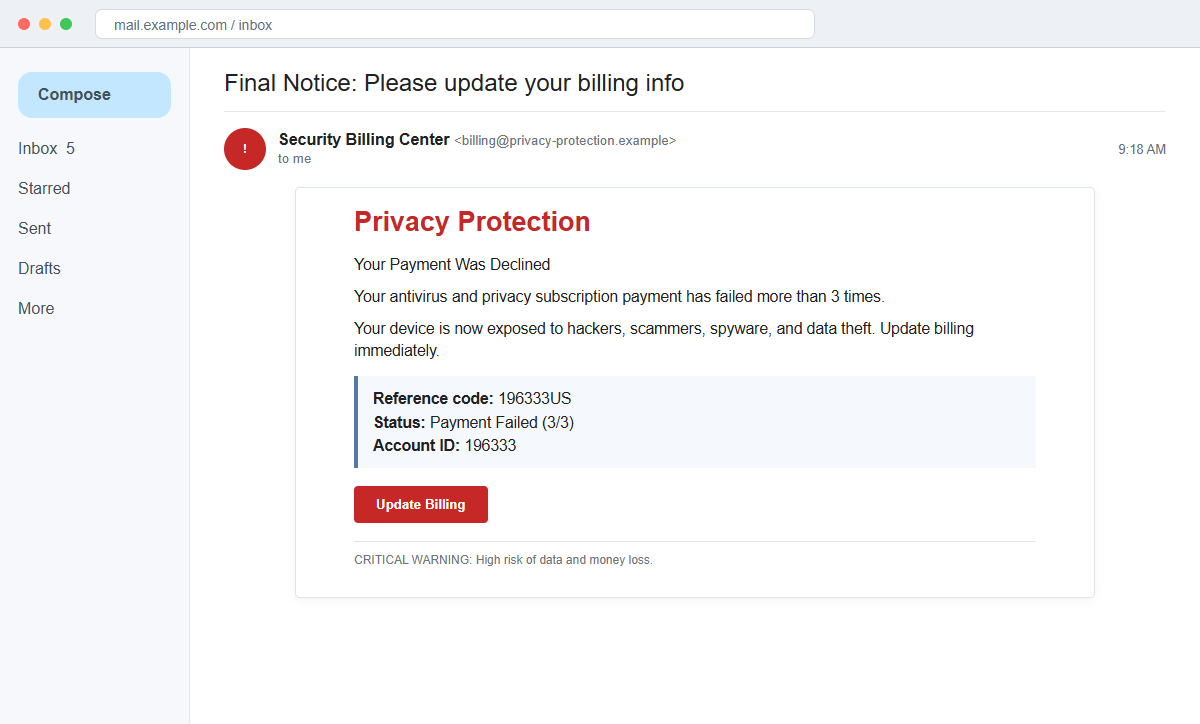
The Your Antivirus Payment Was Declined email scam does not identify a real security subscription. It combines a fake renewal problem with an alarming device warning to drive the recipient toward a payment or sales page.
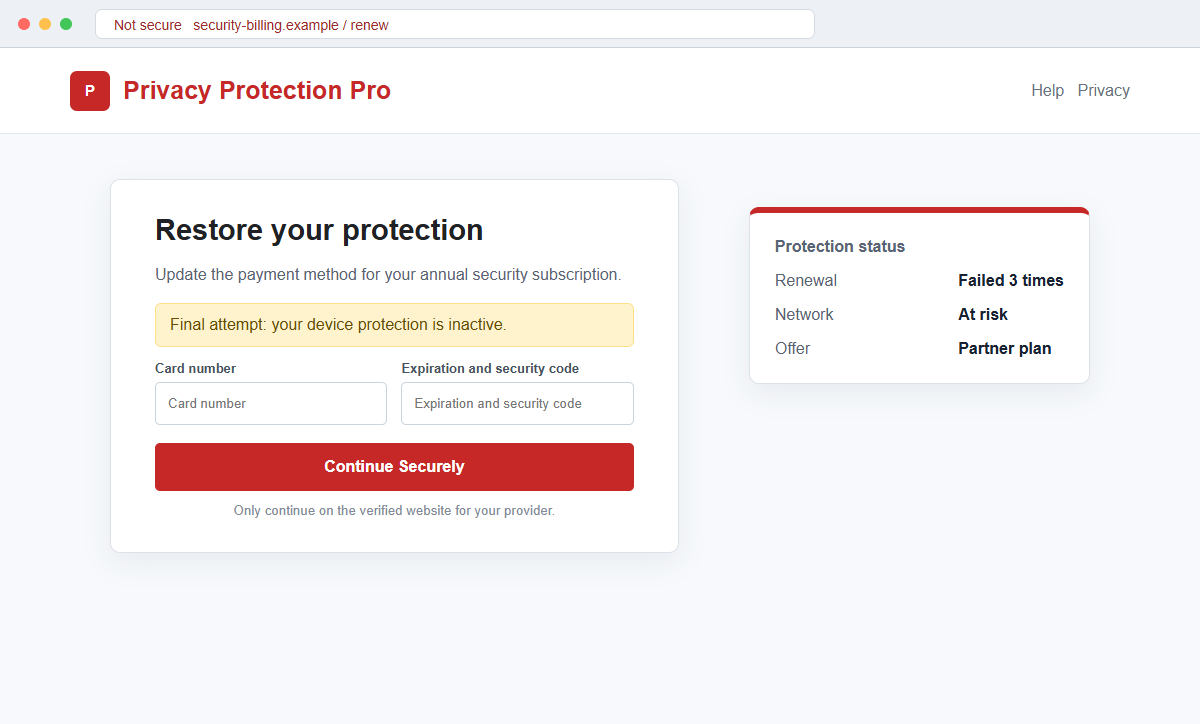
Some versions can seek card details on a fraudulent checkout. Another observed route sent visitors through a deceptive intermediary toward a real antivirus purchase using an affiliate identifier, allowing the operator to profit from fear.
The campaign is not connected to a legitimate cybersecurity provider. The linked destinations can change, and the fact that a known product eventually appears does not make the email or its invented billing history genuine.
Overview
Three failed attempts make the renewal look real
The message says an annual antivirus and privacy subscription failed to renew more than three times. Reference code 196333US, Account ID 196333, and Payment Failed (3/3) add the appearance of an established billing record.
Those values are printed in the email and do not come from the recipient's actual account. The installed security app and independently opened vendor portal are the places where a real license or renewal appears.
A billing issue is turned into a security emergency
The email claims the device is now exposed to hackers, scammers, spyware, phishing, and money loss. It treats a declined payment as proof that protection has ended and that an attack is imminent.
Even an expired security subscription cannot give an email sender a live diagnosis of the device. The warning block is designed to produce fear, not to report scan evidence.
The destination can monetize the click in different ways
A fraudulent checkout can collect the card number, expiration date, security code, billing address, and contact details. A different version may redirect to a genuine product through an affiliate link so the campaign earns commission from an unnecessary purchase.
The observed links were not all still active during analysis, so the exact final form may vary. Card theft, aggressive affiliate marketing, and additional redirects should be treated as possible routes rather than one guaranteed outcome.
- The subject says payment was declined and the device is vulnerable.
- The message calls itself a final attempt.
- An annual subscription allegedly failed more than three times.
- Reference code 196333US and Account ID 196333 are displayed.
- Payment Failed (3/3) creates a billing history.
- Update Billing and Secure My Account Now are offered.
- A critical warning predicts data and money loss.
- No actual antivirus company or subscription is identified.
Why Antivirus Billing Scares Are So Persuasive
Security software is supposed to prevent invisible threats, so users cannot easily judge protection by looking at the screen. A message that says coverage ended can create anxiety before any fact is checked.
Annual renewals are also easy to forget. People may have tried several products over the years, purchased a license with a new computer, or accepted a trial that they no longer remember.
The campaign exploits two opposite fears at once: being charged for an unknown subscription and being left unprotected if the charge fails. Either concern can push the recipient toward the same button.
Specific identifiers reduce skepticism. A reference code and account number look like database values even though a sender can place arbitrary numbers in an HTML email.
Affiliate redirection complicates the picture. A real vendor page at the end can make the earlier deception feel legitimate, although the invented renewal and scare tactics remain false.
How to Check a Real Security Subscription
Open the installed security application and review its account, license, and subscription screen. A genuine expiration or payment problem should be visible there without using an email button.
Next, sign in through the vendor's known website and compare the product name, covered devices, renewal date, amount, and payment method. An unnamed Privacy Protection service cannot be matched to a purchase.
Check the card or bank statement for the merchant and attempted charge. The email's reference code is not financial evidence, and an issuer can confirm whether any authorization was actually declined.
The FTC warns that fake security renewal emails exploit unexpected charges and urgent account problems. It advises consumers to avoid the supplied links and contact the company through details found independently.
Because campaign destinations can be removed or changed, do not infer one fixed checkout. Describe only what the observed email establishes and treat any later card form, affiliate offer, download, or support request according to what appears.
How the Your Antivirus Payment Was Declined Email Scam Works
Step 1: An urgent billing notice arrives
The subject says payment was declined and the device is currently vulnerable. A final-attempt label suggests earlier warnings or renewal attempts were missed.
The sender may use Security Billing Center or Privacy Protection rather than naming a specific vendor. That vagueness lets the same message reach users of many products.
Step 2: Fabricated account details establish a history
Reference code 196333US, Account ID 196333, and a 3/3 failure status imply repeated processing against a stored method.
These numbers can be identical across thousands of emails. Only the official account and card issuer can confirm an actual transaction.
Step 3: The email says protection has collapsed
Hackers, spyware, phishing, data theft, and money loss are listed as immediate consequences. The recipient is encouraged to think the computer is already exposed.
A billing email cannot remotely scan the machine. Security status should be checked inside the installed product and operating system.
Step 4: Two buttons funnel the same fear
Update Billing focuses on the failed charge, while Secure My Account Now focuses on the threat. Both can direct the recipient into the campaign's chosen route.
Hovering may reveal a tracking or intermediary domain unrelated to the vendor. Redirects can hide the eventual destination until after the click.
Step 5: A payment or sales page appears
One route may request card and billing information. Another can promote a legitimate product through an affiliate identifier after presenting exaggerated or false security warnings.
A real product does not retroactively validate the fake subscription. The recipient may still purchase something unnecessary or expose payment data to an unverified operator.
Step 6: More information or money can be requested
A fake checkout can report another decline and ask for a second card. A support number may lead to remote-access demands, refunds, or added services.
Each new step increases exposure. Do not install software, grant remote control, or disclose one-time codes because an unsolicited email created the session.
Step 7: The victim faces card and device risk
Stolen card data can support unauthorized charges. Contact and billing details can be sold or used for convincing follow-up calls.
If a file or remote-support tool was installed, the risk expands beyond payment data. The device and online accounts should then be treated as potentially compromised.
Company and Checkout Checks
Open the security application
Check the current status, last update, scan history, and license inside the product already installed. Do not install a different program to answer the email.
A protected status and active license contradict the message. If coverage expired, renew through the application or official website.
Review the vendor account and receipt
Search past receipts for the product name and merchant, then visit that vendor independently. Compare renewal dates, devices, prices, and the card ending.
An email that names no vendor, plan, price, or real payment method cannot establish which subscription supposedly failed.
Ask the card issuer about the attempt
Use the number on the physical card or the official banking app. Ask whether the referenced merchant attempted a charge and whether any new authorization is pending.
Do not use a telephone number supplied by the alert. A scammer can answer it as a billing or cancellation department.
Inspect the destination before paying
Check the registered domain, privacy terms, merchant identity, total price, and whether the page is an affiliate offer. Leave if the route does not match the claimed provider.
A padlock only encrypts the connection. It cannot prove that the seller created the email or that the renewal story is true.
Warning Signs to Check Before You Act
- The service is called only antivirus and privacy protection.
- No recognizable vendor or product plan is named.
- A final attempt appears without earlier account history.
- The payment allegedly failed three times.
- Reference code 196333US and Account ID 196333 look generic.
- The email claims the device is exposed without scan evidence.
- Data and money loss are predicted immediately.
- Two urgent buttons lead through an unfamiliar domain.
- The official security application shows no billing problem.
- The card statement contains no matching attempt.
- A payment page requests more information than a renewal needs.
- A real product page appears only after deceptive redirects.
A declined renewal can be checked without the email. If the installed product, vendor account, and card issuer cannot find the subscription or payment attempt, the alert has no legitimate billing record behind it.
What to Do if You Have Fallen Victim to This Scam
- Change the exposed password immediately. Open the security product's installed application or official account opened independently through a saved bookmark or its official application, not through the antivirus payment-declined message. Retire the credential associated with that antivirus-payment message completely. A unique replacement limits damage if the password stolen through that antivirus-payment message is tested elsewhere.
- Call the card issuer using the number printed on the card. Explain that the details may have been entered after a fake antivirus payment warning, ask to block the merchant, replace the card, and dispute any unauthorized renewal or test charge.
- Sign in to the real antivirus account from a bookmark. Cancel unknown subscriptions, change a reused password, and verify whether any device licenses or billing profiles were added. Do not return to the payment button in the email.
- Watch the card statement beyond the first few days. Fraudsters may begin with a small authorization before attempting a larger charge or recurring subscription under a different merchant descriptor.
- Protect the email address used at checkout. Change its password if it was reused, enable strong multifactor authentication, and review inbox rules and recovery settings because billing messages can reveal valuable account information.
- Protect the service impersonated by the email. Review subscription status, renewal history, saved payment methods, licenses, devices, and recent charges through its official account and contact support through a verified channel. Review the real account named in this antivirus-payment phishing attempt and remove unknown addresses, payment methods, documents, devices, or profile changes.
- If the page downloaded an installer or remote-support tool, disconnect the device from sensitive accounts and run a complete Malwarebytes scan. Remove unrecognized programs and update Windows, macOS, and the browser before making another payment.
- Use AdGuard or another reputable blocking service to reduce exposure to known fake-renewal pages and malicious ads. A blocker is a safety layer, not proof that an unblocked antivirus offer is genuine.
- Report the phishing message. Use the mail provider's Report Phishing control and notify the impersonated security vendor, your email provider, and your card issuer if payment details were entered. Keep the original headers for this antivirus-payment case, not only a cropped screenshot. Administrators can use them to trace and block related messages.
- Tell family members or coworkers who share the card or antivirus plan. They should ignore follow-up renewal calls, refund messages, and security alerts that quote details from the original fake payment notice.
- Reject anyone promising an instant antivirus refund for another payment. Work directly with the card issuer and the real security vendor; recovery agents asking for gift cards, crypto, or remote computer access are extending the scam.
Frequently Asked Questions
Is the antivirus payment-declined email genuine?
No. The documented campaign uses invented renewal attempts and security warnings to drive recipients toward payment collection or an affiliate purchase.
Does a failed renewal mean my computer is infected?
No. Billing status is not a malware scan. Check protection and scan history inside the installed security application.
Are reference code 196333US and Account ID 196333 real?
They are values printed in the scam message. They do not prove that a vendor account or card transaction exists.
Can a real antivirus page appear after the click?
Yes. A deceptive intermediary may redirect to a legitimate product through an affiliate link. That does not make the fake billing claim genuine.
What if I entered my card details?
Contact the issuer immediately, report the card as exposed, review pending charges, replace it if advised, and monitor statements.
What if I installed software or allowed remote access?
Disconnect remote access, remove the tool, change passwords from a clean device, and run a complete Malwarebytes scan or another trusted security scan.
The Bottom Line
The Your Antivirus Payment Was Declined email scam turns an unnamed renewal into a fake security emergency. Its three failed attempts, reference code, and critical warning are designed to stop the recipient from checking the account.
Verify the license inside the installed product, then review the vendor portal and card statement. Do not let an email choose the software, checkout, or support channel.
If card data, passwords, or remote access were provided, act on each exposure separately and preserve the message for reporting.








