

The FedEx Shipping Labels PDF email scam disguises a phishing page as a routine shipping document.
A FedEx-branded email says shipping labels and supporting documents are attached in PDF format. Print them, arrange a pickup, or open the airway bill before the shipment moves.
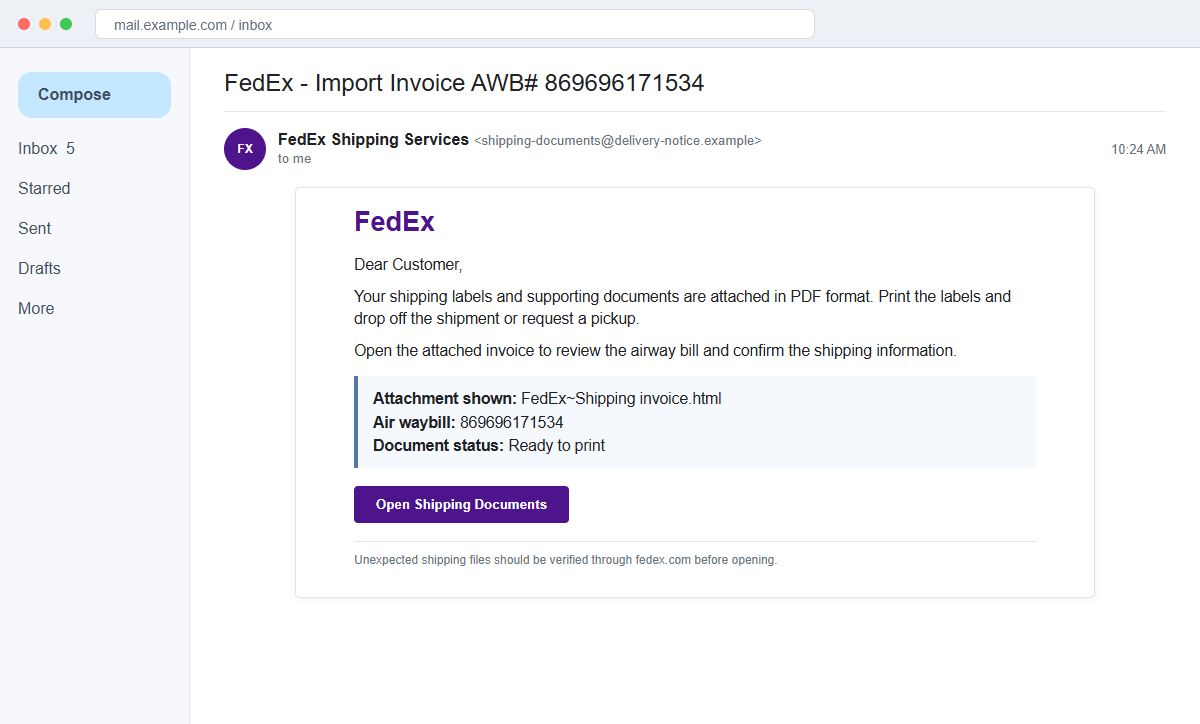
The FedEx Shipping Labels PDF email is a credential-phishing scam. The file presented as shipping paperwork is actually an HTML webpage that opens a fake tracking portal on the recipient's own device.
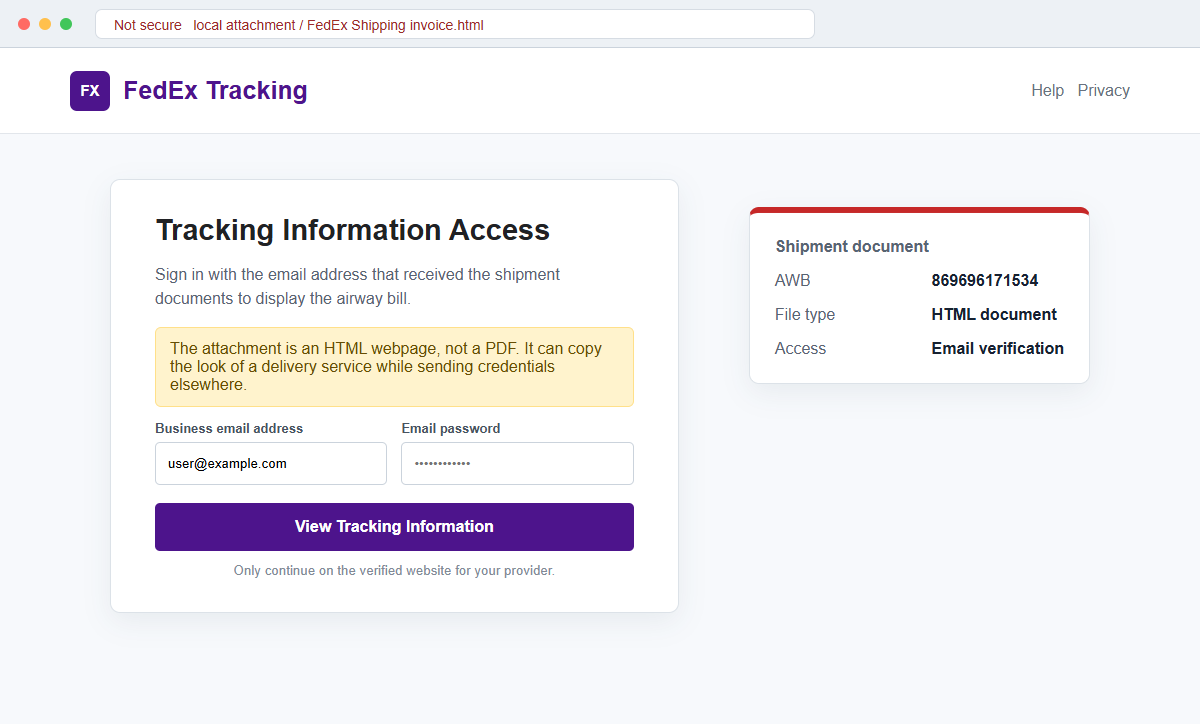
The page asks for the email address and password that received the documents. That is not package verification. It is a way to capture a company mailbox login while the user believes a routine import invoice is being opened.
Do not open the attachment or enter a password. Check the airway bill on fedex.com through a fresh browser tab and confirm the shipment with the known sender or company shipping administrator.
Overview
A believable shipping task makes the attachment feel routine
The subject may read “FedEx – Import Invoice AWB# 869696171534.” The body says the labels and documents are available in PDF format and gives familiar options such as printing, dropping off a parcel, or requesting pickup.
Employees in purchasing, logistics, accounts payable, sales, and reception handle shipment documents every day. The campaign hides inside that ordinary workload rather than promising an obviously unusual reward.
The alleged PDF is really a local HTML page
The attachment name resembles “FedEx~Shipping invoice.html.” Windows or a mail client may display a browser icon or hide the extension, and a hurried recipient may focus on the FedEx words rather than the actual file type.
When opened, the HTML renders a branded “Tracking Information Access” screen. It can look like an online portal even though the first page is being loaded from the attachment on the computer.
Email credentials are requested under the pretext of document access
The form may prefill the recipient's address and request the associated email password. Shipping carriers do not need a user's mailbox password to show an airway bill.
Submitted data can be transmitted to an attacker-controlled service. A compromised company inbox can then expose invoices, customers, supplier conversations, reset links, and internal files.
- The subject uses a realistic-looking airway bill number.
- Shipping labels and supporting documents are said to be PDFs.
- The attached file actually ends in .html.
- Opening it launches a webpage in the default browser.
- The page copies FedEx colors, language, and tracking terminology.
- Tracking Information Access is presented as restricted.
- The recipient's business email may already be filled into the form.
- The page asks for the mailbox password rather than a FedEx login.
- The shipment is not independently confirmed through fedex.com.
- Captured email access can support business payment and identity fraud.
Why an HTML Attachment Can Look Like an Online FedEx Portal
HTML is the language browsers use to display webpages. An HTML file attached to an email can contain logos, buttons, text fields, scripts, and instructions to send submitted information to a remote server.
That makes HTML useful for legitimate forms and reports, but also for phishing. The attacker can place the opening screen directly in the attachment, avoiding an obvious external link in the message body.
The browser address bar may show a local file path, a blank-looking origin, or a remote destination loaded by the file.
None of those locations becomes FedEx simply because the screen uses purple, orange, and a carrier logo.
A genuine PDF normally ends in .pdf and opens in a document viewer. A file named like an invoice but ending in .html is a webpage, even when the message describes it as a PDF or the mail interface shows a generic document icon.
FedEx advises customers to create shipping labels through fedex.com, its mobile app, or an authorized FedEx location using their own account.
Its fraud guidance also says unsolicited messages should not request personal account credentials or identity information.
Real tracking can be checked independently. Type the official FedEx address, use the mobile app, or contact the shipper through details already on file. A mailbox password is never a tracking number.
What the Airway Bill and Attachment Details Reveal
An airway bill number gives the lure specificity, but a string of digits is easy to invent or copy. Entering it on the official tracking site is safer than treating its presence in an email as proof.
The body promises PDF labels while the actual attachment uses an HTML extension. That mismatch is one of the strongest campaign indicators because the recipient is being told to expect a passive document but receives executable web content.
The fake portal asks for an email password, not a FedEx user ID and independently navigated FedEx authentication. The requested secret belongs to a different service from the shipment.
Some kits personalize the page with the target's address, logo, or domain. That information can be taken from the email itself and does not prove that the page communicated with the mail provider.
An attachment can call remote scripts, submit form data, redirect the browser, or display a harmless error after harvesting the password. The visible page is only the front end of the interaction.
Even if the airway bill corresponds to a real parcel, the message may still be malicious. Criminals can reuse leaked shipment data or send phishing during a genuine delivery to make the timing more persuasive.
How the FedEx Shipping Labels PDF Email Scam Works
Step 1: The campaign reaches employees who handle deliveries
Attackers send the message to public company addresses, breached mail lists, or roles associated with imports, receiving, purchasing, and finance. They may also target a known supplier relationship after stealing earlier correspondence.
A recipient who processes many shipments may open the file automatically because the subject resembles a normal operational request.
Step 2: An airway bill and import invoice create context
The subject includes an AWB number and the body describes labels, pickup, and drop-off actions. These details make the email sound connected to an active shipment.
The message may omit the real shipper, origin, destination, package description, or account reference. The number supplies apparent precision while meaningful verification remains absent.
Step 3: The message disguises HTML as PDF paperwork
Recipients are told that the documents are in PDF format, but the attachment name ends in .html. File-extension hiding and small mobile screens can make that difference easy to overlook.
An HTML file does not need to exploit the computer to be dangerous. It can simply display a convincing form and persuade the user to submit information voluntarily.
Step 4: The attachment opens a branded tracking screen
The browser renders a Tracking Information Access page with a FedEx-style mark, airway bill, and document status. Because it opens in a browser, the interface can feel like a secure online service.
The first page may be local, while scripts or form actions communicate with an external host. Users should inspect the full address and should not assume the attachment belongs to the carrier.
Step 5: Document access is tied to the mailbox password
The form says the intended recipient must verify the email account before viewing the invoice. The address may already be present, leaving only the password field to complete.
This cross-service request is illogical. FedEx cannot safely authenticate a corporate mailbox by collecting its secret password, and a carrier document does not require that credential.
Step 6: Credentials are transmitted and tested
After submission, the page may send the data to a collection endpoint and show an error, blank file, or genuine FedEx page. The victim may retry, giving the attacker multiple password candidates.
Criminals test the combination against Microsoft 365, Google Workspace, webmail, VPN, storage, and supplier platforms. They may also request a one-time code through a follow-up page.
Step 7: A stolen inbox enables business email compromise
Attackers can search for unpaid invoices, purchase orders, payment dates, and executive conversations. They may alter bank instructions at the moment a legitimate payment is expected.
They can also send the same attachment from a real employee account, making the next wave far more convincing. Mail rules may hide warnings and replies while the compromise continues.
Company and Checkout Checks
Track the number from a clean official route
Open fedex.com by typing it yourself or use the official mobile application. Enter the airway bill there instead of following a link or relying on the attachment's displayed result.
A missing or unrelated result is a strong reason to stop, but even a valid number does not authenticate the email sender.
Confirm the shipment with the known shipper
Call or message the supplier, customer, or colleague through contact details already stored in company records. Ask whether they created the shipment and what file type they sent.
Do not use a telephone number embedded in the suspicious message, because it may connect to the same criminals.
Expose the complete filename before opening
Save nothing until the mail interface shows the full name and extension. On Windows, enable file-name extensions so Invoice.pdf.html cannot masquerade as a PDF.
If company policy permits analysis, security staff can inspect the file in an isolated environment without submitting real credentials.
Use the FedEx account and fraud channels independently
Review expected shipments in the organization's established FedEx account and contact the carrier through its official support page. FedEx accepts suspicious phishing emails at its published abuse address.
Never use an email password to unlock a carrier document, regardless of how polished the prompt appears.
Warning Signs to Check Before You Act
- An import invoice arrives without an expected shipment or known shipper.
- The AWB number is not paired with verifiable origin and destination details.
- The body promises a PDF while the attachment ends in .html.
- The attachment launches a browser rather than a normal PDF viewer.
- The browser shows a local file or unrelated host instead of fedex.com.
- A generic Tracking Information Access screen blocks the document.
- The recipient's email address is prefilled to create false personalization.
- The page requests the corporate email password.
- No matching shipment appears in the independently opened FedEx account.
- The message pressures the employee to print or arrange pickup immediately.
- The sender address does not belong to an expected partner or FedEx route.
- A login error appears after correct credentials are entered.
A shipping document may arrive unexpectedly, but it should never require the password to the inbox that received it. Verify the parcel and sender separately before opening any attachment.
What to Do if You Have Fallen Victim to This Scam
- Change the exposed email password immediately. Open the real mail provider through a bookmark or official application and create a strong, unique password. Replace it anywhere the same or a similar secret was reused.
- Revoke sessions, tokens, and unfamiliar sign-in methods. Sign out other sessions and inspect OAuth applications, app passwords, devices, passkeys, security keys, recovery addresses, and telephone numbers. Remove anything that was not deliberately registered.
- Inspect the mailbox for business email compromise. Review forwarding, rules, delegates, sent mail, deleted mail, drafts, and archive folders. Search for invoices, bank-detail changes, gift-card requests, and password resets made after the attachment was opened.
- Protect linked FedEx and supplier accounts. Change credentials for shipping, procurement, vendor, and carrier accounts if the exposed password was reused. Review FedEx account activity and report any unauthorized shipments or charges.
- Notify finance, logistics, and affected partners. Warn coworkers and known shippers through a separate channel. Place additional verification on payment changes and ask partners to ignore suspicious files sent during the compromise window.
- Preserve the HTML attachment for authorized analysis. Do not reopen it. Save the original message with headers and let the security team collect hashes, form destinations, remote hosts, and other indicators in an isolated environment.
- Scan the device for added threats. Run a complete Malwarebytes scan or another trusted security product, especially if the attachment downloaded another file, requested an extension, or launched software. Apply operating-system and browser updates.
- Block the campaign infrastructure. Use AdGuard to reduce malicious advertising and familiar phishing destinations after this fedex-shipping incident. Keep verifying new domains independently. Company administrators should also block confirmed senders, domains, URLs, and attachment hashes.
- Report the impersonation. Forward the phishing email as an attachment to the official FedEx abuse channel, report it to the mail provider, and notify the hosting service behind any collection endpoint. Keep full headers intact.
- Contact financial institutions if payment data was exposed. Tell the bank or card issuer if the mailbox contained sensitive statements, card data, or pending wire instructions. Monitor transactions and use known telephone numbers for every fraud report.
- Reject follow-up security and recovery calls. Criminals may pose as FedEx, the mail provider, or an investigator and ask for codes or remote access. Do not provide them; initiate contact with the organization yourself.
Frequently Asked Questions
Is the FedEx Shipping Labels PDF email legitimate?
The reviewed email is phishing. It describes PDF shipping documents but delivers an HTML page that asks for the recipient's email password.
Can FedEx send shipping labels by email?
Legitimate shipping workflows can generate labels and notifications. Confirm them in the official FedEx account or with the known shipper, and carefully verify the actual file type.
Why would an HTML attachment open in my browser?
HTML is webpage code, so the operating system normally opens it with a browser. That behavior does not mean the page came from the carrier or is online and authenticated.
What if the airway bill number is valid?
A real tracking number may be copied from another shipment or stolen correspondence. Validate the sender, expected parcel, destination, and document through independent channels.
What if I opened the file but did not enter a password?
Close it, report it, and check whether any additional file was downloaded. Credential risk is lower if nothing was submitted, but security staff should still inspect the device and indicators.
Should a carrier page ever request my email password?
No legitimate shipping page needs the secret password of a separate mail account. Sign in only through an independently opened official carrier account using its own established credentials.
The Bottom Line
The FedEx Shipping Labels PDF email scam hides a credential form inside an HTML attachment presented as routine import and airway-bill paperwork.
The PDF-versus-HTML mismatch and the demand for an email password expose the scheme. Check tracking through fedex.com and verify the shipper through contact details already on file.
If credentials were submitted, secure the mailbox, review shipping and financial activity, warn business partners, scan the device, preserve the attachment, and report the impersonation immediately.








