

A fake health insurance search ad can meet someone who types a simple coverage question into Google and clicks the first result. The page looks official and promises quick eligibility help. The danger is not always hidden behind a visibly broken website.
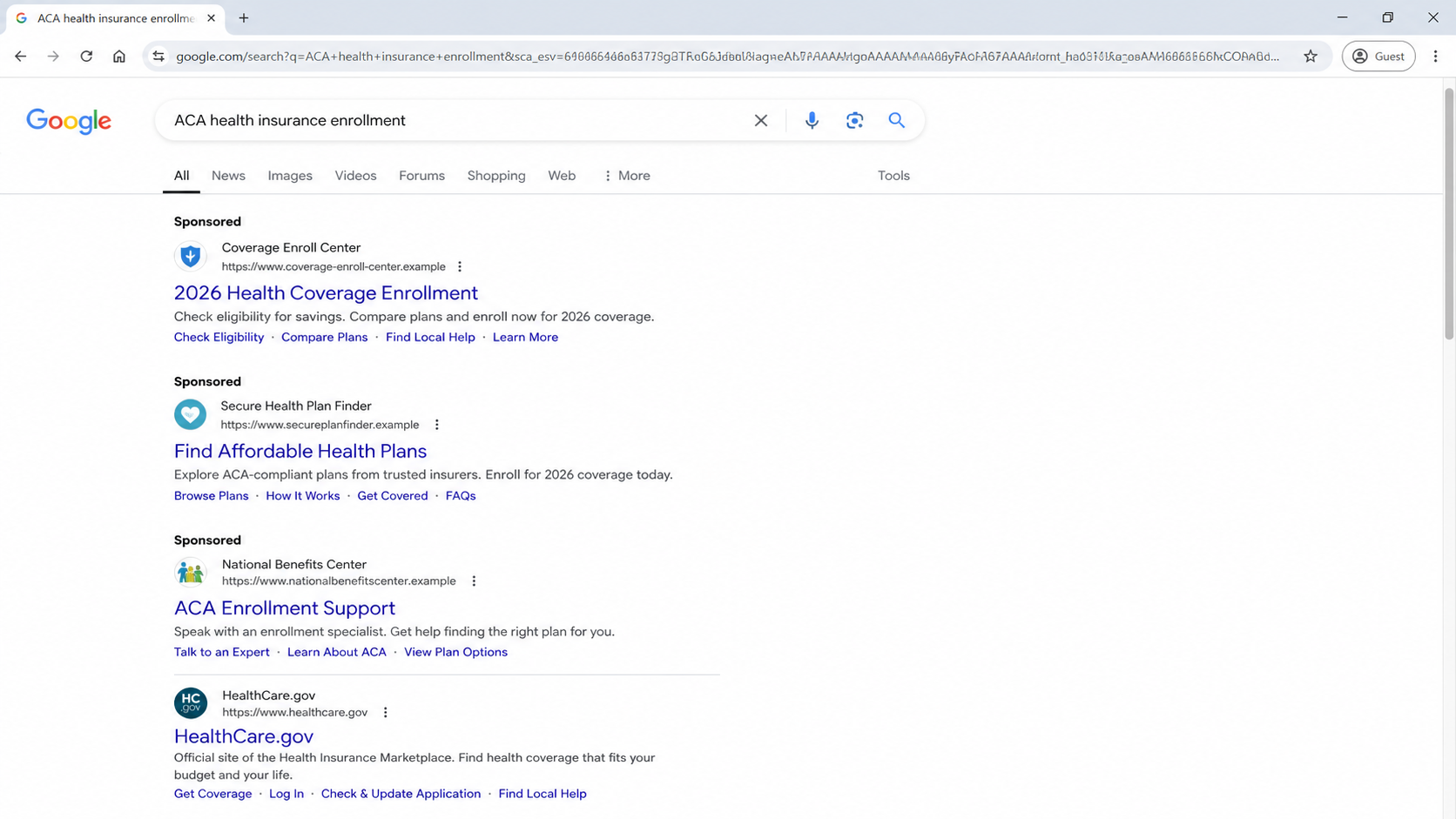
The Federal Trade Commission warned in June 2026 that dishonest businesses can buy search ads that resemble official health insurance or Medicare resources. A paid position can place the impostor before the genuine result.
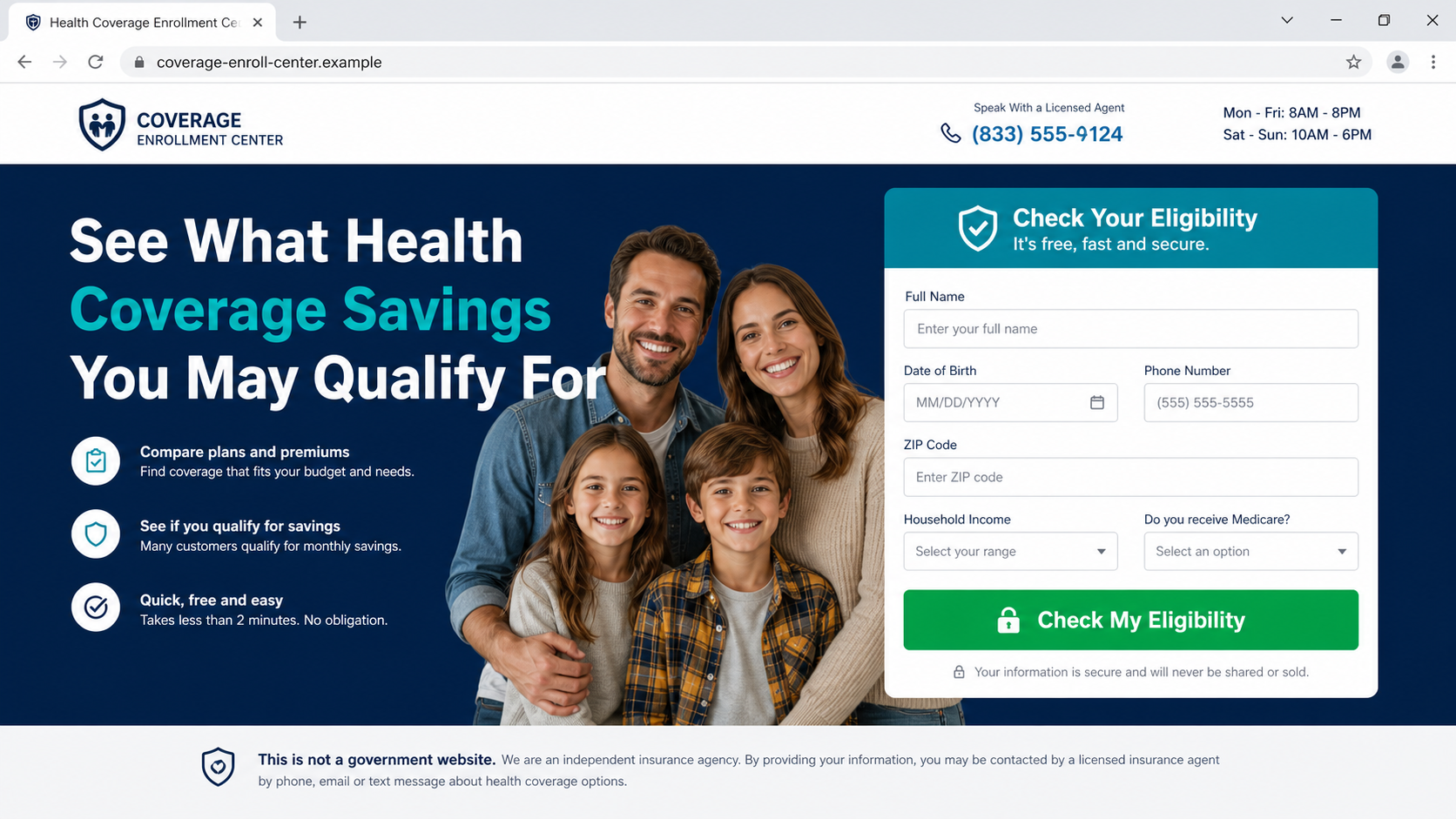
After the click, an official-looking form may request a name, birth date, phone number, ZIP code, household details, or Medicare status. Submitting it can turn a private health search into a marketable sales lead.
Some pages ultimately connect shoppers with agents or limited products rather than the comprehensive coverage implied by the ad. Others may use the collected details for aggressive calls, identity fraud, or a second scam.
Overview
Sometimes it sits in a polished sponsored result, one position above the government service the person intended to reach.
Paid placement borrows authority from the search page
People often read the first result as the best answer. A small Sponsored label tells a different story: the advertiser paid for that position, and the search engine did not certify the offer as a government program.
Official-sounding phrases such as marketplace enrollment, benefits center, ACA savings, or Medicare assistance can create a government impression without making a direct, easily challenged claim.
The form may be a lead generator rather than an enrollment application
A visitor may believe they are checking official eligibility, while the page is collecting contact and demographic information for brokers, call centers, or marketing partners. The important disclosure may appear far below the button.
Once a phone number is submitted, several callers may compete for the lead. That pressure makes it harder to compare plan documents and easier to mistake a sales script for an eligibility decision.
A plan name is not proof of comprehensive insurance
Medical discount memberships, fixed-indemnity products, and limited-benefit arrangements can have lawful uses, but they are not interchangeable with major medical insurance.
The buyer needs the exact plan type, exclusions, network, deductible, and out-of-pocket rules.
The FTC's central advice is simple: notice the ad label, examine the domain, and scroll beyond paid results. Most federal websites use .gov addresses, including HealthCare.gov and Medicare.gov.
- A sponsored result appears above the official government page.
- The headline uses government or public-benefit language.
- The destination uses a commercial domain rather than .gov.
- A short form collects personal and health-related details.
- Calls begin before the shopper receives clear plan documents.
- The eventual product may not match the coverage implied by the advertisement.
Why Health Coverage Searches Create an Ideal Pressure Point
Insurance shopping combines urgency, cost, and unfamiliar terminology. A person may be losing employer coverage, managing a new diagnosis, helping a parent, or racing an enrollment deadline. That pressure rewards the first page that offers a clear answer.
Search advertisements are visually close to ordinary results. On a phone, the domain and Sponsored label can occupy only a small area, while the large blue headline receives most of the attention.
The advertiser may promise savings without explaining whether the visitor is applying for Marketplace coverage, requesting a broker call, joining a discount program, or merely authorizing marketing contacts.
A quote form can ask questions that feel necessary for insurance. Date of birth, location, household size, income, and current coverage really can affect eligibility, which makes an unrelated lead form seem normal.
The safest approach is to choose the destination first, then search within it. For Marketplace coverage, type HealthCare.gov directly. For Medicare, use Medicare.gov or the number printed on an existing official card or notice.
What the FTC's Search-Ad Warning Shows
The FTC used a health insurance search example connected to its MediaAlpha settlement to show how a consumer looking for ACA coverage could encounter paid results that resemble official services.
The agency warned that dishonest businesses may design advertisements to obtain personal information, collect unnecessary fees, or enroll people in misleading services.
A .com or .org address is not automatically fraudulent, but it is not a federal government address. That distinction matters when a page presents itself as the doorway to a government healthcare program.
The word Sponsored is also evidence about placement. It means the position was purchased, not awarded because the advertiser is the official or most relevant authority.
A legitimate broker should clearly identify the legal agency, licensing, carriers represented, purpose of the form, and how information will be shared. Ambiguity at those points is a reason to stop before submitting data.
How the Fake Health Insurance Search Ad Scam Works
Step 1: A high-stress insurance search begins
The shopper searches for ACA insurance, Medicare enrollment, low-cost coverage, or a government healthcare phone number. The phrasing reveals both urgency and the service being sought.
Advertisers bid on those exact phrases so their result appears at the moment the person is most likely to accept help.
Step 2: A sponsored listing looks like the official doorway
The ad uses public-service language, a shield or healthcare icon, and a headline about eligibility or savings. On a small screen, the commercial domain may receive little attention.
The result may sit directly above HealthCare.gov or Medicare.gov, creating the impression that it is part of the same system.
Step 3: The landing page collects a valuable consumer profile
The page asks for contact details, age, ZIP code, household income, current insurance, Medicare status, and preferred coverage. Each answer increases the value of the lead.
A large Check Eligibility button suggests an official decision. In reality, submission may only authorize calls and texts from marketing partners.
Step 4: The lead moves through brokers and call centers
The consumer may receive several calls within minutes. Callers already know the submitted answers, which makes them sound like representatives continuing an application.
A caller can change company names during the conversation or say they represent a marketplace. The buyer should ask for the exact legal agency, state license, and carrier before discussing sensitive details.
Step 5: Coverage language becomes deliberately vague
The pitch emphasizes low monthly cost, broad access, or immediate approval while delaying the Summary of Benefits and Coverage. Words such as plan, protection, and benefits do not establish major medical insurance.
A discount membership or limited-benefit product may pay only fixed amounts or provide negotiated prices, leaving the consumer responsible for most medical bills.
Step 6: Payment is taken before the buyer can compare documents
The caller creates a deadline, says the rate is available only during the call, or asks for bank information to secure enrollment. That pressure prevents careful comparison.
A legitimate decision can wait while the consumer reads exclusions, cancellation terms, network information, deductible, prescription coverage, and the full legal name of the product.
Step 7: The consumer discovers the mismatch when care is needed
Problems often become visible at a pharmacy, clinic, or hospital. A provider may not recognize the plan, a service may be excluded, or the product may reimburse only a small fixed amount.
By then, cancellation may involve a different administrator from the sales caller. The lead generator, broker, carrier, billing company, and support center may all use different names.
Company, Address, and Fulfillment Checks
The website name is not the licensed insurance agency
A benefits-center brand can be created for one campaign. Find the legal entity in the privacy policy, consent language, receipt, and plan documents, then verify its state insurance license.
If no legal agency and producer identity are disclosed before data collection, do not assume the page is authorized to sell coverage.
A prestigious address may be a mailbox or shared sales office
Search the listed address and compare it with regulator records. A virtual suite, coworking location, unrelated tenant, or call center does not prove a national enrollment operation.
The carrier and plan administrator should each have independently verifiable addresses. A marketing address is not a substitute for them.
The call center may answer for several unrelated campaigns
Ask the caller to state the agency, producer license, carrier, exact plan name, and callback number. Then hang up and verify those details through the state insurance department.
If support refuses written documents, changes names, or insists that verification will lose the offer, the sales process is not safe.
The coverage and billing trail must be traceable
Before paying, identify who underwrites or administers the plan, who receives the premium, which network applies, and where claims are submitted. Those names should agree across the contract and receipt.
A charge descriptor unrelated to every disclosed entity creates refund and cancellation risk. Do not authorize payment until the full path is clear.
How to Check a Health Plan Before You Enroll
Start from HealthCare.gov, Medicare.gov, a state Marketplace, or a state insurance department. Do not use the advertisement's phone number to verify the advertiser.
Request the complete plan document and Summary of Benefits and Coverage before paying. Search for exclusions, waiting periods, benefit caps, preexisting-condition language, prescription rules, and cancellation terms.
Ask directly whether the product is comprehensive health insurance, a medical discount plan, fixed indemnity coverage, short-term coverage, or a membership. Get the answer in writing.
Verify the agent and agency license with the state regulator. A real license does not make every recommendation suitable, but an unverifiable identity should end the conversation.
Call a preferred doctor or hospital using a number you already know and ask about the exact carrier, network, and plan. Do not rely on a provider logo or search tool displayed only by the seller.
Warning Signs to Watch For
- The first result is labeled Sponsored but looks like a government service.
- The destination uses a commercial domain while implying federal enrollment.
- The form requests personal data before identifying the legal agency.
- Submission authorizes calls from unnamed marketing partners.
- The caller avoids saying exactly what type of product is being sold.
- Plan documents are withheld until after payment.
- A same-call deadline is used to stop comparison shopping.
- The billing company, support line, agency, and plan all use different names.
A polished design and low quote do not answer the most important question: what contract are you buying, and which accountable company must pay covered claims?
What to Do if You Have Fallen Victim to This Scam
- Cancel through every named entity in writing. Contact the seller, licensed agency, plan administrator, and billing company. State that you want cancellation, no further charges, and written confirmation with the effective date.
- Call the card issuer or bank. Report misleading enrollment if the product did not match the representation. Ask about disputes, recurring-payment blocks, card replacement, and the deadline for challenging the charge.
- Secure the information entered on the form. Change reused passwords, enable multifactor authentication, and monitor accounts. If a Social Security number or identity document was submitted, consider a credit freeze and IdentityTheft.gov plan.
- Confirm whether any real coverage exists. Contact the named carrier or administrator through an independently found number. Ask for the policy status, effective date, plan type, cancellation rights, and claims contact.
- Preserve the full sales trail. Save the search ad, URL, form, consent language, recordings or notes, plan documents, receipts, caller numbers, emails, and card descriptor.
- Scan devices if a suspicious file or app was involved. Remove unknown apps or browser extensions and run a full Malwarebytes scan. This helps detect malicious downloads, but it does not cancel a plan or erase submitted data.
- Block repeat malicious advertising. AdGuard can reduce exposure to known malicious ad domains and scam pages while you research. Still verify insurance through official government and regulator sites.
- Report misleading insurance marketing. Notify the FTC at ReportFraud.ftc.gov and your state insurance department. Include the advertised claim, legal names, agent identity, URL, and payment details.
- Arrange replacement coverage carefully. Do not assume cancellation automatically creates a special enrollment right. Contact HealthCare.gov, Medicare, a state Marketplace, or a trusted benefits adviser promptly to avoid a gap.
Frequently Asked Questions
Is every sponsored health insurance result a scam?
No. Legitimate agencies advertise, but payment does not make a listing official. Verify the advertiser, license, plan, disclosures, and domain independently.
How can I recognize a real federal healthcare website?
Most federal sites use .gov. Type HealthCare.gov or Medicare.gov directly instead of relying on a search advertisement or texted link.
Why did several agents call after one form?
The page may be a lead generator that shares or sells contact data to marketing partners. Read consent language before submitting a phone number.
Is a medical discount plan the same as insurance?
No. A discount plan may reduce certain provider prices but does not pay claims like comprehensive health insurance. Read the exact contract.
Can I cancel after enrolling by phone?
Rights depend on the product and state. Send a written cancellation immediately, contact the administrator and bank, and ask the state insurance department for help.
What should I ask an agent before paying?
Request the legal agency, license number, carrier, plan type, full documents, network, exclusions, deductible, out-of-pocket limit, total cost, and cancellation terms.
The Bottom Line
A fake health insurance search ad succeeds when paid placement is mistaken for public authority. The page may look helpful while collecting a valuable lead or steering the visitor toward a product they never intended to buy.
Slow the process down. Use the official .gov destination, verify licenses, and read the actual coverage contract before sharing sensitive information or authorizing payment.
If you already enrolled, act quickly. Cancel in writing, confirm whether real coverage exists, protect exposed data, and report misleading sales to the bank, FTC, and state insurance regulator.

Join the discussion
0 commentsShare your experience or ask a question about this article.
Discussion
Start the conversation
Have a question or something useful to share? Add the first comment.