

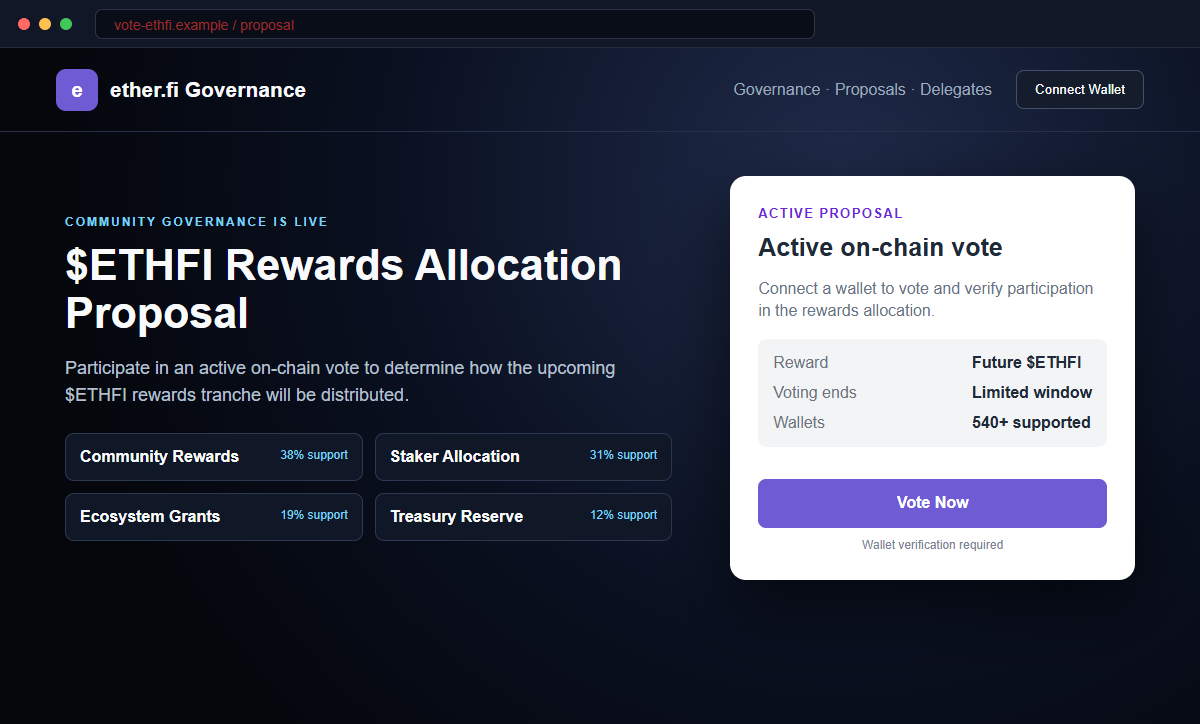
A governance page says the ether.fi community can decide how the next $ETHFI rewards tranche will be distributed. The proposal is active, the vote is on-chain, and connecting a wallet appears to be the only step needed to participate.
The $ETHFI Vote Rewards Scam is a crypto wallet-draining operation. The pages at vote-ethfi[.]app and etherfi-vote[.]xyz impersonate ether.fi and use a fake rewards proposal to provoke a malicious wallet action.
Real governance makes the story believable. ETHFI holders can vote on genuine proposals, so a familiar proposal layout may not feel like a giveaway or obvious phishing page.
Do not connect or sign. Open ether.fi governance through the project's verified resources, locate the proposal there, and read the exact wallet request before approving anything.
Overview
The scam copies a real governance concept
The fraudulent site displays “Community governance is live” and presents a “$ETHFI Rewards Allocation Proposal.” It marks the event active and describes the mechanism as an on-chain vote.
The visitor is told that participation will influence a future rewards tranche. That mixes a governance decision with a financial incentive, creating both civic importance and fear of missing out.
An unofficial domain sits outside ether.fi resources
The known campaign domains include vote-ethfi[.]app and etherfi-vote[.]xyz. Neither is the official ether.fi website, help center, governance forum, or established voting destination.
A hyphenated domain can look related in a fast-moving social feed. The registered domain remains separate regardless of copied typography, token symbols, proposal cards, or navigation labels.
The vote can conceal token authority
Vote Now opens a connection menu listing MetaMask, Trust Wallet, Zerion, OKX Wallet, Rainbow, and other choices. A genuine wallet may therefore display the next request.
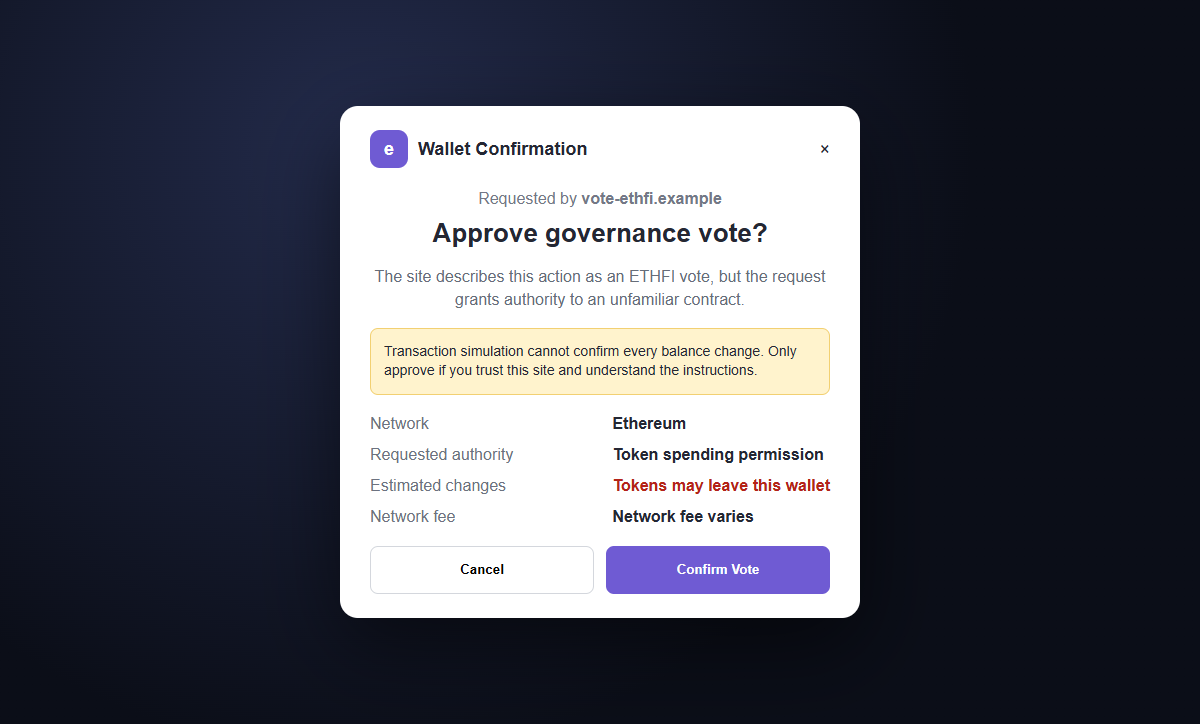
The wallet is not certifying the proposal. If the prompt grants token spending, calls an unfamiliar contract, or predicts outgoing assets, approving it can let a drainer transfer tokens to the attacker.
- The page impersonates ether.fi and the ETHFI governance ecosystem.
- Community governance is described as live.
- A fake $ETHFI Rewards Allocation Proposal is marked active.
- The vote is labeled on-chain to sound authoritative.
- The campaign uses vote-ethfi[.]app and etherfi-vote[.]xyz.
- Wallet Connect is required before meaningful verification.
- Popular wallet names create a familiar connection flow.
- The transaction may be labeled as a vote while granting broader authority.
- A drainer can exploit the approval to transfer exposed assets.
- Confirmed blockchain transfers generally cannot be reversed.
How Legitimate ether.fi Governance Is Organized
ether.fi is a real decentralized finance platform associated with Ethereum staking, liquid restaking, and ETHFI governance. The token gives holders a mechanism to participate in decisions affecting the ecosystem.
Official ether.fi resources describe proposals as having context and discussion around a defined voting window.
The published governance information points users to the ether.fi forum and its recognized voting platform rather than to a surprise lookalike domain.
The project's official community-resource page lists ether.fi, governance.ether.fi, and its voting and delegation destinations. It explicitly advises users to trust listed resources and treat unlisted channels cautiously because impersonation scams are common.
Genuine governance can involve connecting a wallet. That fact makes domain verification and transaction review more important, not less important. A real wallet connection does not authenticate the page that requested it.
A legitimate proposal should have a discussion record, proposal title or identifier, voting choices, timing, quorum or eligibility rules, and a recognized destination. The information should be reachable from official project resources.
Rewards can exist in the ether.fi ecosystem, but a real program does not validate an unrelated domain. The exact event, eligibility, and contract still need confirmation before the wallet interacts.
Why the ETHFI Rewards Allocation Page Is a Drainer Trap
The domains are the clearest evidence. vote-ethfi[.]app and etherfi-vote[.]xyz are independent registered domains, not subdomains of ether.fi. Copying ETHFI into a hostname does not establish ownership.
The proposal is not supported by an official forum record that the visitor can reach independently. A governance card without a linked discussion, proposal identifier, and recognized vote page is only an interface claim, not a community decision.
Reward language changes the risk calculation. Users may believe they must vote quickly to preserve eligibility, even though normal governance should allow enough time to read and discuss a proposal.
The long wallet list is not proof of a partnership. Standard connector software can display hundreds of wallet names on any website, including a page built specifically for theft.
The actual authority appears in the wallet prompt. A vote label on the website cannot turn token spending permission, an outgoing transfer, or an unexplained contract call into a harmless opinion.
No small network fee makes the request safe. A transaction costing very little to submit can expose tokens worth far more if it grants broad authority.
Always compare the predicted asset changes with the stated purpose before confirming the request.
How the $ETHFI Vote Rewards Scam Works
Step 1: A fake governance link reaches ETHFI holders
The campaign can spread through hijacked X or Discord accounts, fake community profiles, direct messages, compromised websites, search ads, malicious pop-ups, and replies beneath genuine project posts.
A trusted-looking account may repeat the link, so the post's apparent source and the destination domain must both be checked.
Step 2: The page recreates a proposal experience
Governance navigation, active status, voting choices, token symbols, and a rewards allocation story make the page look like a specialized application rather than a generic giveaway.
Vote counts and status labels can be fixed text. They do not need to come from an on-chain proposal.
Step 3: Rewards add pressure to a governance decision
The user is told that the vote determines an upcoming tranche, suggesting participation is financially important. A closing window can make careful research feel like a missed opportunity.
The attacker wants the user to begin from the promotional page instead of from ether.fi's official governance resources.
Step 4: Vote Now invokes a genuine wallet
Selecting MetaMask, Trust Wallet, Zerion, OKX, Rainbow, or another option can open the legitimate wallet installed by the visitor. The interface transition feels normal for a decentralized application.
The wallet proves control of the user's keys. It does not prove the website's claim about ether.fi or the proposal.
Step 5: A dangerous request is described as an on-chain vote
The site may ask for a signature, token approval, permit, contract interaction, or transaction. The surrounding text says vote, verify, or confirm participation.
Users must inspect the requested authority and expected balance changes. Cancel when the prompt is blind, unexplained, or inconsistent with the official proposal.
Step 6: The drainer transfers exposed assets
A direct transaction can move tokens when confirmed. A malicious allowance can let the attacker call the token contract later and pull the approved balance from the wallet.
Disconnecting the webpage does not erase an on-chain allowance. The address may remain vulnerable to future deposits until the approval is revoked.
Step 7: Public losses attract recovery impostors
After funds leave, fake support agents and recovery specialists may contact the victim through replies or direct messages. They promise a reversal in exchange for a fee, remote access, or wallet secrets.
Confirmed transfers are generally irreversible. A recovery phrase or private key gives the second scammer complete wallet control and must never be shared.
Company and Checkout Checks
Begin at ether.fi's verified resource page
Type ether.fi yourself, use a trusted bookmark, and follow its listed governance links. Do not make vote-ethfi[.]app or etherfi-vote[.]xyz the starting point.
Confirm the same proposal title, options, dates, and voting destination through the official forum.
Look for the proposal discussion and voting record
A real governance decision should have context that can be read before connecting. Compare the proposer, discussion, quorum, snapshot, timing, network, and voting choices.
A page that offers only rewards and a wallet button is missing the accountability expected from governance.
Read the wallet request independently from the website
Expand every instruction and simulation. Look for token approvals, permits, spending limits, transfers, delegate changes, unfamiliar contracts, and predicted outgoing assets.
Trust the transaction details over the friendly Vote Now label. Cancel if the effect cannot be explained.
Keep valuable assets away from unverified applications
Do not connect a primary savings wallet merely to test a promotion. A separate low-value address limits exposure but cannot make a malicious contract safe.
Hardware wallets protect private keys, yet they will sign a harmful transaction when the owner approves it.
Warning Signs to Check Before You Act
- The proposal arrives through an unsolicited post, reply, message, or ad.
- The domain is not listed in ether.fi's official resources.
- ETHFI appears in the hostname before an unrelated domain ending.
- Rewards are tied to voting without a verifiable proposal record.
- The page says governance is live but omits meaningful discussion.
- A countdown pressures visitors to connect immediately.
- Hundreds of wallet choices are treated as endorsements.
- The wallet opens before the proposal can be verified.
- A vote requests token spending or unexplained contract authority.
- The simulation predicts assets leaving the account.
- The network or contract differs from official documentation.
- Recovery help requires a fee, phrase, key, or remote session.
Real governance is traceable from official project resources to a public discussion and recognized voting record. When that chain is missing, do not let a familiar wallet prompt replace verification.
What to Do if You Have Fallen Victim to This Scam
- Disconnect the fraudulent ETHFI voting site. Remove vote-ethfi[.]app, etherfi-vote[.]xyz, and any unknown session from the wallet's connected-app list. Disconnection prevents routine reconnection but does not cancel permissions already recorded on-chain.
- Revoke suspicious approvals on every affected network. Use the wallet's official approval manager or a reputable explorer reached independently. Remove unfamiliar and unlimited allowances, then confirm the revocation transaction before trusting the address.
- Move remaining assets when harmful authority was granted. Create a new wallet on a clean device and protect its new recovery phrase offline. Transfer valuable tokens and collectibles after a small test, and do not interact again through the compromised address.
- Retire the wallet if its recovery phrase was exposed. A phrase or private key cannot be changed. Anyone who obtained it can recreate the wallet indefinitely, so remove remaining assets and never send future funds to that address.
- Preserve the complete transaction trail. Record the domain, referral post, wallet address, transaction hash, network, contract, approvals, destination addresses, timestamps, screenshots, and value lost. Never place secret keys in an incident report.
- Report the impersonation through verified channels. Notify ether.fi, the wallet provider, domain registrar or hosting service, blockchain explorers, and local cybercrime authorities. Public address reports can help warn other users.
- Contact receiving exchanges quickly. If stolen assets reach a known exchange, send its compliance team the transaction trail and any police report. It may retain records or freeze remaining funds, although recovery is not guaranteed.
- Scan the device if software was installed. Run a complete Malwarebytes scan or another trusted security product if the page delivered a wallet extension, update, file, or remote-access tool. Remove unknown software and install browser and operating-system updates.
- Use domain blocking as a second layer. Use AdGuard to reduce malicious advertising and familiar phishing destinations after this $ethfi-vote wallet incident. Keep verifying new domains independently. Fresh domains may appear before lists update, so continue checking every address and transaction.
- Warn the ether.fi community without sharing secrets. Post the malicious domain and public transaction information only through verified channels. Do not expose a recovery phrase, private key, authentication code, or identity document while requesting help.
- Reject unsolicited recovery offers. No stranger can guarantee a blockchain reversal. Refuse advance fees, remote access, wallet connections, private-key requests, and recovery-phrase requests.
Frequently Asked Questions
Is the $ETHFI Rewards Allocation Proposal real?
The pages at vote-ethfi[.]app and etherfi-vote[.]xyz reviewed here are scams. Verify genuine proposals through ether.fi's listed governance resources.
Does ether.fi have real governance?
Yes. ETHFI holders can participate in governance through recognized project resources. That real process is what the fraudulent pages imitate.
Can connecting a wallet alone move my tokens?
A basic connection normally exposes public address information, not private keys. The greater danger is the approval, signature, or transaction requested immediately afterward.
Why did my real MetaMask or other wallet open?
Websites can invoke genuine wallet extensions. The wallet's presence proves your software opened, not that ether.fi owns the website or endorses the transaction.
Is an off-chain signature always harmless?
No. Some signatures can authorize permits, orders, or other actions. Read what is being signed and reject blind or unexplained requests from an unverified site.
Can ether.fi support recover drained assets?
The team may document the impersonation and help identify the correct process, but it generally cannot reverse a confirmed blockchain transfer. Ignore guaranteed recovery claims.
The Bottom Line
The $ETHFI Vote Rewards Scam copies a real governance ecosystem and turns a fake rewards allocation proposal into a wallet-drainer path.
Start from ether.fi's verified resources, locate the public proposal, and judge the exact transaction inside the wallet. An on-chain label and genuine extension do not make unrelated contract authority safe.
If you approved a request, disconnect the site, revoke permissions, move remaining assets when necessary, preserve the transaction trail, scan installed content, report the impersonation, and reject every unsolicited recovery offer.








