

A purchasing manager says a delayed wire transfer has finally settled. The attached SWIFT confirmation should prove it, and two buttons promise quick access to the official payment slip.
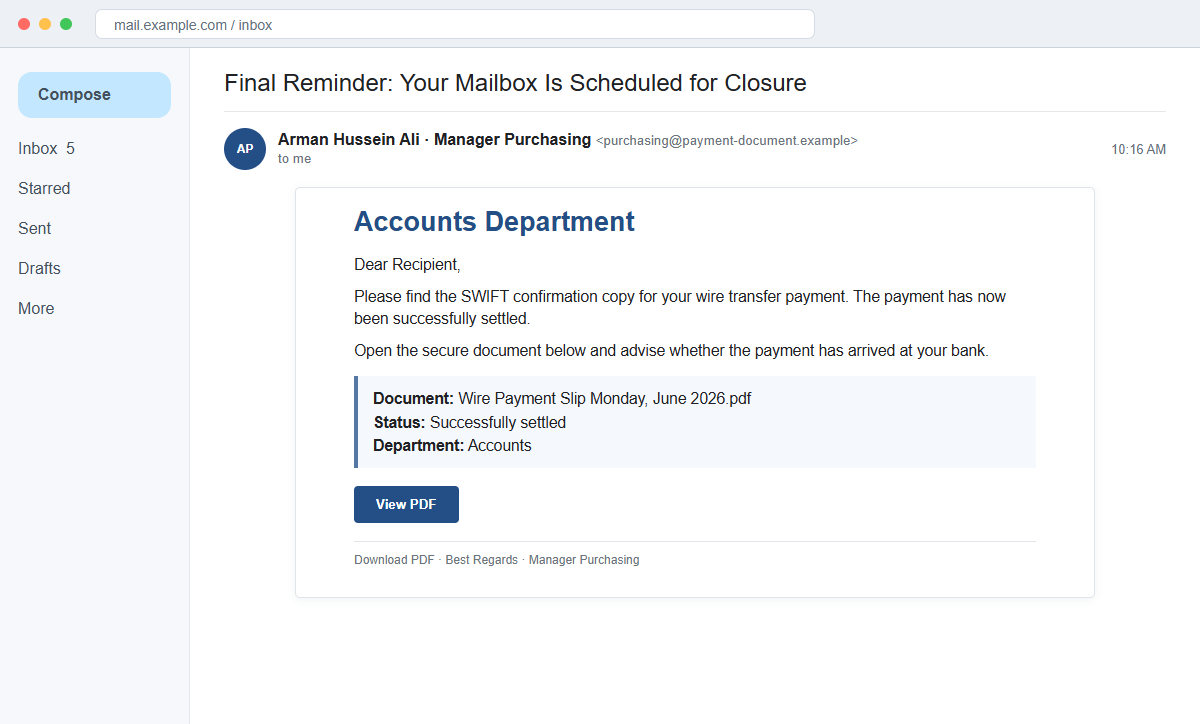
The SWIFT Confirmation Copy email is a credential-phishing scam. There is no payment document behind Download PDF or View PDF. Both buttons open a page that imitates the recipient's email provider and asks for the mailbox password.
The subject makes the message even stranger: “Final Reminder: Your Mailbox Is Scheduled for Closure.” That has nothing to do with the wire-transfer story in the body, revealing a reused campaign template.
Do not open the document through the email. Verify the payment in the bank or accounting system and contact the supposed sender using vendor details already held by your organization.
Overview
A payment confirmation is paired with the wrong subject
The body claims to come from a purchasing manager and says an Accounts Department shared a SWIFT confirmation for a completed wire transfer. The recipient is asked to confirm whether the money reached the bank.
The subject instead warns that the mailbox is scheduled for closure. This abrupt mismatch is a major clue that the attacker repurposed an existing phishing shell and replaced only part of its content.
A PDF label hides a web-based credential form
The email names “Wire Payment Slip Monday, June 2026.pdf” and offers Download PDF and View PDF. Neither button delivers a genuine bank confirmation or a normal file from a known partner.
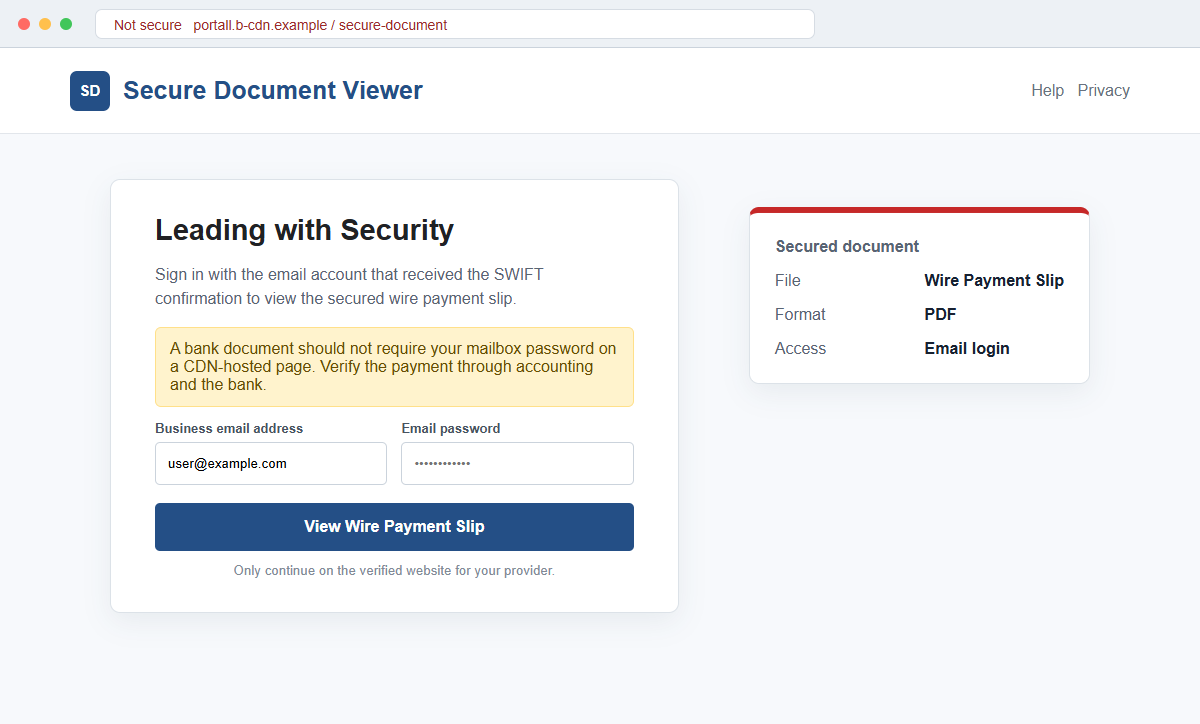
Both lead to portall.b-cdn[.]net, where a “Leading with Security” window requests the recipient's email address and password before the supposed secured document can be opened.
The page changes its disguise for each email provider
The landing page can inspect the submitted address and display a matching Gmail, Yahoo, Outlook, or webmail theme. A long URL parameter may carry the address and prefill the form automatically.
That personalization is generated by the phishing kit. The stolen password can give criminals access to invoices, payment conversations, reset links, customer records, and the trusted identity needed for business email compromise.
- The subject threatens mailbox closure instead of discussing a payment.
- A purchasing manager claims a wire transfer has settled.
- The email references a SWIFT confirmation copy and bank payment slip.
- Download PDF and View PDF lead to the same destination.
- The named PDF is not actually supplied as a normal document.
- The destination uses the unrelated portall.b-cdn[.]net domain.
- Leading with Security appears above an email login request.
- The phishing page adapts to Gmail, Yahoo, Outlook, or other providers.
- A URL parameter can prefill the recipient's email address.
- Mailbox access can be used to hijack real finance conversations.
What a Real SWIFT Confirmation Can and Cannot Prove
SWIFT is a legitimate messaging network used by financial institutions to exchange standardized information about transactions.
Businesses may request transfer confirmations, payment messages, references, or bank-generated evidence during international payments.
That makes the phrase SWIFT confirmation copy plausible. It does not mean every document bearing the words SWIFT, MT103, payment slip, or wire confirmation proves that funds were sent, settled, or credited to the intended account.
The receiving organization should compare the claimed payment with its own bank portal, accounting ledger, invoice, beneficiary details, amount, date, currency, and transaction reference. The email itself is not the source of truth.
SWIFT publicly warns that phishing messages imitate trusted sources and request personal data. It directs users to verify addresses and use secure official access for sensitive information rather than replying with credentials.
A vendor may send a real confirmation, but the recipient should validate it through a contact and telephone number already stored in vendor records. A compromised mailbox can keep an attacker inside an otherwise genuine thread.
No payment slip needs the recipient's email password on a CDN-hosted page. A secure business document may require portal authentication, but that portal, identity provider, sender, and transaction should all be independently recognized.
Clues That Reveal the Fake Wire Payment Slip
The subject-body mismatch is immediate evidence of a reused lure. Mailbox closure and a settled wire transfer are unrelated workflows that a legitimate purchasing manager would not combine in one notification.
The message calls the file attached, yet presents it through website buttons. It does not include a verified bank portal, accounting platform, secure message center, or recognizable document service.
The signature supplies a name, purchasing title, and telephone numbers, but those details are part of the lure and should not be used for verification. A criminal can invent a signature or copy one from a real company.
The destination portall.b-cdn[.]net is not the recipient's email provider, bank, vendor, or SWIFT. A content-delivery domain can host files, but it does not become a trusted finance portal merely because the page displays a familiar login.
Adaptive branding explains why the page may look unusually accurate. The script only needs the email domain to choose the correct logo and background. It has not authenticated the user or connected to the real provider.
The final request exposes the purpose. Viewing a confirmation copy should not require disclosing the mailbox password to the page that arrived inside the suspicious email.
How the SWIFT Confirmation Copy Email Scam Works
Step 1: Finance and purchasing addresses are selected
Attackers collect accounts-payable, purchasing, sales, treasury, office, and executive addresses from company websites, professional profiles, breaches, and predictable naming formats.
A wire-transfer lure is especially effective where international invoices and vendor payments are part of daily work.
Step 2: The email announces a successfully settled payment
A supposed manager says the SWIFT confirmation is ready and apologizes for a delay. That short story gives the recipient a reason to expect money and to resolve the matter quickly.
The language may be awkward, but polished grammar would not make the claim genuine. The transaction still needs independent verification.
Step 3: A PDF name creates document credibility
The message presents Wire Payment Slip Monday, June 2026.pdf as an official bank document. PDF is familiar and usually feels less threatening than an executable attachment.
The file name is only text. Both buttons can open a website instead of downloading the named document.
Step 4: The click reaches an adaptive phishing kit
The page at portall.b-cdn[.]net displays a secure-document prompt. A parameter in the link can carry the victim's address, allowing the kit to identify the provider and prefill the account.
Gmail users see Gmail-style elements, Outlook users see Microsoft-like elements, and other recipients receive a generic webmail imitation.
Step 5: Mailbox credentials are described as document access
The “Leading with Security” form says authentication is required to view the slip. The user may assume the sender protected the PDF with the same email account that received it.
Submitting the form sends the password to the attacker. A fake error can prompt a second attempt and collect another likely credential.
Step 6: The attacker enters the real mailbox and studies payments
Inside a business inbox, criminals can search invoices, beneficiary details, vendor conversations, approval schedules, and payment amounts. They may add forwarding and deletion rules to hide their monitoring.
Stolen sessions or connected-app permissions can preserve access even after the owner notices an unusual sign-in.
Step 7: A credential theft becomes payment fraud
The criminal can reply inside genuine threads, replace bank details, request an urgent transfer, send new phishing documents, or impersonate a supplier. The established conversation makes the change more persuasive.
If money is sent, it may move quickly through additional accounts. Immediate bank and law-enforcement contact offers the best chance of a recall or freeze, but recovery is not guaranteed.
Company and Checkout Checks
Check the payment in systems you already trust
Open the bank, treasury, ERP, or accounting platform from a saved route. Match the invoice, payer, beneficiary, amount, currency, date, reference, and expected settlement status.
A real deposit or pending transfer should be visible without opening the email's document.
Call the vendor using master data
Use a telephone number stored in the vendor record or obtained from a verified official website. Do not use the signature, attachment, or reply thread as the only source of contact details.
Ask the vendor to confirm the transaction reference and the secure method used to share evidence.
Treat changed payment details as a separate high-risk event
If the document or follow-up message introduces a new beneficiary, bank, IBAN, routing number, or urgency, stop the payment workflow and require a second independent approval.
A convincing confirmation copy can be used to prepare the recipient for a later account change.
Inspect the complete destination and file behavior
Hover over both buttons and note whether they lead to the same unrelated host. A button labeled PDF can open HTML, redirect several times, or display a login form.
Do not enable macros, scripts, browser extensions, or remote access to view a payment document.
Warning Signs to Check Before You Act
- The subject is about mailbox closure while the body discusses a wire.
- An unexpected purchasing manager announces a settled payment.
- The invoice, amount, currency, beneficiary, and bank are missing.
- The email says a PDF is attached but supplies web buttons.
- Download PDF and View PDF have the same destination.
- The link goes to portall.b-cdn[.]net.
- A security slogan appears before an email-password request.
- The page changes branding based on the email domain.
- The address is carried in a long URL parameter.
- The signature's telephone numbers are unverified.
- The payment cannot be matched in internal records.
- A mailbox password is required to see supposed bank evidence.
A SWIFT-related document can be legitimate, but the payment must be verified through the bank, accounting records, and a known vendor contact. The phrase SWIFT cannot authenticate an unrelated login page.
What to Do if You Have Fallen Victim to This Scam
- Change the exposed password immediately. Open the organization's official email, bank, and accounting systems through a saved bookmark or its official application, not through the SWIFT Confirmation Copy message. Create a fresh, unique password for the account exposed by that swift-confirmation message. Replace similar passwords anywhere else they were reused.
- Start with the credentials exposed to the SWIFT confirmation message. Create a fresh, unique password for the account exposed by that swift-confirmation message. Replace similar passwords anywhere else they were reused. Compare every sign-in method after this swift-confirmation case with the owner's devices. Unrecognized numbers, addresses, keys, and app passwords must go.
- End the access created through the SWIFT confirmation message. Sign out all other sessions from the company identity and banking portals, revoke unfamiliar OAuth grants, and reconnect trusted mail applications only after the password change. This closes tokens that can survive a simple reset.
- Review the mailbox for changes connected with the SWIFT confirmation message. Remove unknown forwarding addresses, delegates, inbox rules, filters, and automatic replies. Examine mail activity from the time of this swift-confirmation incident. Unfamiliar sent messages or deleted security alerts can reveal what followed this swift-confirmation incident.
- Protect the wider account chain. Prioritize business email, banking, and payment-approval systems. Reset credentials on services whose recovery messages reach the inbox exposed by that swift-confirmation message. Begin with financial and administrator accounts.
- Alert finance and the bank before any related payment proceeds. Tell them the mailbox may be compromised and identify the affected vendor or invoice thread. Freeze pending changes, verify beneficiaries through known contacts, and request an immediate wire recall or fraud hold if money was sent.
- Check the device used to open the SWIFT confirmation message. Run a complete Malwarebytes scan if that swift-confirmation message delivered a file, extension, or remote-support tool. Clean the device before changing sensitive passwords there.
- Reduce the chance of reopening a related page. AdGuard or another reputable DNS and content blocker may stop known phishing hosts and malicious advertisements tied to the SWIFT confirmation message. Blocklists may not recognize the next domain used for this swift-confirmation case. Verify every address before entering account information.
- Report the phishing message. Use the mail provider's Report Phishing control and notify the employer's finance and security teams, the bank, and the impersonated vendor. The raw headers from this swift-confirmation incident should be preserved before reporting. They are especially valuable when the campaign reached multiple inboxes.
- Warn bank, finance team, supplier, and security staff through a separate channel. Explain that the SWIFT confirmation message may have exposed the account and ask them to distrust recent file shares, password requests, invoices, payment changes, or urgent replies until the timeline is confirmed.
- Expect follow-up fraud based on the SWIFT confirmation message. A supposed recovery expert mentioning this swift-confirmation incident may belong to the same operation. Work only with a professional you verify yourself. Choose recovery help for this swift-confirmation phishing attempt through organizations you contact independently. Avoid strangers who appear in messages or search ads.
Frequently Asked Questions
Is every SWIFT confirmation copy email fraudulent?
No. Banks and businesses can exchange real transfer evidence. This campaign is fraudulent because its buttons open an unrelated adaptive login page and the payment cannot be verified from the message alone.
Why does the email subject mention mailbox closure?
The attacker appears to have reused a generic phishing template and replaced the body with payment bait. The mismatch is a strong warning that the message was assembled carelessly.
Can a PDF ask me to sign in?
A legitimate secure portal can require authentication, but the identity provider and sharing service should be known and independently verifiable. A CDN page should not collect your mailbox password.
What if a real supplier confirms sending a payment?
Verify the exact amount, beneficiary, date, and reference through your bank and a known supplier contact. A real payment does not make the email's login link safe.
What if I downloaded a file but did not open it?
Do not open it. Preserve it for security staff and scan it with trusted tools. Delete it only after any incident evidence has been collected.
Why do attackers want the email password instead of bank credentials?
A business inbox contains invoices, resets, contacts, and active payment threads. Access lets criminals create more convincing fraud and target several connected services.
The Bottom Line
The SWIFT Confirmation Copy scam disguises a provider-adaptive email login as a secured wire payment slip. The wrong subject, missing transaction details, and unrelated CDN destination expose the deception.
Verify payments through the bank, accounting system, and a vendor contact already in your records. Never use an unexpected document page as the place to enter a business mailbox password.
If credentials or money were exposed, change the password, revoke sessions, inspect mailbox rules, alert finance and the bank, preserve evidence, secure affected accounts, scan downloaded files, warn partners, and report the campaign immediately.

Join the discussion
0 commentsShare your experience or ask a question about this article.
Discussion
Start the conversation
Have a question or something useful to share? Add the first comment.