


You buy a game code on Gameflip. Before it arrives, the seller says your payment was rejected and tells you to open a support chat.
The order might really be slow. The question is who told you to fix it, and what they want you to send.
Overview
The scam starts with a message about a purchase you recognize
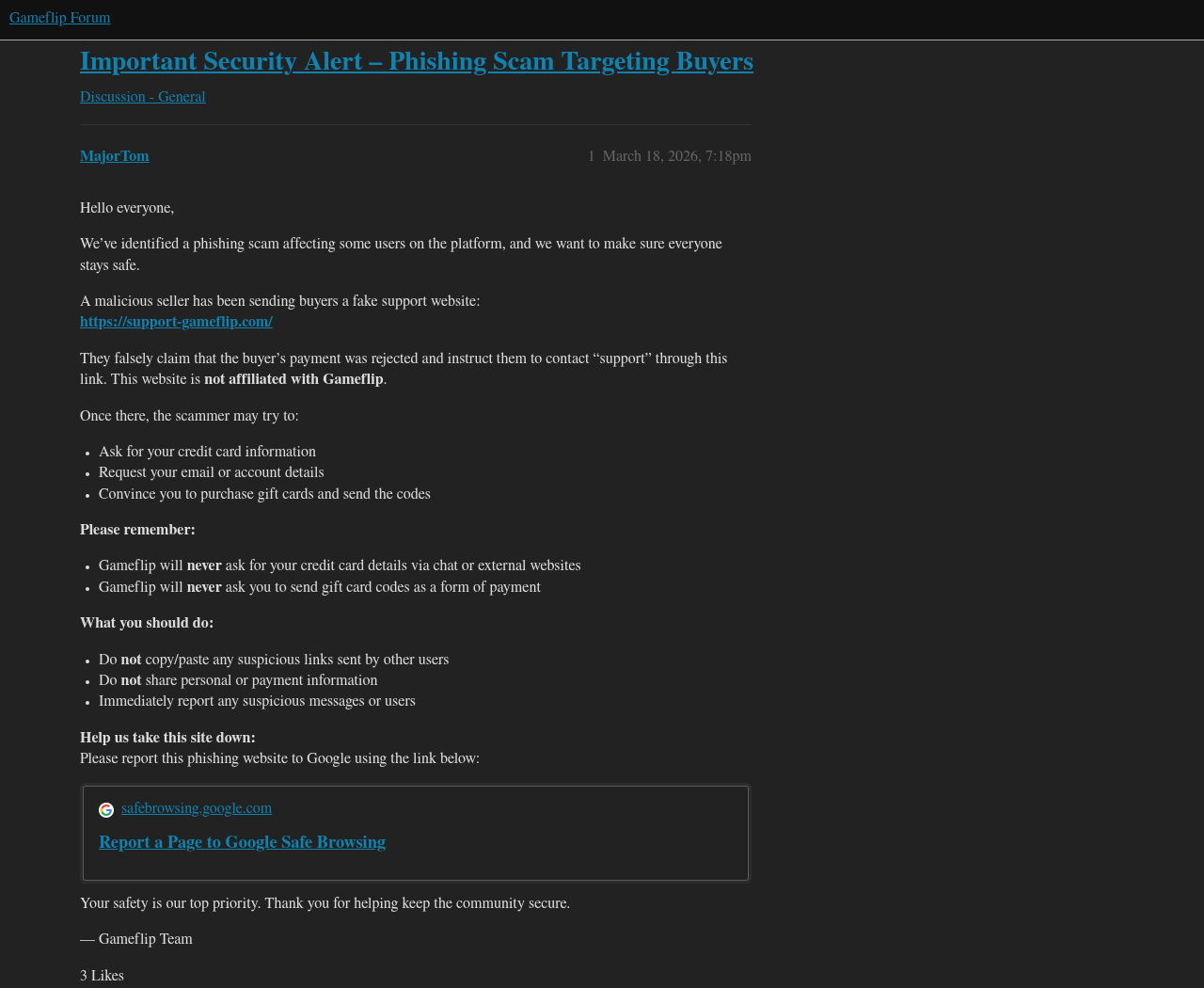
Gameflip’s team warned in March 2026 that a seller was telling buyers their payments had failed and sending them to an imitation support site.
The seller knows what you were trying to buy. That makes the message more convincing than a random payment alert, but it doesn’t make it official.
Gameflip is a real marketplace. The warning concerns a seller and a separate site that Gameflip explicitly said was not affiliated with it.
The impostor turns a supposed payment problem into a new request
According to the warning, fake support may ask for card information, seek account details or tell you to buy a gift card and send the code.
Those requests are not different ways to finish one order. They give someone else information or value that won’t be recorded as payment for your purchase.
Buying a discounted PlayStation code is one thing. Buying a second voucher and surrendering its balance to someone claiming to be support is another.
A real payment review has a record you can find yourself
Open Gameflip independently and check Purchases. Use the record for the exact item and order, not the seller’s message or a screenshot of an alleged decline.
Gameflip does sometimes verify payments. The existence of that process makes this scam believable, but it doesn’t authorize a seller to run a separate verification.
- Seller says payment failed? Check the purchase on your own account.
- Bank shows a pending entry? That can be an authorization, not a settled charge.
- Support wants a gift card as payment? Stop and report the request.
- Already sent a code? Contact the issuer before spending time arguing with the seller.
How the Gameflip Fake Support Scam Works
Step 1: The seller says there’s a problem with your payment
You expect the code to arrive, so a message about the order doesn’t feel out of place. The claim can sound like an explanation for a delay.
The seller’s knowledge of the game or listing proves little: that’s the item they offered. They don’t need access to your bank to name it.
A seller’s assurance that they can see a rejection is not a reliable substitute for your own order status. Check before agreeing to change anything.
Step 2: The seller sends you to support they picked
The site named in Gameflip’s alert put the words “support” and “Gameflip” together in a lookalike domain. It wasn’t a page on Gameflip’s support subdomain.
There’s no need to open a lookalike to settle the question. A seller shouldn’t get to choose where you sign in or ask about a charge.
Open the official Gameflip Help Center yourself. Start a separate request if your order doesn’t tell you what to do.
Step 3: The chat asks you to hand over something the seller can use
Gameflip warned that the person behind fake support could ask about your account or payment card. They may also ask you to send a gift card code.
A code can be spent without the physical card. The receipt in your pocket won’t stop someone else using the value once the code is shared.
The payment risk is separate from whether your original order succeeds. You could have a normal marketplace transaction and still lose money in a second, unrelated exchange.
The warning identifies that scheme. It does not establish what every person was asked for, how much anyone lost, or whether the reported site is still active.
What the Real Order Can Tell You
Pending does not mean the seller has to fix it
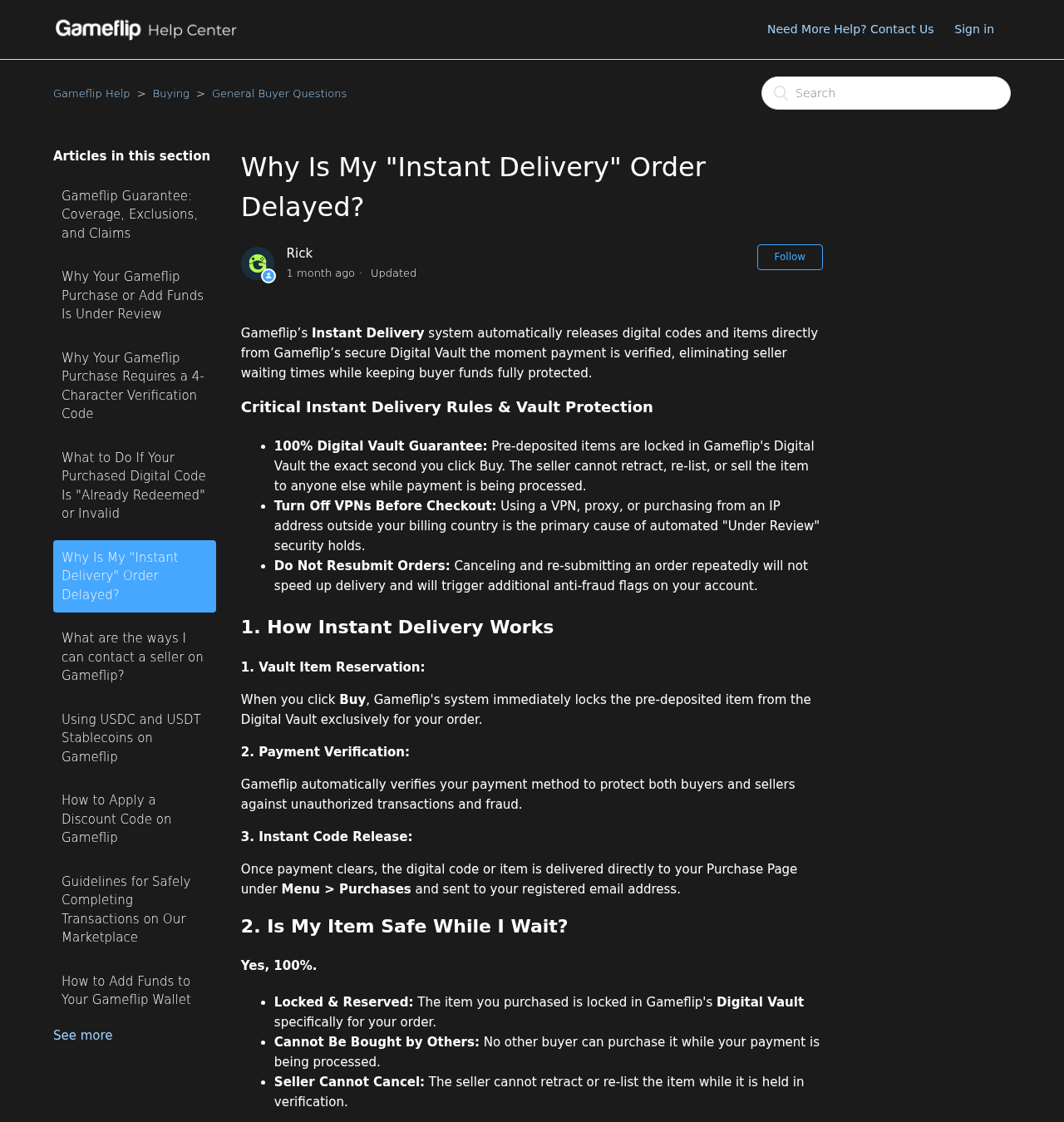
An instant delivery label describes how a code is released after payment is cleared. It doesn’t promise that the payment itself will never be reviewed.
Gameflip’s instant delivery guide says codes for eligible orders become available in Purchases after verification. Check that screen before clicking a reminder or opening a chat.
You may also see money set aside in your bank app during an attempted purchase. Ask your issuer if the entry is an authorization or a posted charge.
Under Review calls for a check through Gameflip
A review can be real. Gameflip’s purchase review instructions say some transactions need more verification and advise against canceling and repeatedly ordering the same thing.
Open the current order and check the email tied to your account. If you can’t verify an email’s instructions, start a support ticket independently before sending information.
Don’t accept a chat invitation to move the deal elsewhere while it’s held. That private conversation cannot change what the review is waiting for.
A canceled order and an unfamiliar charge are separate problems
When your own account shows a cancellation, match it to the charge entry. Gameflip’s cancellation guide distinguishes temporary authorizations from money returned to the original payment source.
If a charge actually posts and the order was canceled, ask official support and your issuer to reconcile it. Keep the original order reference and transaction date handy.
If the transaction is one you never made, tell the issuer that. Don’t sit through a merchant’s refund wait for a separate, unauthorized card charge.
The Four-Character Check Is Not a Gift Card Code
Some Gameflip buyers really are asked for a code. That can sound like the seller’s instructions until you look at where the code comes from.
The official verification guide describes four characters in the description of the pending card transaction. This check doesn’t require buying anything else.
Only use that code in a genuine verification flow you reached independently. If you can’t find the characters, the guide points to a manual review option.
Don’t send a seller your bank screenshot to ask where the code is. It may reveal your balance, other purchases or part of your account information.
A gift card code carries spending value. It comes from the card or its purchase email, not from the statement entry for the original Gameflip order.
A bank’s one-time security code is different again. When your bank says a code authorizes a login or payment, take that instruction at face value.
If someone says the bank’s message is wrong and you need to read back the code to cancel a charge, end the conversation and call your bank.
Three Checks Before You Act on a Payment Message
Start with the order, not the conversation
Match the listing and amount inside Purchases. If you bought more than one code, a message about the right game can still point to the wrong order.
If you can’t find the order, check which account is signed in before assuming it disappeared. You may be using a different sign-in method on another device.
If your bank sees a charge but you still can’t locate the purchase, give Gameflip the transaction reference through its official help center, not through the seller.
Check who is asking you to act
An order message written by a seller is still a seller message. Being inside the marketplace doesn’t turn that person into a member of the support team.
Don’t assume a conversation is safe because the person knows the order amount or timing. Those details may come from the listing or a conversation you already had.
A familiar profile picture and a credible explanation matter less than the request itself. Receiving a digital item does not require sending your card number to a seller.
Check whether the request changes where the money goes
If the original purchase really failed, assess the next attempt through your own Gameflip account. Sending money to a person who offers to fix it is not retrying checkout.
Likewise, a voucher you buy at another retailer won’t be credited back to the original bank card when the Gameflip order is canceled. The transactions are separate.
Save the receipts for both purchases if you made two. It will be easier to explain which payment belongs to the order and which the impostor requested.
A Broken Game Code Is a Different Problem
Suppose the code is already in your purchase record, but the console rejects it. You don’t need a seller-supplied support site to check a redemption error.
Try only through the official platform for the product. For example, PlayStation’s voucher guidance explains country matching and why a voucher already redeemed can’t be used again.
Save the error and original order details. An invalid or mismatched code should go through the marketplace dispute process, not a second payment or an account handover.
Our Gameflip buyer dispute guide covers the deadline and why rating a seller first can cost you the opportunity to use the formal order process.
Someone selling rather than buying faces a different trick: fake sale confirmations are meant to make sellers send items before payment. Here the demand is directed at the buyer.
What to Do if You Have Fallen Victim to This Scam
- Stop the private conversation. Don’t send a new payment or a second code. Open Gameflip independently and check the affected purchase.
- Save the listing, order reference, sender and timestamps. Preserve the address you were sent and any receipts privately, before reporting the message.
- Report the seller through the real help center. Tell support if the order showed a decline, was under review or had already completed.
- If you sent a gift card code, call the gift card issuer immediately. Keep the card and receipt. Ask what they can still stop or recover.
- If you typed card details into fake support, contact the issuer through your banking app or the number on your card. Explain exactly which details were exposed.
- If you shared your password, change it from the legitimate service. Change reused passwords too, and check your email account if that password might also be exposed.
- Keep refund conversations with the original provider. Don’t hand over another payment to someone showing up in your messages to recover the first one.
When you call the gift card issuer, explain that you sent the code to an impersonator. The issuer needs that fact, not just the original store receipt.
The FTC’s gift card recovery guidance explains how to reach common issuers and report the incident in the US. A report doesn’t guarantee reimbursement.
If you only received the message and did not send data, pay or install anything, start by reporting it. You don’t need to treat a message as a confirmed breach.
If you actually downloaded and ran a file at the impostor’s direction, stop using that device for sensitive sign-ins until you’ve had it checked.
A link alone is not evidence that your Gameflip or console account was taken over. Base your response on what you did and what your account now shows.
What to tell support if you paid more than once
Write down the sequence while it’s fresh. Include the purchase attempt, the seller’s message, the platform’s actual order status, and the time you bought or shared the voucher.
Tell the issuer if you authorized a payment because of deception or if someone used your card without permission. Those are different events, even on the same statement.
If a stranger knows your initial order amount and offers a refund, don’t treat that as proof of authority. Ask the original provider which case reference is genuine.
When sharing evidence with verified support, use only the records needed for the case. Don’t post an unredacted card, bank statement or voucher in a public forum.
Frequently Asked Questions
Is Gameflip itself a fake marketplace?
No. The company operates a real marketplace, and its team warned about a seller sending buyers to an imitation support site. That outside route is the scam.
Can a real Gameflip payment take longer than expected?
Yes. A purchase can be pending or under review while the platform checks the payment. Look at the recorded order rather than the seller’s instructions.
Should I send a gift card code to release my order?
No. Gameflip specifically warns that it does not ask for gift card codes as payment. A seller’s promise to refund the card doesn’t change that.
What if the official checkout asks me for four characters?
Confirm you reached the genuine purchase independently. The documented check uses characters in the pending card entry, not a voucher or a bank SMS passcode.
Does a pending bank entry prove that my card was charged twice?
No. One entry may be an authorization hold. Compare the bank’s posted transactions with your order history and ask your issuer about any entry you can’t identify.
I already sent a code to fake support. Who should I call first?
Contact the company that issued the gift card. Keep the code and receipt private and explain what happened. Then report the seller through Gameflip’s genuine support channel.
The Bottom Line
Don’t use support picked by a seller who says your Gameflip payment failed. Open your own order. If you need help, start with Gameflip directly.
Already handed over a gift card code or card details? Contact the issuer now. The seller’s promise to fix the order is not a reason to wait.

Join the discussion
0 commentsShare your experience or ask a question about this article.
Discussion
Start the conversation
Have a question or something useful to share? Add the first comment.