


A buyer asks you to list a game item on Gameflip. Soon afterward, an email says the item sold and tells you to deliver it.
It looks like a normal marketplace sale. Before handing over a code, shipping anything or starting an in-game trade, check where that confirmation came from.
Overview
The buyer borrows the name of a real marketplace
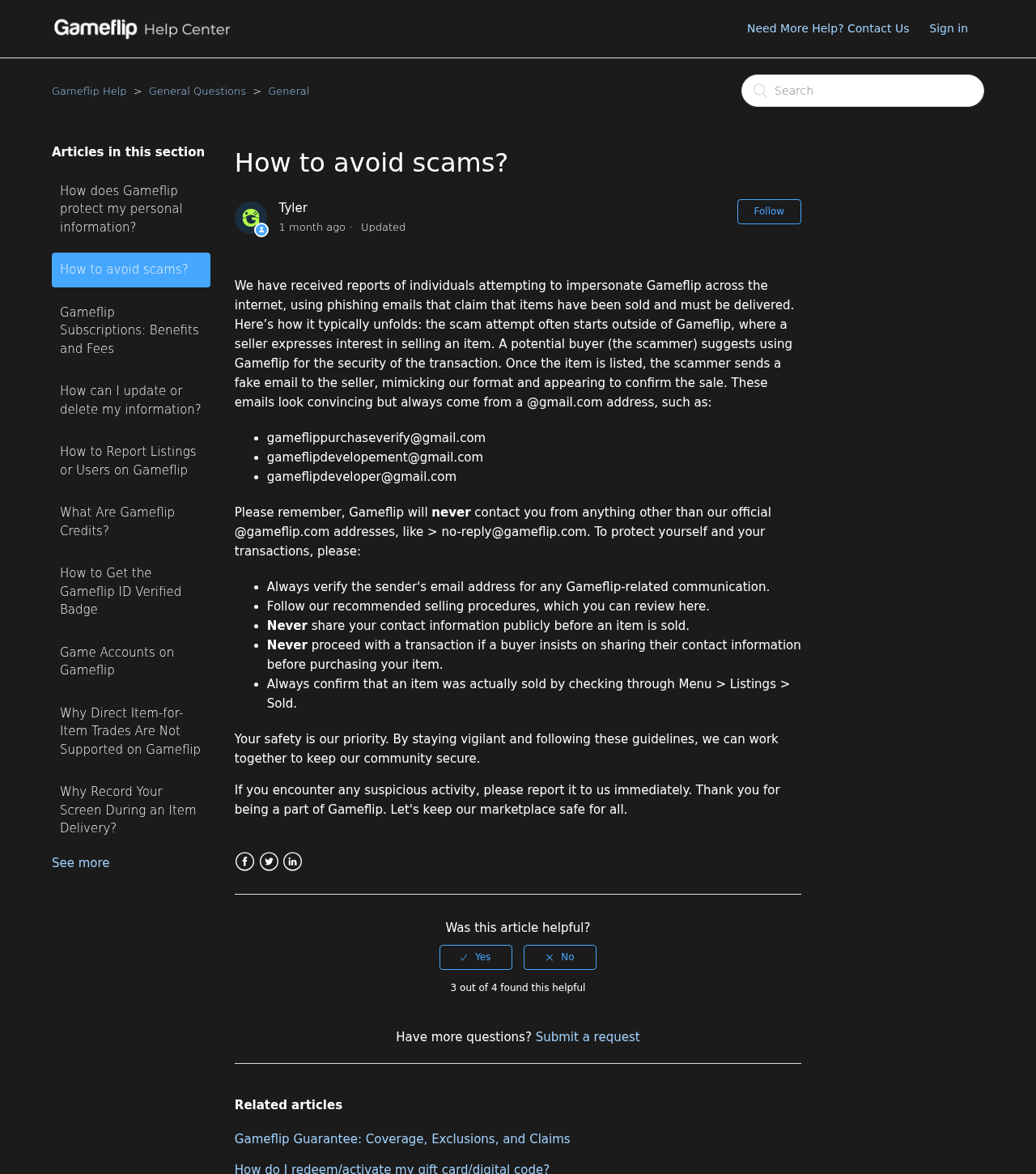
Gameflip is a real marketplace. Its impersonation warning describes fake sale confirmations sent to sellers after someone suggests moving a deal onto the platform.
The marketplace name makes the trade sound safer. The deception is the message claiming the buyer paid, not the seller opening a listing.
The email tries to make you deliver before payment is confirmed
Posting an item isn’t the same as selling it. The scam relies on sellers mistaking an email, screenshot or comment for a paid order.
Once a digital code is handed over, someone may redeem it before you realize no order exists. An in-game item can also leave your control without creating a Gameflip sale.
The check that matters is inside your seller account
Open the marketplace independently and look under your sold listings. Gameflip’s seller instructions say to confirm payment there before delivering the item.
Even a real order can be under review. If it says Processing, Gameflip tells sellers to wait for confirmed status. A buyer can’t end that review by showing a screenshot.
- No confirmed sale in your own account? Don’t deliver anything.
- A comment named “Purchase Confirmation” doesn’t change an order’s status.
- If the real order is Processing, wait. Don’t move the trade to a private chat.
- If you delivered already, preserve the evidence and contact the service that controls the item.
How the Gameflip Fake Sale Confirmation Scam Works
Step 1: The buyer suggests Gameflip as a safer way to trade
The first conversation can happen somewhere else. A potential buyer offers to use Gameflip, giving the seller a familiar name and a reason to create a listing.
There’s nothing wrong with choosing an established marketplace. What matters is whether the other person actually buys there and whether every part of the transaction stays on the platform.
Before you’ve seen an order, don’t hand over contact information just because the buyer says the marketplace needs it. The listing is already the route to the sale.
Step 2: A false confirmation substitutes for a paid order
Gameflip says impostors have sent emails that copy its sale notifications. It cites messages from Gmail accounts rather than its official Gameflip domain.
The message may sound plausible because you really did just post the item. A buyer who knows the listing can name it without having paid for it.
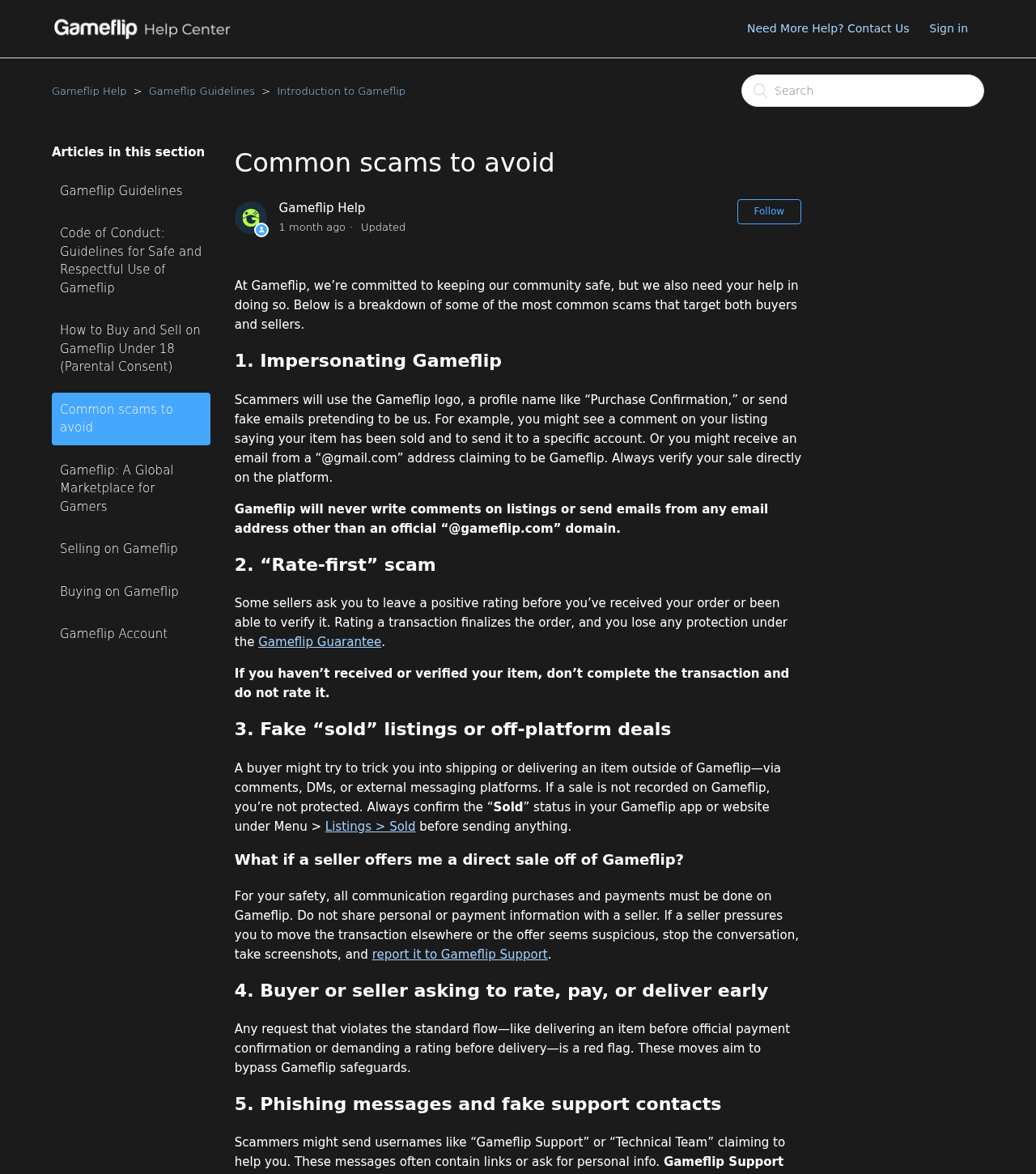
Gameflip’s separate warning also describes listing comments that pretend the item sold. The person writing a comment can choose a misleading display name, but they can’t confirm payment that way.
Step 3: You are asked to release the item outside the order
The email or chat directs you to deliver the item. The danger is the transfer itself, even if the message never asks you to sign into a fake site.
Sending the characters can be enough to lose a code. For an in-game item, the username in the fake message may send it to the wrong account.
A seller might also ship physical goods to an address from the fake notice. Once the carrier has the package, recovering it depends on the carrier and the shipment’s status.
How to Tell a Real Order From a Convincing Message
Use your own Gameflip session, not the email’s button. The seller fulfillment instructions point to Menu, Listings, then Sold.
Find the exact item and open the order. If you sell similar codes or skins, a familiar title isn’t enough. Compare the listing and delivery instructions against your own records.
Then check the status. In its Processing guide, Gameflip says orders under payment verification should not be delivered until they move to Sold or Ready to Deliver.
When there is no order, you don’t need to prove who sent the email. The absence of confirmed payment is enough to stop the transaction.
If you have a real sale, use its order chat and delivery instructions. A separate message giving you a new username is not a replacement for what the order says.
What to Check in the Sender, Listing and Order
The sender field isn’t the company logo
Expand the sender details and look at the full address. Gameflip says official mail comes from its own domain. A Gmail address calling itself Gameflip is not an official notification.
Watch for a different reply address. Don’t send the code or screenshots of your account simply because the display name matches a service you know.
An address that looks right still doesn’t replace the order check. Messages can be forwarded, altered in a screenshot or misread when only part of the address is visible.
A listing comment is not an order message
A comment appears on a listing, where other users can see it. It doesn’t show that a payment cleared or that a seller was assigned to deliver to that commenter.
Gameflip’s common scams guide specifically warns about fake sold messages and delivery requests in comments, direct messages or external chats.
If someone claims to be support, open the help center yourself. Ignore contact details and password reset links supplied by the person asking for delivery.
A screenshot does not follow the sale when its status changes
A buyer’s screenshot might show the right item and an amount. It still doesn’t tell you whether the real payment is under review, canceled or tied to another order.
Even genuine screenshots describe a moment in time. Use the current seller status rather than reconciling photos of two different screens with someone urging you to hurry.
If you think the interface has not updated, ask official support about the listing. Do not deliver early to test whether the order turns up later.
Different Items Need Different Proof of Delivery
A redeemed gift card may be impossible to recover. Send a code only through the confirmed order’s delivery flow. Don’t post it to prove you have it.
If the listing uses automatic delivery, don’t also send the code in a private message. Check how the official order handles delivery before making a separate transfer.
For an in-game trade, use the buyer identity and coordination instructions in the real order. Save the exchange as evidence if the platform recommends it and the game allows it.
A screenshot of a private chat can show what someone asked for. It doesn’t replace proof of which account actually received an item inside the game.
For a shipped item, compare the order’s address with the shipping label you plan to use. Don’t change it on the strength of an email asking for redirection.
Keep the carrier receipt and tracking details privately. If there’s a disagreement, send relevant records to official support rather than posting a buyer’s address or contact details publicly.
Gameflip’s seller verification guide describes the genuine transfer and proof process. The correct evidence depends on the order, not on the format of the fake message.
What If a Real Buyer Wants to Finish the Deal Somewhere Else?
A real listing or order doesn’t protect a separate transaction in Discord, a game chat or a payment app. Keep the negotiation, payment and delivery tied to the recorded order.
Gameflip’s off-platform rules explain that moving parts of a trade outside the platform can void guarantee eligibility. Don’t assume every seller loss is refundable even inside the marketplace.
If the person offers to cover fees, send a tip or pay later, don’t accept a second arrangement. It won’t attach the private transfer to the official order.
If they ask you to buy a gift card to verify your seller account, stop. That’s not a normal way to confirm the buyer’s payment or unlock your listing.
Did you pay for an item that didn’t work? Use the Gameflip buyer dispute guide. That differs from a false confirmation sent to a seller before payment.
Make the Decision Before You Open the Trade Window
The listing is still active
If the listing is still active and there’s no confirmed order, keep the item. The buyer can’t move it into Sold by sending a message.
Take a private screenshot of the listing status, including its reference. It helps support distinguish a false notification from a buyer who contacted you about a different listing.
Do not create a second listing for the same item because the person claims the first one is locked. Ask support to check the original listing instead.
A sale exists, but you can’t reconcile the buyer or destination
Check whether the person in your private messages is asking you to send the item to an account different from the one in the sale instructions.
Keep questions in the order chat, where support can see the context. If the buyer can’t resolve the mismatch there, ask for help before sending the item.
Don’t send a small portion of the order to test the route. Even a partial transfer outside the order leaves you without a reliable record that you fulfilled it.
The sale was confirmed and you delivered, but the money is pending
A recorded sale and a withdrawable balance are separate. Gameflip’s earnings guide describes cases in which proceeds from a real sale are held before becoming available.
Check the pending hold for that sold item in your own account. If the issue is a hold, resending the code won’t speed up the release.
If the platform indicates a dispute, answer through the existing record. Use the delivery proof for that exact trade rather than starting another conversation with someone claiming to help.
The person asks for access instead of delivery
An unfamiliar login link can turn a fake order into an account problem. You don’t need to sign in through the buyer’s message to see whether a sale exists.
Some messages may ask for a screenshot as proof that you followed their instructions. Check it before sharing anything. It could expose codes, your email address or other orders.
Support can investigate a listing without your password. If you’re unsure what evidence to attach, ask through the official help center and keep the original files private.
What to Do if You Have Fallen Victim to This Scam
- Stop delivery. Don’t send a second code, ship another item or pay someone to reverse the first transfer. Check your real seller account before doing anything else.
- Preserve the evidence. Save the email, full sender address, listing, message timestamps and any transfer or shipment record. Keep redeemable codes and personal details private.
- Report the approach to Gameflip. Open the official help center independently. Include the listing reference and whether there was a real sale in your account.
- Contact the relevant issuer or carrier. Ask the card issuer, game publisher or shipping carrier what it can still do. Have your original receipt, transfer ID or tracking number ready.
- Secure exposed accounts. If you entered a password on a suspicious page, change it through the real service, review sessions and secure any reused login. Don’t share recovery codes.
- Contact the payment provider if you sent money. Tell it what happened and ask about its options. No one can promise a code, item or payment will be recovered.
If the email arrived but you didn’t follow it or send anything, reporting and blocking may be enough. Receiving a message isn’t evidence that an account was taken over.
If you already sent a code, tell the issuer when and where it was shared. Don’t publish it while asking whether someone redeemed it.
Frequently Asked Questions
Can a Gameflip sale confirmation come from Gmail?
Gameflip says it uses official Gameflip addresses. A message from Gmail claiming to be its confirmation is a warning sign. Check your seller account, not the message.
Does Gameflip confirm sales through listing comments?
No. A listing comment cannot confirm payment. Open the sold order inside Gameflip and check its status before you deliver.
What if the order says Processing?
Wait. Gameflip says it’s verifying the payment. Do not send the item until the official order moves to the confirmed delivery state.
The buyer has a screenshot. Is that enough?
No. A screenshot isn’t your order record. Look up the specific sale and its current status in your own seller account.
Can Gameflip recover an item I sent without a sale?
Don’t assume it can. Report the impersonation and contact the service that controls the item. A private transfer may not have marketplace protection.
Is the real Gameflip marketplace responsible for the fake notice?
The marketplace warns that impostors copy its name. This scam concerns their false sale confirmation, not every message or transaction made through Gameflip.
The Bottom Line
Don’t deliver on the strength of a Gameflip email, listing comment or buyer screenshot. Open the marketplace yourself and wait until your exact order shows confirmed payment.
Already sent the item? Save the message and report it. Contact the code issuer, game publisher or carrier. Don’t pay a stranger to recover it.

Join the discussion
0 commentsShare your experience or ask a question about this article.
Discussion
Start the conversation
Have a question or something useful to share? Add the first comment.