

A game code at a tempting price can feel like an easy win. You pay, wait for delivery, and expect the marketplace to protect you if something goes wrong.
Gameflip does offer buyer protection. The detail worth understanding is when that protection ends, because one routine-looking action can change your options.
Overview
Gameflip is real, but its protection has a hard edge
Gameflip is an operating marketplace where independent sellers offer digital goods, gaming items, and some physical products. It is not itself a fake storefront.
The important distinction is between the platform and a dishonest listing. A real marketplace can still host a seller who delivers an invalid code or nothing at all.
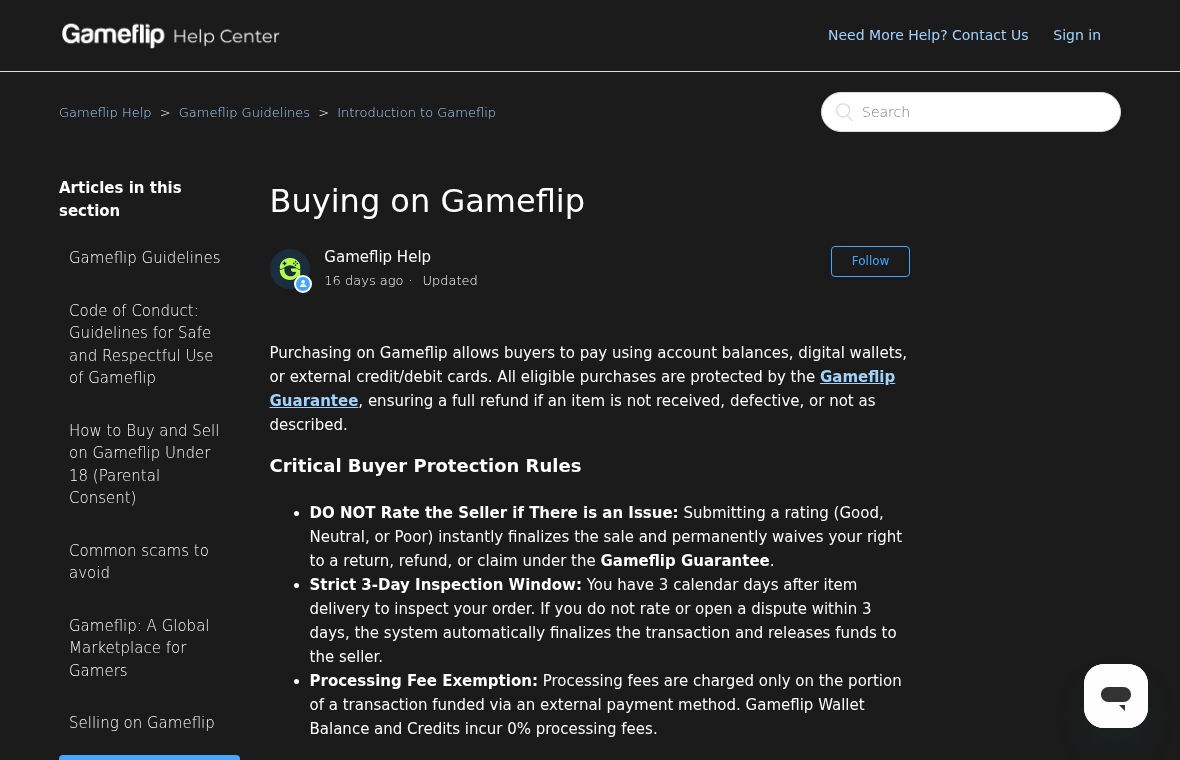
Gameflip says eligible purchases are covered when an item never arrives, fails to work, or differs from its description. That protection is conditional.
Its current buyer guide gives buyers three calendar days after delivery to inspect an order and open an issue.
Rating the seller immediately finalizes the sale, even if that rating is neutral or poor. Missing the deadline can also finalize the transaction automatically.
The action that matters most is opening an issue
If a code fails, do not rate the seller to express frustration. The platform says any rating permanently waives a claim under its guarantee.
Instead, go to the purchase page and select “Hold Transaction and Open Issue.” That pauses the countdown while Gameflip examines the problem.
Messaging the seller can help, but a friendly conversation does not replace the formal hold. The timer keeps moving until the issue is opened.
That distinction makes this a practical buyer-risk investigation, not a claim that Gameflip is a scam. The remedy is available, but it requires the correct action.
Our verdict is specific, not alarmist
Buying through Gameflip can be reasonable if you understand its rules and can test the item promptly. Avoid sellers who urge you off-platform.
A bargain stops being a bargain when you cannot inspect it within three days or cannot document why it failed. Consider that before checkout.
Use this short checklist before paying:
- Confirm the listing identifies the exact game, platform, region, edition, and delivery method.
- Check the seller’s history and read recent negative feedback, not only the average rating.
- Look at the final total, including the external-payment processing fee.
- Plan to redeem or test the item immediately after delivery.
- Keep all communication and payment inside Gameflip.
Why Buyers Confuse a Marketplace Dispute With a Scam
A buyer searches for a discounted key and sees dozens of nearly identical listings. The platform name gives the page a familiar, orderly appearance.
That familiarity can hide an important fact: the individual seller, not Gameflip, controls the listing and usually supplies the code or item.
Many transactions finish without trouble. When one fails, the cause might be a previously redeemed code, a region restriction, an incorrect edition, or deliberate deception.
Those possibilities require different evidence. A code rejected as “already used” is not the same as a valid code for another country.
Photographing a physical package or recording an unedited redemption attempt helps establish exactly what happened. A vague message saying “it doesn’t work” is weaker.
The listing text also matters. If it clearly states a regional limitation that the buyer overlooked, a refund is less certain than for misdescribed goods.
Gameflip’s guarantee rules distinguish covered problems from exclusions. Read those terms before assuming every disappointment qualifies.
Seller misconduct should be described as seller misconduct. Calling the entire platform fraudulent would blur the person responsible and could mislead other buyers.
At the same time, “real platform” is not a reason to ignore a bad transaction. The clock and finalization rules make early action essential.
How a Gameflip Purchase Can Go Wrong
Step 1: A listing promises a quick discount
A lower-than-retail price draws attention first. The buyer may see an appealing thumbnail, a rating badge, and a delivery estimate before reading limitations.
Digital goods are especially easy to describe loosely. “Game key” might refer to a specific region, an account, a gift link, or another fulfillment method.
Read the complete description, not just the headline. A key that works on one platform may be useless on another, even when the game title matches.
Be wary of any seller asking for your account password. A legitimate code sale should not require control of your gaming account.
Step 2: Checkout creates expectations about protection
The Gameflip Guarantee can reassure a shopper, but it is not an unlimited return privilege. Its timing and claim conditions govern the transaction.
Gameflip currently lists a fixed $1 fee plus 6% for a US external card or wallet payment, applied only to that externally funded portion.
Outside the US, the published variable rate is 7% plus $1. Wallet balance and promotional credits have 0% processing fees under the same guide.
Those fees are not evidence of fraud. They are part of the actual total a buyer should compare against an ordinary retailer’s price.
Take a screenshot of the listing and the completed checkout. Listings can change, and a dated record helps explain what you believed you purchased.
Step 3: Delivery starts the three-day inspection period
The important clock starts after delivery, not whenever the buyer finally has time to play. Gameflip calls it a three-calendar-day inspection window.
For a code, attempt redemption on the correct official platform soon after receipt. For a physical item, inspect its condition and contents on arrival.
Do not wait until a weekend trip ends or a child opens the purchase days later. By then, the transaction may have closed automatically.
If the item is delayed or never delivered, use the order page to check the handling period and available cancellation or issue controls.
Step 4: An unhelpful seller may try to keep the timer running
Some sellers will resolve errors promptly. A dishonest seller might offer vague assurances, request more time, or steer the buyer into another messaging app.
Neither an apology nor an off-platform chat preserves the claim window. Open the formal issue as soon as the problem is clear.
Use the purchase chat to document the seller’s response. Avoid sending additional money or accepting a replacement through a link you cannot verify.
Gameflip says “Hold Transaction and Open Issue” pauses auto-completion. That is the feature designed for a disputed purchase.
Step 5: A rating can end the protection early
A buyer might leave a negative rating to warn others, then ask support for a refund. Under the current rules, that sequence is backwards.
Gameflip states that a Good, Neutral, or Poor rating instantly finalizes the sale and waives the right to a return, refund, or guarantee claim.
Do not use the rating screen as a complaint form. Resolve the delivery or validity issue through the hold and dispute process first.
Once an order auto-completes after three days, the platform also says the buyer cannot return or obtain a refund through that order process.
Step 6: Evidence determines whether support can act
A clear claim identifies the listing, delivery time, exact error, attempted platform, and any seller response. Attach original screenshots or unedited video.
For a rejected code, include the platform’s error message without exposing the entire code publicly. Support may request further verification privately.
The current refund guidance explains that eligibility depends on the problem and stage of the transaction.
Respond quickly to support requests. A valid claim can weaken if the buyer disappears while the investigation is pending.
What the Gameflip Guarantee Covers, and What It Does Not
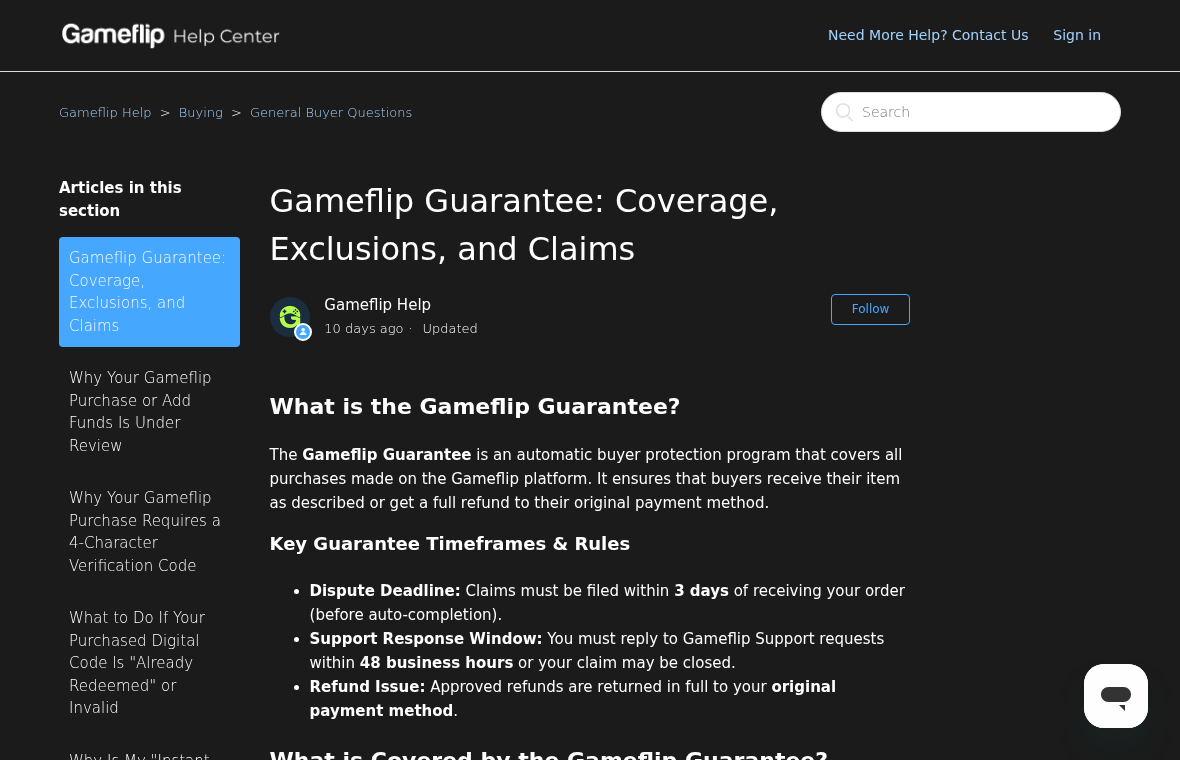
The guarantee is aimed at concrete failures: non-delivery, an invalid item, or an item materially different from its listing. It is not general buyer’s remorse.
That distinction is sensible for digital codes, which cannot simply be put back on a shelf after redemption. It also means details matter.
If a listing advertises a working code for a particular console and it fails there, preserve the rejection screen and exact product page.
If you bought the wrong edition despite accurate disclosure, the guarantee may not solve the mistake. Contact support, but do not misrepresent the facts.
For physical goods, record the shipping label and the condition of the parcel before opening it. That helps separate transit damage from listing misrepresentation.
The Help Center says approved refunds go to the original payment method. Processing times depend on the method, so a pending refund may not appear immediately.
Do not confuse a seller’s promise to refund with an approved Gameflip claim. Ask for confirmation inside the platform’s order record.
Likewise, a disputed card transaction is not the same as the marketplace process. Try the direct remedy promptly, and consult your issuer if it fails.
Payment rules can differ by country and funding method. If the card statement surprises you, compare the final order total with Gameflip’s published fee table.
A platform guarantee is valuable only if buyers know how to invoke it. The most useful fact here is the action, not the marketing label.
Seller Warning Signs Worth Taking Seriously
Several red flags deserve attention before and after a purchase. None proves fraud alone, but together they can make the risk unacceptable.
- The seller asks you to pay through a separate site, cryptocurrency wallet, or direct transfer.
- The listing hides the region, edition, platform, or delivery method behind vague language.
- The seller insists you rate first before receiving the complete item.
- A “support agent” requests your gaming password, recovery code, or two-factor code.
- The seller says a broken key will work later, but will not document a replacement in Gameflip.
- The offer is dramatically cheaper than comparable listings without a clear explanation.
Check the seller’s recent history, not just account age. A long-lived account can change hands, and a high average may hide recent trouble.
Search for the exact game and version elsewhere. A small price difference may not justify a time-sensitive dispute process.
When a seller sends an external redemption page, stop and verify the domain independently. Do not type your gaming credentials into a lookalike login.
If you entered a password on such a page, the problem is now account security, not merely a marketplace refund. Change credentials and review active sessions.
Gameflip cannot guarantee what happens after a buyer voluntarily leaves its payment and messaging system. Keep the transaction on-platform.
The cleanest purchase is one you can describe in a single sentence: what you bought, where it works, when it arrives, and what you will test.
What to Do If Your Gameflip Purchase Has a Problem
- Do not rate the seller yet. Even a bad rating closes the transaction under Gameflip’s current rules. Keep the order open while you investigate.
- Check the delivery timestamp. Find the purchase in your account and count the three calendar days. Treat the deadline as urgent, not approximate.
- Open the formal issue. Select “Hold Transaction and Open Issue” on the purchase page. A chat message alone does not pause the timer.
- Preserve useful evidence. Save the listing, order page, redemption error, seller messages, and any unedited recording. Hide passwords and complete codes in public posts.
- Explain the mismatch precisely. Tell support whether the item never arrived, arrived invalid, or differed from the description. State your platform, region, and attempted steps.
- Respond to support promptly. Watch your account and email for requests. If the seller offers a replacement, keep the agreement documented within Gameflip.
- Escalate payment concerns carefully. If a valid claim is denied or an unauthorized charge appears, ask your card issuer about dispute options and deadlines.
- Secure any exposed account. If you entered credentials into a seller-supplied site, change the password, enable two-factor authentication, and review recent logins.
A failed order can feel embarrassing, especially when the price looked unusually good. The practical response is documentation and a timely issue, not self-blame.
If a third party claims they can “unlock” your refund for another fee, ignore them. Real support should not require an extra outside payment.
Frequently Asked Questions
Is Gameflip a scam?
No evidence in this review shows Gameflip itself is a fake service. It is a functioning marketplace, but individual sellers and strict claim rules create risks.
How long do I have to dispute a Gameflip purchase?
Gameflip’s current buyer guidance gives three calendar days after delivery. Open an issue before auto-completion, rather than waiting for an informal reply.
Should I leave a negative rating before requesting a refund?
No. Gameflip says any rating instantly finalizes the sale and waives its guarantee claim. Use the hold and issue controls first.
What if my digital key says it was already redeemed?
Capture the error and listing details, then open a formal issue immediately. Provide support with the platform and time of your redemption attempt.
Are Gameflip payment processing fees a sign of fraud?
No. The published fee table explains charges on externally funded portions. Compare the checkout total before buying; unexpected charges deserve a separate review.
Can I get a refund after the three-day window closes?
The platform says finalized orders cannot be returned or refunded through its ordinary process. Contact support anyway if circumstances are unusual, without assuming an exception.
The Bottom Line
Gameflip is a real marketplace, not a blanket scam. Its buyer protection can help with an invalid or missing item, but it has a strict deadline.
Test what you receive immediately. If anything is wrong, open an issue before rating the seller or letting three calendar days pass.

Join the discussion
0 commentsShare your experience or ask a question about this article.
Discussion
Start the conversation
Have a question or something useful to share? Add the first comment.