

A message says your hardware wallet missed a critical firmware update. There is a deadline, a warning that portfolio access could be restricted, and one reassuring button that promises to fix everything.
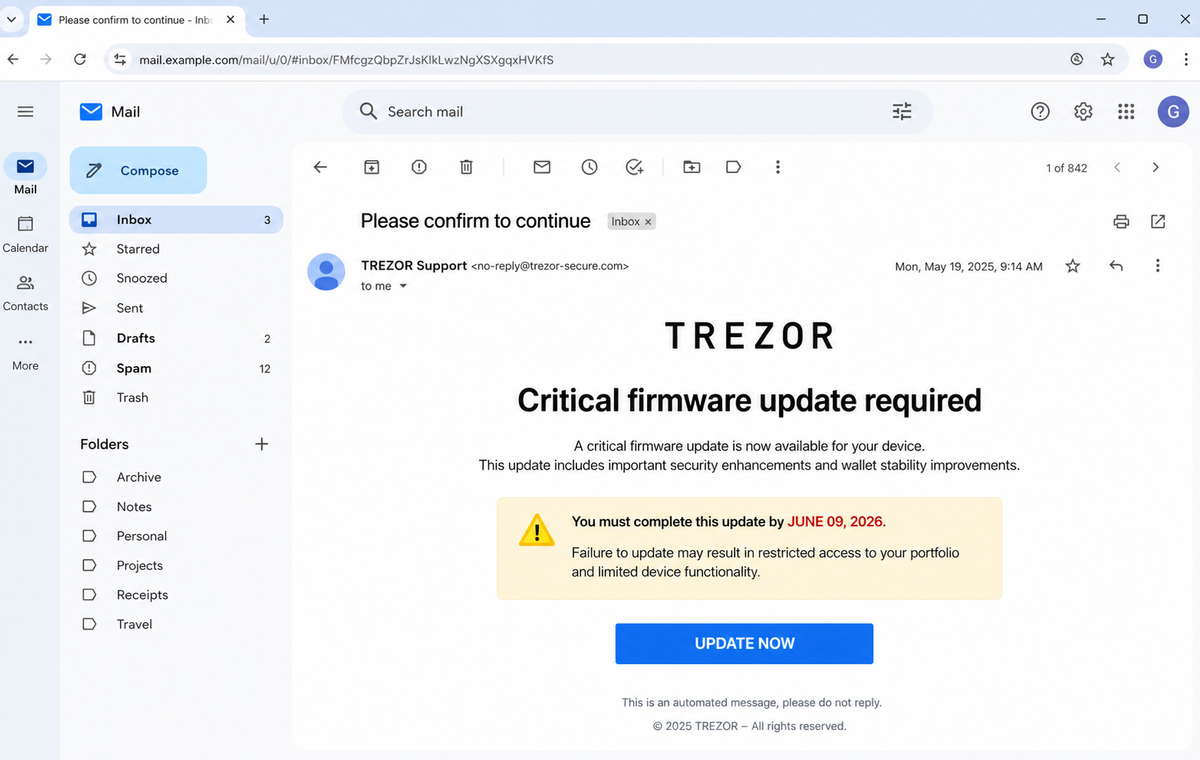
The Update Your Hardware Wallet Email Scam turns a sensible security habit into a phishing trap. It borrows Trezor's name, invents an urgent device problem, and sends the recipient to a webmail form that has nothing to do with a genuine firmware update.
That mismatch is the clue many people overlook. A hardware wallet update happens through the wallet's official desktop application and connected device, not by typing an email password into a page reached from an unsolicited message.
If this email appears in your inbox, pause before touching the button. Open Trezor Suite independently, check the device there, and treat any password or wallet-backup request as an attempt to steal access.
Overview
The message turns a routine firmware update into an emergency
The reviewed campaign uses the subject “Please confirm to continue.” Its body claims a critical issue is preventing the recipient's device from reaching the latest system version and describes the notice as a final reminder.
A fixed deadline increases the pressure. The email warns that delayed action may restrict access to the recipient's portfolio and leave the device exposed to security threats.
Even though the sender has not identified a model, serial number, installed version, or actual diagnostic result.
The button leads away from the real update process
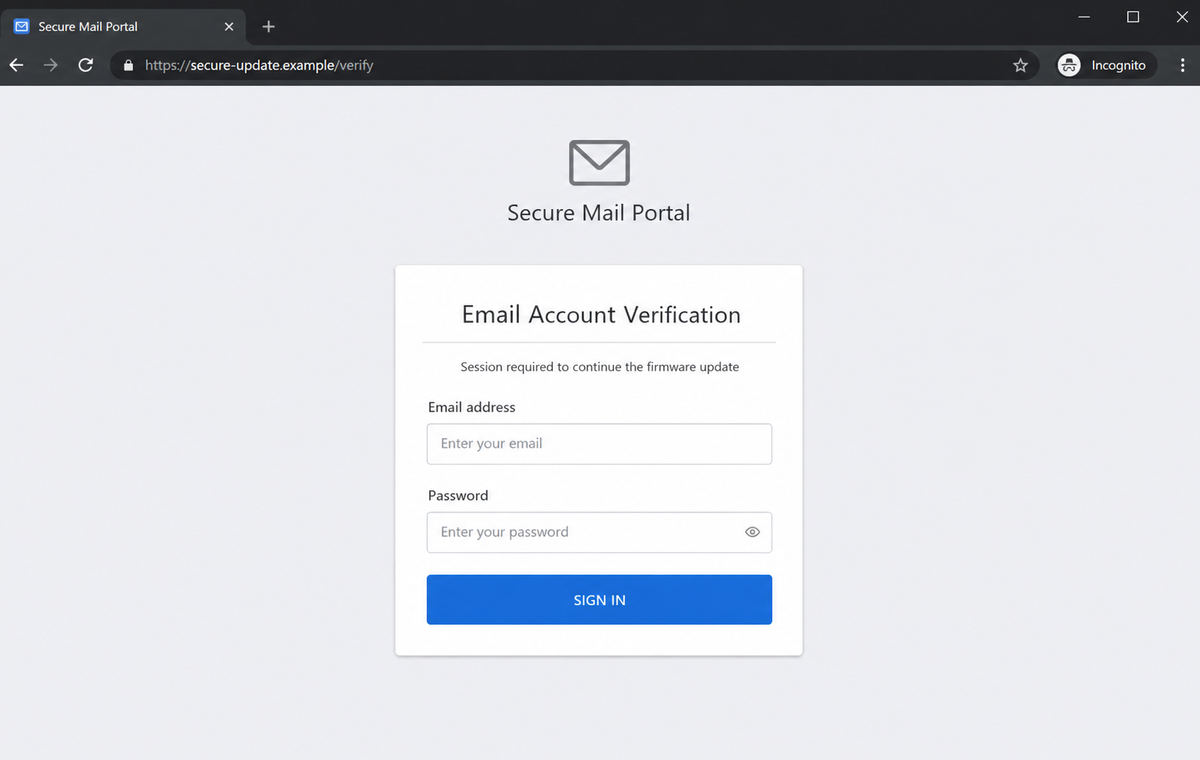
The Update Now button does not open a legitimate device-management workflow. The destination imitates a standard webmail sign-in page and asks for an email address and password, data that a firmware updater does not need.
A victim may assume the login is an identity check before the download begins. In reality, the form can transmit the credentials to the campaign operator, display an error, and redirect to a harmless page so the theft is not immediately obvious.
A stolen inbox can become the bridge to cryptocurrency theft
This version initially targets email credentials rather than a wallet backup. That does not make it harmless.
An inbox can reveal exchange accounts, purchase records, support conversations, identity documents, password-reset links, and the names of services used by the owner.
Attackers can use that intelligence for a second, more convincing approach. A follow-up may request the wallet backup, promote a fake Trezor Suite download, impersonate exchange support, or exploit password reuse on accounts that directly hold cryptocurrency.
- The email claims a critical hardware-wallet update has failed.
- A fixed deadline is presented as the recipient's final opportunity to act.
- Restricted portfolio access and increased security exposure are threatened.
- No device model, serial number, firmware version, or account record is shown.
- The Update Now button is framed as the only safe route forward.
- The destination asks for a mailbox password instead of using the wallet application.
- A professional layout is used to compensate for the missing technical details.
- Stolen email access can expose exchange, order, and recovery information.
- Later messages may escalate from password theft to wallet-backup theft.
- The genuine update status can be checked without using the email.
How Genuine Trezor Firmware Updates Actually Work
Trezor does release firmware updates, and keeping a hardware wallet current is important. The safe procedure begins inside the official Trezor Suite desktop application or its verified web version after the user connects the physical device.
Trezor's own security guidance states that firmware and Trezor Suite updates are performed through the desktop application.
A random website has no legitimate reason to collect the password for the user's Gmail, Outlook, business mailbox, or other email service before an update.
The connected device is an active part of the process. Trezor Suite identifies the model and installed firmware, offers an available version, and asks the owner to confirm important actions on the trusted display.
The message reviewed here provides none of that device-specific evidence.
Trezor also performs firmware revision and hash checks.
These controls help determine whether installed firmware is official and untampered, and warnings are displayed through the trusted application and device flow rather than through an unverified email login screen.
A firmware update can require preparation because an interrupted or incompatible update may wipe the device. The owner should confirm that the wallet backup is available, but the backup must remain private and offline.
It should never be typed into an email form or handed to support.
Trezor states that it cannot remotely deactivate a physical device. A message claiming the wallet will be disabled unless the owner follows an email link uses fear that contradicts the limits of what the company can do to hardware in the user's possession.
Why the Hardware Wallet Update Warning Fails Basic Checks
The message claims knowledge of a critical issue but does not name the affected device or installed version. A genuine technical alert should be verifiable inside Trezor Suite, where the connected hardware can be examined directly.
Its deadline is persuasive theater. Firmware releases do not transform a webmail password into an update credential, and a date printed in an email does not prove that the sender inspected the recipient's device.
The destination changes the subject from hardware security to mailbox authentication. That sudden pivot is not a normal security control.
It gives the operator a credential with broad value while offering no evidence that any firmware package will be installed.
The visible sender name is also insufficient. Email display names and copied wordmarks can be forged, while links can be hidden behind buttons.
The registered hostname and the workflow inside the trusted application matter more than the message's appearance.
Trezor warns that scammers may contact users by email, telephone, or message and may use polished language or AI-generated content.
Professional formatting is therefore not a substitute for a correct domain, a valid support case, and an expected action inside Trezor Suite.
Even if the page stops after collecting an email password, the campaign can continue. Mailbox access may expose recovery routes, transaction notices, and personal context that help an attacker craft a wallet-specific theft attempt later.
How the Update Your Hardware Wallet Email Scam Works
Step 1: A broad mailing list is filtered for likely crypto users
Attackers obtain addresses from breaches, marketing databases, fake giveaways, crypto communities, previous phishing pages, and scraped public profiles. Purchase or support data exposed elsewhere can make the targeting more precise.
The campaign does not need to know whether every recipient owns a Trezor. A small response rate can still be profitable when thousands of messages are sent.
Step 2: A fabricated update failure creates fear around stored assets
The email says a critical issue blocked the latest system version. It carefully acknowledges that the wallet is currently secure while warning that delay could create future danger, a balance that sounds measured rather than openly panicked.
References to portfolio access make the consequences feel financial. The reader may focus on protecting cryptocurrency and overlook the absence of device-specific facts.
Step 3: A final deadline suppresses independent verification
A date and the phrase “final reminder” imply that earlier notices were missed. The recipient is pushed to act before opening Trezor Suite, checking official announcements, or asking whether the sender could actually know the device's condition.
Deadlines are easy to change between waves, so an expired version can be replaced with a new date without altering the rest of the template.
Step 4: Update Now sends the browser to an unrelated login page
The button can pass the recipient's email address through the URL and prefill the next page. That small personalization makes the form feel connected to the message even though the hostname belongs to neither Trezor nor the mailbox provider.
Redirect services and compromised sites may be placed between the email and final page, making the destination harder to judge from the original link alone.
Step 5: The fake portal records one or more passwords
The page requests the current mailbox password under the pretext of continuing the firmware update. It may reject the first entry as incorrect, capturing a second password that helps if the victim is unsure which credential was used.
No secure update occurs. The values are transmitted to the attacker or stored for later collection.
Step 6: Stolen email access supports account discovery and impersonation
The attacker tests the credentials on the real provider and may defeat weak verification through repeated prompts or stolen recovery information. Once inside, searches for wallet, exchange, invoice, seed, recovery, and transaction terms can reveal valuable targets.
Forwarding rules, application passwords, and delegated access can preserve a foothold after the visible password is changed.
Step 7: A second lure targets the wallet or exchange account
With better context, criminals can send a fake recovery request, claim that the device update still failed, or direct the victim to a counterfeit wallet application.
The next stage may ask for the wallet backup, private key, exchange code, or malicious transaction approval.
The initial email-password theft therefore acts as reconnaissance for a potentially larger cryptocurrency loss.
Company and Checkout Checks
Open Trezor Suite without using the message
Launch the already installed application or type the official Trezor address yourself. Connect the device and check whether Suite offers an update for that exact model and firmware version.
Do not download a replacement application from an advertisement, search result, email button, or direct message.
Compare every request with the real update workflow
A firmware update should involve Trezor Suite and the physical device. A request for an email password, remote-access session, one-time bank code, wallet backup, or private key is outside that workflow.
The device's trusted display should confirm sensitive wallet actions. A browser page cannot replace that hardware check.
Verify the sender and hostname independently
Expand the From field and inspect the full address, but do not rely on it alone because mail can be spoofed or a third-party account can be compromised. Read the destination's registered hostname before entering anything.
Use only official Trezor support channels reached from the known website if uncertainty remains.
Protect the wallet backup above everything else
Keep the recovery seed offline and private. Trezor support does not need it to diagnose a firmware problem, and anyone who obtains it can recreate the wallet elsewhere.
If the backup has already been exposed, the old wallet must be treated as compromised even if no transfer is visible yet.
Warning Signs to Check Before You Act
- The message claims a device failure without identifying the model or firmware version.
- A final deadline is used to discourage verification.
- The email threatens restricted portfolio access even though the physical wallet cannot be remotely deactivated.
- Update Now is the only route offered.
- The destination is not reached through the installed Trezor Suite application.
- A web page asks for the password to an unrelated email account.
- The hostname does not end in the official Trezor domain.
- The page may be prefilled with the recipient's address to simulate recognition.
- No release number, changelog, device confirmation, or trusted-display prompt appears.
- The message treats polished branding as proof of authenticity.
- Support is reachable only through details supplied by the email.
- A later message asks for the wallet backup, private key, or remote access.
Firmware maintenance is real, but the correct response begins inside the trusted application. If the same warning cannot be confirmed there, the email has no authority over the device or the assets it protects.
What to Do if You Have Fallen Victim to This Scam
- Change the exposed password immediately. Open Trezor Suite and the email provider's official security page through a saved bookmark or its official application, not through the Update Your Hardware Wallet message. Create a fresh, unique password for the account exposed by that update-hardware dApp. Replace similar passwords anywhere else they were reused.
- If the fake hardware-wallet update collected a recovery phrase, move remaining cryptocurrency to a brand-new wallet created on a clean device. The old phrase must never be trusted again, even if the phishing page later disappears.
- Review wallet history and revoke suspicious token approvals. Record transaction hashes, receiving addresses, the fake update domain, and the exact time of every signature or transfer.
- Secure the email account and any exchange linked to the wallet. Change unique passwords, enable hardware-backed multifactor authentication, end active sessions, and remove unknown API keys or withdrawal addresses.
- Reinstall wallet software only from the manufacturer’s official site. Verify the model, firmware process, and device screen prompts; a real hardware wallet should keep the recovery phrase off websites and computer forms.
- Secure the hardware wallet and connected financial accounts. If a wallet backup or private key was entered anywhere, create a new wallet on a clean device and move remaining assets promptly. If only email credentials were exposed, inspect exchange accounts, reset reused passwords, and watch for follow-up messages that refer to genuine wallet or transaction details.
- Run a complete Malwarebytes scan if the update installed a desktop program, browser extension, or firmware utility. Rebuild access only after the computer is clean and fully updated.
- AdGuard or another reputable DNS blocker can stop some known wallet-update phishing sites and malicious ads. It cannot make a transaction safe, so verify every address and permission on the hardware device itself.
- Report the phishing message. Use the mail provider's Report Phishing control and notify Trezor through its official phishing-report channel and the mailbox provider or workplace security team. Keep the original headers for this update-hardware approval scam, not only a cropped screenshot. Administrators can use them to trace and block related messages.
- Warn anyone who received wallet-support messages from the compromised email or social account. Ask them to ignore firmware deadlines, balance alerts, seed-phrase forms, and requests to synchronize a device.
- Do not trust recovery companies promising to reverse blockchain transfers for an advance crypto payment. Report addresses to exchanges and police, but assume any stranger guaranteeing recovery is attempting a second scam.
Frequently Asked Questions
Is the Update Your Hardware Wallet email genuine?
No. The campaign described here impersonates Trezor and leads to a page that asks for email credentials. Check updates only through Trezor Suite opened independently.
Can Trezor remotely disable my hardware wallet?
Trezor states that it cannot remotely deactivate the physical device. A threat that the wallet will be disabled unless an email link is used is a strong scam indicator.
Do real firmware updates require my email password?
No. Trezor firmware updates run through Trezor Suite with the connected device. Your Gmail, Outlook, or business-mail password is not a firmware credential.
What if Trezor Suite really shows an available update?
Install it through the trusted application after confirming that the wallet backup is available offline. The presence of a real update does not authenticate the unrelated email.
What if I entered only my email password?
Change it immediately through the real provider, revoke sessions, inspect forwarding and recovery settings, and secure exchange or financial accounts linked to that inbox.
What if I entered my recovery seed later?
Treat the wallet as fully compromised. On a clean device, create a new wallet with a fresh backup and move remaining assets before the attacker can transfer them.
The Bottom Line
The Update Your Hardware Wallet Email Scam uses a believable maintenance story to lead recipients into an unrelated password form. The deadline, branding, and security language do not make that detour legitimate.
Check firmware only through Trezor Suite and the connected device. Never provide a mailbox password, wallet backup, private key, or one-time code to a page opened from an unsolicited update notice.
If information was submitted, secure the inbox first, review linked crypto accounts, scan the device, and move assets to a new wallet immediately if any recovery seed or private key was exposed.

Join the discussion
0 commentsShare your experience or ask a question about this article.
Discussion
Start the conversation
Have a question or something useful to share? Add the first comment.