

The email does not start with a virus warning. It starts with a receipt. Norton charged you, it says, often through PayPal, for a Deepfake Plus annual plan. There is an invoice number, a product line that sounds new, and a phone number if you want it canceled. That number is the trap.
You do not need to have bought anything. The message is written for people who are not sure what they subscribed to last year, and for people who have heard that Norton added tools against AI video scams. A name like Deepfake Plus or Deepfake Plus Defense is close enough to a real Norton feature that it can feel like a forgotten add-on. The goal is not to collect a click. The goal is to get you on a live call, then into remote access and a fake refund.
Norton is a real company. The official site is norton.com. The company sells real security plans and it publishes real help for customers who get impersonation email. This article is about a fake invoice that borrows the brand and a near-real product name. It is not a claim that Norton itself is a scam.
Overview
This variant is a callback invoice. Someone sends a message that looks like billing mail. It claims a Deepfake Plus plan renewed, or that a Deepfake Plus Defense annual subscription just billed your saved PayPal account or card. Then it gives you one useful-looking action: call the number in the email to cancel, dispute, or get a refund.
That is the whole product the criminal is selling. Not antivirus. Not a deepfake scanner. A frightened phone call.
The invoice that names a product you never bought
Older Norton invoice lures used familiar plan names. This one leans on a newer fear. Deepfakes are in the news. People have seen cloned voices and fake celebrity clips. Norton really did add a feature for that problem. So the email does not invent a random brand. It invents a premium-sounding SKU next to a brand you already trust.
The body often reads like a quiet confirmation, not a threat. Thank you for your renewal. The charge went through. Coverage continues. If this was not you, contact billing. That last line is the hook. It turns a fake receipt into a deadline in your head, even when the message never prints a real clock.
Norton’s own scam-email guide describes the same family of tricks. Auto-renewal messages claim a subscription will renew for hundreds of dollars and tell you to contact a listed billing desk. Payment messages claim a purchase already processed and quote a high total so you will rush. Tech-support messages later ask for remote access. The Deepfake Plus costume is new. The pattern is not.
The real Norton feature the name is leaning on
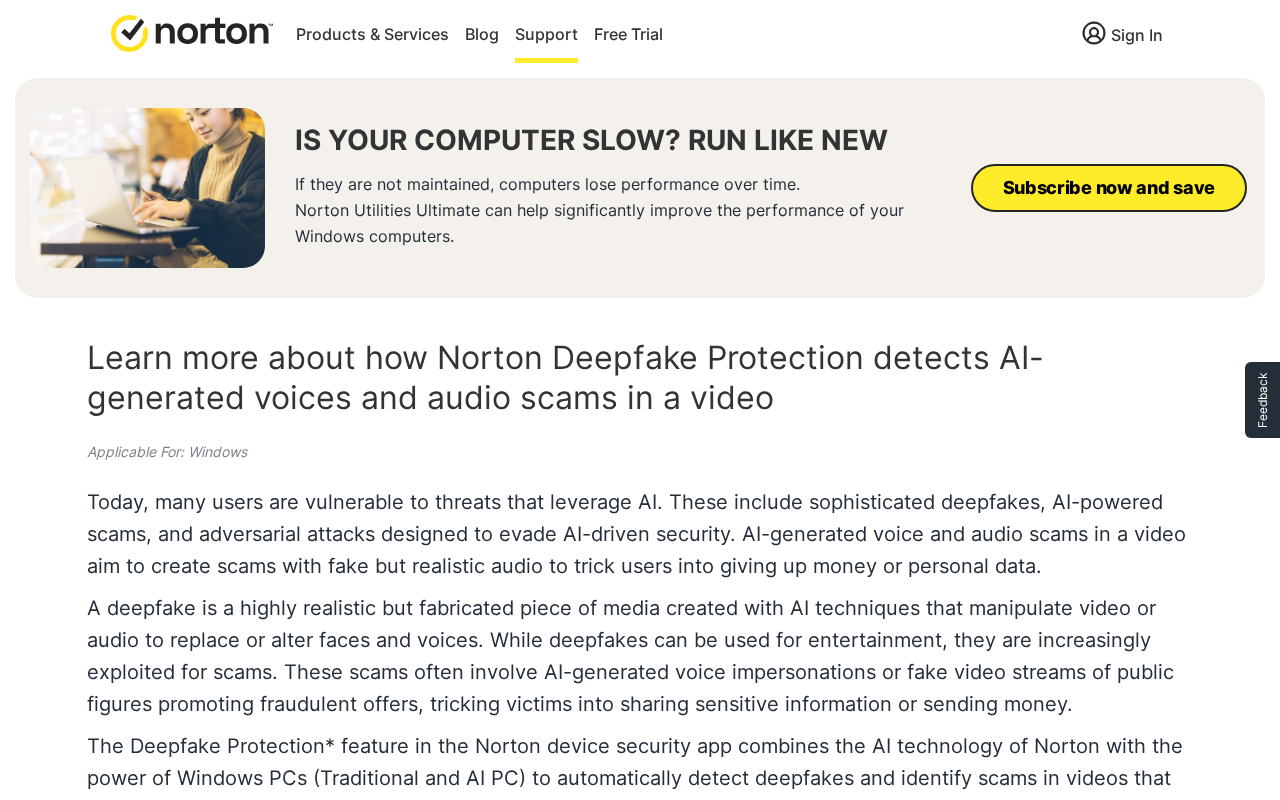
On official Norton pages, the real name is Deepfake Protection. It is a feature inside plans that include Scam Protection or Scam Protection Pro. It is not sold on those pages as a standalone Deepfake Plus annual product, and it is not sold as Deepfake Plus Defense.
Norton’s support article for the feature says the Norton device security app can watch for synthetic voices while you play video or audio, then notify you. Automatic detection is described for supported Windows PCs and for a short list of sites, including YouTube, Facebook, X, TikTok, Vimeo, Instagram, Dailymotion, and Twitch. Other apps need a manual audio scan. Language support is listed as English, Spanish, French, German, Czech, and Japanese. That is a device feature with requirements, not a mystery invoice.
The same support page lists the plans that include it: Norton AntiVirus Plus, Norton 360 Standard, Norton 360 Deluxe, Norton 360 Premium, Norton 360 Platinum, Norton 360 for Gamers, Norton Mobile Security, Norton 360 for Mobile, Norton 360 with LifeLock plans in the US, Norton 360 Advanced, Norton Mobile Scam Defense, and Norton 360 Plus for Mobile. Notice the real Plus names. AntiVirus Plus is a real plan. Norton 360 Plus for Mobile is a real plan. Deepfake Plus is the costume sitting next to those words.
Official US product pages put Deepfake Protection on the feature list for those plans, next to antivirus, scam protection, and Norton Genie. They also print first-year and renewal prices for the plans themselves. On Norton’s AI scam protection page, Norton AntiVirus Plus has been shown at $29.99 for the first year against a $59.99 renewal, Norton 360 Standard at $34.99 against a $94.99 renewal, and Norton 360 Deluxe at $39.99 against a $124.99 renewal. Those figures belong to published plans that already include the deepfake feature. They are not a separate Deepfake Plus Defense sticker price, and they are not a reason to trust a number that exists only inside an unexpected email.
If you already pay Norton, the place that should show a renewal is your Norton account, not a cold invoice with a callback line. Official renewal language on Norton product pages says annual subscribers get an email with the renewal price beforehand, and that you cancel inside the account or through official support. It does not tell you to phone a number that arrived only in the invoice.
The callback, not the charge, is the product
A lot of people open the mail and immediately hunt for a matching PayPal or bank line. That is healthy. Do it in an app or a site you opened yourself. Do not do it by calling the number printed under “Contact Support.”
Norton’s cyber-scam page already describes the exact envelope. Some messages look like they came from a household name such as PayPal or Microsoft. Inside is a Norton renewal notice, an attached invoice, and a phone number to cancel a pending charge. Shopping-app copies of the same trick bury a fake support number in an order screen. Calendar copies invent a billing event. Norton says it never sends calendar invites related to billing or payment.
PayPal’s own help for a strange money request or invoice is just as plain. Do not pay it. Do not call phone numbers stated in the invoice note. Do not open suspicious links. Cancel or report the item from your PayPal Activity after you sign in yourself.
The Deepfake Plus email is built to skip that advice. It gives you a number so you never reach Norton or PayPal through a door you chose. Once you call, the invoice can stay fake and you can still lose money. The voice can ask for remote access “to process the refund,” walk you into a bank page, or start a story about an overpayment that you must send back. Official Norton mail guidance says real Norton emails will not try to start an unprompted remote takeover, and they will not ask for passwords, Social Security numbers, or card numbers through email.
How The Scam Works
1. A familiar brand, a slightly wrong product name
The first job is recognition. The logo looks like Norton. The subject looks like billing. The product line uses words you have seen in real ads: Norton, deepfake, plus, defense, annual, PayPal. Put together, they sound like a premium upgrade you might have clicked during a checkout you barely remember.
That near-miss is the point of this variant. A generic “Norton 360 renewal” email has been around for years. Deepfake Plus Defense tries to ride a newer product story. If you have a real Norton plan, you might think Deepfake Protection was unbundled and billed on its own. If you do not have a plan, you might think someone used your PayPal to buy one.
Official plan lists do not show a Deepfake Plus Defense SKU. They show Deepfake Protection sitting inside plans you can open on norton.com. If the email’s product name does not match a plan you can find in your own account, treat the message as costume until the account and the payment app agree.
2. The receipt says the money already moved
The second job is panic with a paper trail. Invoice number. Transaction date. Billing cycle. Payment method. Saved PayPal account. Language like “successfully processed” or “your account continues to receive full service.” The email wants you to feel late. If the charge already happened, calling feels like the only way to undo it.
Norton’s public examples of auto-renewal and payment impersonation use that same pressure. They talk about hundreds of dollars and about a purchase that was “successfully processed.” This article is not going to invent a Deepfake Plus sticker price or a phone number that is not printed on an official Norton page. Those details rotate. The structure does not. A large, unexpected total plus a callback is the bait, whether the number in your inbox is high, odd, or dressed up as a PayPal debit.
A real Norton renewal should be visible in two places you control. One is the Norton account you open from the official site or app. The other is the payment method you actually use, which may be a card, a bank, or PayPal. Official Norton renewal copy also says annual customers get the renewal price by email before the bill. A cold “already charged, call now” note is the opposite of that path.
3. PayPal is borrowed as a trust stamp
Many Deepfake Plus messages say the renewal billed a saved PayPal account. That line does two jobs. It explains why you might not see a Norton name on a card statement yet. It also makes the invoice feel like a third-party receipt, which a lot of people treat as more official than a random brand email.
PayPal is a real payments company. Criminals know that. Norton’s own cyber-scam page says some of these envelopes are dressed as PayPal or Microsoft mail, then stuffed with a Norton renewal, an invoice, and a cancel number. The costume can sit in Gmail, Outlook, or a PDF attachment. The attachment is useful to the sender because filters that hunt for links may miss a phone number sitting in a picture or a file.
If a PayPal invoice or money request is sitting in your actual PayPal Activity, PayPal’s help page says you can cancel it and report it there. If nothing matching is in Activity, the email is still doing its job. It only needed you to believe a charge existed long enough to dial.
4. The phone number is the conversion
Once you call, the criminal can rewrite the story in real time. They can ask for the invoice number from the email and “find” your order. They can sound like a billing desk. They can switch from refund to security alert if you hesitate. Email cannot do that. A live voice can.
Norton’s scam-email FAQ is careful about phone numbers in messages. If a company is real, a number in a real message might be real. Because fake mail is hard to sort at a glance, the safe move is to look the number up on the official website. Norton says that if you call a scam number, anything you give can turn into financial loss or identity theft.
That is why this article will not treat a callback from an unexpected Deepfake Plus invoice as Norton support. Official contact starts at Norton’s support site and at the account you open yourself. Official mail starts on domains Norton publishes, such as norton.com and nortonlifelock.com. A display name that says Norton Help Center is not a domain.
5. Remote access gets sold as a refund
On the call, the next ask is often control of your screen. The script says they need to cancel the Deepfake Plus plan from your device, or push a refund through a secure console, or check whether malware created the order. You are told to install a remote-support tool and not to touch the mouse.
Remote-support software is not a crime by itself. IT teams use it every day. On this call it is a door. The person on the other end can watch saved passwords, open PayPal or a bank tab, change email recovery settings, or drop files you will not notice until later.
Norton’s published mail rules are the opposite of that door. Legitimate Norton emails do not ask you to hand over secrets through insecure channels. They do not try to start a remote device takeover without you asking for help through official support. A cold invoice that leads to “share your screen so we can refund Deepfake Plus” is the tech-support scam sitting inside a billing costume.
6. The extra-money story, then the second bill
Refund theater is the usual third act. The agent “issues” a return for the fake Deepfake Plus charge. Then the screen, or a page they open, shows a much larger credit. They act shocked. They say a manager will fire them, or your bank will freeze the account, unless you send the difference back right now.
There was no Deepfake Plus charge to reverse. There was no accidental over-refund. The extra number is a prop. The repayment they want is the real theft, often through gift cards, crypto, a wire, or a payment app they choose because those paths are hard to unwind.
PayPal’s unauthorized-transaction help is useful here for a different reason. If a payment you did not approve is actually in your PayPal Activity, you report it in the Resolution Center and choose unauthorized activity. PayPal says it investigates and emails you within 10 days. That path does not require a stranger on remote desktop. It also does not require you to “return” a fantasy credit with a gift card.
7. The follow-up after you hang up
If you engaged at all, the same crew, or a buyer of your number, may call back. The new voice can claim to be Norton, PayPal, a bank fraud desk, or a recovery service. The story changes. The refund is stuck. Your computer is still “processing.” You owe a release fee. You must stay on the line.
Treat those callbacks as part of the same invoice. Official Norton support is something you open from the company’s site after you hang up. Official PayPal help is something you open from the PayPal site or app. A second stranger who already knows you were upset about Deepfake Plus is not a coincidence. It is a list.
What To Do If You Already Called
If you only read the email and closed it, you are not charged by opening a message. The risk starts when you call, click, install, or send money. If you already dialed, slow down. You can still close the door.
1. End the call and stop using that number
Hang up. Do not call back “to finish the refund.” Do not answer the private number that rings two minutes later. Block it if your phone allows that. The person who picked up is not Norton billing just because they read the invoice number you were holding.
If you already gave a card number, a PayPal password, a one-time code, or remote access, keep going through the next steps before you sit with the embarrassment. Speed helps more than replay.
2. Check PayPal and your bank in an app you opened
Open the PayPal app or type the PayPal address yourself. Look at Activity for a completed payment, a pending payment, a money request, or an invoice that matches the story. If you see an invoice or request you do not recognize, PayPal says do not pay it and do not call numbers from the note. Cancel it, then use Report on that item.
If you see a completed payment you did not approve, use the Resolution Center and report unauthorized activity. PayPal also tells you to look under Settings, then Payments, for subscriptions and automatic payments, in case a family member or an old saved merchant explains a line that looked strange.
Do the same with your card and bank. Use the number on the back of the card or the official app, not a number from the email. Ask whether a matching debit exists. If it does, say you did not authorize it and you want the card or login locked if needed. If it does not, the Deepfake Plus invoice was bait, and you still need to treat the call as a security incident if you shared anything.
3. Open your Norton account from the official site
Type the Norton site yourself or use the Norton app you already installed. Sign in and look at subscriptions and billing. You are looking for a plan you recognize, not for a Deepfake Plus Defense line that exists only in the email. Official pages list Deepfake Protection as a feature of plans such as Norton AntiVirus Plus and Norton 360, not as that invoice’s product name.
If you have no Norton account, that is useful information. The email still may have gone to millions of addresses. Norton says these impersonation messages are sent even to people who never subscribed. If you do have an account and you want to cancel a real renewal, use the account controls or the contact path on Norton’s official support pages. Product pages also describe a refund window of 14 days on monthly plans and 60 days on annual payments, through those official channels.
If the mail still bothers you, Norton asks you to forward the suspicious message as an attachment to spam@norton.com. Sending it as an attachment keeps headers and the original file, which the company says it needs. You will not get a case-by-case update. That is fine. You are filing a sample, not waiting for permission to protect your accounts.
4. If you installed remote access, treat the computer as open
If the caller connected to the PC, disconnect the internet. Uninstall the remote tool they named. Then use another device, if you have one, to change the passwords that matter first: email, PayPal, bank, Norton, Apple or Google, and any password manager. Turn on two-factor authentication where it is off.
On the email account, look for forwarding rules, extra recovery phones, and new app passwords. Those are quiet ways to stay in after you think you locked the door. On PayPal and the bank, review devices, extra emails, and automatic payments. On the PC, run a full scan with the security software you already trust, then have someone you trust look at the machine before you use it for banking again.
Norton’s own “already scammed” steps match that order. Change passwords for the computer, financial accounts, and the Norton account. Run a full virus scan. Contact the company that actually charged you and ask about a refund. If that company cannot help, contact the bank. Then file a complaint with a consumer protection authority in your country.
5. Report the invoice on the paths that can actually act
You now have three official inboxes that match this pattern.
- Norton wants the email as an attachment at spam@norton.com. Use the company’s scam-email guide and its list of legitimate sender domains if you want to compare the From line. A matching domain still does not make a callback number safe. Display names get forged.
- PayPal wants unauthorized payments and strange invoices handled in the account. Use the unauthorized transaction help, the suspicious invoice help, and the report fraud page.
- In the United States, file the incident at the FTC’s ReportFraud.ftc.gov site. If money left a bank or card, keep the bank case number with that report.
If you shared a Social Security number, a driver’s license, or a full identity packet, add a fraud alert or a credit freeze with the credit bureaus. PayPal’s fraud page points people in that direction when account data may have been used more broadly. You are not being dramatic. You are closing the next loan or card that could be opened in your name.
6. Save the evidence, then ignore the recovery pitch
Keep the email, the headers if you can export them, the phone number, screenshots of the invoice, and any payment receipts. Write down the name the caller used and the tool they asked you to install. That packet helps a bank, PayPal, or police desk more than a long retelling.
Then be ready for the kindness that is not kindness. A later caller who already knows you were hit with a Deepfake Plus invoice may offer to recover the money for a fee, or to “finish Norton’s refund.” Real recovery work does not start with a cold call that references the last scam. If you want help, you call the bank, PayPal, or Norton from a number you looked up, or you walk into a branch.
The Bottom Line
A Deepfake Plus or Deepfake Plus Defense invoice is a costume. Norton is real. Deepfake Protection is a real feature inside published Norton plans. The standalone annual plan in the email, the callback number, and the remote-access refund are the fake part.
Do not call the number in the message. Check PayPal and your bank yourself. Open your Norton account from the official site. If you already called, hang up, lock the accounts you touched, remove remote software, and report the mail to Norton and the payment to PayPal. The invoice wanted a conversation. You do not owe it one.

Reviews & discussion
0 commentsShare a firsthand experience, or ask a question.
Community reviews
Norton Deepfake Plus
Moderated reader experiences, not an editorial verdict.
Start the conversation
Have a question or something useful to share? Add the first comment.