FoodiePerk EXPOSED – Fake Gift Cards or Real? Investigation
Written by: Thomas Orsolya
Published on:
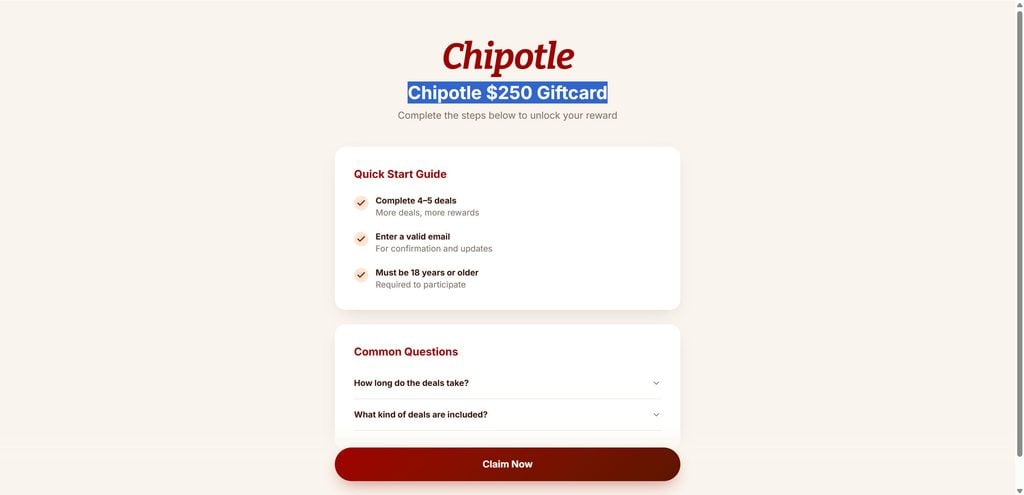
FoodiePerk.com is promoting a $250 Chipotle gift card in exchange for completing several online “deals.”
But FoodiePerk is not Chipotle, and clicking its Claim Now button does not take you to Chipotle. It sends visitors into a third-party affiliate reward funnel.
Even more revealing, the prize has already changed. Just days ago, the same website was promoting an Olive Garden $750 gift card.
The brand changes. The funnel stays the same.
Overview
At first glance, FoodiePerk looks almost ridiculously simple.
Visit the website today and the headline reads:
Chipotle $250 Giftcard
Underneath, FoodiePerk tells visitors to “complete the steps below to unlock your reward.”
The instructions are short:
Complete 4 to 5 deals
Enter a valid email address
Be at least 18 years old
Click Claim Now
That is essentially the entire pitch. No long explanation. No obvious reason why somebody wants to give you $250.
No detailed breakdown on the main screen of what completing those deals could ultimately involve.
Just a famous brand, a big gift card amount, a few easy-looking steps, and a button inviting you to continue.
That simplicity is not accidental. It is the hook.
Yesterday It Was Olive Garden. Today It Is Chipotle.
This is where FoodiePerk becomes much more interesting.
FoodiePerk was indexed only days ago with an entirely different offer:
Olive Garden $750 Giftcard
The wording underneath was almost identical.
Visitors were told to complete 4 to 5 deals, enter an email address, confirm they were at least 18, and claim the reward.
Now visit the exact same URL and Olive Garden is gone.
The live page currently promotes: Chipotle $250 Giftcard.
That is not a minor update.
The restaurant changed.
The gift card value changed.
The promotional hook changed.
But the mechanism underneath did not.
This is the key to understanding FoodiePerk.
FoodiePerk does not appear to be a website built around one genuine Chipotle promotion.
It looks like a rotating affiliate landing page that can swap whatever recognizable brand and reward happens to be useful for attracting clicks.
Today it is Chipotle.
Previously it was Olive Garden.
Tomorrow the same template could easily be dressed up around Target, Walmart, Sephora, Amazon, Starbucks, or another major consumer brand.
Different logo.
Different dollar amount.
Same playbook.
The Brand Is The Bait, Not The Business
There is an important psychological trick happening here.
When someone sees:
Chipotle $250 Giftcard
their brain immediately focuses on two things:
Chipotle and $250.
Those are the strongest visual and emotional elements on the page.
The visitor is not initially thinking:
“Who operates FoodiePerk?”
They are thinking:
“Can I really get $250 to spend at Chipotle?”
That distinction matters.
The familiar brand supplies credibility.
The reward supplies excitement.
FoodiePerk supplies the click.
FoodiePerk Is Not Chipotle
Chipotle operates its own official gift-card program through Chipotle.com.
Its official gift-card page offers physical cards, digital cards, bulk gift cards, balance checking, and support directly through Chipotle’s website.
FoodiePerk.com is an entirely separate domain.
And when you click the FoodiePerk Claim Now button, you are not transferred to Chipotle.com.
You are sent to Giftclick.org.
That is one of the most important facts in this entire investigation.
The Claim Button Reveals What FoodiePerk Really Is
The visible FoodiePerk page talks about a Chipotle reward.
But look behind the Claim Now button and the real business model begins to show.
During our live check, the button redirected toward:
giftclick.org
The referral URL contained tracking parameters including:
aff_id=16148
and:
offer_id=1725
Those are classic affiliate tracking parameters.
An aff_id identifies an affiliate or traffic source.
An offer_id identifies a particular campaign or offer.
In other words, when somebody clicks from FoodiePerk into the next stage, the system can identify which affiliate sent that visitor and which offer generated the click.
That is not how an ordinary Chipotle gift-card page works.
It is how an affiliate marketing funnel works.
The Offer Changed, But The Affiliate ID Stayed
This is what makes the rotating-brand setup so important.
The public-facing page can be changed quickly.
Olive Garden disappears.
Chipotle appears.
A $750 reward becomes $250.
A new image can be uploaded.
A new headline can be written.
But underneath, visitors can still be pushed into the same affiliate ecosystem.
Think of FoodiePerk as a storefront window.
The display can be swapped whenever the operator wants.
The machinery behind the wall does not need to change.
That makes the page highly reusable.
If one campaign stops performing, another brand can take its place.
If people stop clicking Olive Garden, test Chipotle.
If Chipotle slows down, try a beauty retailer.
If that loses momentum, switch to a nationwide retailer.
The specific company in the headline is almost secondary.
The goal is getting the visitor into the funnel.
This Is Not Really About Chipotle
That is perhaps the biggest mistake someone can make when evaluating FoodiePerk.
This is not fundamentally a story about Chipotle.
It was not fundamentally a story about Olive Garden either.
The recognizable brand is interchangeable.
The real structure is:
Famous brand + unusually large gift card + easy-looking requirements + Claim Now button + affiliate redirect + offer completion
Once you recognize that structure, changing the logo does not make it a new promotion.
It is the same machine wearing a different costume.
Why Rotate Major Brands?
Because different brands attract different audiences.
A $250 Chipotle gift card might perform well with younger consumers, students, families, or frequent fast-casual customers.
A Sephora gift card could attract beauty shoppers.
A Walmart reward has mass appeal.
Target is recognizable across the United States.
Restaurant rewards work because people immediately understand their value.
The advertiser does not need to explain why someone would want $250 at Chipotle.
The brand does all the selling.
Large Rewards Create Curiosity
$250 is enough money to make people stop scrolling.
$750 is even better.
That is the psychology behind these promotions.
If FoodiePerk advertised:
“Complete several advertiser offers for a chance to navigate a third-party rewards platform”
almost nobody would click.
But:
Chipotle $250 Giftcard
is another story.
Now the visitor wants to know what happens next.
That curiosity is valuable.
How The FoodiePerk Gift Card Scam Works
The FoodiePerk Gift Card Scam is best understood as a funnel rather than a single fake webpage.
Each stage has a purpose.
The first page gets your attention.
The next stage gets your participation.
The deals create conversions.
And those conversions create affiliate revenue.
Here is how the process works.
Step 1: A Big-Name Gift Card Gets Your Attention
You encounter FoodiePerk through an advertisement, social post, search result, recommendation, or promotional link.
The headline is intentionally simple.
Today:
Chipotle $250 Giftcard
Previously:
Olive Garden $750 Giftcard
You recognize the company immediately.
The reward is large enough to seem exciting.
And because gift-card giveaways are common online, the concept does not initially feel impossible.
That is all the landing page needs.
A click.
Step 2: The Requirements Look Surprisingly Easy
FoodiePerk tells users to complete only 4 to 5 deals.
Four or five does not sound like much.
The word “deal” is also conveniently vague.
It sounds easier than:
Start paid subscriptions
Complete advertiser offers
Purchase products
Install apps
Sign up for trials
Submit personal information
Meet individual advertiser requirements
Remain subscribed long enough to receive credit
Whether any particular downstream deal requires those actions depends on the offer shown to the user.
But that is precisely the problem with the initial presentation.
“Complete 4 to 5 deals” tells you almost nothing about the real commitment involved.
A “Deal” Is Not The Same As A Survey Question
This is critical.
Some users see these gift-card promotions and assume completing deals means answering a few survey questions.
That is not necessarily what an affiliate reward offer means.
In incentive marketing, a qualifying offer can involve substantially more effort.
The visitor may need to become a customer or valuable lead for another company.
That is where advertisers are willing to pay.
And that is what makes the reward funnel financially possible.
Step 3: FoodiePerk Asks For A Valid Email
FoodiePerk specifically tells visitors to use a valid email address “for confirmation and updates.”
An email address may sound harmless.
But email addresses are valuable inside performance marketing funnels.
They allow users to be identified, contacted, retargeted, and potentially connected with additional promotions.
The FTC has previously taken action against gift-card funnels in which personal information gathered during reward registrations was allegedly monetized or passed to marketers.
That does not establish exactly how FoodiePerk handles every visitor’s information.
It does show why consumers should never assume that entering an email into a gift-card funnel is meaningless.
Read the privacy terms before submitting anything.
Step 4: “Claim Now” Takes You Away From FoodiePerk
This is the moment where the promotion reveals itself.
Click Claim Now.
You do not arrive at Chipotle.
You do not arrive at Chipotle’s official gift-card page.
You are sent toward Giftclick.org through an affiliate-tracked URL.
FoodiePerk is therefore not the destination.
It is a bridge page.
Its job is to catch your attention and send you somewhere else.
That Affiliate ID Matters
The aff_id=16148 parameter is not decorative.
Affiliate tracking allows networks and advertisers to determine which publisher or traffic source generated a conversion.
If a visitor later completes whatever action the campaign pays for, the referral can potentially be attributed back to the affiliate.
This explains an important question:
Why would someone build FoodiePerk and promote huge gift cards?
Because sending people into offer funnels can have monetary value.
The operator does not need to sell you a Chipotle burrito.
Your downstream actions can be the monetized event.
Step 5: You Enter The Offer Funnel
This is where the enormous gift card headline starts fading into the background.
The conversation is no longer about whether you like Chipotle.
Now you are dealing with eligibility requirements.
You may need to complete various third-party promotions to qualify for the reward.
Each advertiser can have its own conditions.
That is why these funnels can become far more complicated than the first landing page suggests.
The FTC Has Seen This Exact Pattern Before
This is not theoretical.
The Federal Trade Commission has brought multiple enforcement cases involving large gift-card promotions tied to affiliate marketing.
In one major crackdown, consumers were promised gift cards worth as much as $1,000 from recognizable companies including Walmart, Target, and Best Buy.
According to the FTC, consumers who clicked were ultimately required to provide personal information and complete multiple offers, some involving paid subscriptions or applications for credit.
In another case, the FTC described supposedly free gift-card promotions that redirected consumers into numerous trial offers, some of which generated recurring monthly charges.
The brands and websites involved in those historical cases are not FoodiePerk.
But the structure is strikingly familiar.
Big reward.
Famous brand.
Affiliate traffic.
Offer completion.
That is why the FoodiePerk setup deserves serious scrutiny.
Step 6: Every Completed Deal Can Have Value
Why require deals at all?
Because advertisers pay for results.
Depending on the campaign, an advertiser might value:
A new subscriber
A new customer
An app installation
A trial signup
A purchase
A lead
An application
A membership
A completed registration
Those are called conversions.
If you complete an advertiser’s required action, somebody in the marketing chain may get paid.
The FTC has previously described gift-card schemes where affiliates were compensated based on consumers entering information and operators received payments when consumers became customers or subscribers through promoted offers.
That is the economic engine.
The $250 gift card gets you through the door.
The deals create value behind the scenes.
Step 7: The “Free Reward” Can Stop Feeling Free
This is where users need to slow down.
A large gift card sounds wonderful if the cost is zero.
The calculation changes if qualifying requires spending money, entering trials, joining subscriptions, or repeatedly providing information to outside companies.
Imagine completing five different offers.
One requires a purchase.
Another converts into a monthly membership.
A third has a trial cancellation deadline.
A fourth requires you to remain subscribed for a qualifying period.
A fifth does not properly track.
Now the simple $250 headline feels very different.
Small Payments Add Up
The human brain tends to evaluate individual transactions rather than the entire process.
$9.99 does not sound like much.
Neither does $14.99.
Or $19.99.
But multiple qualifying offers can accumulate.
And if recurring billing is involved, the real cost may continue long after the user stops thinking about the gift card.
Step 8: Tracking Becomes Your Problem
Affiliate rewards frequently depend on technical tracking.
The system may need to record:
The original click
Your browser session
Cookies
Your email
Your device
The advertiser conversion
The date of completion
Whether you met the offer terms
If something breaks, the deal might not receive credit.
That can create an extremely frustrating situation.
You believe you completed the requirement.
The system says you did not.
Now you are chasing customer support to prove it.
Common Tracking Problems Can Include
Switching browsers
Switching phones or computers
Blocking cookies
Using an ad blocker
Opening the advertiser separately
Using a different email address
Having previously used an offer
Canceling before the qualifying period
Failing an advertiser’s eligibility rules
The beautiful promise of “complete 4 to 5 deals” suddenly becomes a lot less beautiful.
Step 9: Sunk Cost Keeps People Going
This is one of the strongest psychological forces in reward funnels.
Suppose you already completed three deals.
You have spent an hour registering.
You gave several companies your information.
Maybe you spent $30.
Then another requirement appears.
Logically, you should evaluate that new requirement on its own.
Psychologically, most people think:
“I’ve already come this far.”
So they continue.
That is the sunk cost effect.
The closer the user believes they are to $250, the harder it becomes to walk away.
Step 10: FoodiePerk Can Change The Bait Whenever It Wants
This is the part that makes the current investigation especially revealing.
FoodiePerk has already demonstrated that the headline reward is replaceable.
The indexed version advertised:
Olive Garden $750 Giftcard
The live version now advertises: Chipotle $250 Giftcard
Same domain. Same layout. Same “complete 4 to 5 deals” instructions. Same email requirement. Same Claim Now concept. Different bait.
That means consumers should not get distracted debating whether one specific Chipotle promotion is real.
The better question is:
Why does the same website keep changing the major brand attached to its gift-card funnel?
The Rotating Brand Strategy Is The Biggest Red Flag
Most official brand promotions are built around the company running them.
Chipotle launches a Chipotle campaign.
Target launches a Target campaign.
Sephora launches a Sephora promotion.
FoodiePerk behaves differently.
The landing page itself can apparently be repurposed.
Today Chipotle.
Previously Olive Garden.
Potentially another recognizable company next.
New Logo, Same Funnel
That is what consumers need to remember.
Changing the reward does not change the mechanism.
A future page might say:
Target $500 Gift Card
or:
Walmart $750 Gift Card
or:
Sephora $250 Gift Card
The names could change endlessly.
The important questions remain exactly the same:
Who actually operates the website?
Where does Claim Now send you?
Is the destination the official brand website?
Why do you need to complete deals?
What do those deals cost?
Who receives your personal information?
Is an affiliate being paid for your actions?
What happens if an offer does not track?
What are the complete conditions for receiving the gift card?
If the answers are buried several clicks deep, the giant gift-card headline should not be trusted at face value.
FoodiePerk’s Domain Is Extremely New
FoodiePerk.com was registered in August 2026.
Available domain information lists the registration date as August 11, 2026, with registrant information hidden from public WHOIS records
Again, a new website is not automatically a scam.
Every legitimate company was new once.
But a brand-new, privacy-protected domain that immediately begins cycling major consumer brands and high-value gift-card offers deserves far more scrutiny than an established rewards company with years of public history.
There is simply very little reputation history to rely on.
Giftclick Raises Additional Questions
The outbound destination is also worth examining.
Independent reputation service Gridinsoft has classified Giftclick.org as suspicious and reported that one external security provider flagged the domain for phishing.
The same report notes that Giftclick.org itself is relatively new, having been registered in January 2026.
Automated website reputation scores are not proof of fraud by themselves.
False positives happen.
But in combination with the other facts, the finding adds another reason for caution.
FoodiePerk is extremely new.
The headline reward changes.
The site borrows the attention of major brands.
The Claim Now button leads somewhere other than those brands.
The redirect is explicitly affiliate tracked.
And the downstream domain has attracted at least one phishing warning.
That is not a combination we would recommend trusting with personal information or payment details.
Why We Call FoodiePerk A Gift Card Scam
The problem is not merely that affiliate marketing exists.
Affiliate marketing itself is legitimate.
Millions of normal websites earn commissions by linking readers to products and services.
The issue is how the visitor is persuaded into the affiliate funnel.
FoodiePerk leads with the impression of an enormous gift-card reward from a recognizable brand.
The underlying reality is substantially more complicated.
You are not simply claiming $250 from Chipotle.
You are clicking into a third-party performance marketing ecosystem where completing advertiser offers is central to eligibility.
And the company being used to attract you can apparently be switched almost overnight.
That is why we consider the FoodiePerk presentation deceptive enough to avoid.
A Familiar Scam Formula
The Federal Trade Commission’s past enforcement actions are particularly relevant because this type of funnel has existed for years.
In 2014, the FTC announced a $2.5 million settlement involving operators of websites that promised consumers “free $1,000 gift cards.”
According to the FTC, consumers provided information while registering for prizes and were then required to complete offers that could involve paid subscriptions or applying for credit.
The companies advertising those offers paid the website operators.
The FTC has also taken action against affiliate marketers accused of promoting gift cards to brands such as Target, Walmart, and Best Buy while sending consumers into complicated offer funnels.
Again, those enforcement actions concern other companies.
But they demonstrate something extremely important:
The fake-big-brand-gift-card-to-affiliate-offer-funnel model is not new.
FoodiePerk simply gives it a fresh domain and a rotating 2026 wrapper.
What To Do If You Already Used FoodiePerk
If you already clicked through FoodiePerk, do not panic.
Simply work through what information and commitments you provided.
1. Stop Completing More Deals
You do not need to keep going just because you already started.
Do not allow the promise of a gift card to pressure you into making purchases you would never normally make.
2. Make A List Of Every Offer You Joined
Write down:
The company
The website
What information you provided
Whether you entered payment details
How much you paid
Whether it was a trial
When the trial renews
How to cancel it
Do this immediately while you still remember.
3. Cancel Unwanted Trials And Subscriptions
Do not assume uninstalling an app cancels billing.
Follow the official cancellation procedure for every service.
Save confirmation emails and screenshots.
4. Check Your Bank And Credit Card Statements
If any offer required payment details, monitor your accounts carefully.
Look for:
Unrecognized merchants
Trial conversions
Recurring charges
Duplicate payments
Higher charges than expected
Contact your bank or card provider immediately if you find unauthorized activity.
5. Watch Your Email Closely
If you provided your email address, expect the possibility of additional marketing.
Treat new gift-card offers with particular suspicion.
Once someone knows you respond to large reward promotions, similar campaigns become easier to target toward you.
6. Change Any Reused Passwords
If you created accounts while completing deals and reused a password from another service, change it.
This can help if you need to dispute a charge or file a complaint later.
8. Report Misleading Advertising
If you reached FoodiePerk through a social media advertisement, report the ad to that platform.
Consumers in the United States can also report suspected deceptive marketing to the Federal Trade Commission.
Is Your Device Infected? Run a Free Malware Scan
Slow performance, constant pop-ups, or strange behavior? These are classic signs of a malware infection. The fastest way to find out is to scan your device with Malwarebytes Anti-Malware Free — one of the most trusted malware removal tools available.
The free version detects and removes the most common threats, including:
Adware — the cause of those annoying pop-ups
Browser hijackers — unwanted redirects and changed homepages
Trojans and spyware — hidden programs stealing your data
Potentially unwanted programs (PUPs) — software you never asked for
👉 Select your device below — Windows, Mac, or Android — then follow the simple steps to download Malwarebytes, scan your system, and remove any threats it finds. The whole process takes about 5 minutes.
Malwarebytes for WindowsMalwarebytes for MacMalwarebytes for Android
Run a Malware Scan with Malwarebytes for Windows
Malwarebytes is one of the most popular and trusted anti-malware tools for Windows — and it’s completely free for removing infections. It catches threats that many antivirus programs miss, including adware, browser hijackers, and trojans. Follow the steps below to scan and clean your PC in just a few minutes.
Download Malwarebytes
Click the button below to download the latest version of Malwarebytes for Windows from the official source. The free version is all you need — it will scan your computer and remove adware, browser hijackers, and other malicious software at no cost.
(The link opens in a new page where your download will start)
Install Malwarebytes
When the download finishes, open your Downloads folder and double-click the MBSetup file. If Windows shows a User Account Control pop-up, click “Yes” to allow the installation.
Follow the On-Screen Prompts to Install Malwarebytes
The setup wizard will walk you through a few quick screens:
Choose where you’re installing the program — “Personal Computer” or “Work Computer” — then click Next.
Malwarebytes will now install on your device. This usually takes under a minute.
When installation is complete, the “Welcome to Malwarebytes” screen will open automatically.
On the final screen, click Open Malwarebytes to launch the program.
Enable “Scan for Rootkits”
Before scanning, turn on rootkit detection so Malwarebytes can find even the most hidden threats. Click the Settings gear icon on the left side of the screen.
In the settings menu, find “Scan for rootkits” and click the toggle so it turns blue.
Done? Click “Dashboard” in the left pane to return to the main screen.
Start the Scan
Click the blue Scan button. Malwarebytes will automatically update its virus database and start checking your computer for malware.
Wait for the Scan to Finish
The scan checks your entire system for browser hijackers and other malicious programs, so it can take several minutes. Feel free to do something else — just check back occasionally to see the progress.
Quarantine the Detected Threats
When the scan is done, you’ll see a list of everything Malwarebytes found — malware, adware, and potentially unwanted programs. Click the “Quarantine” button to remove all of them at once.
Malwarebytes will now remove the malicious files and registry entries and move them safely into quarantine.
Restart Your Computer
Some threats can only be fully removed after a reboot. If Malwarebytes asks you to restart, click Yes. Once you’re logged back in, your PC is clean and you can continue with the next steps in this guide.
When the scan finishes, click Quarantine to remove everything Malwarebytes found. That’s it — your Windows PC is now clean of trojans, adware, and other malware, and should be back to running smoothly.
If your current antivirus allowed this malicious program on your computer, you may want to consider purchasing Malwarebytes Premium to protect against these types of threats in the future. If you are still having problems with your computer after completing these instructions, then please follow one of the steps:
Malwarebytes for Mac is a free on-demand scanner that removes the malware other security software tends to miss — adware, browser hijackers, and unwanted programs included. Cleaning an infected Mac with Malwarebytes has always been completely free, and it’s our go-to recommendation. Follow the steps below to scan and clean your Mac in just a few minutes.
Download Malwarebytes for Mac
Click the button below to download the latest version of Malwarebytes for Mac.
When the download finishes, open your Downloads folder and double-click the setup file to begin the installation.
Follow the On-Screen Prompts to Install Malwarebytes
The Malwarebytes for Mac Installer will guide you through a few quick screens. Click “Continue” and keep following the prompts until the installation completes.
When the installation is complete, Malwarebytes opens to the Welcome to Malwarebytes screen. Click “Get started“.
Select “Personal Computer” or “Work Computer”
Malwarebytes will ask what type of computer you’re installing it on. Click either Personal Computer or Work Computer, whichever applies.
Start the Scan
Click the “Scan” button. Malwarebytes will automatically update its detection database and begin checking your Mac for malware.
Wait for the Scan to Finish
Malwarebytes will scan your Mac for adware, browser hijackers, and other malicious programs. This can take a few minutes, so feel free to do something else — just check back occasionally to see the progress.
Quarantine the Detected Threats
When the scan is done, you’ll see a list of everything Malwarebytes found. Click the “Quarantine” button to remove all the threats at once.
Restart Your Mac
Malwarebytes will now remove all the malicious files it found. Some threats can only be fully removed after a reboot — if Malwarebytes asks you to restart, allow it. Once you’re logged back in, your Mac is clean.
Once the scan is done, remove every threat it detected. Your Mac is now free of adware, rogue browser extensions, and other potentially harmful software.
If your current antivirus allowed a malicious program on your computer, you might want to consider purchasing the full-featured version of Malwarebytes Anti-Malware to protect against these types of threats in the future. If you are still experiencing problems while trying to remove a malicious program from your computer, please ask for help in our Mac Malware Removal Help & Support forum.
Run a Malware Scan with Malwarebytes for Android
Malwarebytes for Android automatically detects and removes dangerous threats like malware and ransomware so you don’t have to worry about your most-used device being compromised. Aggressive detection of adware and potentially unwanted programs keeps your Android phone or tablet running smooth.
Download Malwarebytes for Android.
You can download Malwarebytes for Android by clicking the link below.
In the Google Play Store, tap “Install” to install Malwarebytes for Android on your device.
When the installation process has finished, tap “Open” to begin using Malwarebytes for Android. You can also open Malwarebytes by tapping on its icon in your phone menu or home screen.
Follow the on-screen prompts to complete the setup process
When Malwarebytes will open, you will see the Malwarebytes Setup Wizard which will guide you through a series of permissions and other setup options. This is the first of two screens that explain the difference between the Premium and Free versions. Swipe this screen to continue. Tap on “Got it” to proceed to the next step. Malwarebytes for Android will now ask for a set of permissions that are required to scan your device and protect it from malware. Tap on “Give permission” to continue. Tap on “Allow” to permit Malwarebytes to access the files on your phone.
Update database and run a scan with Malwarebytes for Android
You will now be prompted to update the Malwarebytes database and run a full system scan.
Click on “Update database” to update the Malwarebytes for Android definitions to the latest version, then click on “Run full scan” to perform a system scan.
Wait for the Malwarebytes scan to complete.
Malwarebytes will now start scanning your phone for adware and other malicious apps. This process can take a few minutes, so we suggest you do something else and periodically check on the status of the scan to see when it is finished.
Click on “Remove Selected”.
When the scan has been completed, you will be presented with a screen showing the malware infections that Malwarebytes for Android has detected. To remove the malicious apps that Malwarebytes has found, tap on the “Remove Selected” button.
Restart your phone.
Malwarebytes for Android will now remove all the malicious apps that it has found. To complete the malware removal process, Malwarebytes may ask you to restart your device.
After the scan, tap Remove Selected to delete all detected threats. Your Android phone is now clean — no more malicious apps, adware, or browser redirects.
If your current antivirus allowed a malicious app on your phone, you may want to consider purchasing the full-featured version of Malwarebytes to protect against these types of threats in the future. If you are still having problems with your phone after completing these instructions, then please follow one of the steps:
Restore your phone to factory settings by going to Settings > General management > Reset > Factory data reset.
Now that your device is clean, keep it that way. Most infections start with a malicious ad or a fake download button — so blocking them at the source is your best defense.
We recommend AdGuard, which blocks malicious ads, phishing pages, and dangerous redirects before they can reach you.
That will protect you after the scammers change domains, brands, or gift-card amounts.
Red Flag 1: A Massive Reward For Very Little Work
A $250, $500, $750, or $1,000 gift card should immediately make you ask how the promotion is funded.
Red Flag 2: The Brand And Domain Do Not Match
If the page says Chipotle but the URL says FoodiePerk, investigate.
If it says Target but you are not on Target.com, investigate.
Red Flag 3: “Complete Deals”
This is one of the biggest clues.
Find out exactly what “deals” means before continuing.
Red Flag 4: Claim Now Sends You Somewhere Else
Hover over or inspect the link.
A redirect into an unrelated reward or affiliate domain changes the nature of the promotion.
Red Flag 5: The Offer Keeps Changing Brands
A website that was advertising Olive Garden days ago and Chipotle today is clearly not built around one official restaurant promotion.
Red Flag 6: Extremely New Domains
New domains deserve extra caution when they are asking you to trust high-value financial incentives.
Red Flag 7: Affiliate Tracking
Parameters such as aff_id, offer_id, subid, clickid, or similar identifiers show that your referral is being commercially tracked.
Affiliate tracking alone is not fraud.
Combined with a misleading gift-card presentation, it becomes highly relevant.
FAQ
Is the FoodiePerk $250 Chipotle gift card real?
FoodiePerk currently advertises a $250 Chipotle gift card, but users are not simply given the card. FoodiePerk tells visitors to complete 4 to 5 deals and routes Claim Now clicks into a third-party affiliate funnel. (Foodie Perk)
Is FoodiePerk an official Chipotle website?
No. FoodiePerk.com is a separate domain. Chipotle’s official gift-card program is available through Chipotle.com.
Why did FoodiePerk previously show an Olive Garden $750 gift card?
FoodiePerk’s indexed page previously displayed an Olive Garden $750 reward, while the live page now displays Chipotle $250. This strongly indicates that the gift-card branding is being rotated while the underlying offer structure remains largely unchanged.
Where does FoodiePerk’s Claim Now button go?
Our live check found that it redirects toward Giftclick.org using a URL containing affiliate and offer tracking parameters.
Could FoodiePerk change to Target, Walmart, Sephora, or another brand?
The site has already changed from Olive Garden to Chipotle, demonstrating that the branding can be swapped. Consumers should judge the underlying funnel rather than trusting whichever major brand happens to appear on the page.
Should I complete the FoodiePerk deals?
We recommend avoiding the promotion. If you are interested in a genuine gift card or promotion from Chipotle or another retailer, verify it directly on that company’s official website.
The Bottom Line
The most revealing thing about FoodiePerk is not the $250 Chipotle gift card currently displayed on its homepage.
It is what was there before.
Days ago, FoodiePerk was advertising an Olive Garden $750 gift card.
Today, Olive Garden has vanished.
Chipotle has taken its place.
Yet visitors are still told to complete 4 to 5 deals, provide a valid email address, and click through a Claim Now button that sends them into a third-party affiliate system.
That tells you everything you really need to know.
The brand is disposable. The gift-card amount is disposable. The landing-page headline is disposable.The affiliate funnel is the constant.
So do not get distracted if FoodiePerk changes again.
Chipotle today.
Olive Garden yesterday.
Target, Walmart, Sephora, or another household name tomorrow.
The logo may change.
The dollar amount may change.
The advertisement may change.
The scam stays the same.
10 Rules to Avoid Online Scams
Here are 10 practical safety rules to help you avoid malware, online shopping scams, crypto scams, and other online fraud. Each tip includes a quick “if you already got hit” action.
Stop and verify before you click, log in, download, or pay.
Most scams win by creating urgency. Verify using a trusted method: type the website address yourself, use the official app, or call a known number (not the one in the message).
If you already clicked: close the page, do not enter passwords, and run a malware scan.
Keep your operating system, browser, and apps updated.
Updates patch security holes used by malware and malicious ads. Turn on automatic updates where possible.
If you saw a scary “update now” pop-up: close it and update only through your device settings or the official app store.
Use layered protection: antivirus plus an ad blocker.
Antivirus helps block malware. An ad blocker reduces scam redirects, phishing pages, and malvertising.
If your browser is acting weird: remove unknown extensions, reset the browser, then run a full scan.
Install apps, software, and extensions only from official sources.
Avoid cracked software, “keygens,” and random downloads. During installs, choose Custom/Advanced and decline bundled offers you do not recognize.
If you already installed something suspicious: uninstall it, restart, and scan again.
Treat links and attachments as untrusted by default.
Phishing often impersonates delivery services, banks, and popular brands. If it is unexpected, do not open attachments or log in through the message.
If you entered credentials: change the password immediately and enable 2FA.
Shop safely: research the store, then pay with protection.
Be cautious with brand-new stores, “closing sale” stories, and prices that make no sense. Prefer credit cards or PayPal for dispute options. Avoid wire transfers, gift cards, and crypto payments.
If you already paid: contact your card issuer or PayPal quickly to dispute the transaction.
Crypto rule: never pay a “fee” to withdraw or recover money.
Common patterns include fake profits, then “tax,” “gas,” or “verification” fees. Another is a “recovery agent” who demands upfront crypto.
If you already sent crypto: stop paying, save evidence (wallet addresses, TXIDs, chats), and report the scam to the platform used.
Secure your accounts with unique passwords and 2FA (start with email).
Use a password manager and unique passwords for every account. Enable 2FA using an authenticator app when possible.
If you suspect an account takeover: change passwords, sign out of all devices, and review recent logins and recovery settings.
Back up important files and keep one backup offline.
Backups protect you from ransomware and device failure. Keep at least one backup on an external drive that is not always connected.
If you suspect infection: do not connect backup drives until the system is clean.
If you think you are a victim: stop losses, document evidence, and escalate fast.
Move quickly. Speed matters for disputes, account recovery, and limiting damage.
Stop payments and contact: do not send more money or respond to the scammer.
Call your bank or card issuer: block transactions, replace the card if needed, and start a dispute or chargeback.
Secure your email first: change the email password, enable 2FA, and remove unfamiliar recovery options.
Secure other accounts: change passwords, enable 2FA, and log out of all sessions.
Scan your device: remove suspicious apps or extensions, then run a full malware scan.
Save evidence: screenshots, emails, order pages, tracking pages, wallet addresses, TXIDs, and chat logs.
Report it: to the payment provider, marketplace, social platform, exchange, or wallet service involved.
These rules are intentionally simple. Most online losses happen when decisions are rushed. Slow down, verify independently, and use payment methods and account controls that give you recourse.
Thomas is an expert at uncovering scams and providing in-depth reporting on cyber threats and online fraud. As an editor, he is dedicated to keeping readers informed on the latest developments in cybersecurity and tech.