

A FedEx Ground text says a delivery attempt failed. Your package needs a signature, the message claims, and a link lets you choose a new date before it is returned.
The timing can feel believable even when you are expecting several orders. The text uses the language of package tracking and turns a common delivery delay into a problem that appears easy to fix.
Before replying “Y” or opening the address, inspect what sits after fedex.com in the link. That small detail can reveal who actually controls the page waiting on the other side.
Overview
The text invents a failed FedEx Ground delivery
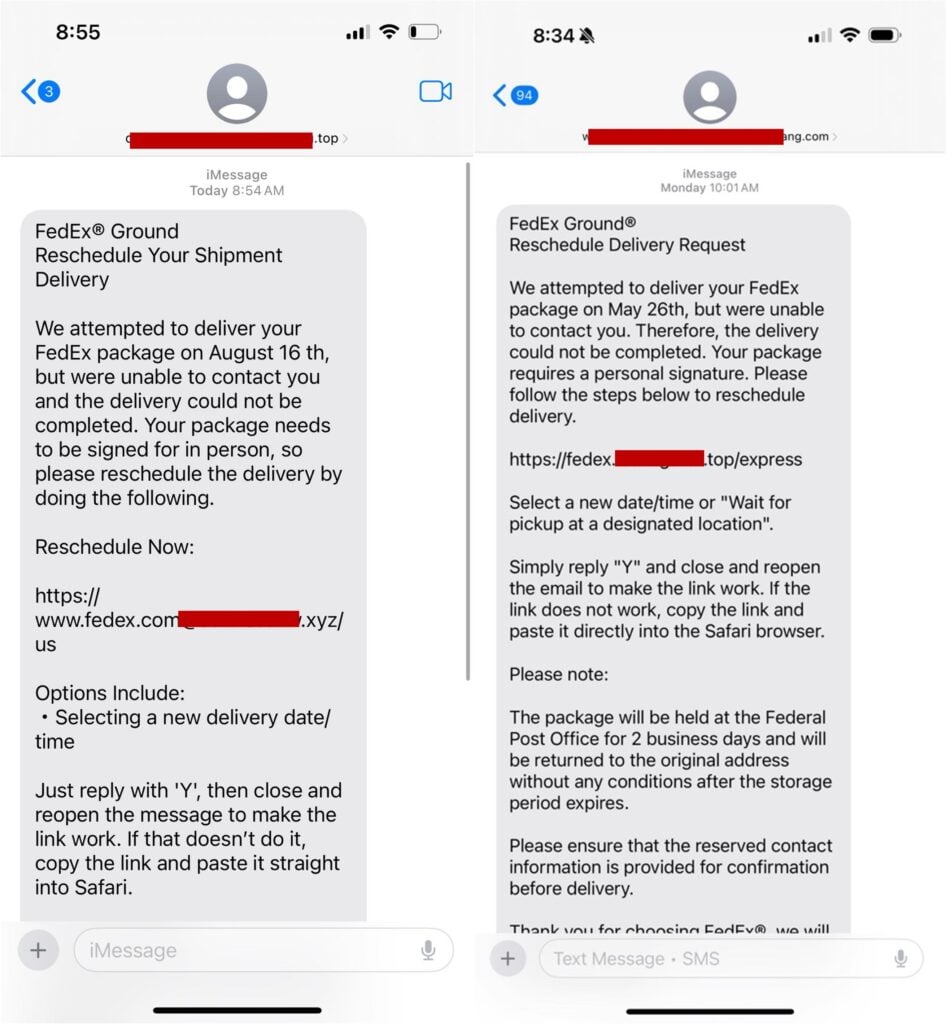
The message says a driver could not contact the recipient or obtain a required signature. It asks the recipient to reschedule delivery or wait for pickup at a designated location.
The story is deliberately ordinary. Missed deliveries happen, and many people have several parcels moving at once. A victim may assume the text belongs to an order without checking for a tracking number.
The visible link is designed to look familiar
Observed URLs place “fedex.com” at the beginning of a much longer address. One ends with .xyz and another uses a separate .top domain. Neither is controlled by FedEx simply because the brand name appears somewhere on the left.
On a phone, the rest of a long address may wrap or disappear. The scam relies on the recipient recognizing the first familiar word and overlooking the registered domain.
A small redelivery fee opens the payment trap
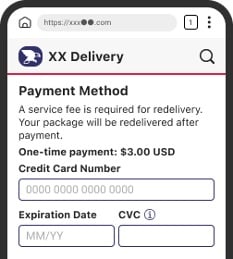
The linked page can request an address and card details for a small service fee. A fake payment form may call it a one-time $3.00 charge and promise delivery after payment.
The small amount lowers suspicion, but the form can collect the full card number, expiration date, security code, billing address, and contact information.
- The message arrives without a verifiable tracking number.
- It says a delivery failed or a signature was missed.
- The recipient is told to reply “Y” and reopen the text.
- The link contains FedEx words but ends on another domain.
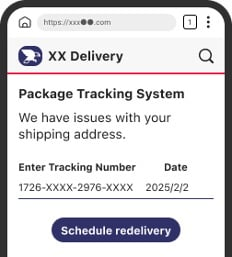
- A fake tracking page asks for address information.
- A small redelivery fee requires full card details.
- The page may report an error and request another card.
Why the Link Can Look Like FedEx Without Being FedEx
A web address is read by browsers according to its registered domain, not according to the most recognizable word. Criminals exploit this by placing brand names inside subdomains, paths, or longer domain labels.
For example, an address beginning with “www.fedex.com” can continue into additional characters before ending in .xyz. If there is no slash immediately after fedex.com, the browser may be visiting an entirely different registered domain.
Another observed message uses a domain that includes the FedEx name but ends in .top. It is not a fedex.com page. Red boxes in public screenshots cover portions of the criminal domains so readers do not accidentally visit them.
A padlock does not prove company ownership
A phishing site can use HTTPS and display a padlock. Encryption protects the connection between the victim and the fake site. It does not verify that the site belongs to FedEx or that the form is safe.
Check the domain before considering the design, certificate, or logo. If the site is not under fedex.com, close it.
The “reply Y” instruction is a manipulation step
Some iPhones do not make a link clickable when the sender is unknown. The scam text tells the recipient to reply “Y,” close the message, and reopen it to activate the link.
That instruction serves two purposes. It helps bypass the phone’s caution and confirms to the sender that the number is active and responsive.
The Fake Redelivery Page Wants More Than $3.00
The first page may resemble a package-tracking system. It displays a tracking number, date, address problem, and a button to schedule redelivery.
The next page asks for personal details. A delivery form can reasonably request a name and address, so the data collection may not feel unusual.
Finally, a payment page says a service fee is required. The victim enters card details for a small charge, believing the form belongs to a national delivery company.
The payment is only the cover story. The information can be used for unauthorized transactions, account verification attempts, targeted calls, or resale to other fraud groups.
A fake decline can collect several cards
The page may say the first card failed and ask for another. That message can be generated regardless of what the bank returned.
Trying a second card expands the theft. The victim may later see test charges, larger transactions, or calls from criminals pretending to be the card issuer’s fraud department.
The site can capture information before submission
Modern forms can transmit each field while it is typed. Closing the page before pressing the final button may not guarantee that entered data stayed private.
If a card number or password was typed into a suspicious delivery page, contact the provider instead of waiting to see whether a charge appears.
The Details Inside the Text Do Not Add Up
The messages use FedEx Ground branding, but some wording does not match the company or the delivery system. One example says the package will be held at the “Federal Post Office,” even though FedEx is a private carrier.
The text may give a specific delivery date without a usable tracking number, sender, destination, or item description. A real tracking event can be checked independently at fedex.com.
The message also creates unnecessary instructions for making its own link work. A legitimate carrier does not need a recipient to reply to an unknown number so a tracking link becomes clickable.
These contradictions are valuable because branding can be copied. Operational details are harder for a generic mass-text script to keep consistent.
FedEx warns about unsolicited requests for information
FedEx’s fraud guidance says it does not request account credentials or identity information through unsolicited mail, email, or text. It also lists altered web addresses, urgent money requests, and personal-data requests as warning signs.
Do not use the text to reach FedEx. Open fedex.com independently and enter a tracking number you received from the real merchant.
The FTC describes the same missed-delivery story
The FTC’s fake shipping notification warning says scammers claim a delivery was missed and ask recipients to click a link to reschedule.
The destination is a look-alike site built to collect personal or financial information. The name on the message may change, but the redelivery funnel stays the same.
How the FedEx Ground Text Scam Works
Step 1: Criminals send package texts in bulk
The sender does not need to know whether a real FedEx shipment exists. Online shopping makes the probability high enough that some recipients will be waiting for a package.
A successful coincidence feels like proof. In reality, the message may contain no order number, merchant, destination, or valid tracking event.
Step 2: The text creates a routine delivery problem
The package supposedly needs a signature, could not be delivered, or will be returned after a short holding period. The issue sounds frustrating but solvable.
That balance matters. The victim is worried enough to act but not alarmed enough to call a bank or ask someone else for help.
Step 3: The sender makes the link look familiar
The URL includes FedEx branding, a shipping word, or a path such as “express.” It may be formatted across several lines so the real ending is easy to miss.
The recipient sees the brand before the .xyz or .top ending and assumes the address is official.
Step 4: Replying activates the social-engineering path
The message instructs the recipient to reply “Y” and reopen the conversation. This can make the phone treat the sender as known and turn the text into a clickable link.
The reply also confirms an active target. More scam messages can follow even if the recipient never finishes the fake form.
Step 5: A cloned tracking page asks for address data
The page presents a delivery status and asks the victim to confirm a name, street address, city, postal code, telephone number, or email address.
The information makes later fraud more personal and can be combined with data from previous breaches.
Step 6: A small fee collects the card
A payment screen asks for a redelivery, customs, storage, or service charge. The amount looks too small to justify calling support.
The form collects enough information for online card transactions and may request a one-time code if the bank challenges an attempt.
Step 7: The result page delays suspicion
A confirmation says the package was rescheduled. A decline asks for another card. Neither response proves that a shipment exists or that a real carrier received the request.
The delay gives the operator time to test the submitted information.
Step 8: Follow-up scams impersonate the bank or carrier
A later caller may know the victim’s name, address, card brand, and delivery story. They claim to be from FedEx security or the bank’s fraud team and ask for codes or money movement.
Use only independently located contact details. Never trust a follow-up simply because it knows information entered on the phishing page.
Company, Address, and Fulfillment Checks
FedEx is being impersonated
The company name and logo are trust signals copied by the sender. They do not indicate that FedEx created the text, owns the linked domain, or charged the redelivery fee.
The domain does not match fedex.com
Observed links end on unrelated .xyz or .top domains. Placing “fedex” or “fedex.com” earlier in a longer address does not make the registered domain official.
The tracking and address trail cannot be verified
The text may omit a valid tracking number and merchant. Entering any supplied number directly at fedex.com can expose that there is no matching shipment or delivery attempt.
The fee does not connect to real fulfillment
A fake page promises redelivery after collecting card data, but it has no access to a FedEx route, package, driver, or delivery instruction. The form cannot fulfill what the text promises.
Warning Signs in a Fake FedEx Ground Text
- You did not request text tracking for the shipment.
- The merchant and item are not identified.
- The tracking number is missing or invalid at fedex.com.
- The message says to reply “Y” to activate the link.
- The address ends outside fedex.com.
- The package will supposedly be returned within days.
- The wording mentions a “Federal Post Office.”
- A small fee requires complete card information.
- The page asks for an OTP or online banking login.
- A failed payment prompts you to try another card.
The same technique appears in other delivery brands. MalwareTips’ report on the USPS redelivery payment scam shows how a missed-package story becomes a payment and identity phishing form.
How to Check a FedEx Delivery Safely
Do not reply to the text. Open a new browser window, type fedex.com, and enter the tracking number supplied by the actual merchant or order confirmation.
Review the order inside the retailer’s app or website. A real seller can show which carrier has the parcel and provide a tracking link from the order record.
If a delivery needs attention, use FedEx Delivery Manager or the contact information published on fedex.com. Do not use a telephone number or web address in an unexpected text.
Report the message as junk and forward it to 7726 when supported by your carrier. Preserving the sender and URL helps providers identify related campaigns.
What to Do if You Have Fallen Victim to This Scam
- Close the fake delivery page. Do not resubmit the form, try another card, download an app, or provide a one-time code. Do not return to the link to check whether it still works.
- Call the card issuer immediately. Use the number on the card or official banking app. Explain that the card details were entered on a phishing site and ask about replacement, transaction blocks, and disputes.
- Secure exposed accounts. If a password was entered, change it from a clean device everywhere it was reused. Enable multi-factor authentication and review active sessions and recovery details.
- Contact the real merchant and FedEx independently. Confirm whether a package exists and whether any legitimate delivery action is required. Use the order record and fedex.com, not the text.
- Preserve the evidence. Save screenshots, the complete URL, sender, date, text, entered fields, payment page, bank alerts, and any transaction. Do not expose the phishing link to other people.
- Watch for follow-up calls. A criminal may impersonate the bank or FedEx using the data submitted. End the call and contact the organization through a trusted number.
- Check the device. Install Malwarebytes from its official site and run a full scan. Use AdGuard to help block known phishing and malicious advertising during recovery.
- Protect your identity. If identity documents or a Social Security number were entered, follow the recovery steps at IdentityTheft.gov and consider a credit freeze.
- Report the fraud. Forward the text to 7726, report the sender through the phone, and submit the campaign to ReportFraud.ftc.gov. Financial cybercrime can also be reported to IC3.
- Ignore recovery services. No legitimate investigator needs an upfront fee, gift card, cryptocurrency transfer, or remote access to recover a redelivery charge.
Frequently Asked Questions
Does FedEx send delivery text messages?
FedEx can send tracking notifications when a customer or recipient has requested them. An unexpected message is not automatically authentic. Verify the tracking number and delivery status directly at fedex.com.
Why does the link contain fedex.com?
Scammers can place those words inside a longer domain, subdomain, or path. Check where the registered address actually ends. An official FedEx page remains under fedex.com.
Should I reply Y to make the link work?
No. That instruction can bypass a phone’s protection for unknown senders and confirm that your number is active. Do not reply. Check the shipment through the official site or merchant account.
Is a $3.00 redelivery fee proof the page is fake?
The amount alone is not the test. The unexpected text, unrelated domain, unverifiable shipment, and request for full card details form the scam pattern. Pay only through an official account you opened independently.
What if I clicked but did not submit the form?
Close the page. If you typed information, assume it may have been captured. Risk is higher if you downloaded software, entered credentials, allowed notifications, or supplied a bank code.
Can FedEx recover money taken by the scammer?
FedEx is being impersonated and does not control the criminal payment. Contact the bank or card issuer immediately for a block or dispute, then report the phishing campaign to FedEx, the FTC, and IC3.
The Bottom Line
The FedEx Ground text scam turns a believable missed delivery into a fake tracking and payment flow. The copied brand is the bait, while the unrelated domain and card form reveal the real purpose.
Do not reply, do not pay, and do not trust the first familiar word in a long URL. Verify the package through the merchant and fedex.com, where the text cannot control what you see.








