

The seller has five hard-to-find tickets, a video that appears to show them inside a real account, and a payment plan that seems designed to protect the buyer.
That combination can make the Ticketmaster transfer scam feel safer than an ordinary social media sale. The danger is hidden in what the video, the first small payment, and the promised transfer do not prove.
Overview
The offer is built to answer the buyer’s objections
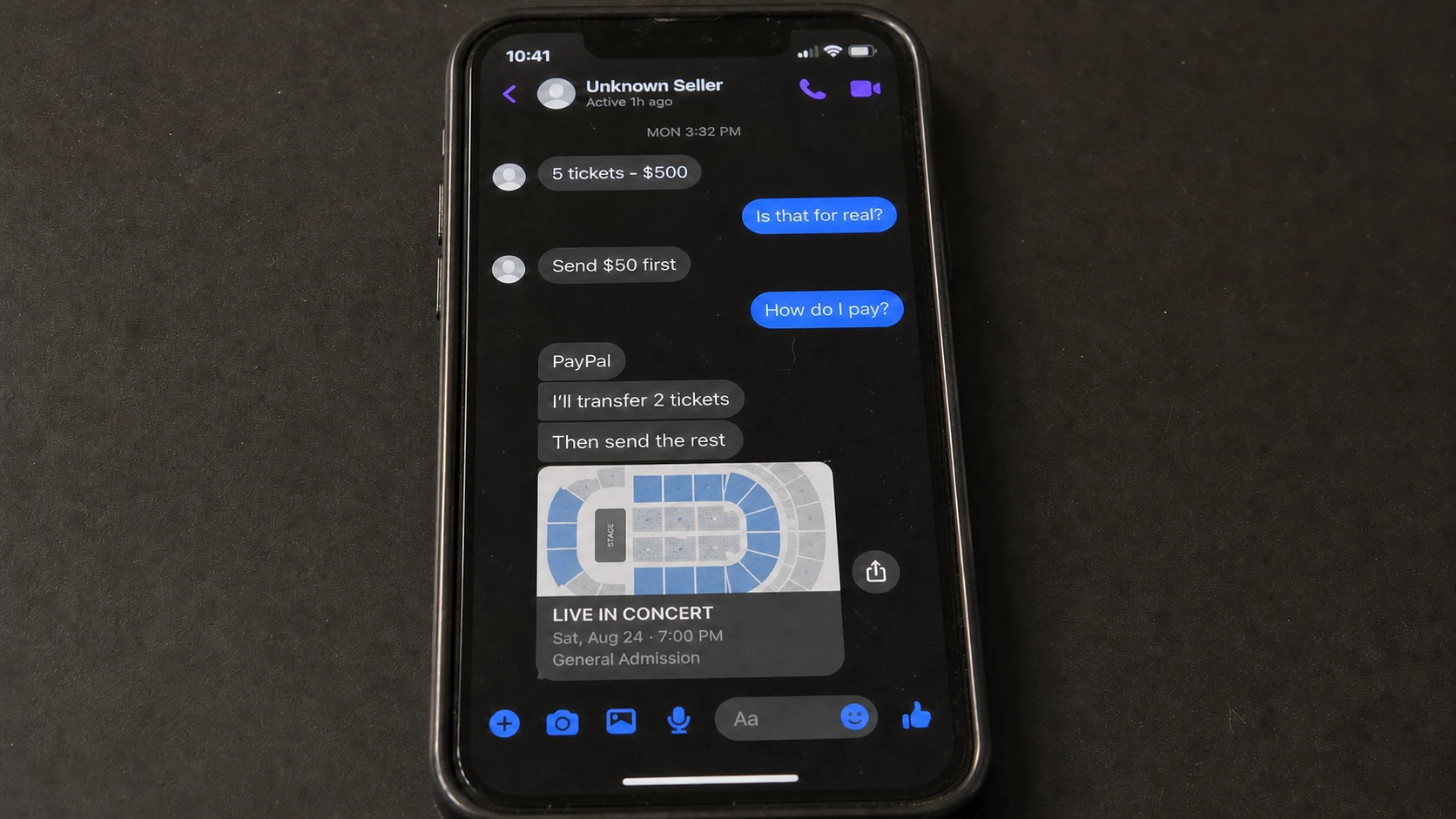
A recent consumer report described a random Facebook page offering five tickets for $500. The seller supplied a video, proposed taking only $50 at first, and promised to transfer two tickets before collecting the next payment. After that, the remaining three tickets and the remaining balance would supposedly change hands.
This is more persuasive than a seller who simply demands everything upfront. The arrangement looks like a sequence of small, verifiable exchanges. It gives the buyer the feeling that the risk is shared, even though the seller controls the account, the evidence, the transfer timing, and the payment destination.
The seller reportedly offered an even more dramatic trust signal: all the tickets could be sent first if the buyer supplied a driver’s license and Social Security number, supposedly with details edited for safety. That is not a reasonable ticket-sale requirement. It converts a purchase risk into an identity-theft risk.
The video proves less than it appears to prove
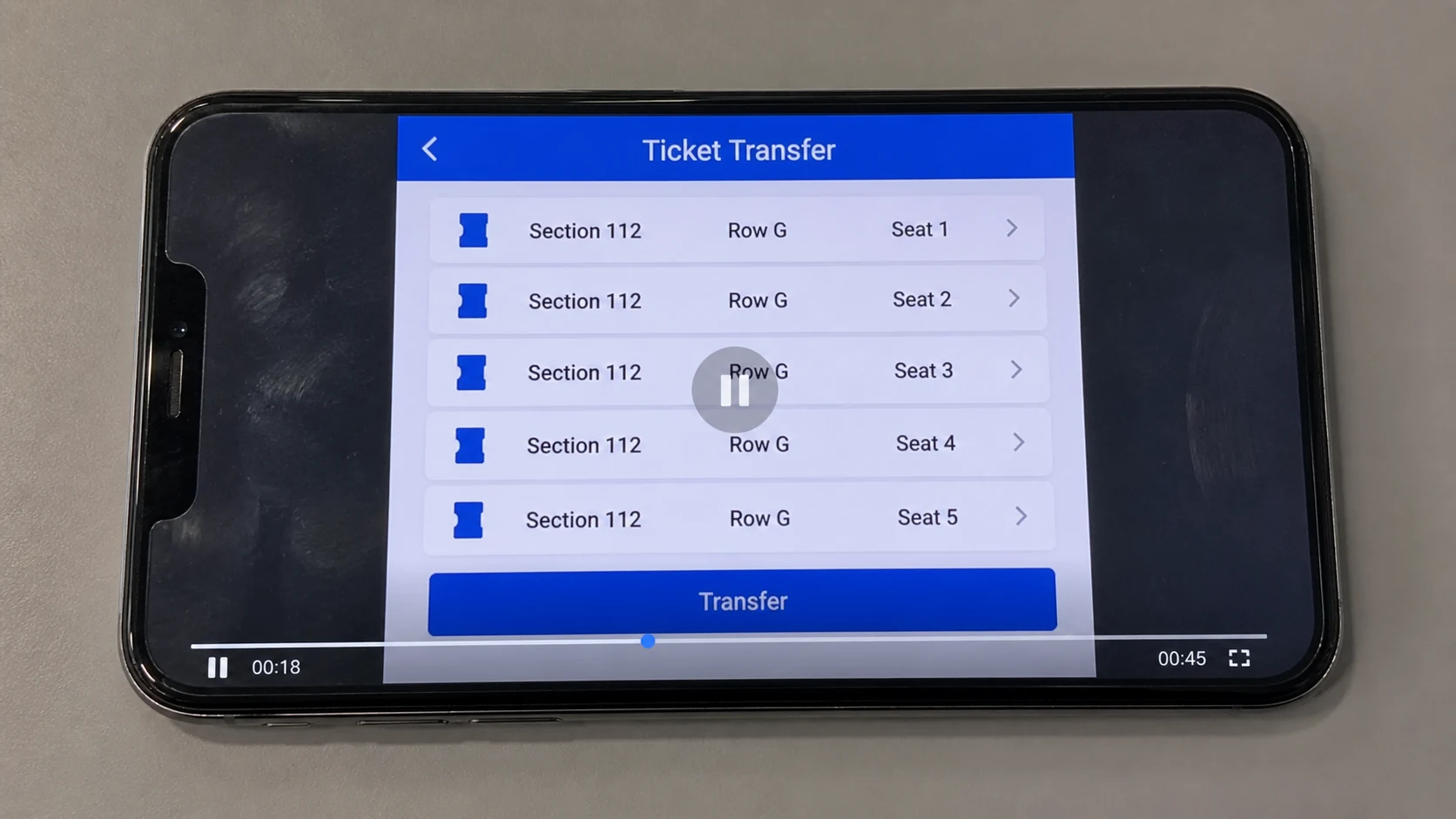
A screen recording can show an account, an event page, seat numbers, and a transfer button. It cannot prove that the person sending the recording controls that account now. The clip may be old, stolen, edited, recorded from another person’s device, or replayed from a legitimate seller’s earlier listing.
Even a live video call is not a complete solution. A scammer may control a compromised account, hold tickets purchased with a stolen card, or display tickets that will be transferred to several buyers. Visual access to a ticketing screen is not the same as a protected purchase.
Ticketmaster says its Transfer feature sends the recipient a new barcode after acceptance. It also warns that tickets obtained fraudulently by the sender may be canceled at any time. A transfer can therefore be technically real while the underlying sale remains unsafe.
The payment and the ticket transfer are separate systems
The seller wants the buyer to connect two independent events: a PayPal payment and a Ticketmaster transfer. Ticketmaster does not verify the Facebook seller, collect the agreed price, or enforce the private deal.
PayPal does not know that a moving barcode represents the seats promised in a chat unless the payment qualifies and the evidence supports a claim.
Splitting the price does not create escrow. It only changes how much the buyer can lose at each stage. The first $50 may be stolen immediately, or it may be used as a low-cost trust test before the scammer requests $150, the remaining balance, an invented transfer fee, or identity documents.
The warning signs in this pattern are not subtle when viewed together:
- The seller was found through an unknown Facebook page rather than an authorized ticket marketplace.
- Five tickets are bundled at a price that may be unusually attractive.
- A video is treated as proof of ownership.
- Payments are divided into stages to lower resistance.
- The transaction happens outside Ticketmaster’s resale checkout.
- The buyer is asked to trust a private PayPal arrangement.
- A driver’s license and Social Security number are offered as an alternative to payment.
- The seller controls when each supposed ticket is released.
Why a Ticketmaster Screen Recording Is Not Proof
A recording shows pixels, not provenance. It may accurately capture five tickets inside an account at the moment it was made, but it does not identify the current owner, explain how the tickets were purchased, or bind the person in the Facebook chat to that account.
Scammers can copy a legitimate listing, ask a real seller for a custom proof video, record a compromised account, edit the recipient name in a clip, or reuse footage from a completed sale.
A slow scroll, the current date, or a spoken buyer name can make the recording harder to fake. None of those elements protect the payment.
A video can also hide what happens outside the frame. The sender may switch between apps, start from a prerecorded clip, or stop before the final confirmation screen. A transfer button only shows that the interface contains a button. It does not show that the transfer was completed to the buyer’s account.
The official Ticketmaster transfer instructions explain that accepted tickets receive a new barcode and appear in the recipient’s account. They also make clear that Ticket Transfer is for sending tickets, not for exchanging them as part of a private sale.
That distinction matters. If the buyer sends money in one app and receives a transfer invitation in another, no shared checkout supervises the sequence. The seller can change the terms after each payment, cancel a pending transfer before acceptance, or vanish after learning which proof the buyer expects.
The only useful test is not whether the seller can display tickets. It is whether the entire purchase occurs through a marketplace that verifies the listing, processes the payment, records the transaction, and provides an enforceable dispute path. A clip cannot replace those controls.
How the Ticketmaster Transfer Scam Works
Step 1: A seller appears where fans are already searching
The listing may appear on a Facebook page, fan group, event discussion, Marketplace-style post, or comment beneath someone asking for tickets. The profile may look established because it has photos, friends, old posts, and ordinary activity.
Those details do not establish control. The account may be stolen, purchased, cloned, or filled with copied material. This is the same trust problem seen in other Facebook Marketplace scams: a familiar platform supplies social context, but the platform does not vouch for the person behind every profile.
Step 2: The price creates urgency without looking impossible
The offer is attractive enough to keep the conversation moving. Five tickets for $500 may look like a fortunate group deal rather than a giveaway that is obviously fake. The seller may explain the discount with a canceled trip, family emergency, schedule conflict, or need for a quick sale.
Scarcity does the rest. The buyer expects competition from other fans and worries that a long verification process will lose the seats. A scammer does not need to demand immediate payment explicitly when the event itself creates the deadline.
Step 3: A polished video replaces independent verification
The seller sends a recording that appears to move through a Ticketmaster account. It may show the event, section, row, seat numbers, and transfer controls. The buyer is encouraged to treat the amount of visible detail as proof.
The recording may be genuine footage of tickets and still have no connection to the person requesting payment. It may also show tickets bought through fraud. Ticketmaster’s own ticket scam guidance advises extreme caution when buying from unknown individuals on social media and recommends official sources whenever possible.
Step 4: A small payment becomes a trust experiment
Instead of requesting $500 at once, the seller asks for $50 and promises two tickets. The buyer feels able to test the process cheaply. If nothing arrives, the apparent maximum loss seems limited.
This framing ignores the scammer’s options. The seller can keep the first payment and disappear, send a fake transfer invitation, demand a fee to release the transfer, or transfer a ticket acquired through a compromised account. If something appears in the buyer’s account, that success may unlock much larger payments.
Step 5: The first apparent success raises the stakes
A transfer email, ticket card, or accepted barcode can feel conclusive. The buyer has moved from evaluating a stranger to seeing an asset inside a trusted app. The seller then asks for $150, transfers more tickets, and requests the remaining balance.
Yet a transfer does not retroactively protect the private payment. Ticketmaster notes that transferred tickets obtained fraudulently may be canceled. A scammer who used a stolen account or payment card may have enough time to collect the buyer’s money before the original owner or card issuer reports the fraud.
Step 6: Personal documents become the alternate prize
If the buyer resists paying, the seller may offer to transfer first in exchange for a license image, Social Security number, or other identity data. The request is presented as protection against a dishonest buyer.
That exchange is more dangerous than it sounds. A license can reveal a full name, address, birth date, document number, signature, and photograph. Combining it with part or all of an SSN can support account applications, identity verification attempts, impersonation, tax fraud, and targeted follow-up scams.
Editing a document does not make the request legitimate. Redaction can be incomplete, metadata may remain, and the visible fields may still be enough to enrich an identity profile. An unknown ticket seller has no valid reason to collect those records.
What a Real Ticket Transfer Does and Does Not Guarantee
A genuine Ticketmaster transfer sends an invitation to the recipient’s email, text, or WhatsApp, depending on the available method. The recipient signs in or creates an account using the matching contact information and accepts the tickets. After acceptance, the recipient should see the tickets in the account.
That process helps prevent simple screenshot duplication because the recipient receives a new barcode. It does not turn a social media profile into a verified seller, confirm that the requested price is fair, or make an off-platform PayPal payment part of Ticketmaster’s transaction.
It also does not guarantee that the sender obtained the tickets lawfully. Ticketmaster’s delivery guidance says recipients should know and trust the person transferring tickets, because fraudulently obtained tickets may later be canceled. That warning directly undermines the scammer’s claim that arrival in the app settles every concern.
A pending invitation is weaker still. An email can imitate Ticketmaster, a link can lead to a phishing page, and a transfer can remain unaccepted or be recalled. Open the official Ticketmaster app or type the official domain yourself rather than relying on a seller-supplied link.
For a purchase, use Ticketmaster’s official resale inventory or another reputable marketplace that handles both payment and delivery. Ticketmaster recommends official sources and warns against direct money transfers that do not clearly identify the transaction as a purchase.
If PayPal is the agreed payment method, PayPal says purchases from unknown sellers should use Goods and Services. Its Friends and Family scam warning explains that personal payments are not covered by Purchase Protection.
Event tickets may be eligible under Goods and Services, but terms and claim requirements still apply. Protection is a dispute mechanism, not permission to ignore warning signs.
Company, Address, and Fulfillment Checks
The Facebook page is not verified seller identity
A profile name, history, or friendly conversation can be fabricated or inherited from a hacked account. Ask why the profile is selling, compare its activity with the claimed location and event, and search the profile photos and wording. Contradictions matter, but a clean profile still does not make an off-platform deal safe.
The Ticketmaster brand supplies borrowed credibility
Ticketmaster may be the legitimate ticket issuer without being involved in the sale. The scammer borrows the brand’s interface, emails, and transfer feature to make a separate Facebook transaction look supervised. Keep the two relationships distinct: Ticketmaster may deliver a transfer while offering no guarantee for the money sent privately to the seller.
The PayPal recipient may not identify the operator
The payment account can use a different name, belong to a recruited money mule, or be compromised. A seller may explain a mismatch by mentioning a spouse, business partner, relative, or payment limit. Do not send money when the seller, account holder, and listing identity do not align.
Ticket delivery is not complete until the purchase is secure
A screenshot, screen recording, forwarded email, pending invitation, or visible ticket card is not final fulfillment. The ticket must be accepted through the official account, match the promised event and seats, remain valid, and be tied to a protected purchase record.
Even then, tickets funded or obtained through fraud can be revoked. That is why the marketplace and payment path matter from the beginning.
Red Flags That Should End the Conversation
No single detail must prove fraud before you walk away. A private seller is optional; your identity and money are not. End the deal when the seller tries to make you solve uncertainty by taking on more risk.
- The listing comes from an unknown social media page or unsolicited reply.
- The seller offers several desirable seats at a convenient group price.
- A video or screenshot is presented as conclusive proof.
- The seller refuses an official resale marketplace.
- The payment must be made as Friends and Family, a bank transfer, gift card, cryptocurrency, or another hard-to-reverse method.
- The recipient’s payment name does not match the seller’s profile.
- The seller splits the price into escalating installments.
- An extra transfer, insurance, verification, or release fee appears after the first payment.
- The seller requests a license, SSN, selfie, bank statement, or one-time security code.
- The buyer is told that sending personal documents is safer than paying.
- The seller discourages checking the offer with the venue or official marketplace.
- The event deadline is used to prevent careful verification.
The FTC reports that scams beginning on social media continue to produce substantial losses. Its social media scam guidance recommends checking sellers independently and limiting the personal information visible through social profiles.
Do not negotiate with a red flag. A scammer can improve the story faster than a buyer can disprove each claim. Moving the transaction to an official marketplace is a simple condition. If the seller refuses, the refusal is the answer.
What to Do if You Have Fallen Victim to This Scam
- Stop all further payments and contact. Do not send the promised next installment, a transfer fee, or money to “unlock” tickets. Block the account only after preserving the evidence.
- Save the complete transaction record. Capture the listing, profile URL, messages, video, event details, payment request, recipient name, receipts, transfer emails, and ticket status. Keep original files when possible because timestamps and metadata may help a dispute.
- Open the PayPal transaction and report the problem immediately. If the payment was sent as Goods and Services, use the Resolution Center and follow every deadline. PayPal says eligible event tickets may qualify for Purchase Protection. If it was sent as Friends and Family, report the scam anyway and ask what options remain, but understand that personal payments are not covered by Purchase Protection.
- Contact the card issuer or bank used to fund the payment. Explain that you authorized a payment based on a fraudulent ticket sale. Ask about dispute rights and whether the funding source can be protected. Do not mislabel an authorized scam payment as an unauthorized account takeover.
- Secure the Ticketmaster account. Change a reused password, enable multifactor authentication, review contact details, and sign out unfamiliar sessions. Contact Ticketmaster through its official app or website if a transfer looks suspicious, disappears, or contains the wrong event or seats.
- Do not use links in transfer emails until they are verified. Open the official app directly. If you entered credentials on a seller-supplied page, change the password immediately anywhere it was reused.
- Act quickly if identity documents were shared. If the seller received an SSN, license image, or other sensitive data, visit IdentityTheft.gov for a tailored recovery plan. Consider a credit freeze or fraud alert, monitor credit reports, and contact the issuing motor vehicle agency about the exposed license.
- Scan devices if you downloaded anything. A video viewed inside a normal app is not automatically malware. However, if the seller sent an app, attachment, extension, or installer, remove it and run a full Malwarebytes scan to check for common threats.
- Reduce exposure to repeat phishing. AdGuard can block many known malicious advertising, phishing, and redirect domains. It cannot verify a private seller or guarantee a ticket, so continue opening ticketing and payment services independently.
- Report the seller and listing. Use Facebook’s report controls, report the payment account, and submit the incident to ReportFraud.ftc.gov. If the loss is significant or identity documents were taken, also consider a local police report and an IC3 complaint.
- Warn the venue without relying on it for reimbursement. The venue or box office may confirm the authorized ticket seller and document suspicious seat information, but it may not be able to validate a private seller or restore an off-platform payment.
- Ignore recovery agents. Fraudsters may return claiming they can retrieve the money or reactivate tickets for an upfront fee. The FTC warns that recovery pitches often target people who have already paid a scammer.
Frequently Asked Questions
Can a Ticketmaster transfer still be part of a scam?
Yes. A real transfer proves that tickets moved between accounts at that moment. It does not prove that the seller acquired them lawfully or that the private payment is protected. Ticketmaster warns that tickets obtained fraudulently may be canceled.
Does a screen recording prove the seller owns the tickets?
No. A recording can be old, stolen, edited, or captured from another person’s account. It may show real tickets without connecting them to the Facebook profile requesting payment.
Is splitting the payment into smaller amounts safer?
It limits only the amount sent at one moment. It does not create escrow or connect PayPal to the Ticketmaster transfer. Scammers use a small first payment to build trust before requesting larger amounts.
Are tickets safe once they appear in my Ticketmaster account?
They are more credible than a screenshot, but not immune from cancellation. If the sender obtained them through account theft or payment fraud, the transfer may later be reversed or the tickets canceled.
Should I send a redacted license or partial SSN as security?
No. An unknown ticket seller has no legitimate reason to collect identity documents. Redacted records may still expose useful data, and the request can be the beginning of identity theft or a more targeted scam.
What is the safest way to buy resale tickets?
Use the official primary seller, venue box office, or a reputable resale marketplace that processes both payment and ticket delivery. Avoid private social media deals that separate the money from the transfer.
The Bottom Line
The Ticketmaster transfer scam works because each piece looks reasonable in isolation: a detailed video, a small first payment, two tickets sent before the next installment, and a familiar payment app. Together, those pieces create confidence without creating buyer protection.
Do not send money or identity documents to prove you are a serious buyer. A legitimate seller can list the tickets through an official resale channel. If the seller’s deal only works when you leave that protected path, let the tickets go.








