

A spelling mistake on an airline ticket feels small until a search result says the passenger may be denied boarding. Then a phone call that began as routine support can become an expensive emergency.
The Flight Trip Charge scam targets that moment of panic. The page looks like a travel service, the caller knows enough about the flight to sound credible, and an urgent name-change fee appears to offer the fastest way out.

Overview
The trap begins where travelers expect to find help
A recent consumer report described a traveler who believed the caller represented Delta or United. The traveler paid $400 for a name change, then contacted the bank, Delta, and the Federal Trade Commission after realizing something was wrong.
That story is not isolated. A 2024 BBB Scam Tracker report says a traveler searched for airline help and reached a number presented as support. The caller reportedly described the service as a third-party system working with United Airlines and collected $398.
Another report says a passenger called what appeared to be Delta customer service and was asked to pay for correcting a misspelled name. The domain listed in that January 2025 complaint was Flighttripcharge.com.
The emergency fee is built around a believable travel problem
Names on airline tickets matter, and some corrections genuinely require help. That makes the story more convincing than a random prize or refund call. The agent can warn that the booking will be canceled, TSA will reject the passenger, or the gate will deny boarding unless payment is made immediately.
In a separate Allegiant-related report, a traveler said the caller demanded $200 to remove one incorrect letter. The caller reportedly knew flight details, yet the airline later said the typo had not been corrected and the payment was not in its records.
That detail explains the power of the scam. A flight number, route, or reservation detail may be real. It does not prove the person on the phone is authorized by the airline or able to edit the ticket.
The website creates the appearance of a broad travel agency
Flighttripcharge.com was live during our review. Its homepage advertised flight bookings, changes, cancellations, refunds, and help altering an incorrect name. It displayed the phone number (800) 270-2088 and described itself as a one-stop platform serving travelers in the USA, UK, and Canada.
The page also used airline-themed branding, a booking form, destination links, testimonials, 24-hour support claims, and a call-now banner. Those elements can make a person who arrived through a search result believe the site is a normal airline partner.
Before trusting a result, check the entire chain:
- Did you open the airline’s known website or a different travel domain?
- Does the airline list the same phone number in its official app or help center?
- Is the caller clearly identifying an independent agency before requesting payment?
- Can the airline see the proposed correction and fee inside the real booking?
- Does the card statement identify the merchant you were told would charge you?
- Are the total price, service fee, refund terms, and legal business name in writing?
- Can you verify the change without calling the number that sold it?
Why a $400 Name-Change Fee Can Feel Legitimate
Air travel already contains unfamiliar rules, deadlines, fare classes, ticket numbers, and separate booking agents. A traveler may not know whether a name correction is free, whether a ticket must be reissued, or whether an agency is allowed to charge a service fee.
The scammer does not need to explain every rule accurately. The caller only needs to create a believable consequence: pay now or lose the trip. A family vacation, international flight, or next-day departure makes independent verification feel risky.
The caller may read public schedule information, ask the traveler for the confirmation number, or repeat details supplied moments earlier. Under stress, hearing those details repeated can feel like proof that the agent accessed an airline system.
Real airlines do have name-correction procedures. Delta’s current name correction policy says many minor corrections on qualifying Delta-operated tickets can be handled as an even exchange without a waiver code. More complex itineraries require Delta assistance.
That does not mean every correction is free in every situation. Fare rules, other carriers, ticketing agencies, and larger changes can affect the process. It does mean a stranger’s urgent fee should be checked with the airline through a separate channel before payment.
The safest question is not whether the caller sounds knowledgeable. Ask whether the number appears on the airline’s own website and whether the change is visible in the official reservation before ending the call.
How the Flight Trip Charge Scam Works
Step 1: A traveler searches for urgent airline support
The passenger notices a typo, needs to change a date, or fears a problem with check-in. A search for phrases such as “Delta name correction” or “United customer service” produces ads, snippets, forum posts, directories, and travel pages.
The FTC warns that travel scammers may use paid ads that place their number beside a famous company name or lead to a page that only resembles an airline. Its 2026 travel scam guidance recommends checking the real domain and typing a known address directly.
Step 2: The call is framed as official or airline-connected
The person answering may use the airline’s name first, speak like a reservations agent, or describe the business as a partner, consolidator, or third-party support desk. The distinction between airline and agency remains vague until after payment.
A toll-free number and hold music can reinforce the impression. Neither proves affiliation. Phone numbers can be purchased, changed, forwarded, or promoted beside unrelated brand names.
Step 3: Booking details create borrowed authority
The agent asks for the passenger’s name, flight number, route, departure date, and booking reference. After receiving them, the agent repeats the information as if it came from a reservation database.
Some callers may retrieve public flight information or see limited booking data after the traveler supplies a confirmation code. Accurate trip details show only that someone obtained those details. They do not establish authorization to change the ticket.
Step 4: A boarding crisis turns a service fee into a rescue
The passenger is told the mismatch will cause cancellation, TSA rejection, or denied boarding. The supposed correction may be described as a ticket reissue, fare protection, identity validation, or airline penalty.
The price can be several hundred in the card’s billing currency, which is high enough to matter but plausible beside the cost of losing a flight. The deadline blocks the most useful action: hanging up and contacting the airline independently.
Step 5: Payment is collected outside the airline’s normal path
The caller asks for card details and may send an email receipt or itinerary. The charge can appear under a travel-related descriptor that does not match the airline. The passenger assumes the correction is complete because payment was approved.
Yet the real airline account may show no change. A polished receipt records what the seller claims to have done, not what the airline actually changed.
Step 6: Refund requests return the victim to the same call center
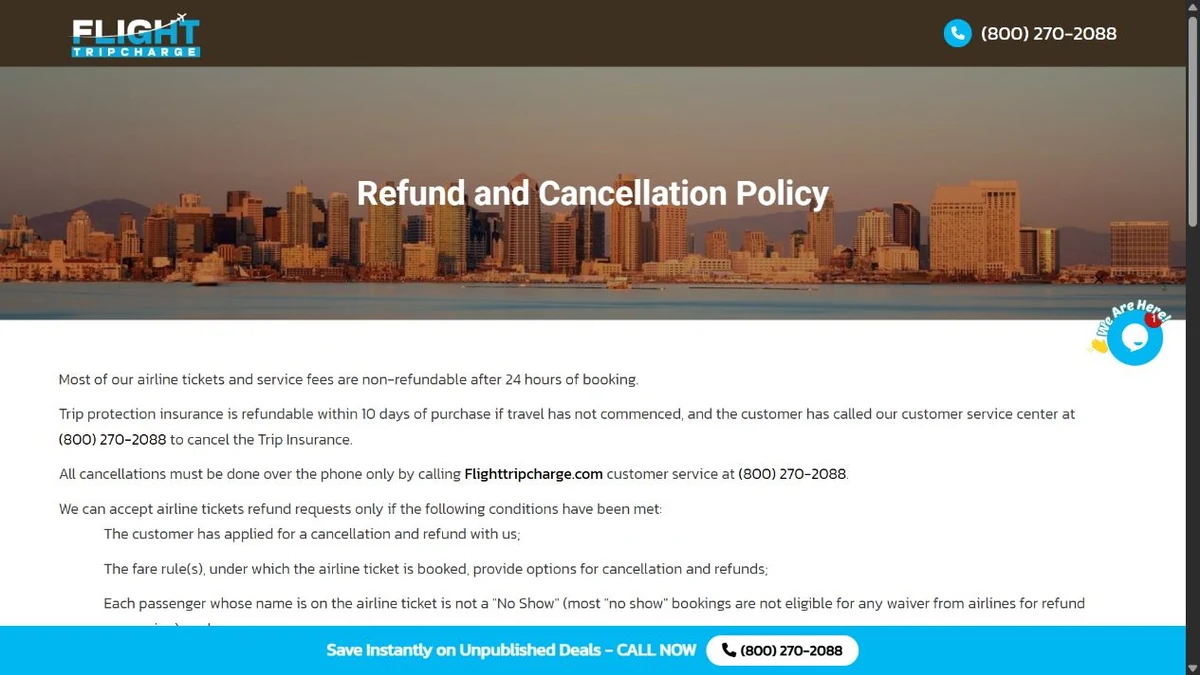
Once the passenger discovers the problem, the website’s own process directs cancellations back to its phone number. During our review, the refund policy said most tickets and service fees become non-refundable after 24 hours and that service fees are not refundable.
The same policy said cancellations must be requested by phone, not email or web chat. It described a unique cancellation password that expires after three hours and warned that the overall refund process may take 60 to 90 days.
Those conditions can keep a victim calling the same operator while card-dispute deadlines continue to run.
What the Website Reveals About the Operation
The current site does not look like a blank disposable page. It contains booking functions, airline-specific routes, terms, a privacy page, a disclaimer, and a refund policy. That depth can persuade a traveler who performs only a quick visual check.
The homepage claims travelers can receive a full refund on cancellations according to airline rules. The separate refund page adds major qualifications: supplier approval, airline penalties, post-ticketing fees, phone-only cancellation, non-refundable service fees, and a possible wait of several months.
The site also presents testimonials from named travelers. We found no visible method on the page for independently verifying those reviews or connecting them to completed bookings.
Its terms use generic labels such as “The Company,” “We,” and “Our Company.” During our review, the contact and legal pages did not visibly identify a registered legal entity, corporate number, or street address.
That gap matters because a passenger needs to know who accepted the card payment, who was authorized to service the ticket, and where a written dispute or legal notice can be sent. A domain name and call-center number are not substitutes for a transparent merchant identity.
Public RDAP registration data shows Flighttripcharge.com was registered on February 25, 2023 through GoDaddy. Domain age alone does not prove honesty or fraud. It does show that the web brand is separate from long-established airlines whose names may bring travelers to it.
Company, Address, and Fulfillment Checks
The site name is not a legal business identity
Flighttripcharge.com repeatedly calls itself a travel service, but the pages we reviewed did not prominently name the corporation or individual operating it. Before paying an agency, ask for the legal merchant name, registration jurisdiction, written fee schedule, and proof of its authority to service the ticket.
If the agent avoids that request or says the airline brand is all you need, end the call.
The contact page offers no visible physical address
The live contact page displayed a form, the phone number (800) 270-2088, and info@flighttripcharge.com. We did not find a street address on that page, the homepage, the terms, or the refund policy.
An online business does not need a storefront to be legitimate. A merchant selling ticket services should still make it clear which entity customers are contracting with and where formal complaints can be directed.
The airline relationship must be verified with the airline
A third-party agency can legitimately service tickets it issued. It should state that role clearly and explain any separate service fee before collecting card data. Do not accept phrases such as “working with” or “connected to” an airline as proof.
Open the airline’s official app or help center independently. Delta lists its reservation contacts in its official help center. Use the equivalent first-party page for the carrier on your ticket.
Fulfillment means the airline record actually changed
A receipt, email, or verbal confirmation is not enough. Sign in through the airline’s known app, inspect the passenger name, and ask the airline to confirm any ticket reissue or agency action.
If the airline sees no correction, save a screenshot or written response. That evidence is more useful to a card issuer than arguing about the caller’s promises.
Warning Signs Before You Pay an Airline Support Number
- The number came from an ad, forum post, directory, or search snippet rather than the airline’s official site.
- The agent answers with an airline name but later calls the business an independent service.
- A minor typo suddenly becomes a same-call boarding emergency.
- The caller insists there is no time to verify the fee with the airline.
- The fee is not visible inside the official booking.
- The caller asks for full card details before providing written terms.
- The merchant name is unclear or does not match the airline.
- The site lists no clear legal entity or physical address.
- The promised correction does not appear in the airline account.
- A refund requires repeated calls to the same number that collected payment.
- The operator requests a passport image, login code, or email password.
- A new fee appears to release, validate, insure, or refund the first payment.
Airline impersonation also appears in texts and social media replies. Our guide to the fake flight update text scam explains why one accurate itinerary detail does not authenticate the sender.
Travelers should also distinguish this support trap from a fake booking offer. A cheap vacation package scam uses a different story but relies on the same separation between a persuasive seller and the real airline, hotel, or booking platform.
What to Do if You Have Fallen Victim to This Scam
- Stop further payments. Do not pay a second correction, cancellation, refund, insurance, or verification fee. End the call and do not let the operator transfer you to a supposed supervisor.
- Contact the airline through a first-party channel. Open the official app or type the airline’s known domain. Ask whether the name was corrected, whether the ticket was reissued, and whether the caller or agency had authority to service it.
- Protect the reservation. Tell the airline that a third party received the booking reference and passenger details. Ask whether the confirmation code can be changed, whether contact information was altered, and whether extra authentication can be added.
- Call the card issuer immediately. Use the number on the back of the card. Explain accurately that you authorized payment after the merchant represented that it would perform an airline name correction, and say whether the airline confirms the service was not completed.
- Follow the issuer’s written dispute process. The CFPB advises consumers to report problems promptly and notes that a written billing-error notice may be required within 60 calendar days after the charge appears on a statement.
- Preserve evidence before pages or numbers change. Save the search result, domain, phone number, emails, receipts, card descriptor, call times, names used by agents, refund promises, and the airline’s written confirmation. Export files instead of relying only on temporary app views.
- Replace the card if details were exposed. Ask the issuer whether a new number is appropriate. Review pending and posted transactions, enable alerts, and continue monitoring because card data may be reused later.
- Secure connected accounts. Change any password entered on an unfamiliar page, especially a reused email or airline password. Enable multifactor authentication and review stored payment methods, contact details, loyalty balances, and recent account activity.
- Scan the device when extra software was involved. A phone call alone does not infect a device. If the operator sent an attachment, installer, browser extension, or remote-access tool, remove it and run a full Malwarebytes scan to check for common malware and unwanted software.
- Block malicious advertising and lookalike pages. AdGuard can reduce exposure to known scam ads, phishing domains, and redirects. It cannot decide whether a travel agent is authorized, so always verify airline support through the official app or website.
- Report the operation. Submit the details to ReportFraud.ftc.gov. For an air-travel service or ticket-agent complaint, the US Department of Transportation accepts complaints and recommends including booking, flight, payment, and supporting documents.
- Ignore recovery callers. Anyone promising a guaranteed refund for an upfront fee may be targeting the victim again. Work only with the card issuer, airline, regulators, and a lawyer or law-enforcement agency you contacted independently.
Frequently Asked Questions
Is Flighttripcharge.com the official website for Delta or United?
No. It is a separate travel website, not the official Delta.com or United.com domain. A caller must clearly disclose any independent-agency role. Verify every claimed relationship directly with the airline before sharing booking or card details.
Can an airline charge for correcting a passenger name?
Rules vary by airline, itinerary, ticket issuer, and the size of the change. Some minor corrections may be handled without a waiver or fare change, while complex tickets can require help. Only trust a fee confirmed through the airline or the agency that actually issued the ticket.
Does knowing my flight information prove the caller is real?
No. The caller may repeat details you supplied, use public schedule data, or access limited booking information with a confirmation code. Accurate trip details are sensitive context, not proof of identity or authorization.
What if the charge is still pending?
Contact the card issuer immediately and explain what happened. The issuer decides whether it can stop, monitor, replace, or dispute the transaction. Do not wait for the merchant’s promised refund period before learning the issuer’s deadlines.
Should I call Flight Trip Charge again for a refund?
Preserve any written cancellation request required by your dispute, but do not let repeated calls delay contact with the airline and card issuer. Do not provide new card details, passwords, codes, or additional fees to obtain a refund.
How can I find the airline’s real customer-service number?
Open the official airline app, type the known airline domain, or use the contact details on the original booking confirmation after verifying its sender. Avoid phone numbers displayed only in ads, forum answers, directories, or unfamiliar travel sites.
The Bottom Line
The Flight Trip Charge scam works because a real travel problem is wrapped in borrowed airline authority. A familiar logo, toll-free number, flight detail, and urgent warning can make an independent call center feel like the carrier itself.
Hang up before paying. Open the airline’s official app, confirm the correction and fee, and check who actually issued the ticket. If the story cannot survive that independent check, it should not receive your card number.








