


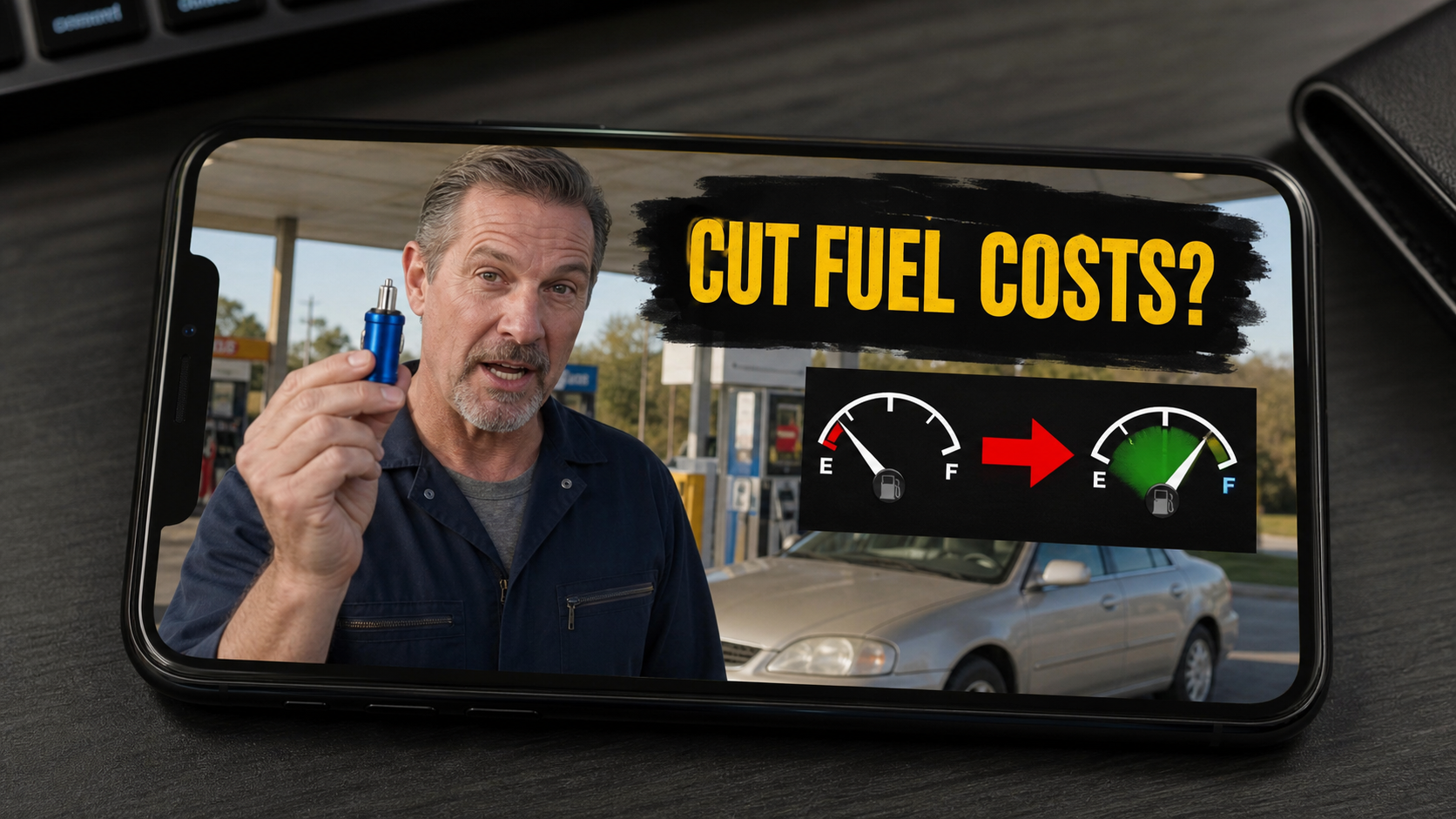
A tiny plug appears on your screen beside a fuel gauge that seems to move in the right direction. The pitch is simple: connect the device to your car, drive normally, and spend far less at the pump.
That promise is especially tempting when fuel prices are high. It also leaves out the most important questions about what the device can actually do, who is selling it, and what may be added during checkout.
This investigation follows the sales path behind these fuel saver plug ads and separates the dramatic advertising claims from the evidence a driver can verify.
Overview
The same fuel-saving story appears under changing names
OptiFuel, EcoFuel, NeoSocket, Fuel Sync, and similar names have appeared in short video ads and one-product stores. The casing, colors, connector, claims, and sales language can change, but the central promise remains familiar.
Buyers are told that a small plug can optimize a vehicle, improve efficiency, increase power, and sharply reduce fuel use. Some pages claim savings of 15%, others reach 35%, and social ads can make even more dramatic suggestions.
The technology claim does not match the size of the promise
Some versions plug into the OBD-II diagnostic port. Others fit a 12-volt accessory socket. Those ports can supply data or power, but simply occupying one does not give a generic gadget the ability to redesign an engine’s combustion strategy.
A genuine engine calibration depends on the exact vehicle, engine, sensors, emissions controls, and operating conditions. A universal plug sold for nearly every car cannot safely make large, personalized changes merely because an LED turns on.
The checkout can create a second problem
The initial device price is only one part of the investigation. We found package steering, add-on protection, changing discounts, and, on one related Fuel Sync sales path, a $49.99 monthly membership option tied to the checkout.
That does not prove every fuel saver seller enrolls every customer in a subscription. It does show why buyers must inspect the order summary, checkboxes, and terms instead of relying on the price shown in the ad.
- The product name and website may change while the pitch stays the same.
- Large mileage claims are not supported by independent vehicle-specific testing.
- Countdowns and large discounts push buyers toward a quick decision.
- Bundle selectors can turn a one-device purchase into a multi-unit order.
- Optional memberships or protection plans may add costs at checkout.
What These Fuel Saver Plugs Claim to Do
The most common OBD-style version is presented as an intelligent optimization tool. The sales copy says it learns a driver’s habits, communicates with the vehicle’s electronic control unit, and adjusts performance after a short driving period.
That description borrows real automotive terms. Modern cars do have electronic control units, adaptive fuel trims, diagnostic ports, and many sensors. The presence of accurate vocabulary, however, does not prove the little plug performs the advertised work.
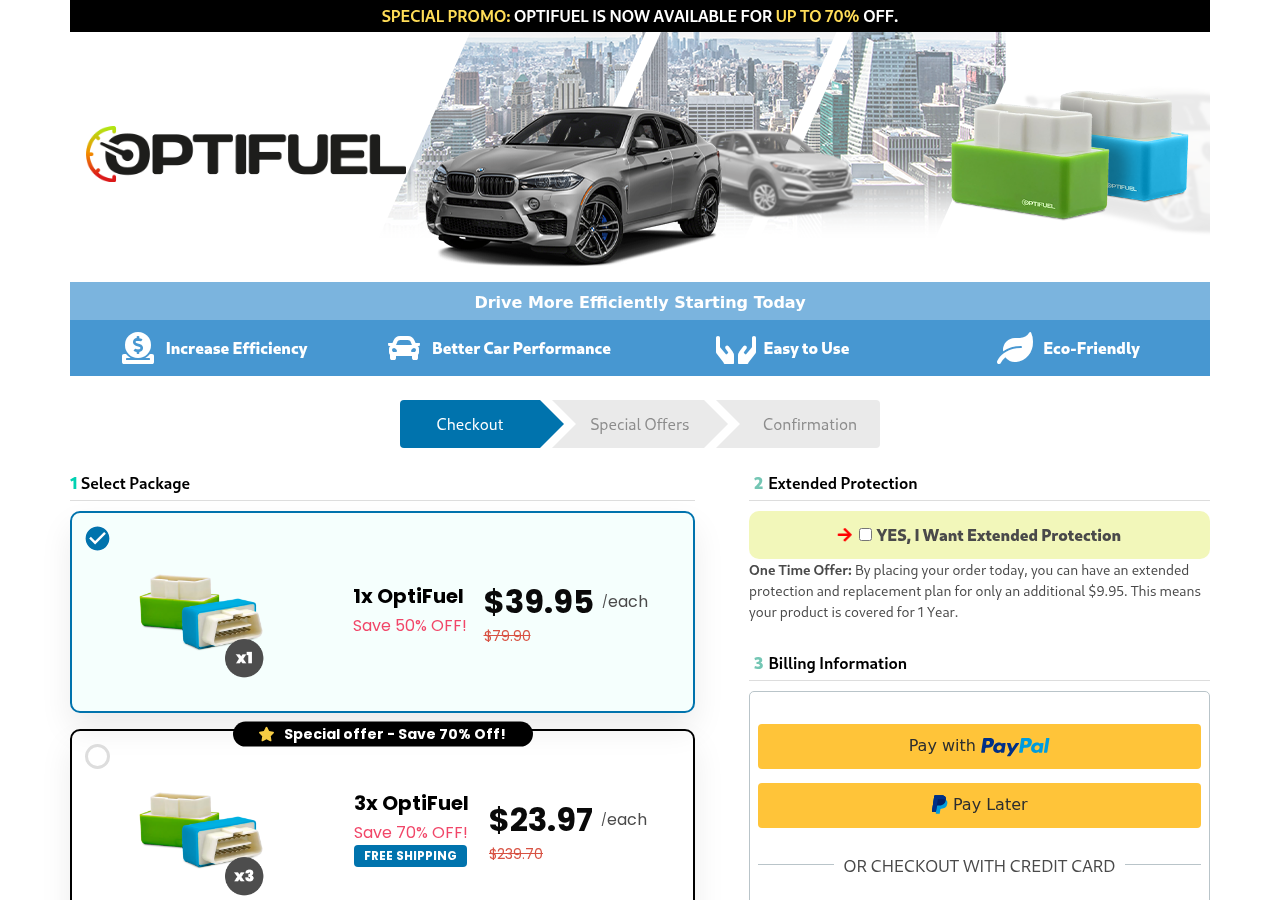
One OptiFuel checkout offered a single device for $39.95 and a three-device package at $23.97 each. The same page advertised up to 70% off and offered an additional $9.95 protection plan.
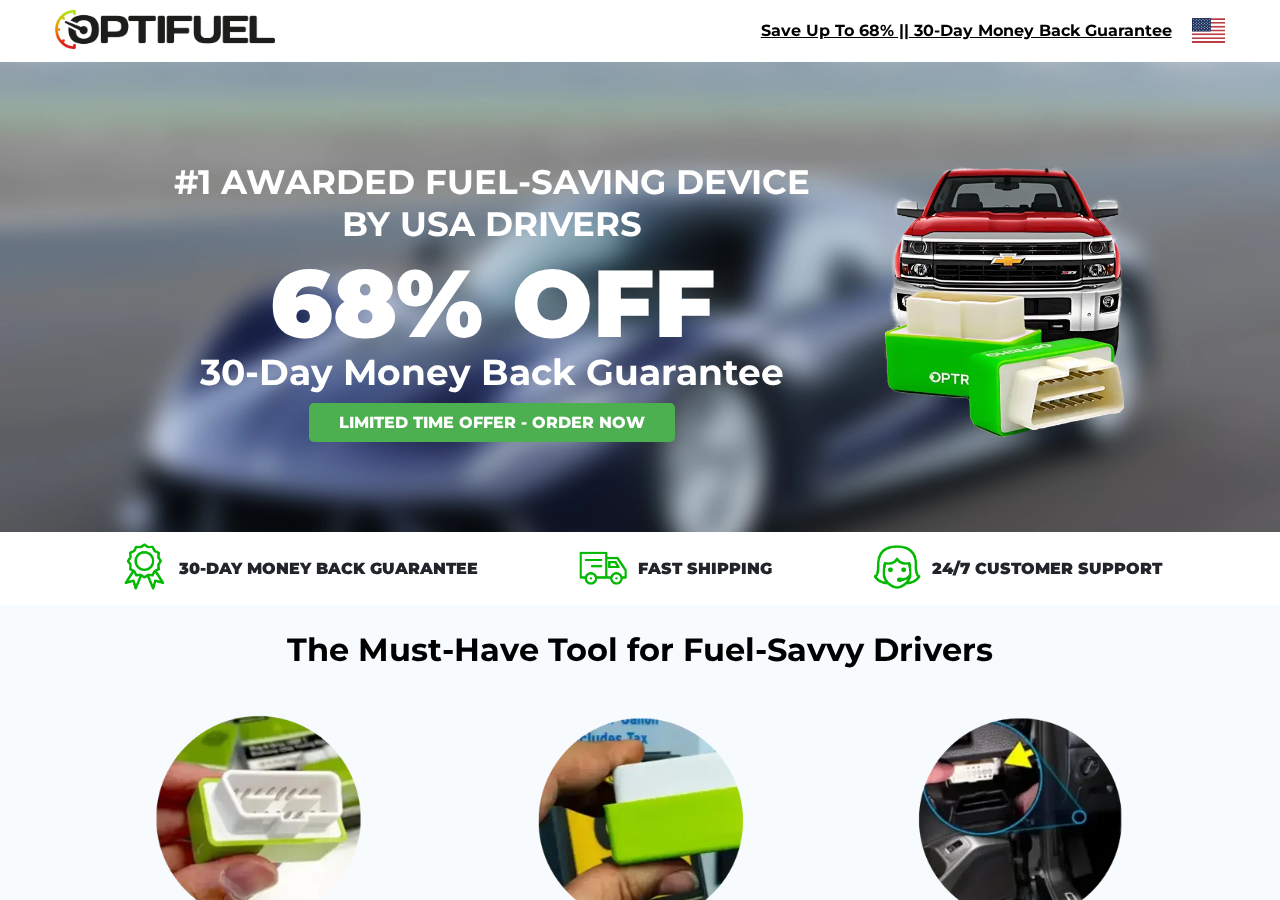
A separate OptiFuel storefront described the gadget as an award-winning fuel-saving device, promoted a 68% discount, and displayed a 30-day guarantee. The polished layout makes the offer feel established even though a visitor still needs independent proof of the core mileage claim.
Why the Mileage Claims Do Not Add Up
A car’s fuel consumption is influenced by speed, acceleration, tire pressure, temperature, traffic, engine condition, load, aerodynamics, and many other factors. Improving mileage by a meaningful amount normally requires a real change to how the vehicle is driven, maintained, or engineered.
An OBD-II port is primarily a diagnostic interface. A sophisticated, vehicle-specific tuning tool can communicate with a compatible car, but that is very different from a universal device marketed to ordinary drivers with no calibration procedure, no dyno report, and no model-specific compatibility work.
The Environmental Protection Agency has evaluated more than 100 supposed gas-saving devices and additives over the years. It has not found a device that significantly improved fuel economy in the sweeping way these ads suggest.
The EPA also makes an important distinction that marketers often blur. Its vehicle testing programs do not amount to an approval, certification, or endorsement of a consumer fuel-saving product. A seller should not turn a reference to testing or registration into a claim of government validation.
A glowing light is not proof of engine optimization
Several inexpensive fuel saver plugs examined by electronics reviewers contain little more than a circuit board, capacitors, resistors, and indicator lights. In those examples, the device receives power and lights up, but there is no credible mechanism for the claimed engine remapping.
The important point is not that every colored plug is internally identical. It is that buyers should demand evidence for the exact model being sold. That evidence should include reproducible testing on named vehicles, clear methodology, and results that account for normal variation in driving.
The claim often moves when one number becomes difficult to defend
One page may promise up to 15% better efficiency while another advertises up to 35%. A video can imply that the savings are much larger without stating a testable number. This flexibility lets the story remain exciting while making accountability difficult.
The phrase “up to” is especially useful to marketers because it highlights the highest imagined outcome. It says nothing about the typical buyer’s result, the number of vehicles tested, or whether most drivers saved anything at all.
The Offer Is Built to Feel Safer Than It Is
The sales page usually surrounds the technical claim with reassurance. Visitors see badges, customer ratings, guarantees, fast-shipping promises, and photographs of ordinary drivers holding the product.
None of those design elements demonstrates fuel savings. A guarantee may be valuable only if the customer can identify the responsible company, reach support, obtain return authorization, send the item to the correct address, and receive the promised refund.
Urgency is another recurring feature. Stock counters, limited-time discounts, and “today only” language reduce the time a buyer spends researching. Yet the same promotion often remains available after the countdown or appears on another domain under a different name.
Multi-pack pricing also changes the decision. Instead of asking whether the device works, the page nudges the visitor to compare which package appears to offer the biggest savings. That shift is subtle, but effective.
How the Scam Works
Step 1: A social media video creates an easy solution
The first ad normally starts with pain everyone understands: high fuel bills. A presenter, mechanic-like character, or enthusiastic customer then holds up a small plug and says drivers have been kept in the dark about a simple money-saving secret.
Fuel gauges, mileage counters, and gas-station footage turn the promise into a visual story. The viewer sees the supposed result before hearing anything that can be independently checked.
Step 2: Real automotive language gives the gadget credibility
The ad mentions an ECU, OBD-II port, optimization, fuel mapping, engine performance, or driving-pattern analysis. These are real concepts, but they are arranged around a conclusion the seller has not proven.
Technical words can make a generic product sound like advanced equipment. The missing pieces are exact compatibility data, independent laboratory testing, and a transparent explanation of what signals the device reads or changes.
Step 3: The viewer enters a tightly controlled sales page
The ad opens a landing page designed around one action: placing an order. It may resemble a product review, an innovation report, or an official manufacturer page, but its links repeatedly lead to the same checkout.
Negative information is hard to find. The visitor sees selected testimonials and benefit claims, not failure rates, independent test results, or a clear comparison with the same generic hardware sold elsewhere.
Step 4: A dramatic discount reframes the purchase
A crossed-out reference price makes the current price appear unusually low. A banner may promise 68% or 70% off, even when the product has been displayed at that “sale” price for an extended period.
The discount encourages the buyer to focus on not missing the deal. It does not establish the gadget’s normal market value or prove that the advertised reference price reflects genuine sales.
Step 5: The checkout steers buyers toward more units or add-ons
Package selectors emphasize three or more devices as the “best value.” Protection plans, priority handling, or memberships can appear nearby. A rushed buyer may approve a larger total than expected.
In the Fuel Sync path we reviewed, checkout language included a $49.99 monthly membership option. This is why the final payment page matters more than the ad. The exact recurring terms must be visible before the order is submitted.
Step 6: The delivered device cannot prove the advertised result
A buyer may receive a functioning object that lights up. That makes a payment dispute more complicated because the issue is not necessarily non-delivery. It is whether the product performs as advertised.
Fuel economy naturally changes between tanks, seasons, routes, and driving conditions. A seller can use that normal variation to encourage customers to keep testing until the refund window becomes harder to use.
Step 7: Returns and recurring costs become the final obstacle
Customers may need to locate a return address, obtain authorization, pay tracked shipping, or prove they acted within the guarantee period. If a membership was accepted, canceling the product order may not automatically cancel the recurring service.
The buyer should treat the device refund and any membership cancellation as separate tasks. Written confirmation is essential for both.
Company, Address, and Fulfillment Checks
The brand name may be a disposable storefront label
A polished logo does not identify the legal entity taking payment. Look for the company name in the terms, privacy policy, checkout, receipt, and card statement. If those names do not match, save every version.
Fuel saver products frequently reappear under new labels. That makes the story and checkout pattern more important than the name printed on the plastic shell.
A returns address is not necessarily a headquarters
The address given after purchase may belong to a fulfillment warehouse, mailbox provider, or returns processor. Such a location can receive packages without designing, testing, or manufacturing the product.
Search the full address before ordering. If many unrelated brands use it, the location is more likely part of a logistics network than a transparent operating office.
Support details should work before money changes hands
Call the published number and ask whether it supports the exact product name, how returns work, and whether any recurring program is attached. Send the same questions by email so there is a written record.
Disconnected numbers, unanswered mailboxes, generic contact forms, and support agents who cannot identify the seller are serious warning signs. Do not assume a 24/7 support badge means help is actually available.
Unknown hardware deserves caution inside a vehicle
Do not leave an unverified electronic device connected simply because it appears passive. Poorly made hardware can draw power, fit badly, interfere with access to the diagnostic port, or create confusion during legitimate service.
If the seller provides no manufacturer, electrical specifications, compatibility list, or credible testing, disconnect the device and ask a qualified mechanic before using it again.
What to Do if You Have Fallen Victim to This Scam
- Disconnect the device and document it. Photograph the plug, packaging, instructions, label, and the port where it was installed. Save the advertisement and every claim that influenced your purchase.
- Check the complete payment record. Compare the advertised price with the receipt and card transaction. Look for separate protection plans, memberships, shipping charges, or additional units.
- Cancel recurring services in writing. If the checkout included a membership, tell the seller to cancel it immediately and ask for a confirmation number. Canceling the device order alone may not end a separate subscription.
- Request a refund within the stated window. Follow the written return procedure, use tracked shipping, and keep the receipt. Do not send the product to an address found in an ad unless support confirms it in writing.
- Contact your card issuer if the seller does not resolve it. Explain whether the dispute involves misleading claims, an incorrect total, an unauthorized recurring charge, or failure to honor the return policy. Provide the timeline and saved evidence.
- Monitor the card for future charges. Ask the issuer whether a merchant block or replacement card is appropriate. A new card number does not always stop every account updater or recurring billing arrangement, so follow the bank’s specific advice.
- Secure any information entered on an unfamiliar site. If you reused a password, change it everywhere it was used. Run a Malwarebytes scan if you downloaded a file, browser extension, or “driver” during the purchase. The physical plug itself is not something Malwarebytes can scan.
- Reduce exposure to repeat ads. AdGuard can block many advertising and tracking elements that help the same campaign follow you across websites. It does not prove an offer is safe, so continue checking sellers independently.
- Report the campaign. Report the ad to the social platform and submit a complaint to the FTC or your country’s consumer protection authority. Include the domain, product name, amount, and any recurring terms.
Frequently Asked Questions
Do fuel saver plugs really reduce gas consumption?
There is no credible independent evidence that the generic plugs promoted in these campaigns deliver the dramatic savings advertised. A real improvement must be demonstrated through controlled, repeatable testing on compatible vehicles.
Can an OBD-II device change engine settings?
Some legitimate, vehicle-specific diagnostic and tuning tools can communicate with an ECU. That does not mean every universal plug has the hardware, software, authorization, or calibration needed to make safe and useful changes.
Are OptiFuel, EcoFuel, NeoSocket, and Fuel Sync the same product?
They have been promoted with closely related designs and claims, but the available evidence does not prove every unit came from the same supplier. Consumers should evaluate the seller, hardware, checkout, and terms for the exact offer they encounter.
Is every fuel saver plug order a subscription?
No. We did not find evidence that every seller uses recurring billing. We did find a $49.99 monthly membership option in one related Fuel Sync checkout, which makes a careful order-summary review essential.
What is the safest way to improve fuel economy?
Use vehicle-specific guidance: maintain correct tire pressure, repair warning lights, follow the service schedule, remove unnecessary load, and drive smoothly. A trusted mechanic can investigate a sudden drop in mileage.
What should I do if the plug caused a warning light?
Disconnect it when safe, do not clear diagnostic codes before they are read, and have the vehicle inspected by a qualified mechanic. Keep the device and purchase records in case you need to support a refund or damage claim.
The Bottom Line
The fuel saver plug scam succeeds by attaching an extraordinary promise to a cheap-looking, easy-to-understand gadget. Real automotive language, glowing lights, large discounts, and polished guarantees make the story feel more credible than the evidence supports.
Do not judge these offers by the current product name. Look for independent testing, a traceable seller, clear checkout terms, and a realistic explanation of how the device works. If those pieces are missing, the safest savings come from keeping your money and maintaining your car properly.

Join the discussion
0 commentsShare your experience or ask a question about this article.
Discussion
Start the conversation
Have a question or something useful to share? Add the first comment.