


The text lands at exactly the right moment. It names an airline you are genuinely flying with and says your itinerary changed. There is just enough truth to make the link feel safer than it is.
A fake flight update text scam does not need to invent your entire trip. One real detail can be enough to lead you toward a fraudulent payment or login page.
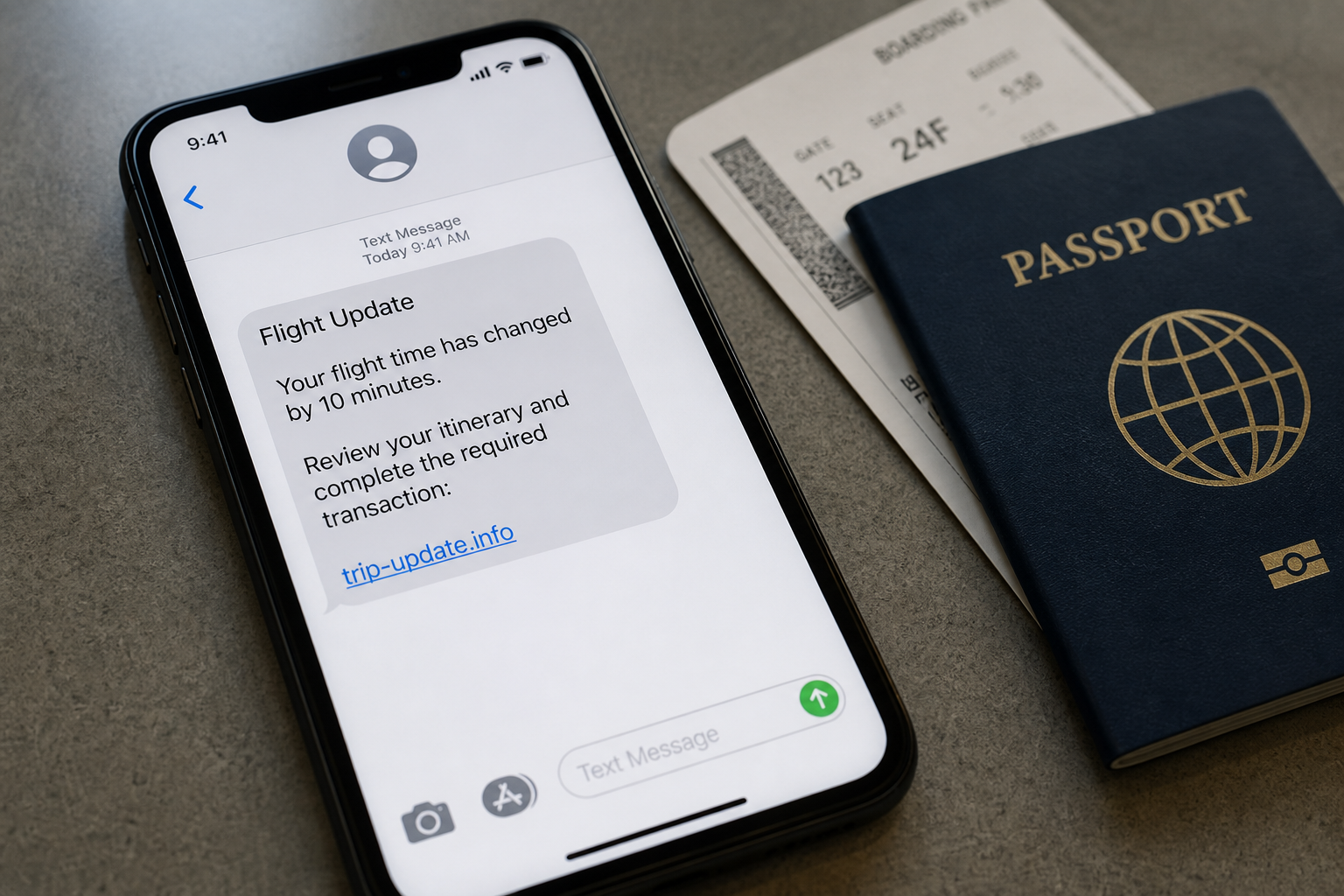
A recent traveler reported receiving an SMS about a real Turkish Airlines itinerary booked through a third-party agency. The message asked the passenger to open a link and complete a “transaction” connected to a flight update.
The traveler checked with both the agency and Turkish Airlines instead of using the link. They were told the text was not a message those companies would send. The flight had changed, but reportedly by only ten minutes, making the timing unusually persuasive.
The report does not establish how the sender learned the itinerary. It does show why a believable flight number, route, or timing detail should be treated as context, not proof that the message came from the airline.
Overview
The scam starts with a fact the passenger recognizes
Generic delivery and bank texts are easier to dismiss. Travel messages are different because passengers expect schedule changes, gate updates, check-in reminders, and urgent decisions. A real airline name or travel date can lower suspicion immediately.
The attacker may know a complete itinerary, only a route, or nothing beyond the fact that a popular flight changed. The message can still feel personal because the recipient is already watching for travel updates.
The link creates a fake reason to pay or sign in
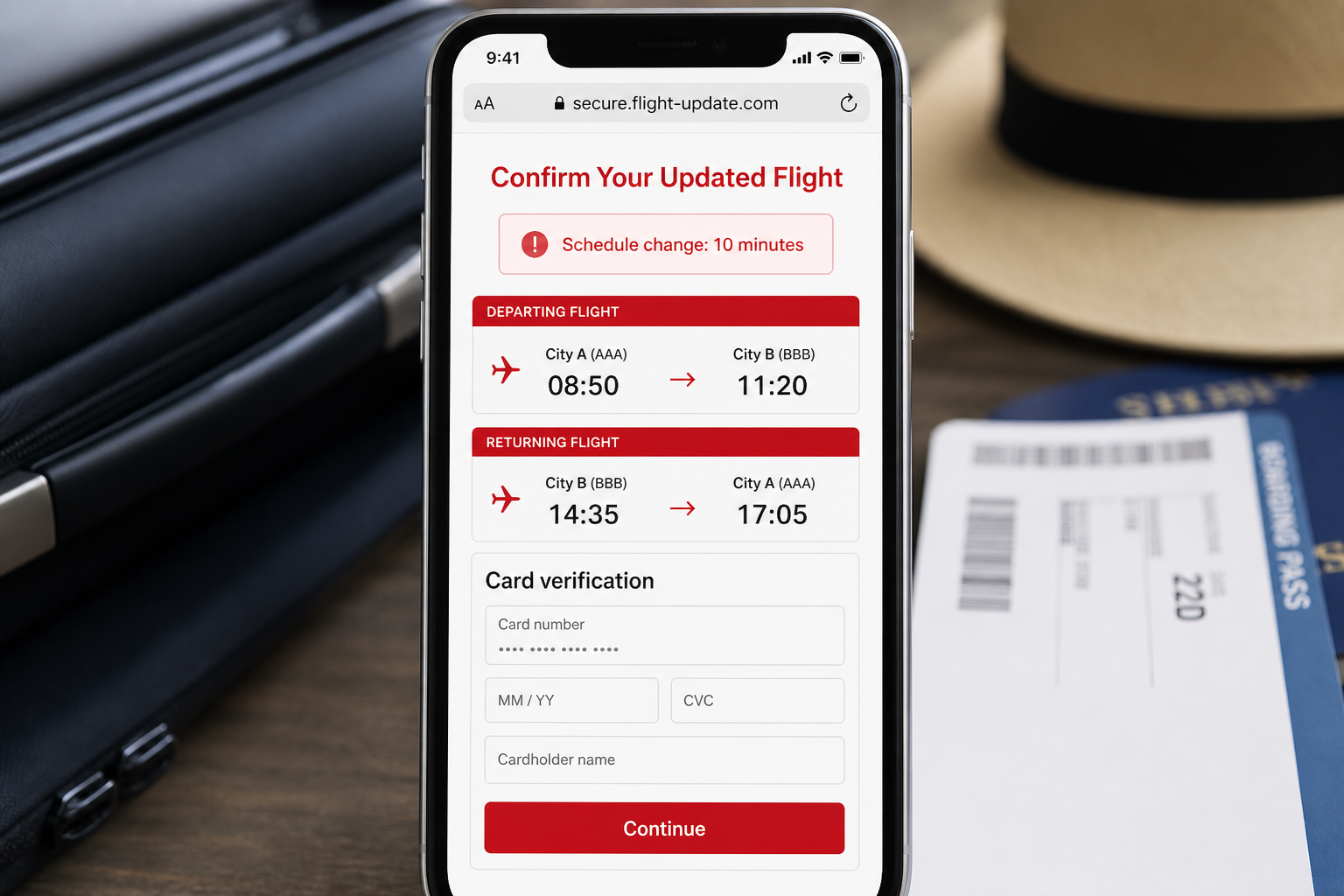
The landing page may imitate an airline, booking agency, or compensation service. It can ask for card details to “confirm” a change, pay a small fare difference, preserve a seat, receive a refund, or verify the passenger’s identity.
Some versions steal an airline-account password or booking reference instead. That information can expose passenger details and enable further changes. A small initial payment can also test whether a stolen card is active.
The safe verification route never begins with the text link
Turkish Airlines warns that smishing messages can claim a flight was delayed and offer a link for compensation. Its guidance is simple: open the official app, go to My Flights, and verify the trip there.
Use this checklist:
- Open the airline or agency app independently.
- Type the known website address instead of following the SMS.
- Compare the booking reference, route, and time inside the real account.
- Call a number from the official site if the change is unclear.
- Never provide a PIN or one-time code to someone who contacted you.
How Could a Scammer Know the Real Flight?
There is no responsible way to name one cause without logs from the airline, agency, email provider, and affected devices. A targeted-looking text does not automatically prove that Turkish Airlines or the booking company suffered a breach.
One possibility is exposure through a travel intermediary. A booking can pass through airlines, agencies, ticketing platforms, payment providers, loyalty programs, corporate travel systems, notification services, and support vendors. Access at any weak point can reveal useful details.
A compromised email account is another possibility. Confirmation emails often contain passenger names, travel dates, routes, ticket numbers, and booking references. An attacker with mailbox access may learn when a message will be most believable.
Travelers also expose itinerary information accidentally. Boarding-pass photos, luggage-tag images, calendar invites, shared documents, and public posts can reveal dates or reference codes. A deleted social post may remain copied elsewhere.
Finally, coincidence can be more powerful than it sounds. Flight times are public, delays affect many passengers at once, and a large SMS campaign can reach someone who happens to be booked on the named airline. The victim’s real trip does not prove individual targeting.
Why a Ten-Minute Schedule Change Makes the Text Convincing
Airlines make small timetable adjustments frequently. A passenger may receive legitimate notices through email, an app, or a travel agency. When a scam message lands near a real change, the overlap feels like private knowledge.
The attacker does not need to explain the change accurately. Vague language such as “your itinerary was updated” lets the recipient fill in the missing detail. Urgency then pushes the passenger to click before comparing official records.
A request to complete a “transaction” is a major warning sign when the only change is a few minutes. Legitimate fare differences can occur after voluntary rebooking, but an unexpected text should never be the sole evidence that payment is required.
Open the original booking directly. If the airline app displays the new time with no payment request, the SMS story collapses. If an agency handled the ticket, confirm with both parties because their notification responsibilities can differ.
How the Fake Flight Update Text Scam Works
Step 1: The sender chooses a believable travel event
The message refers to a delay, cancellation, seat problem, refund, or itinerary change. These are normal travel disruptions, so the passenger has little reason to reject the premise immediately.
The timing may be random, based on public flight information, or informed by exposed booking data. The victim cannot determine the cause from the text alone.
Step 2: A real detail supplies borrowed credibility
The SMS may include an airline name, route, departure date, airport, or partial booking reference. Even one correct detail can overshadow warning signs such as an unfamiliar sender, strange wording, or shortened link.
Do not use accuracy as authentication. Scammers routinely work with leaked, scraped, or previously stolen data.
Step 3: Urgency turns verification into a race
The passenger is told a seat will be released, compensation will expire, or a change must be accepted immediately. Travel already involves deadlines, so the invented pressure feels plausible.
Real itinerary changes remain visible through official channels. Taking a few minutes to open the app or call the airline is safer than racing through an unknown page.
Step 4: The link opens a branded phishing page
The page can copy colors, aircraft images, booking layouts, and support language. A logo is only an image. The address bar matters more, and even a realistic domain name can be newly registered or unrelated to the airline.
A secure padlock means the connection is encrypted. It does not mean the business behind the page is honest.
Step 5: The page asks for valuable information
The form may request a card number, billing address, passport data, airline login, email password, booking reference, or one-time code. The explanation changes according to the page’s theme.
No legitimate company needs your banking PIN. Authentication codes are meant for the action you initiated, not for a caller or text sender to collect.
Step 6: A small charge or account takeover follows
A token “verification” fee can become an unauthorized charge or confirm that the card works. Stolen credentials can be used to access travel, email, or payment accounts and create more convincing follow-up messages.
If booking details are stolen, the scammer may pose as support and quote them back to the passenger. That second contact can feel even more authentic.
Step 7: The campaign changes names and domains
The same template can rotate among airlines, agencies, compensation programs, and airport services. When one domain is blocked, another can appear with similar wording and a new logo.
Memorizing one bad address is not enough. The durable defense is to leave the message and verify the itinerary inside a channel you opened independently.
Company, Address, and Fulfillment Checks
The airline name is not the sender’s identity
SMS sender names and phone numbers can be spoofed, recycled, or presented inside an existing message thread. Seeing an airline name above the text does not prove the airline sent it.
Turkish Airlines identifies thy.com and turkishairlines.com as official domains. A page that merely contains those words elsewhere in a longer address is not automatically official.
The web address may be disposable
Phishing domains can be registered for short campaigns and abandoned after complaints. Some links pass through tracking or shortening services, preventing the passenger from seeing the final destination before clicking.
Do not explore a suspicious site to investigate it. Report the message, capture the address without opening it when possible, and let the airline or security provider analyze it.
Real support will verify the booking without collecting secret codes
Call the airline through the number on its official website or use in-app support. Provide the booking reference only after you know you reached the correct organization. Never read out an OTP, card PIN, or account password.
The Federal Trade Commission has also warned about scammers impersonating airline customer-service representatives. Sponsored search results and social-media replies can lead to fraudulent agents, so the route to support matters.
The booking chain may involve several independent companies
An airline, online agency, consolidator, and payment processor can all appear in one reservation. A real change from one party does not authenticate a payment request from another. Ask which company issued the ticket and which one is asking for money.
Save the original ticket receipt. It shows the ticketing entity, fare, route, and contact details that can help distinguish a genuine reissue from an invented fee.
Warning Signs in a Flight Update Message
- The text asks you to pay to view or accept a routine schedule change.
- The link does not clearly end in the airline’s official domain.
- The page requests an email password, card PIN, or one-time code.
- The message threatens immediate seat loss or a disappearing refund.
- The airline app shows no matching alert or payment requirement.
- The sender discourages you from calling the airline or booking agency.
- A “support agent” asks to install remote-access software.
Grammar is not a reliable test. Modern phishing pages can be polished, localized, and free of obvious mistakes. Process is stronger than appearance: an unexpected message should be verified through a separate, trusted channel.
What to Do if You Have Fallen Victim to This Scam
- Stop using the page. Close it without submitting more information. Do not return to test whether it was fake, and do not continue a conversation with the sender.
- Verify the flight independently. Open the official airline or agency app, type the known domain, or call a published number. Ask whether the itinerary changed and whether any payment is actually due.
- Contact the card issuer if you entered payment details. Lock or replace the card, report the page, dispute unauthorized charges, and ask the issuer to monitor or block further attempts.
- Change exposed passwords. Start with email, then airline and agency accounts. Use unique passwords, sign out unfamiliar sessions, review recovery details, and enable two-factor authentication.
- Protect the booking. Ask the airline or ticketing agency whether the booking reference should be changed, add an account PIN if available, and check contact details, seats, loyalty points, and itinerary changes.
- Scan the device. If the page downloaded a file, requested an app, or behaved strangely, run a full Malwarebytes scan. It can detect common phishing-related malware and unwanted software that may persist after the browser closes.
- Block malicious follow-up pages. AdGuard can stop many known scam domains and harmful ads before they load. It is an added layer, not a replacement for verifying travel inside the official app.
- Report the text and ignore recovery scammers. Forward details to the airline, agency, mobile carrier, and national fraud authority. No legitimate investigator needs an upfront fee, crypto payment, or authentication code to recover your money.
Frequently Asked Questions
How did the scammer know my real flight?
Possible explanations include exposed agency data, a compromised email or travel account, a public boarding-pass image, shared itinerary information, or coincidence based on public schedules. The message alone cannot identify the source.
Does a correct booking detail prove the text is real?
No. Personal data can be leaked, scraped, guessed, or stolen earlier. Authentication requires an official app, known website, or independently obtained support number.
Do airlines ever charge for schedule changes?
Charges can arise in voluntary rebooking or fare changes, but an unsolicited link is not proof that money is due. Confirm the exact reason and amount inside the official booking.
Is it safe if the page has a padlock?
No. The padlock shows that traffic to the site is encrypted. Criminals can obtain certificates for phishing domains too. Check the complete domain and the process.
What if I clicked but entered nothing?
The risk is lower. Close the page, update the browser, watch for downloads or permission requests, and scan the device if anything unusual occurred. Continue verifying the trip independently.
Should I cancel the real flight?
Not merely because a phishing text arrived. Contact the airline or ticketing agency, secure the booking and accounts, and follow their advice. Cancel only if your travel plans or the verified booking require it.
The Bottom Line
A fake flight update text scam succeeds by placing one accurate travel detail beside one dangerous link. The detail earns attention, but it does not authenticate the sender.
Leave the message, open the official app, and verify the itinerary there. A real airline can see your booking without asking you to trust a surprise text, reveal a password, or surrender a one-time code.

Join the discussion
0 commentsShare your experience or ask a question about this article.
Discussion
Start the conversation
Have a question or something useful to share? Add the first comment.