

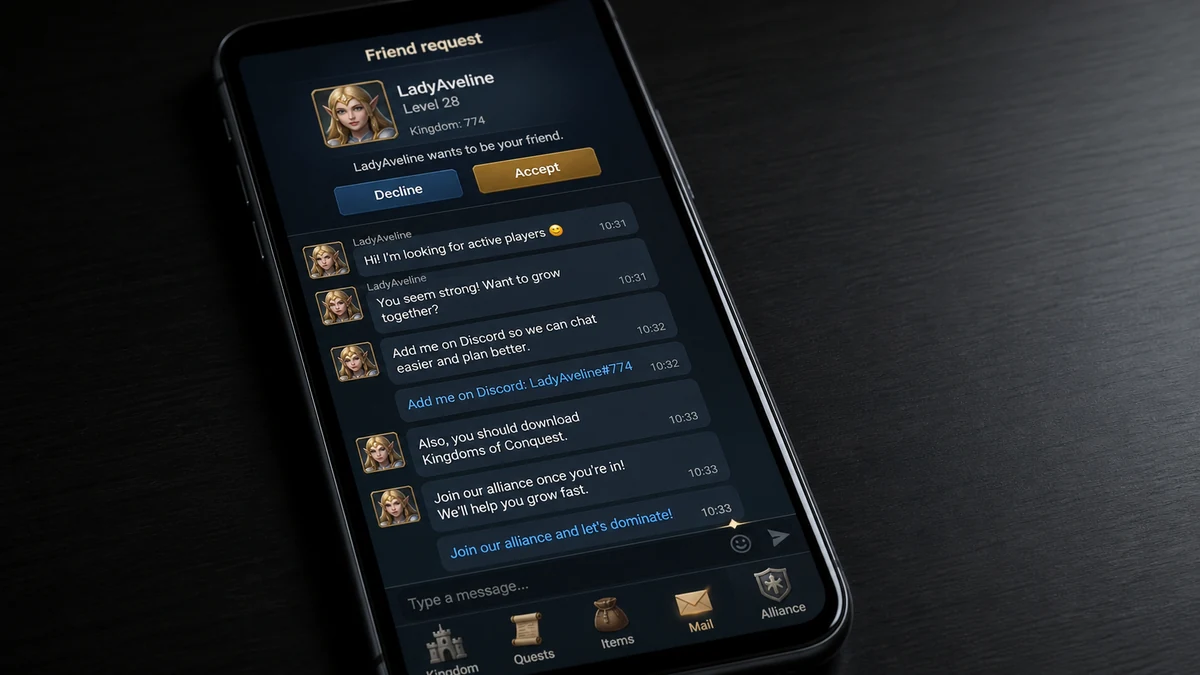
A friendly player appears in a game you already trust. The conversation feels spontaneous, moves to Discord, and soon revolves around a different mobile title and a supposedly welcoming alliance.
The invitation may look harmless, yet the persistence and rehearsed intimacy reveal a recruitment funnel that deserves a closer look.
Overview
The approach begins as an ordinary friendship
A recent consumer report described a random friend request inside another mobile game. The new contact spent roughly a day building rapport, asked for the player’s Discord name, and then pushed them to download Infinity Kingdom and join an alliance.
After the player refused, similar profiles allegedly returned with “accidental” friend requests. The report described a repeating script: an attractive fantasy or anime-style profile, an apology for adding the wrong person, a little casual conversation, and another invitation to the same kind of game.
That account is not proof that every Infinity Kingdom player, alliance recruiter, or community representative participates in deception. It is evidence of a specific unsolicited recruitment pattern, and multiple older public reports describe broadly similar approaches. The operator behind any individual account remains unverified.
The real app and the recruiter are separate trust questions
Infinity Kingdom is a real game. Its current Google Play listing identifies Yoozoo (Singapore) Pte. Ltd. as the developer, and the Apple App Store listing names the same corporate provider.
That does not authenticate a stranger who mentions the game. A legitimate product can be promoted through spam, referral farming, deceptive personas, compromised accounts, or unaffiliated schemes. The app-store listing proves who publishes the app, not who controls a Discord profile.
It is also important not to overstate the outcome. Some recruiters may want active alliance members, referral credit, or players likely to spend in the game. Others may steer targets toward fake download pages, account verification, payment requests, or a different scam later. The opening conversation alone does not prove which objective applies.
Pressure and repeated “mistakes” are the strongest warnings
A genuine invitation can survive a polite no. Repeated contact from new profiles, emotional flattery, demands to move platforms, and pressure to install immediately point to a managed acquisition script rather than an organic friendship.
Before accepting this kind of invitation, ask:
- Did the contact appear without any shared context?
- Does the conversation quickly move from friendship to recruitment?
- Is the profile persona unusually polished but personally vague?
- Does the person avoid voice chat or verifiable history?
- Do several accounts use the same “wrong person” opening?
- Are you told to use a private download link instead of an official store?
- Does the recruiter keep checking whether you installed the game?
- Do payment, gift-card, login, or verification requests appear later?
One sign can have an innocent explanation. A cluster of them, especially after a refusal, is enough reason to block the account and preserve the messages.
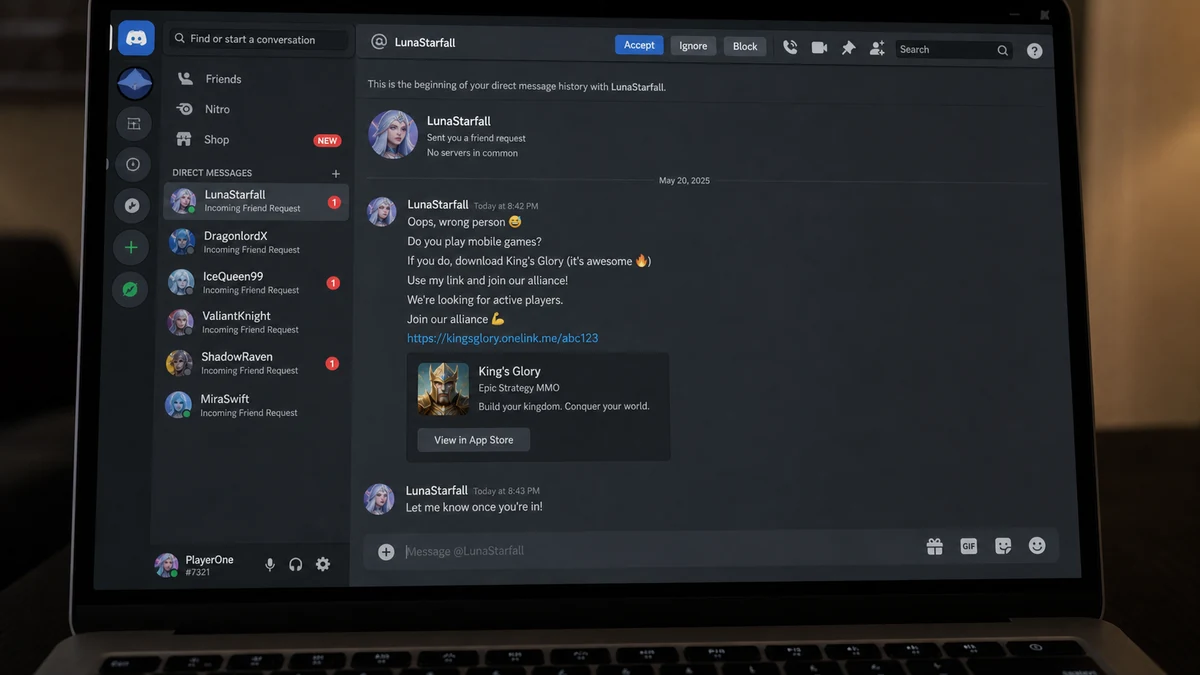
The “Wrong Person” Opening Is a Social Engineering Tool
“Sorry, I added the wrong person” creates a conversation without admitting that the contact was targeted. It gives the sender a harmless explanation for appearing in the victim’s inbox and invites a polite reply.
Once the recipient answers, the stranger can ask about games, location, age, work, spending habits, or preferred chat platforms. Each response makes the next message feel more personal.
The technique also protects the script when challenged. If the recipient is suspicious, the sender can retreat and claim there was no sales pitch. If the recipient is friendly, the conversation continues toward the recruitment objective.
Profile images and invented identities help the sender maintain attention. A consistent anime persona, lifestyle story, or flirtatious tone can make the interaction feel like a relationship rather than a marketing funnel.
The repeated nature matters. One mistaken request is plausible. Five similar contacts in a month, each leading toward the same product or alliance structure, is not normal coincidence.
Do not spend time proving whether the persona is a bot, a paid recruiter, a player chasing referral rewards, or a scammer. The practical decision is the same: an unsolicited contact that ignores boundaries is not entitled to more access.
How the Infinity Kingdom Recruiter Scam Works
Step 1: A stranger enters through a familiar game
The first request appears in a game or community the target already uses. Shared context lowers suspicion because the contact looks like another player rather than an advertiser.
The profile may claim to need friends, teammates, advice, or help with an event. Nothing in the first message needs to mention Infinity Kingdom.
Step 2: The recruiter builds rapid rapport
Messages arrive frequently and mirror the target’s interests. The sender may use compliments, personal questions, emojis, or mild flirting to accelerate a sense of familiarity.
This stage is useful even if the end goal is only player acquisition. A friend is more persuasive than a banner ad, especially when the game requires alliances and long-term participation.
Step 3: The conversation moves to Discord
The recruiter asks for a Discord username or sends an invite. Moving platforms avoids moderation in the original game and gives the operator access to direct messages, servers, bots, links, and a richer profile.
Discord itself is not the warning. The warning is an unexplained move combined with a scripted sales pitch and pressure.
Step 4: A specific game and alliance become urgent
The sender says their alliance needs one more active player, an event is starting, friends are moving from another title, or special rewards expire soon.
The target is encouraged to download immediately and report back after installing. Frequent status checks turn a casual suggestion into a compliance test.
Step 5: The download path determines the immediate risk
If the recruiter tells the target to search the official Apple or Google store, the risk is different from receiving an APK, desktop installer, shortened link, browser extension, or fake login page.
A side-loaded file can contain malware. A fake store page can steal credentials. A genuine app downloaded from an official listing avoids those specific traps, but it does not validate the recruiter or promise a healthy community experience.
Step 6: The alliance creates continued pressure
Once inside, the new player may be encouraged to level quickly, buy bundles, move servers, share contact details, recruit friends, or stay available for events.
Spending requests may come from game mechanics rather than a direct transfer to the recruiter. That makes the pressure look normal even when the relationship was created through deception.
Step 7: Refusal triggers recycling
When the target declines, the account may disappear and a new profile tries the same opening later. Rotating personas prevents the victim from immediately connecting each request to the previous recruiter.
Blocking one username is therefore only part of the response. Tighten direct-message permissions and report repeated accounts as coordinated spam.
What the Report Proves and What It Does Not
The report proves that one user received repeated unsolicited approaches that allegedly converged on Infinity Kingdom recruitment. The post supplies a recognizable sequence that other players can compare with their own messages.
It does not establish a contract between the profiles and the game’s publisher. It does not show whether the accounts were paid, rewarded with referral benefits, acting for an alliance, or using the game as cover for a later scheme.
Public app-store reviews can help identify recurring complaints, but they remain user-generated claims. They should not be treated as an official investigation or a verified statement about the developer’s marketing program.
The fairest conclusion is narrower and more useful: a real game is being named in a recruitment pattern that uses strangers, fast intimacy, Discord migration, and repeated pressure. Recipients should judge the contact independently of the product.
This distinction protects readers from two mistakes. The first is assuming a real app makes every invitation safe. The second is assuming every ordinary player or alliance member is part of a criminal operation.
Evidence should follow the account. Save the username, user ID, invite, timestamps, download link, server name, payment handle, and exact language used. Those details are more useful than a profile picture that can be changed in seconds.
Risks Beyond an Annoying Game Invitation
The mildest outcome is spam. The target loses time, receives repeated friend requests, and is pressured to install a game they did not want.
A more serious version collects personal information. Casual chat can reveal age, country, work schedule, gaming accounts, spending habits, and relationships. Those facts improve later phishing attempts.
Another version uses a fake client. The recruiter says the official app is unavailable in the target’s region or that an alliance-specific build provides bonuses. The supplied APK or installer may be unrelated to the real game.
Account theft can follow a fake verification step. The target may be asked to sign into Discord, Google, Apple, or GTarcade through a page controlled by the attacker, scan a QR code, or share a one-time code.
Payment fraud may arrive after trust is established. The sender can request a gift card for a starter pack, a deposit to reserve an alliance slot, or a transfer for discounted in-game currency.
Finally, the recruited account can become a new distribution channel. A compromised or persuaded player may be told to invite friends, post in other games, or copy the same accidental-contact script.
Discord’s scam safety guidance recommends avoiding suspicious links, downloads, QR codes, and requests for account information. It also advises server owners to keep official invite links current so abandoned invites cannot be reused by deceptive communities.
How to Respond Without Creating More Risk
Do not challenge the recruiter with personal information or click more links to investigate. A hostile exchange confirms that your account is active and may reveal which warnings you recognize.
Take screenshots before blocking, including the full username, profile ID where available, server invite, and any download destination. Screenshots of the conversation are useful, but message links and IDs are stronger for platform reports.
Install any game only from a store listing you locate independently. Compare the developer name with the official listing. Do not use a link supplied in a private message when you can search the store yourself.
Review Discord privacy settings so members of shared servers cannot automatically direct-message you. Remove unfamiliar authorized applications and change your password if you approved a login or scanned a QR code for the stranger.
If you already joined the alliance, leaving it does not require deleting a legitimate game account. Secure the account first, document any pressure or payment requests, and use the publisher’s support channel from the official listing.
Parents should discuss this pattern as relationship-based advertising and social engineering, not simply as “stranger danger.” The profile may talk for days and appear supportive before asking for anything.
Why Alliance Economics Change the Conversation
Alliance games reward organised groups. Active members contribute resources, participate in timed events, help defend territory, and can improve the standing of everyone in the group. That creates a real incentive to recruit, even when no direct referral payment exists.
The incentive does not excuse deception. If a recruiter believes the game and alliance offer genuine value, they can identify themselves, explain the invitation, disclose any reward, and accept a refusal. A fabricated friendship suggests the target would not agree if the pitch were presented honestly.
Spending can become part of the pressure after joining. A new player may be told that a starter bundle is essential, that an event requires faster growth, or that alliance loyalty means keeping pace with heavy spenders. Those messages can come from players rather than the publisher, which makes responsibility harder to recognise.
Set a budget before installing, disable impulsive purchases, and do not let a recruiter define what counts as commitment. Time-limited events repeat, and no legitimate group needs access to your payment account or private identity documents.
If the alliance punishes questions, hides costs, or asks members to recruit through false personas, leave. Community success built on deceptive acquisition is not a reason to remain involved.
Company, Address, and Fulfillment Checks
Verify the actual app publisher
The current Apple and Google listings identify Yoozoo (Singapore) Pte. Ltd. as the Infinity Kingdom provider. Google lists a Singapore business address and a support email tied to the app.
A Discord nickname, anime avatar, or alliance title is not proof that the person represents that company.
Separate official domains from recruiter links
Official app-store listings link to the publisher’s support resources. A lookalike domain, shortened URL, file-sharing host, or direct APK deserves independent verification.
Type the store or official site address yourself. Do not let a recruiter explain away browser or certificate warnings.
Ask what the recruiter receives
A transparent invitation should disclose any referral reward, alliance target, paid promotion, or spending expectation. Evasive answers make it harder to understand whose interests the conversation serves.
Do not assume an attractive persona is an employee. Ask for verifiable role information through an official channel.
Define what is actually being delivered
A free app download does not end the transaction. The practical commitment may include time, recurring purchases, server migration, alliance duties, and access to personal contact channels.
Never pay a private recruiter to unlock the app, obtain an alliance seat, verify an account, or receive a refund.
Warning Signs of a Mobile-Game Recruitment Funnel
- A stranger adds you in a game with no shared history.
- The profile uses fast intimacy or flirtation.
- The conversation moves to Discord almost immediately.
- The sender promotes a different game after casual chat.
- You are asked to install now and report back.
- The alliance supposedly needs one more player urgently.
- Several profiles repeat the same wrong-person excuse.
- The download arrives as an APK, archive, or shortened link.
- Verification requires a password, QR code, token, or one-time code.
- The recruiter will not explain referral or payment incentives.
- A polite refusal leads to harassment or new accounts.
- The profile disappears when asked for official credentials.
Spam recruitment becomes a security incident the moment a file, login, payment, or sensitive detail is requested. Do not wait for a proven loss before blocking the route.
MalwareTips documented a closely related pattern in the Jurassic Front Survival Discord scam, where a friendly direct message gradually turns into pressure to install another alliance game.
What to Do if You Have Fallen Victim to This Scam
- Stop responding. Do not argue, pay, or open another link to test the recruiter.
- Preserve the evidence. Save usernames, numeric IDs, invites, timestamps, messages, download URLs, and payment instructions.
- Block and report the accounts. Use Discord’s reporting guidance and report in-game profiles through the original platform.
- Delete untrusted installers. Do not open an APK, archive, extension, or desktop client received through the chat.
- Secure Discord. Change the password, enable strong multifactor authentication, remove unknown authorized apps, and review active sessions if you approved anything.
- Secure linked accounts. Review Google, Apple, email, gaming, and payment accounts for new sessions or recovery-detail changes.
- Contact the real publisher. Use support details from the official app-store listing to report impersonation or abusive recruitment.
- Contact the payment provider. If you sent money, explain the deceptive transaction and ask about reversal options immediately.
- Warn contacts. If your account sent invitations, tell recipients not to use them.
- Scan affected devices. Run a full Malwarebytes scan if you installed a file, extension, or unofficial client.
- Reduce malicious redirects. AdGuard can block many known phishing and malware domains, but it cannot verify the motives of a real person in Discord.
- Report financial fraud. File a report at ReportFraud.ftc.gov if money or identity information was taken.
Frequently Asked Questions
Is Infinity Kingdom itself a fake game?
No. Current Apple and Google listings show a real game published by Yoozoo (Singapore) Pte. Ltd. The concern here is the unsolicited recruitment method and any links or demands made by an unverified stranger.
Does the Reddit report prove the developer hired the recruiters?
No. The report does not establish who paid or controlled the profiles. They could be alliance recruiters, referral farmers, spammers, scammers, or another group.
Is it safe if I download from Google Play or the App Store?
Using the verified official listing avoids a fake installer, but it does not make the recruiter’s identity or future requests trustworthy. Review in-app spending and privacy separately.
Why do the profiles pretend to add the wrong person?
The excuse creates a low-pressure reason to start talking. It allows the sender to test whether the account is active before introducing the game.
What if the recruiter never asks for money?
The immediate goal may be player acquisition, alliance activity, or referral value. You still do not owe an unsolicited stranger access to your Discord profile, time, or personal information.
Should I delete a legitimate game account after joining?
Not automatically. Secure your accounts, leave the suspicious alliance, preserve evidence, and contact official support. Delete only untrusted software or accounts you no longer want.
The Bottom Line
The Infinity Kingdom recruiter scam begins with a relationship, not a download button. A stranger creates familiarity, moves the conversation to Discord, and turns friendly attention into persistent pressure to join a game and alliance.
The app can be real while the approach remains deceptive. Search official stores independently, reject private verification and payment requests, and block any recruiter who treats “no” as the start of another account.








