


A hard-to-find running shoe appears in exactly the right width, at a price low enough to feel like a lucky discovery. The storefront looks familiar, the product page is polished, and the checkout accepts major cards.
The warning does not arrive until the payment fails, then fails again, and the shopper is encouraged to keep trying.
Overview
The fake store catches shoppers searching for discontinued shoes
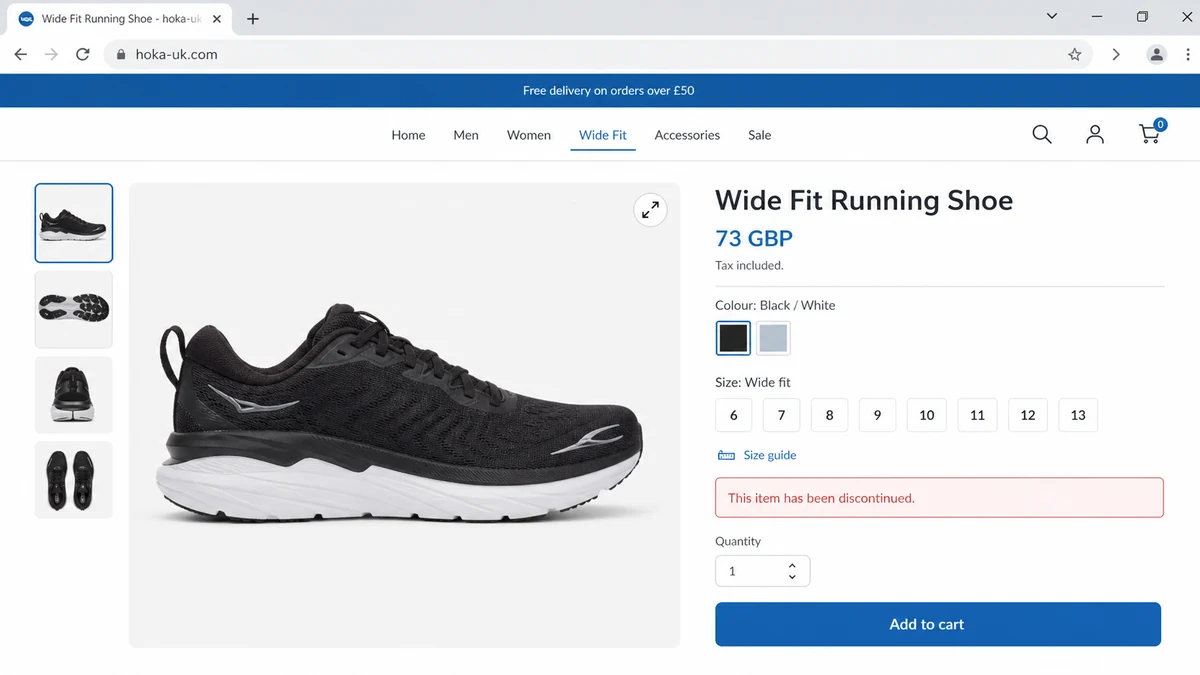
A recent shopper report describes a search for a discontinued Hoka style in a specific width. A site using the domain hoka-uk.com appeared to have the unavailable shoe in stock and offered it for 73 GBP.
That is a powerful lure. A shopper who already knows the model may search by its exact name, colour, width, and size. A fake shop can build product pages around those long searches and appear where the official retailer has no stock to sell.
The page does not need to convince every visitor. It only needs to reach people whose desire to find a discontinued product is stronger than their suspicion about an unfamiliar domain.
The checkout error can be a card-harvesting mechanism
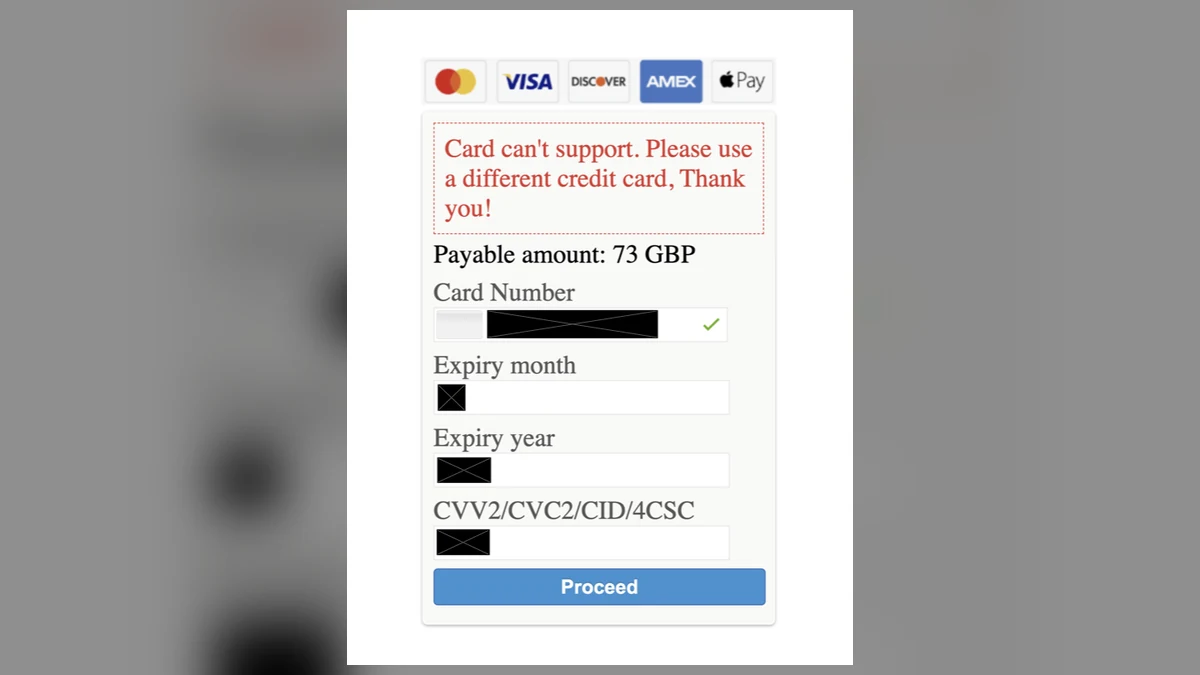
The shopper said the checkout rejected three cards with the message, “Card can’t support. Please use a different credit card, Thank you!” The attached screenshot shows that wording above a 73 GBP total and fields for the card number, expiry date, and security code.
A normal payment failure does not by itself prove theft. In this case, however, attempts later appeared against one of the cards at Steam and Shopify, and the card issuer rejected them. The shopper replaced the card.
The sequence is consistent with a checkout that collects usable payment details while pretending each submission failed. Asking for a different card can turn one victim into several sets of stolen credentials.
The domain history does not resemble the established UK brand
The official Hoka UK store is at hoka.com/en/gb/. Its legal footer identifies Deckers Europe Limited and a London address. The reported hoka-uk.com address is a separate domain, not a country section of hoka.com.
A Verisign RDAP record for hoka-uk.com shows a registration date of November 21, 2025, Dynadot as registrar, and DynaDot name servers. A recent independent registration is materially different from Hoka’s established official domain.
Check the whole storefront before entering payment details:
- Is the address on hoka.com, or merely built around the Hoka name?
- Does the official UK store link to this seller?
- Is a discontinued size unexpectedly available in every variation?
- Are prices far below current official models?
- Does the footer name a verifiable business?
- Do the returns address and company address match?
- Does checkout repeatedly request another card?
- Does the browser move to an unrelated payment domain?
- Are policies copied, vague, or written for another country?
- Can customer service answer a product-specific question?
The combination matters more than any single clue. A padlock only means the connection is encrypted; it does not prove the merchant is Hoka or that the checkout is honest.
The Payment Failure Is the Most Important Part of the Story
Shoppers often interpret a failed payment as protection. They assume the website did not receive anything because no order was confirmed. That assumption is unsafe on an untrusted checkout.
Card data is entered into page fields before a payment processor approves or declines a transaction. A dishonest page can copy those values at the moment the shopper presses Proceed, regardless of what message appears next.
The false failure also gives the operator a useful script. The victim tries another card, corrects the number, disables a bank restriction, or uses a partner’s card. Each attempt can provide a fresh card number, expiry date, security code, name, billing address, phone number, and email.
The shopper may leave without an order confirmation and therefore wait before calling the bank. During that delay, small verification charges or merchant tests can reveal which cards are active.
Steam and Shopify are legitimate companies. A reference to them on a card alert does not mean either company operates the fake shoe site. Criminals can try stolen credentials through unrelated merchants, payment flows, or stores.
A declined test is still an incident. It shows that card details may have left the fake checkout. Replacing the card is safer than relying only on a temporary lock, especially when the number and security code were both submitted.
Review every card entered, not only the one that later showed a test. The absence of an immediate charge does not establish that the information was not collected or will not be sold.
How the Fake Hoka UK Store Scam Works
Step 1: Search results capture a very specific need
The operator publishes product pages for popular or discontinued shoes, including model names, colours, widths, and sizes. Search engines can match those pages to shoppers who are already motivated.
A familiar brand name in the domain and page title creates recognition before the visitor inspects the actual address.
Step 2: Copied design makes the store feel official
Logos, navigation labels, product photographs, size selectors, delivery promises, and policy text can be copied from a genuine retailer in hours. A visually accurate page proves only that the operator can copy public material.
Hoka’s own product-authenticity warning says counterfeit webstores may imitate its logo and site design, use unusual URLs, advertise suspiciously low prices, and provide poor contact information.
Step 3: Scarcity and a discount suppress verification
The product is positioned as a rare leftover or clearance item. The visitor feels that delaying to research the store could mean losing the last available pair.
Free delivery and a plausible price make the offer feel better than a wild giveaway. The aim is credibility, not necessarily the lowest number on the internet.
Step 4: Checkout collects contact and payment data
The shopper provides a delivery name, address, phone number, email, and card details. Even if no shoe is shipped, that combined record can support payment fraud and convincing follow-up messages.
A fake order page may also send the data to more than one endpoint or store it without the security controls expected of a real retailer.
Step 5: A false error invites more cards
Instead of confirming the purchase, checkout displays a vague error and asks for another credit card. The message blames compatibility rather than the merchant.
The victim may submit two or three cards because each failure appears temporary. That is why repeated failure on an unfamiliar shop should end the session, not start another attempt.
Step 6: Stolen details are tested elsewhere
The operator or a buyer can attempt small transactions, create accounts, add the card to a wallet, or try merchants with different fraud controls. Some tests fail, while one successful authorization can lead to larger use.
The merchant name in an alert may have no visible connection to shoes. That mismatch is a reason to act quickly, not a reason to dismiss the alert.
Step 7: The storefront can disappear or change
Once complaints accumulate, the same template can move to another domain, brand spelling, or country suffix. Product photographs and checkout code can be reused with minimal work.
This is why the story is about a search-to-checkout card trap, not one permanent website. A later domain closure does not recover exposed cards.
How to Verify a Brand Store Before Checkout
Start from the brand’s verified social profile, packaging, or a search result that clearly points to its long-established root domain. Then navigate to the country selector from inside that site.
Read the domain from right to left. In hoka-uk.com, the registered domain is hoka-uk.com. A hyphen and country letters do not make it a Hoka subdomain. An official subdomain would end in the brand’s actual registered domain.
Search the exact domain in quotation marks with terms such as reviews, scam, returns, and company. Separate complaints about the real brand from complaints that name the exact suspicious domain.
Look up the registration record through an RDAP service. A newly registered domain is not automatically fraudulent, but it conflicts with claims of a long trading history.
Compare the legal name, registration number, tax details, address, and returns instructions across the footer, terms, privacy policy, and checkout. Fake stores often copy sections from different businesses.
Test support before payment. Ask whether the exact discontinued model is physically in stock and where a return would be sent. Generic or contradictory replies expose a store that does not control inventory.
Reverse-search product images and distinctive policy sentences. Finding the same material across unrelated shops suggests a reusable template or copied catalog.
Do not let a browser padlock settle the question. HTTPS protects data in transit to the site, including data sent safely to a criminal-controlled server.
Prefer a credit card or a trusted payment wallet when buying from an unfamiliar merchant. Avoid bank transfer, cryptocurrency, gift cards, or debit where recovery protections are weaker.
If checkout fails, stop. Open your bank app independently, review authorization alerts, and call the number printed on the card if anything is unfamiliar.
What the Store Could Collect Beyond the Card
A checkout profile connects identity and payment information. A name, residential address, mobile number, email, shoe interest, and card may be more useful together than each item alone.
The operator can send a believable order problem message that includes the exact item and total. A later caller can pretend to be the bank and refer to a real declined attempt.
Password reuse creates another risk. If the shop required an account and the password was used elsewhere, attackers may test it against email, retail, and social accounts.
A card replacement does not change the exposed email, phone, address, or reused password. Recovery needs to cover the whole checkout record.
Be cautious with delivery texts after the incident. A message about a small customs fee or failed parcel can exploit the expectation that shoes are on the way.
Do not pay a second fee to obtain a refund. A fake merchant may claim that insurance, customs, or account verification must be paid before money can be returned.
Preserve the original product URL and screenshots because the page may change. The order total and wording can help the card issuer connect a later transaction with the exposure.
What Not to Do After the Checkout Fails
Do not refresh the payment page and submit the same card again. A second submission gives the site another opportunity to record the details and may create confusing duplicate authorizations.
Do not call a support number shown only on the suspicious store. A fake agent can ask for the card again, request a one-time bank code, or persuade you to install remote-access software.
Do not send a photograph of the card to prove that it belongs to you. The front and back can expose everything needed for card-not-present purchases.
Do not approve a bank notification because the merchant says it is required to release the order. Read the authorization prompt carefully; approving it may confirm an unrelated transaction.
Do not wait for a parcel before contacting the issuer. A tracking number can be fake, copied from another shipment, or created without the carrier receiving a package.
Do not assume that deleting the browser history removes information from the merchant. Preserve the evidence first, then clear site permissions and stored data if needed.
Do not accept a partial refund that requires another card or fee. A legitimate card refund normally returns through the original payment rail without collecting fresh security codes.
Do not focus only on the 73 GBP amount. Criminal tests can be smaller, use foreign currency, or appear under unrelated merchant descriptors.
Do not ignore cards that seemed to fail before the final attempt. Make a list of every card number entered and tell each issuer exactly where and when it was exposed.
Do not return to the site from a promotional email claiming your basket is reserved. That message may be the next stage of the same collection attempt.
Finally, do not let embarrassment delay the call. Card issuers handle compromised checkouts every day, and early reporting gives fraud systems more time to block use.
Company, Address, and Fulfillment Checks
Compare the domain with Hoka’s official UK route
The official UK storefront sits under hoka.com. A domain that merely combines the brand with UK is an independent registration unless Hoka links to it.
Navigate from the official root instead of trusting an advert or search result.
Verify the named company and address
Hoka’s official UK pages identify Deckers Europe Limited. A suspicious store should not be trusted because it copies that name or an address into a footer.
Confirm the details in an official company registry and check whether the company itself links to the store.
Test stock and return claims
Ask for a precise dispatch location, returns address, carrier, and stock confirmation for the exact size. A store advertising discontinued inventory should be able to explain where it is held.
Do not accept a returns policy that reveals the destination only after purchase.
Inspect the payment path
Before entering a card, note the checkout domain and merchant identity. If an error asks for another card, stop and treat the information already entered as potentially exposed.
A real card-network logo is not proof of a real processing relationship.
What to Do if You Have Fallen Victim to This Scam
- Stop submitting cards. Close the page and do not test whether a fourth card works.
- Lock every card entered. Use the issuer’s official app or telephone number, then explain that full card details were submitted to a suspected harvesting checkout.
- Request replacements. Ask the issuer whether the card number should be replaced even if current attempts were declined.
- Review pending and posted activity. Look beyond shoe-related names and report any Steam, Shopify, wallet, or unfamiliar merchant attempt.
- Preserve evidence. Save the product URL, domain, checkout screenshot, error, attempted total, times, emails, and bank alerts.
- Change reused passwords. Start with email and financial accounts, and enable strong multifactor authentication.
- Watch for follow-up phishing. Ignore refund, parcel, customs, and bank messages that arrive through links or request codes.
- Report the domain. Send evidence to the registrar’s abuse channel, the brand’s counterfeit-reporting contact, and ReportFraud.ftc.gov where applicable.
- Dispute completed charges. Contact the issuer promptly and follow its process for unauthorized transactions or goods never received.
- Run Malwarebytes. Scan the device if the site prompted an extension, download, notification permission, or payment helper installation.
- Use AdGuard as a supporting layer. It can reduce exposure to malicious ads and known tracking domains, but it cannot make an unknown merchant trustworthy.
- Keep monitoring. Review all cards entered and the email account for new attempts after the visible alerts stop.
Frequently Asked Questions
Is hoka-uk.com Hoka’s official UK store?
No official link was found. Hoka’s UK store operates at hoka.com/en/gb/, while hoka-uk.com is a separately registered domain.
Does a checkout decline mean my card is safe?
No. A dishonest form can copy the details before displaying an error. Contact the issuer if full card information was entered.
Why would the site ask me to try another card?
The request may produce additional usable card records. A vague failure on an unfamiliar store is a reason to stop, not to keep testing cards.
Are Steam or Shopify responsible for the fake shoe store?
The reported attempts do not establish that. Legitimate merchants and platforms can appear when criminals test stolen card details through unrelated transactions.
Can I trust a store because it uses HTTPS?
No. HTTPS encrypts the connection to the site. It does not verify that the business behind the site is Hoka or that it will protect payment data.
What if I paid but received no confirmation?
Contact the card issuer, preserve screenshots, monitor for unrelated attempts, and use the issuer’s dispute process. Do not pay another fee for a promised refund.
The Bottom Line
The fake Hoka UK store turns a precise shoe search into a payment trap. The rare size, copied storefront, and believable price get the shopper to checkout; the repeated failure can collect more than one card.
Buy through the country route linked from hoka.com, verify independent domains before checkout, and treat every card entered into this failed payment page as exposed. The missing order confirmation is not reassurance when unauthorized tests begin elsewhere.

Join the discussion
0 commentsShare your experience or ask a question about this article.
Discussion
Start the conversation
Have a question or something useful to share? Add the first comment.