


A recruiter offers a remote IT support role at a pharmaceutical company, schedules an interview through Microsoft Teams, and moves from application to offer with remarkable speed.
The questions sound like hiring until the interviewer becomes more interested in the applicant’s bank than in the work.
Overview
The offer impersonates a real pharmaceutical company
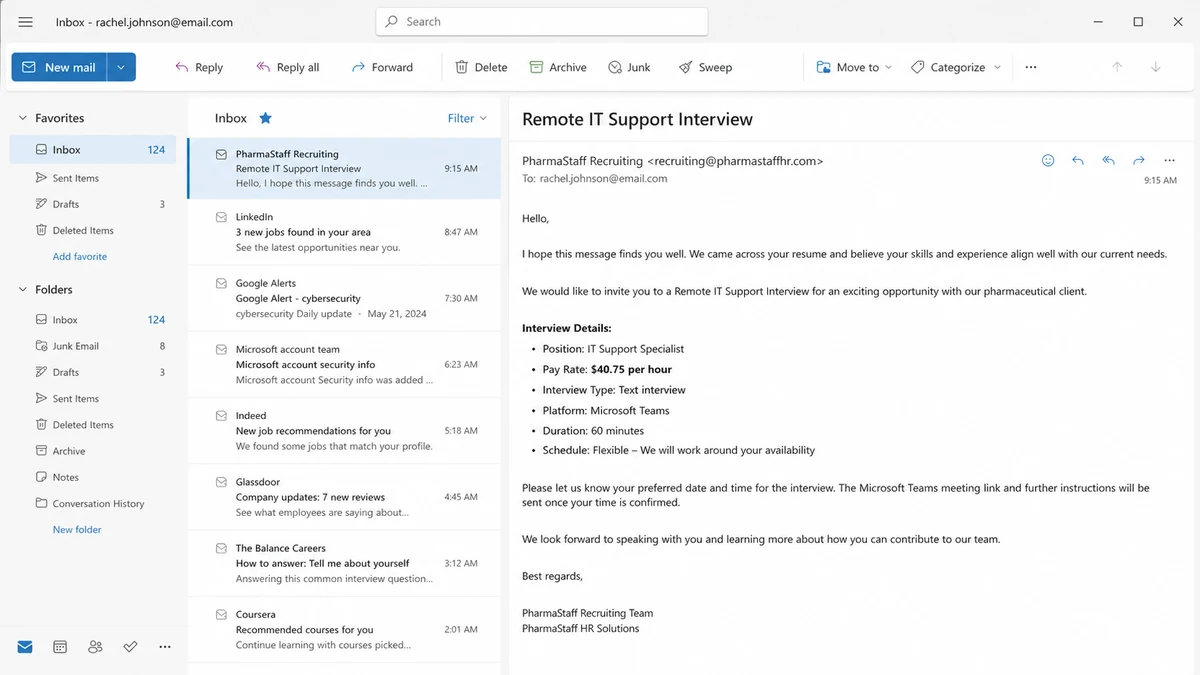
A recent job seeker report describes a supposed remote IT Support role at Hanford Pharmaceuticals. The proposed rate was $40.75 an hour, and the interview took place through Microsoft Teams.
Hanford Pharmaceuticals is a real company in Syracuse, New York. That fact gives the approach a searchable corporate history, products, contact information, and a professional identity that the scammer did not need to create.
The real company’s existence is not proof that the recruiter works for it. Employer impersonation succeeds precisely because a target can confirm the organization while failing to verify the person and vacancy.
The process replaces a real interview with text
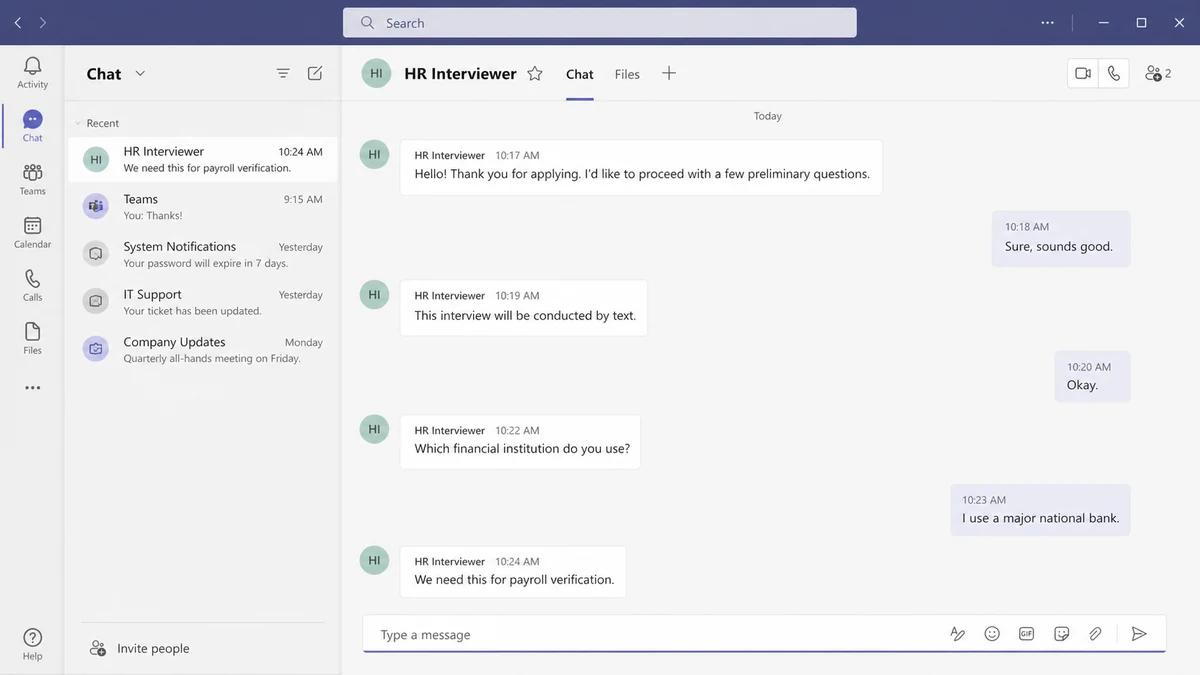
The reported interview was conducted entirely through Teams chat. The applicant received an offer almost immediately for the following day, while questions about written terms and normal hiring details were not answered clearly.
Text-only interviews are attractive to scammers because they conceal voice, location, age, language inconsistencies, and lack of technical knowledge. The operator can follow a script while claiming that chat is company policy.
A legitimate remote employer may use Teams, but the platform does not authenticate the recruiter. Anyone can create a display name, use a logo, and send an invitation.
The bank question reveals the payment stage being prepared
The interviewer asked how the applicant wanted to be paid and which bank they used. A real payroll department may eventually collect routing information through a secure onboarding system after a signed offer and identity verification.
Asking for the name of the bank during an informal chat can help a fake employer choose a counterfeit check from another institution, avoid a bank that may detect an internal item quickly, or tailor a direct-deposit form.
Before continuing, verify:
- Did you apply through the company’s official careers page?
- Does the exact vacancy appear there?
- Does the sender use the exact corporate domain?
- Can the company switchboard confirm the recruiter?
- Was there a live voice or video discussion?
- Were job duties discussed in meaningful detail?
- Did an offer arrive before references or eligibility checks?
- Are banking questions appearing before a contract?
- Will the employer send a check for equipment?
- Are you expected to buy from a named vendor?
The FTC warns that fake recruiters often move quickly and seek financial or personal information before a real interview takes place.
What the Real Hanford Careers Page Shows
The official Hanford employment page lists openings tied to its Syracuse operations, including production, quality, warehouse, sanitation, and technical work. The reviewed page did not list the remote IT Support position described in the approach.
Some official openings route applicants to Indeed, while the company also publishes an employment contact at its own hanford.com domain. That gives candidates an independent way to confirm whether a recruiter and job are genuine.
The absence of one role on a page is not absolute proof of fraud because openings can change. It is a reason to call the employer using the number on its official contact page, not a number supplied by the recruiter.
The Reddit reporter did exactly that. They contacted the real company, which confirmed that it had received scam reports. This verification was stronger than searching the recruiter’s display name or trusting the Teams invitation.
A genuine recruiter should be able to provide the internal job identifier, reporting manager, department, work location, equipment policy, employment classification, benefits summary, and a written offer that the corporate HR team can verify.
An unusually high rate for an entry-level remote role is not conclusive on its own. Combined with a text-only interview, instant offer, evasive answers, and bank questions, it becomes part of a consistent fake-job pattern.
Do not use the recruiter’s telephone number to verify the recruiter. That simply returns you to the person being checked.
How the Fake Pharma Interview Scam Works
Step 1: The scammer copies a credible employer
The operator chooses a real pharmaceutical, healthcare, laboratory, or technology company with a professional website. Public staff names, addresses, logos, and job language supply a ready-made identity.
A lesser-known regional company can be especially useful because applicants recognize the industry but may not know its normal hiring process.
Step 2: A remote role carries an attractive rate
The approach offers flexible work, rapid hiring, benefits, paid training, and compensation above common entry-level listings. The role may be IT support, data entry, customer service, administrative assistance, or project coordination.
Remote work explains why the candidate will not visit an office or meet local staff.
Step 3: Microsoft Teams becomes a trust prop
The recruiter sends a Teams invitation or asks the applicant to add a hiring manager. Because real organizations use Microsoft products, the conversation inherits some of that credibility.
The scammer may use a free account, external guest access, or a display name that resembles the employer. The Teams logo does not validate the tenant, email domain, or employment authority.
Step 4: A scripted text interview avoids scrutiny
Questions cover availability, strengths, equipment, past work, and basic scenarios. Long prepared messages arrive quickly, while follow-up questions receive vague answers.
No manager appears on camera, and the candidate cannot observe a real workplace or spontaneous team interaction.
Step 5: The offer arrives before normal checks
The applicant is congratulated during or immediately after the chat. Urgency is framed as growth, a new project, or the need to start training the next morning.
Emotional commitment begins before the victim sees a verifiable contract.
Step 6: Banking and identity information is collected
The recruiter asks which bank the candidate uses, preferred payment method, address, tax identifier, identity document, or direct-deposit details. A form may carry the copied company logo.
The data can support identity theft, account targeting, or preparation for a counterfeit-check payment.
Step 7: An equipment payment converts the story into loss
Many fake remote jobs send a digital check to buy a laptop, printer, software, or home office package. The candidate is instructed to pay a preferred vendor before the bank discovers the check is counterfeit.
Other versions ask for an activation fee, training payment, cryptocurrency, or gift cards. Honest employers do not make new hires move company funds through personal accounts.
Why the Name of Your Bank Matters to a Fake Employer
A bank name seems less sensitive than an account number, which is why a candidate may answer. It can still improve the criminal’s next move.
For a fake-check scheme, knowing the victim’s institution may help the operator present a check drawn on a different bank. An internal check can sometimes be identified faster because the receiving bank can see the purported account directly.
The answer also helps tailor a fake direct-deposit portal, bank security call, or login page. A later message can name the correct institution and appear to respond to an enrollment problem.
The recruiter can learn whether the candidate uses a mobile-first bank, prepaid service, or traditional institution and adapt the requested transfer method.
Combined with name, phone, email, address, and date of birth, the bank affiliation makes follow-up impersonation more believable.
Do not provide payroll data until you have independently verified the employer, received and accepted a written offer, and opened the onboarding portal from the official corporate domain.
A real HR team can explain who processes payroll and why each field is required. It will not pressure a candidate to type banking secrets into Teams chat.
How to Verify a Remote Interview Invitation
Go to the company’s website by typing its address or using a known official listing. Search the careers page for the exact title and location.
Call the main switchboard and ask for human resources. Provide the recruiter’s name, email, job identifier, and proposed interview time.
Compare the sender domain character by character. A domain containing the company name with jobs, careers, team, or hr added is not automatically corporate.
Check the Microsoft invitation details. An external or unverified tenant should prompt more verification, not a quick assumption that Microsoft approved the sender.
Ask for a live conversation with the hiring manager. Video alone is not perfect because identities can be faked, but refusal to provide any unscripted contact is a major warning.
Request the written job description, reporting line, schedule, legal employing entity, work state, and equipment policy. Compare each answer with the official HR team.
Look for the recruiter’s professional history, but do not rely on LinkedIn alone. Fake and compromised profiles can copy real employees.
Do not download interview software sent as an attachment or executable. Use the official Teams application or browser site obtained independently.
Never deposit a check to prove that you can receive payroll. Payroll begins after onboarding and work, not through an equipment overpayment.
If You Shared Information but Did Not Send Money
List every field disclosed during the application and chat. Separate ordinary resume data from date of birth, identity documents, tax identifiers, bank details, passwords, and codes.
Secure the email account used for the application. Fake recruiters may send password resets and targeted bank messages using details from the interview.
If you shared only the bank name, remain alert for tailored phishing. If you shared routing and account numbers, call the bank’s fraud department and ask whether the account should be replaced.
If an identity document or tax identifier was sent, create an identity-theft recovery plan and freeze credit where available.
Report the impersonation to the real company. It can warn candidates, preserve logs, and clarify official recruiting channels.
Keep the Teams chat and invitation. User IDs, tenant information, email addresses, meeting links, and timestamps can be more useful than screenshots alone.
Do not accept help from a second recruiter who says they can correct the first application. Scam records are often reused for follow-up approaches.
Tell references named on the resume that they may receive convincing messages. The operator may impersonate the candidate or employer to collect more information.
What a Verifiable Offer Package Should Contain
A real written offer identifies the legal employer, exact position, work location, manager, start date, compensation, schedule, classification, and conditions. The information should match the vacancy discussed during interviews.
The sender should use the employer’s established domain, and the document should be confirmable through the HR team reached from the official website. A PDF signature alone is easy to copy.
Remote work terms should explain where the employee may work, how equipment is provided, which expenses are reimbursable, and how company data is protected.
Benefits language should be specific enough for HR to explain eligibility and enrollment. Generic promises of full medical, retirement, and paid leave do not authenticate an offer.
A legitimate package does not include a check image for equipment. It also does not require the candidate to pay a supplier selected by the recruiter.
Tax and direct-deposit forms should arrive through a known onboarding system after the candidate accepts. Confirm the provider and portal address with HR before entering identity or bank data.
The offer should allow reasonable time for review. A demand to sign within minutes or begin the next morning prevents the candidate from checking the employer.
Ask how employment eligibility is verified and who can answer policy questions. A scammer may avoid these details because they expose the absence of a real HR operation.
Search for contradictions between the job title, department, supervisor, and address. Templates often combine material copied from several vacancies or companies.
Call the main office and read the offer’s job identifier. Do not merely ask whether the company exists or whether it sometimes hires remote staff.
If the supposed manager is named, ask the switchboard to connect you. A recruiter who forbids direct verification is protecting the impersonation, not the hiring process.
Keep the offer unsigned until the company confirms it. Your signature can be copied into later forms even when no job exists.
A careful employer will understand independent verification. Pressure, anger, or withdrawal of the role because you called HR is a strong reason to end contact.
Compare the promised rate with similar roles in the same location and industry. A large gap needs a credible explanation involving experience, duties, shift, contract length, or specialization.
Verify the start date against ordinary onboarding requirements. A regulated pharmaceutical employer is unlikely to place an unknown remote worker into systems immediately after a chat interview.
Company, Address, and Fulfillment Checks
Confirm the employer through Hanford’s official site
Use hanford.com to locate employment and contact information. Ask the company whether the remote IT role, recruiter, and Teams account are authorized.
Do not use contact details from the invitation.
Match the job to a real department
A valid vacancy should have a reporting manager, job identifier, location, responsibilities, and hiring workflow. Compare these details with the official careers page.
A copied company description is not enough.
Verify the legal employing entity and address
The offer should name the entity that pays wages and the location governing employment. Confirm it with HR before sending tax or bank data.
Watch for forms that switch to an unrelated company name or address.
Define equipment and payroll fulfillment
A legitimate employer can ship equipment directly or use a documented purchasing system. It does not send a new hire a check and direct payment to a chosen vendor.
Payroll data belongs in a verified onboarding portal after acceptance, not in interview chat.
What to Do if You Have Fallen Victim to This Scam
- Stop the interview. Do not answer more bank questions, deposit a check, or buy equipment.
- Call the real company. Report the impersonation through contact details on its official website.
- Preserve evidence. Export the Teams chat and save emails with headers, account IDs, meeting links, forms, offer documents, and check images.
- Contact your bank. Explain what information was shared and ask whether accounts or cards need replacement.
- Do not spend a check deposit. Tell the bank it may be counterfeit even if funds appear available.
- Secure email and Microsoft accounts. Change reused passwords, review sessions, and enable strong multifactor authentication.
- Freeze credit if sensitive identity data was sent. Review reports for unfamiliar inquiries or accounts.
- Report the account. Use Microsoft’s official abuse tools and the job platform where the approach began.
- Create an official report. Use ReportFraud.ftc.gov and IC3.gov where applicable.
- Run Malwarebytes. Scan devices if you installed software or opened an attachment during the interview.
- Use AdGuard as a supporting layer. It may block known malicious pages, but it cannot authenticate a recruiter in Teams.
- Expect follow-up attempts. Ignore recovery agents, payroll corrections, and equipment refunds that continue the same story.
Frequently Asked Questions
Does Hanford Pharmaceuticals hire through Microsoft Teams?
Teams may be used by many employers, but the platform alone proves nothing. Confirm the exact recruiter and vacancy directly with Hanford through hanford.com.
Why did the interviewer ask which bank I use?
The answer can help tailor a fake check, direct-deposit form, or bank impersonation. It is not a normal early interview question.
Is a text-only interview always a scam?
No, but it is a serious warning when combined with an unsolicited offer, unusually high pay, instant acceptance, weak job detail, and early financial questions.
Can a fake check appear available in my account?
Yes. Banks may make funds available before discovering that the check is counterfeit. Availability is not final clearance.
What if I shared only my resume?
Expect targeted phishing using your work history and contact details. Secure email, warn references, and do not provide additional identity or bank information.
Should I trust an offer letter with the company logo?
No. Logos and signatures are easy to copy. Verify the job identifier, sender, legal entity, and offer through the company’s independently contacted HR department.
The Bottom Line
The fake pharma interview borrows a real company’s identity and a real collaboration platform, then removes the parts of hiring that would expose the impersonation. Fast acceptance and a bank question prepare the victim for data theft or a fake equipment payment.
Verify the role through hanford.com, speak with real HR, and keep financial information out of interview chat. A legitimate employer can wait for an independently confirmed offer and secure onboarding process.

Join the discussion
0 commentsShare your experience or ask a question about this article.
Discussion
Start the conversation
Have a question or something useful to share? Add the first comment.