


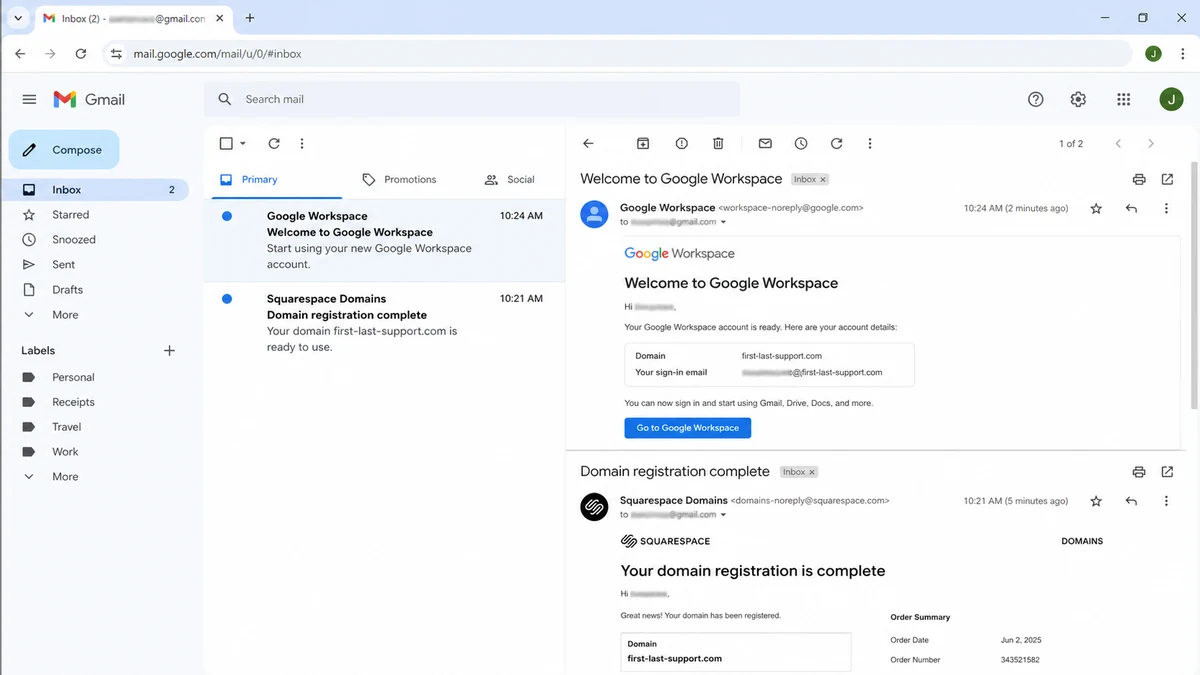
An unfamiliar card charge is followed by welcome messages for a domain and business email account bearing your own name. It looks less like an ordinary purchase and more like someone has started building an online identity around you.
Cancelling the card stops one payment method. It does not automatically close the domain, inboxes, or accounts already created.
Overview
The fraud combines a stolen card with personal information
A recent cardholder report describes someone using the victim’s credit card and personal details to create a Google Workspace account and register a domain through Squarespace. The domain was based on the victim’s name.
That is different from a criminal simply buying merchandise. A domain and hosted email system can remain useful after the original card is cancelled, and the victim’s name can make messages from that infrastructure appear credible.
The report does not reveal what the operator ultimately intended to do with the domain. It is reasonable to treat the setup as high risk without claiming a specific later crime that has not yet been observed.
The domain can become infrastructure for further scams
A custom domain can create addresses such as billing@, support@, legal@, or the victim’s name. Recipients often give a domain-based email more trust than a free mailbox.
The account could be used for phishing, fake invoices, vendor impersonation, job offers, account recovery, or spam. It could also be parked, resold, or used only to test stolen payment and identity information.
Because these are possible uses rather than confirmed facts in the report, responders should preserve evidence and disable the infrastructure instead of guessing at the exact campaign.
Disputing the charge is necessary but incomplete
The card issuer can replace the number and investigate unauthorized transactions. It cannot directly delete a Google Workspace tenant, cancel a domain registration, remove DNS records, or preserve registrar logs.
Those actions require separate reports to the service providers. Google offers a payment investigation path and a form for a domain already in use. Squarespace publishes an abuse reporting process.
Build an incident map before reporting:
- Which card and billing address were used?
- What exact merchant descriptors appear?
- What domain was registered?
- When was it created and through which registrar?
- Which email address received notifications?
- Was a Google Workspace tenant created?
- Are DNS or mail records active?
- Does the domain display a website or redirect?
- Were other accounts opened with the same identity?
- Which providers received abuse reports?
Treat each service as one branch of the incident. Closing one branch should not end monitoring of the others.
Why a Criminal Would Register a Domain in Someone Else’s Name
A domain is a reusable identity layer. It can host pages, send mail, receive replies, create subdomains, and connect to cloud services without revealing the operator’s everyday account.
Using stolen card details shifts the initial cost and fraud alert to the victim. Using the victim’s personal details can also create a misleading paper trail when a registrar or recipient investigates.
A name-based domain may look like a consultant, recruiter, small business, attorney, or personal portfolio. Even a newly registered address can appear plausible to someone who does not inspect its history.
Google Workspace can give the domain familiar productivity and mail services. A message routed through real Google infrastructure is not automatically honest; the customer controlling the tenant may be fraudulent.
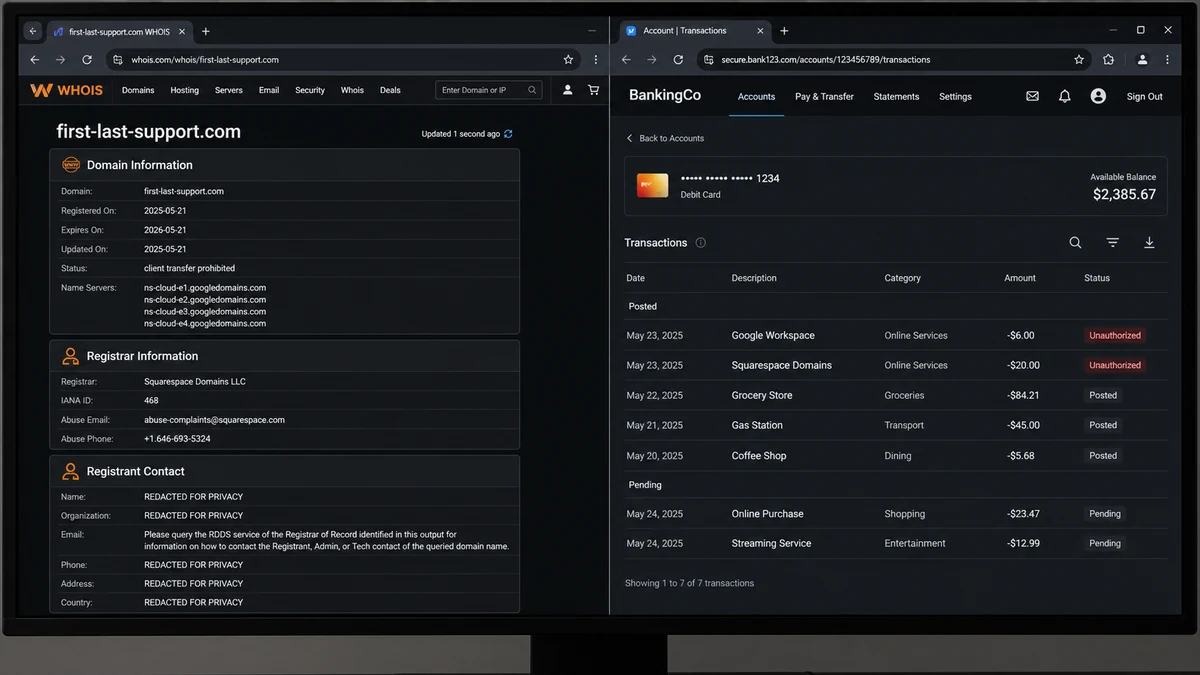
Domain privacy can hide public registrant fields. Privacy protection is normal and not evidence of wrongdoing, but it means the registrar must use its internal records to investigate the purchaser.
A criminal may also be testing a complete identity package. If the card, address, phone, and name pass automated checks, the information may be reused at other providers.
The domain does not need to stay online for long. A short phishing run can target vendors or contacts before reputation systems classify it.
That is why rapid reporting matters even if the initial charges are small. The monetary amount does not measure the potential harm of a working impersonation domain.
How the Stolen Card Domain Scam Works
Step 1: Payment and identity data is obtained
The operator acquires a card number, expiry date, security code, billing details, name, email, and possibly a telephone number through phishing, a compromised shop, malware, or a data market.
The exact source may be unknown. Avoid assuming that the most recent merchant caused the theft without evidence.
Step 2: A domain tied to the victim is selected
The domain may contain a full name, business name, profession, support wording, or geographic term. It is chosen to appear credible to future recipients.
Availability can be checked and registration completed in minutes.
Step 3: The stolen card funds registration
The registrar receives a real card and matching billing information. Automated controls may accept the transaction, challenge it, or allow the registration before a later dispute.
A small domain charge can be overlooked among ordinary subscriptions.
Step 4: Workspace mail is activated
The operator connects the domain to Google Workspace or another mail provider and creates addresses. Verification may involve DNS records controlled through the registrar account.
The victim may receive a receipt or welcome email if their address was included during registration.
Step 5: The domain gains credibility through real services
Mail can pass through established provider infrastructure, and the website can use HTTPS. Those technical features say nothing about whether the customer opened the account lawfully.
Recipients see a custom address and may not know the domain was created days earlier.
Step 6: The infrastructure is used or held for later
The domain may send fake invoices, recruitment messages, password resets, or support requests. It may redirect visitors to another site or remain blank until a campaign starts.
Absence of visible content does not mean there are no email records or cloud accounts.
Step 7: The card is cancelled but the accounts persist
A chargeback can create a billing problem for the operator, but service suspension may not be immediate. Some accounts continue through grace periods, credits, or another payment method.
The victim must report both unauthorized payment and identity misuse to every provider involved.
How to Investigate Without Damaging Evidence
Start with screenshots of card activity and original emails. Save complete email headers, not only the visible message, because message IDs, recipient fields, and sending systems can identify the account.
Record the exact domain without clicking it. A visit could load tracking, malware, or content that changes based on the viewer.
Use an RDAP lookup to identify the registrar, registration time, status, and name servers. Public privacy-protected data will not name the buyer, but it directs the abuse report.
Check DNS through a reputable lookup service. Mail exchange records can show whether an email provider is configured. Preserve results with timestamps because DNS can change quickly.
Do not attempt to sign in, reset the account, or claim the domain unless a provider instructs you through its official recovery process. Unauthorized access can complicate the investigation.
Ask the card issuer for the exact merchant descriptor, authorization time, amount, and any transaction reference it can share. Provider support may use those details to locate the fraudulent purchase.
Document every case number. Google billing, Google Workspace, Squarespace Domains, the card issuer, the registrar abuse team, and law enforcement may each create separate records.
If the domain is actively phishing, capture the URL from a safe environment or submit it directly to the provider. Do not enter information or download files to gather more proof.
The ICANN DNS abuse reporting guide recommends sending a clear, evidence-supported complaint to the relevant registrar or registry first.
Keep a timeline from the first suspicious charge through every provider response. A later recipient complaint can then be connected to the original unauthorized registration.
Separate the Payment Case From the Identity Case
The payment case asks whether charges were authorized and how the card should be replaced. The identity case asks which services were opened, what data they hold, and how the accounts can be restricted.
A bank dispute may refund a charge while leaving the registrant account active during review. Conversely, a registrar may suspend a domain while the card issuer still needs a formal fraud claim.
Use the phrase “unauthorized account creation using my identity and payment card” in provider reports. That communicates more than a generic refund request.
Ask providers to preserve logs before deleting data. Login IPs, device information, recovery addresses, telephone numbers, DNS changes, and connected accounts may help an investigation.
Do not ask a registrar to transfer the domain to you unless you actually want and have a legal basis to control it. Suspension and preservation may be the appropriate immediate goals.
Check whether the personal name in the domain creates reputation risk. If messages were sent, notify affected contacts through a verified channel and state the exact unauthorized domain.
Search for other domains that combine the same name and wording. Criminals sometimes register variations or several top-level domains in one session.
Review credit reports and identity accounts because the same dataset may have been used outside domain services.
What Notifications Can Reveal
A legitimate welcome email can still document an illegitimate signup. Its sender, account identifier, domain, timestamp, trial status, and billing profile can help support teams locate the tenant.
Do not click the buttons in an unexpected welcome message. Type the provider’s official support address separately and provide the message as evidence.
A receipt may expose an order number or partial card digits. Preserve it even if the transaction later disappears from pending activity.
Password reset messages reveal which email address is attached to the account, but initiating repeated resets can alert the operator or interfere with provider handling.
DNS verification messages can show that the domain and Workspace tenant were linked. Include them in both provider reports.
If notification emails are themselves phishing, their links may point to a lookalike provider. Inspect headers and contact the company independently before deciding that a real account exists.
A real merchant descriptor on a bank statement is stronger evidence of an account purchase than an email alone. Correlate times, amounts, and domains across sources.
Continue watching the inbox after the first report. Suspension, billing failure, transfer, renewal, and recovery notices can reveal attempted changes.
What to Include in Provider Abuse Reports
Lead with a concise statement that the domain or tenant was created without your permission using your identity and payment card. Put the exact domain in plain text.
Include the registration and transaction timestamps with time zone. Close timing helps a provider match payment, signup, login, and DNS events.
Provide the merchant descriptor, transaction reference, amount, and masked card digits. Never email a complete card number or security code.
Attach the original receipt or welcome message as a file when the official form permits it. Retain full headers so support can distinguish a real platform notification from phishing.
Explain which personal fields belong to you and state clearly that you did not create or authorize the account. Mention whether the domain includes your legal or business name.
Describe observed abuse separately from suspected use. For example, say that mail records are active, then state that no phishing message has yet been confirmed if that is the truth.
Request suspension or restriction, preservation of relevant logs, and a written case reference. Do not demand deletion before evidence is retained.
List the bank fraud case and other provider case numbers. Cross-references help investigators understand that the registration and Workspace account form one incident.
Provide a safe contact address that the fraudulent domain does not control. Secure that inbox with a unique password and strong multifactor authentication first.
Do not include identity documents unless the provider’s authenticated process specifically requires them. Ask how they will be stored and whether redaction is allowed.
Follow up if no acknowledgement arrives, but do not submit many conflicting reports. One complete evidence package is easier to investigate than fragmented messages.
Record the date, recipient, reference, and response for every submission. If the domain changes registrar, forward the timeline to the new provider.
When a form asks for harm, explain the impersonation risk as well as the card charge. A domain carrying a real person’s name can mislead recipients even before a malicious page is visible.
Continue checking public registration and DNS status after acknowledgement. Record changes, but allow the provider time to investigate rather than contacting the suspected operator.
Company, Address, and Fulfillment Checks
Identify the registrar of record
Use RDAP to determine which company currently sponsors the domain. Send the complaint to that registrar’s published abuse path, even if a different company appears on the website.
Include the domain, evidence, timeline, and case references.
Confirm the Workspace provider and tenant
Google’s logo or mail servers may establish the service provider, not the customer’s legitimacy. Report unauthorized billing and domain use through Google’s official forms.
Do not negotiate with an administrator at the suspicious domain.
Separate real company addresses from stolen identity fields
A registrar and Google are legitimate companies even when a criminal abuses their services. The victim’s name or billing address in a receipt does not prove the victim opened the account.
State clearly which fields are yours and which actions are not.
Define what each purchase fulfilled
Ask the registrar to identify the domain order and Google to identify the Workspace tenant tied to the charge. Closing only the card transaction does not fulfill the need to disable the infrastructure.
Track each item until the provider confirms its status.
What to Do if You Have Fallen Victim to This Scam
- Lock the affected card. Call the issuer through the number on the card and request replacement.
- Dispute every unauthorized charge. Provide the exact merchant descriptors, times, amounts, and related emails.
- Preserve digital evidence. Save emails with headers, receipts, domain records, DNS results, card alerts, and screenshots.
- Report the Workspace account. Use Google’s official unauthorized transaction and domain-use channels.
- Report the domain. Submit Squarespace’s official abuse form or the current registrar’s published abuse route.
- Ask providers to preserve logs. Request retention of registration, login, recovery, payment, and DNS records for investigators.
- Create an identity recovery plan. Use IdentityTheft.gov and freeze credit where appropriate.
- Secure email and mobile accounts. Change reused passwords, review sessions and forwarding rules, and add strong multifactor authentication.
- Warn likely contacts. Tell clients, colleagues, or relatives not to trust mail from the unauthorized domain.
- Run Malwarebytes. Scan devices if the card or identity data may have been taken through a suspicious page, attachment, or extension.
- Use AdGuard as a supporting layer. It can block many known phishing and tracking domains, but it cannot cancel registrations or remove stolen identity data.
- File official reports. Report the incident through ReportFraud.ftc.gov and IC3.gov.
Frequently Asked Questions
Why would someone register a domain with my name?
It can make email or a website appear connected to you and may support impersonation. The exact intended use cannot be known until evidence appears.
Will cancelling the card cancel the domain?
Not necessarily. Card replacement stops future use of that number, but the registrar and Workspace provider must handle the accounts separately.
Should I visit the domain to see what it contains?
Avoid opening an unknown site on your normal device. Record the domain and use provider abuse teams or a safe scanning service instead.
Can I take control of a domain that uses my name?
A personal name does not automatically grant domain ownership. Ask the registrar about suspension and abuse procedures, and seek legal advice for a disputed registration.
Are Google and Squarespace responsible for the identity theft?
The report shows their real services may have been abused. It does not show that either company authorized the fraud. Report the customer accounts through official channels.
What if the charges are small?
Act anyway. Small charges can test a card, while the domain and mail system may be worth more to the operator than the registration cost.
The Bottom Line
The stolen card domain scam creates more than an unauthorized transaction. It can leave behind a registered name, working email tenant, DNS records, and a credible platform for messages that appear to come from the victim.
Replace the card, but also report the Workspace account and domain, preserve logs, secure identity channels, and warn likely contacts. Recovery is complete only when both the payment fraud and the online infrastructure have been addressed.

Join the discussion
0 commentsShare your experience or ask a question about this article.
Discussion
Start the conversation
Have a question or something useful to share? Add the first comment.