


A mutual sends an anxious direct message and says your X account was reported by mistake. They seem embarrassed, share a formal-looking notice, and insist that your profile is close to deletion.
The story feels personal because it comes from someone you already follow. The next contact, however, is not where real X support operates.
Overview
A compromised mutual provides the first layer of trust
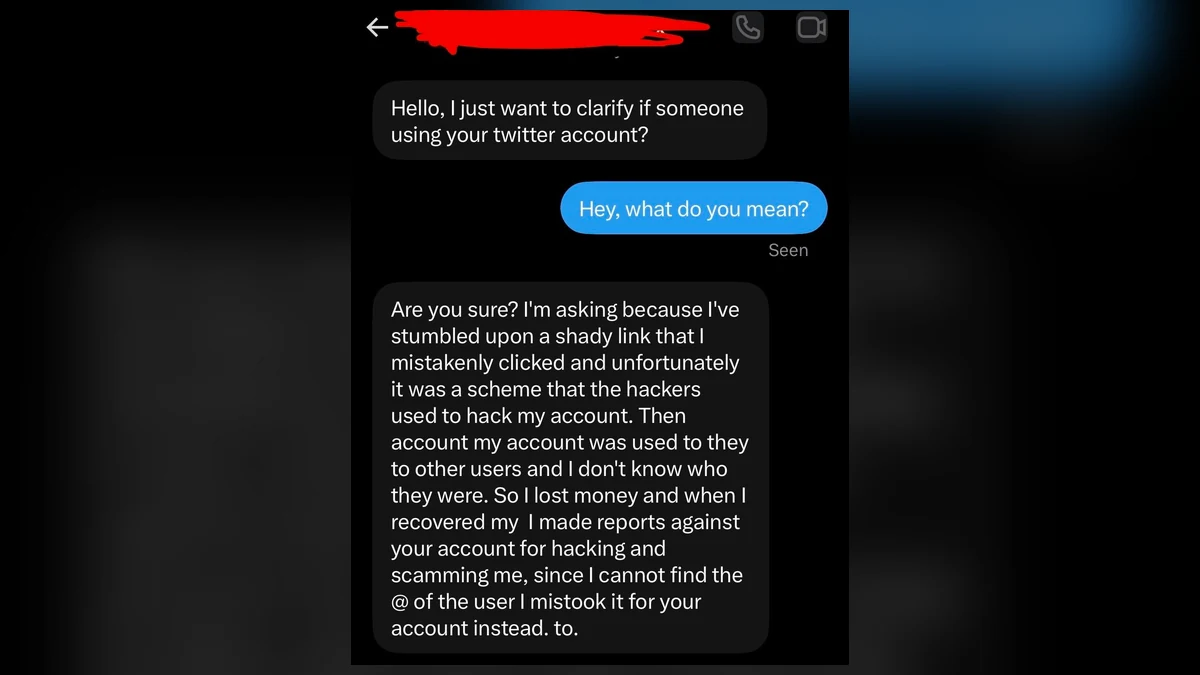
A recent X user report shows a mutual opening with an awkward question: “Hello, I just want to clarify if someone using your twitter account?” The account then claims it was hacked after clicking a shady link.
The sender says the hackers scammed other users and that, while trying to report them, they mistakenly reported the recipient instead. The message apologizes and says X support refuses to correct the error.
This is effective because the opening account may really belong to a mutual. The familiar profile can be compromised, and its followers become the next target list.
The accidental report creates a problem only fake support can solve
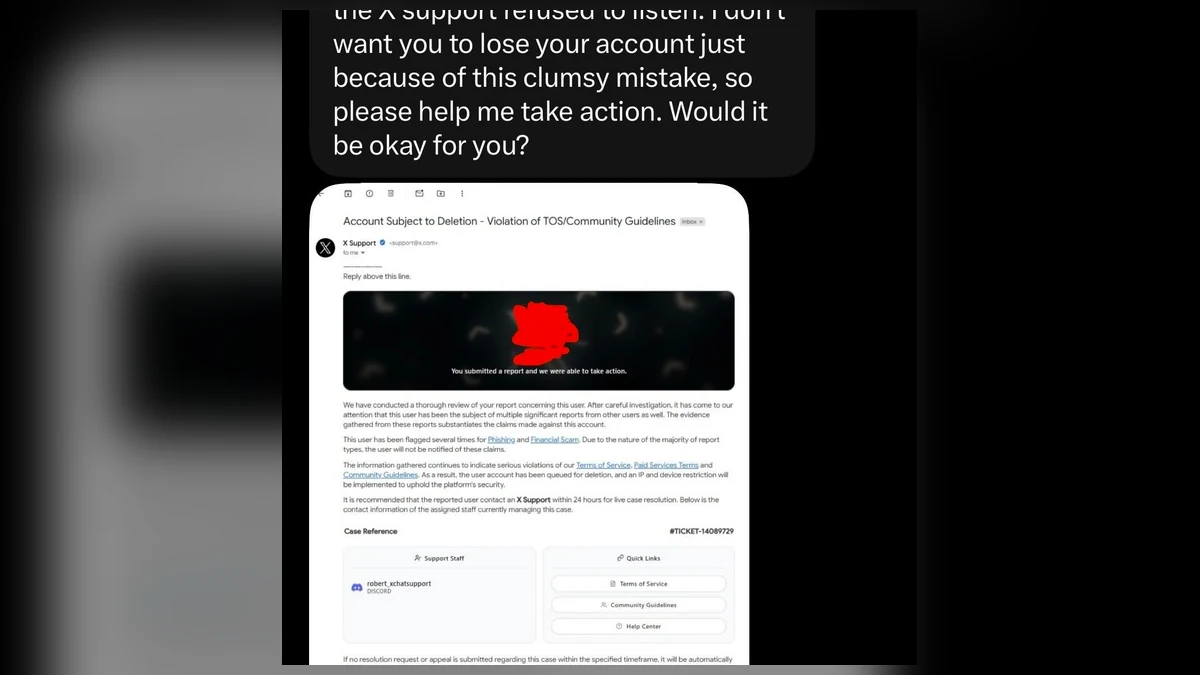
The target is told that multiple reports have placed their account in danger. A screenshot presented as an X notice says the account is subject to deletion for violations involving phishing and financial scams.
The notice includes legal-sounding language, a case number, a 24-hour deadline, and a supposed staff contact on Discord. Those details simulate a process while moving the target away from X’s real support channels.
X provides official forms at help.x.com/en/forms. A mutual cannot appoint a Discord user to reverse an enforcement decision, and an image inside a DM is not an account notice.
The support conversation is designed to take the account
After the target contacts the named “support” account, the operator can request a verification code, password, recovery email change, screen share, or login through a copied page. The exact request may vary, but the goal is control.
X’s account security guidance says it will never ask users to provide a password by email, direct message, or reply. Genuine login notifications and security controls remain inside X and official help pages.
Pause when a mutual tells you to contact support somewhere else. Check:
- Did the warning appear inside your own X account?
- Is there an official email visible in your account settings?
- Does the appeal route remain on help.x.com or x.com?
- Why is a Discord user handling an X case?
- Does the notice exist only as a screenshot?
- Is the deadline intended to stop independent verification?
- Has the mutual suddenly changed writing style?
- Is the mutual avoiding a voice call through a known channel?
- Are you being asked to share a code or change recovery details?
- Does the helper want you to stay in a private chat?
The safest response is not to argue inside the suspicious thread. Open X support independently and contact the mutual through a channel you previously used.
The Notice Looks Formal, but Its Delivery Exposes It
The fake notice uses the visual grammar of platform enforcement: a severe subject line, references to rules, a ticket number, official-looking links, and a deadline. A reader may inspect the design instead of questioning why it arrived through a mutual.
Delivery is more important than appearance. The target did not receive the notice from an authenticated X channel. They received a screenshot of an alleged email inside another user’s private message.
A screenshot cannot prove the sender, headers, recipient, link destinations, or whether the message ever existed. Every visible element can be assembled in an image editor or web template.
The Discord contact is another decisive contradiction. Discord is a legitimate service, but a Discord handle is not an official X support identity. Moving platforms removes the victim from X’s reporting controls and makes the conversation harder to connect with the compromised account.
The 24-hour threat narrows the target’s attention. Instead of checking account status, they begin performing instructions quickly to save a profile, audience, archive, or business identity they fear losing.
Case numbers are cheap to invent. A long reference string is not verifiable unless it appears inside the user’s own authenticated support history on the official platform.
Real enforcement may be stressful, but it will not require a user to reveal an authentication code to a stranger. A code proves possession of your login channel; it does not prove innocence.
How the Fake X Support Report Scam Works
Step 1: A real X account is compromised
The criminal gains access through phishing, credential reuse, a stolen session, or an earlier version of the same scam. The account’s followers and direct-message history become useful social proof.
Because the profile is familiar, recipients may forgive unusual grammar or urgency.
Step 2: The account invents an accidental report
The mutual claims they reported the wrong person for hacking, fraud, impersonation, or illegal activity. The apology makes the sender appear responsible rather than threatening.
The story also tells the target why support supposedly needs to speak with them, removing the need for a convincing unsolicited support approach.
Step 3: A fake deletion notice raises the stakes
An image claims the account is queued for suspension or deletion. It may cite terms of service, several complaints, law enforcement, or a short appeal window.
The operator expects the target to focus on the consequences, not on the missing authentic notification.
Step 4: The target is moved to a fake support agent
The notice provides a Discord, Telegram, or separate social account. The criminal can control both the apologetic mutual and the supposed support agent, creating a staged conversation between two roles.
Any hesitation can be answered by the mutual, who says the agent helped them recover their own account.
Step 5: Support requests a security action
The agent may ask for the account email, phone number, screenshot of settings, password reset code, two-factor code, backup code, or a change to the recovery address.
Some versions send a fake login page or ask the target to screen-share while opening account settings. The explanation is “verification,” but the effect is transferring control.
Step 6: The attacker locks out the victim
Once the recovery email, password, or session changes, the attacker removes trusted devices and adds their own authentication method. The victim’s account becomes the next believable messenger.
The operator may demand payment for restoration or immediately contact followers with the same accidental-report story.
Step 7: The stolen profile expands the chain
A mature account can promote cryptocurrency, fake giveaways, investment groups, recovery services, or malicious links. Its age and social connections make later fraud more convincing.
Fast public warnings to followers can reduce that secondary harm even before recovery is complete.
Why Smart Users Still Follow the Fake Agent
The scam combines guilt and fear. A mutual appears to have caused the problem accidentally, while the target feels pressure to cooperate so both accounts can be cleared.
It also offers a simple path through an intimidating platform process. Instead of searching help pages, the victim receives the name of a person who supposedly owns the case.
Account value is emotional as well as financial. A user may fear losing years of posts, private messages, contacts, verification status, or access to customers.
The formal notice reduces uncertainty. It names a violation, deadline, ticket, and contact, even though every element was created by the attacker.
Two controlled identities create false corroboration. The mutual says the support agent is real, and the support agent confirms the mutual’s story.
Private messages prevent other followers from seeing and challenging the claim. The victim receives no public warning unless they ask someone else.
The safest mental rule is simple: platform support stays on the platform’s official domain. A person who asks you to carry a case to Discord is not made legitimate by a ticket image.
How to Check the Account Without Alerting the Scammer
Open a new browser tab or the official X app. Do not click links in the DM or screenshot. Review account status, security alerts, active sessions, connected applications, email address, phone number, and two-factor settings.
Visit the official reporting guidance directly. A real report is evaluated by X; the person who submitted it cannot send you a private agent who cancels it.
Contact the mutual through a known telephone number, another established account, or a shared contact. Ask a question that a stranger reading recent posts could not easily answer.
Do not tell the suspicious account exactly which security evidence you are checking. That can help the attacker change the story or delete useful messages.
Search the purported support username independently. A profile that calls itself X Support may still be an impersonator, even if it has followers or a polished avatar.
Inspect URLs before opening them. X help pages should end in x.com or help.x.com. Lookalike domains can hide brand words to the left of a different registered domain.
Never paste a code into chat. The FTC explains that anyone requesting your verification code is trying to access an account protected by that code.
If the account looks normal, that does not make the mutual’s DM safe. The scam may be interrupted before any change appears.
Security Actions That Prevent a Full Takeover
Use a unique password that is not shared with email, Discord, or other social accounts. Password managers make uniqueness practical and reduce the chance of entering credentials on a lookalike domain.
Prefer an authenticator app or security key over text codes where available. Any factor can fail if voluntarily handed to an attacker, but phishing-resistant keys provide stronger protection.
Secure the email account first. An attacker who controls email can reset X again after you change the social password.
Review connected apps and revoke anything unfamiliar. A malicious application can retain access without knowing the new password.
Save backup codes offline and never photograph or send them to support. Each code can function like a temporary password.
Turn on login alerts and read them. If an alert says a new device requested access while a “support” agent is talking to you, deny it.
Tell friends that support impersonation may come from a compromised mutual. Awareness breaks the trust chain that gives this scam its reach.
Keep recovery contact details current. An old email or telephone number can make genuine recovery slower and increase the temptation to trust a fake shortcut.
What Real Support Will Never Need From a DM
A support representative does not need your current password. Authentication systems can verify account ownership without an employee reading the secret you use to sign in.
They do not need a two-factor code sent to your phone or authenticator. That code is generated because someone is attempting a login or sensitive change at that moment.
They do not need backup codes. Those are emergency credentials intended for the account owner and can bypass the normal second factor.
They do not need you to change the recovery email to an address they provide. That action gives the new address control over resets and can lock out the real owner.
They do not need remote control of your device. Screen-sharing can reveal recovery codes, private messages, password manager contents, and active sessions.
They do not need a cryptocurrency payment, gift card, or fee to stop deletion. Account enforcement is not resolved through a private payment to an individual agent.
They do not need you to contact a colleague on Discord, Telegram, or another social network. Official case handling remains in the platform’s documented support system.
They do not need a screenshot of a complete security page. Even when a password is hidden, the page can expose email, telephone, backup options, account IDs, or session details.
They do not need you to approve an unfamiliar login so they can “inspect” the account. That approval grants access rather than allowing a harmless review.
If a genuine form requests identity evidence during recovery, reach it by typing the official support domain yourself. Check the privacy explanation and case reference before uploading anything.
A useful test is to close the private conversation and begin again from help.x.com. A real case remains accessible; a fake agent will try to keep you inside the chat.
Take a screenshot before blocking the accounts so the usernames, wording, deadline, and off-platform contact remain available for reports.
Company, Address, and Fulfillment Checks
Confirm who actually provides X support
Official self-service forms and guidance are published on help.x.com. X does not outsource an individual enforcement appeal to a Discord username supplied by another user.
Open support independently rather than through the DM.
Check the origin of every notice
A screenshot has no trustworthy sender data. Look for the notice inside your own authenticated account and email inbox, then inspect the full sender and links.
Do not treat a copied logo as origin evidence.
Verify the mutual outside the compromised profile
Use a telephone number, other platform, or shared acquaintance that existed before the incident. A reply from the same X account proves only that someone controls it.
Warn the owner without sending sensitive information.
Define what support is supposedly delivering
A real appeal produces a traceable case in an official system. A private agent who asks for codes, recovery changes, payment, or screen sharing is not delivering a legitimate account review.
End the conversation immediately.
What to Do if You Have Fallen Victim to This Scam
- End contact. Stop messaging both the mutual and the fake support account.
- Change the X password. Use the official app or x.com from a trusted device.
- Secure your email. Change its password, remove forwarding rules, review sessions, and strengthen multifactor authentication.
- Revoke unknown access. Remove unfamiliar X sessions, devices, applications, and recovery methods.
- Start official recovery. Use X’s account-access forms and the FTC’s hacked social account checklist.
- Preserve evidence. Save both DM threads, usernames, profile URLs, the fake notice, Discord identity, links, and security emails.
- Warn followers. Use another verified channel if the attacker controls the account and tell contacts not to trust recent messages.
- Report impersonation. Report the compromised profile and fake support identity through official X and Discord tools.
- Contact financial providers. If payment details or funds were shared, call the relevant bank or service through its official number.
- Run Malwarebytes. Scan devices if you installed software, opened an attachment, or granted a browser extension at the agent’s direction.
- Use AdGuard as a supporting layer. It may block known phishing pages, but it cannot determine whether a familiar social account is compromised.
- Monitor for recovery scams. Ignore strangers who promise to restore the account for a fee or claim they know an employee.
Frequently Asked Questions
Can someone get my X account deleted by reporting me once?
A report can be reviewed, but another user does not receive a private power to schedule your deletion. Check your own account status and official support channels.
Does X support use Discord?
Do not trust a Discord contact supplied in a DM as X support. Use help.x.com and the support paths available inside your authenticated account.
Why is the message coming from a real mutual?
The mutual’s account may be compromised. Stolen profiles provide believable connections and a ready list of new targets.
Is it safe to share a verification code with support?
No. A verification code authorizes access or a sensitive change. Official support does not need you to paste that secret into a private chat.
What if I only gave them my email address?
Secure the email, expect targeted password-reset attempts, and never approve a login you did not initiate. The address alone is less serious than sharing a code.
Can a screenshot of an enforcement email be verified?
Not by appearance. Check whether the message exists in your own inbox and authenticated X account, and use the official case system rather than the contact shown in the image.
The Bottom Line
The fake X support report scam borrows the credibility of a mutual, then manufactures a crisis that only a private agent can supposedly fix. The apology, ticket number, and deadline are parts of one takeover script.
Do not contact support through Discord, do not share codes, and do not change recovery details for a stranger. Verify account status inside X, secure the connected email, and warn the real owner of the compromised mutual account.

Join the discussion
0 commentsShare your experience or ask a question about this article.
Discussion
Start the conversation
Have a question or something useful to share? Add the first comment.