

You wake up to a payment notification for a trip you never planned. The merchant is familiar, the transaction is already complete, and the money has crossed two accounts before breakfast.
The PayPal Airbnb Charge story shows why an ordinary-looking booking can become a complicated account-takeover case rather than a simple merchant refund.
Overview
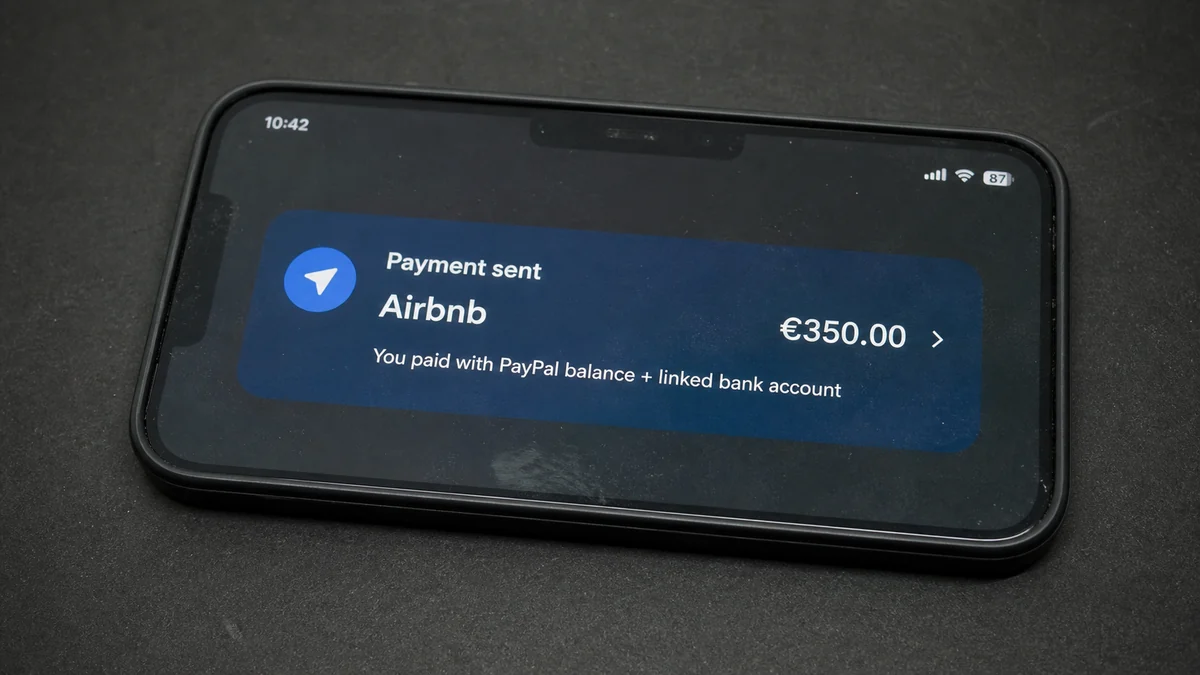
A €350 booking used both PayPal and a linked bank account
A recent consumer report from Germany describes a morning notification showing €350 paid to Airbnb through PayPal. The account holder said they had not made the booking, shared access, or knowingly clicked a malicious link.
The PayPal balance did not cover the full amount, so the rest came from a linked bank account. One unauthorized checkout therefore created records and possible disputes across PayPal, Airbnb, and the bank.
The victim changed the PayPal password and contacted both companies. PayPal treated account compromise as possible. Airbnb initially declined a refund and suggested checking whether friends or relatives had made the booking.
The merchant name does not reveal how access was obtained
An Airbnb descriptor proves where the payment was routed, not how the PayPal account was accessed. The starting point could be a reused password, compromised email, stolen session cookie, malicious browser extension, infostealer, social engineering, or access from a trusted device.
No public evidence identifies the cause in this individual case. The absence of a remembered phishing click does not rule out compromise, and the presence of a known merchant does not prove the victim authorized the purchase.
Investigators need to separate three questions: who controlled PayPal, which Airbnb account received the booking, and which funding source ultimately paid.
Fast action creates evidence and limits a second charge
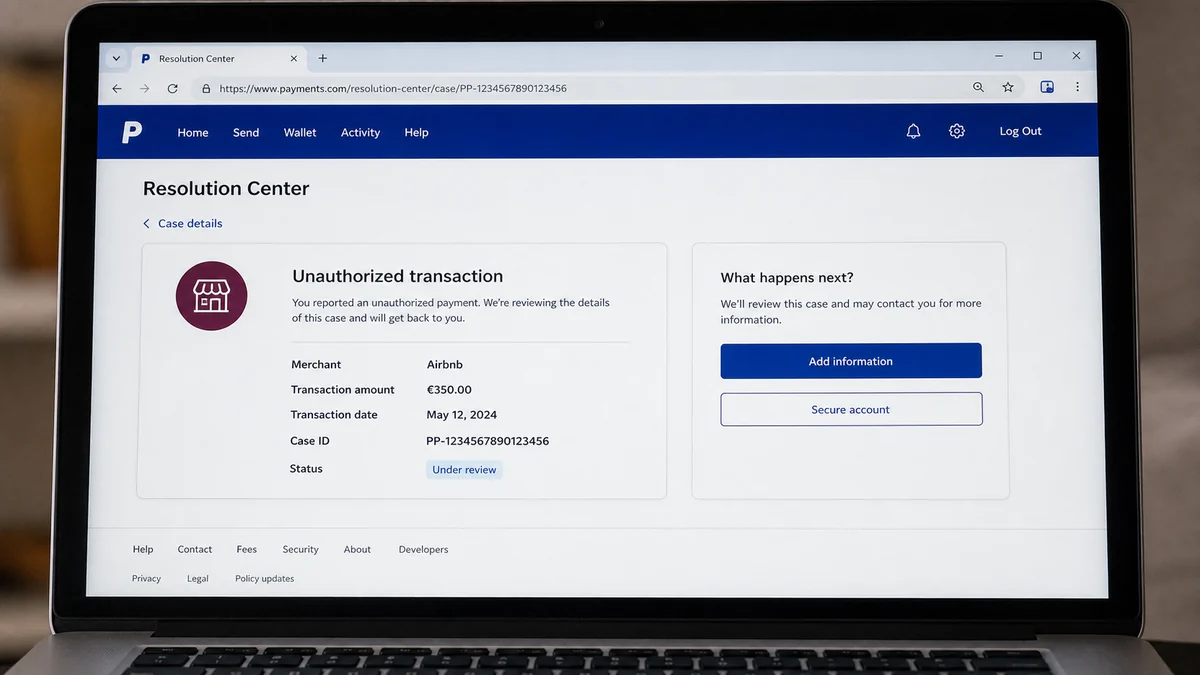
PayPal’s official fraud-reporting guidance tells account holders to report unrecognized activity through the Resolution Center. PayPal can examine the account and transaction using information that a merchant or victim cannot see.
Airbnb advises users who suspect unauthorized access to review account activity, change passwords, inspect devices and locations, verify contact details, and confirm that reservations are recognized.
Before treating the charge as resolved, check every layer:
- Does the transaction appear inside PayPal after a fresh login?
- Which funding sources paid the amount?
- Is there a corresponding reservation in your Airbnb account?
- Were PayPal contact details or security settings changed?
- Are unfamiliar devices or sessions still active?
- Was the email account accessed from a new location?
- Do other accounts reuse the same password?
- Did a browser store PayPal or email sessions?
- Did the bank receive a direct debit or card request?
- Have smaller test payments appeared elsewhere?
Changing one password is essential, but it is not a complete investigation. If email or a device remains compromised, the attacker can reset the account again or target other services.
Why a Real Airbnb Charge Can Still Be Unauthorized
Fraud does not always use a fake merchant page. A criminal can use a victim’s legitimate PayPal account to buy a real service on a separate Airbnb account.
From Airbnb’s side, the payment may pass normal checkout checks. The person making the reservation can appear to have access to a valid PayPal wallet, while the actual owner is asleep or unaware.
From PayPal’s side, the login may come from a familiar browser session or device fingerprint. Stolen session cookies can sometimes bypass the point where a new password would normally be requested.
From the bank’s side, PayPal may be the authorized payment intermediary already permitted to draw from a linked account. The bank statement therefore shows PayPal or Airbnb rather than the attacker.
This chain explains why first-line support may ask whether a relative made the booking. Friendly fraud and forgotten shared access do happen, so a company cannot accept every unverified denial immediately.
That does not make the victim powerless. A formal unauthorized-transaction report creates a clear factual position and gives each provider the information required by its process.
Airbnb may not reveal another customer’s identity or travel details to the payer. Privacy restrictions do not mean the company cannot preserve records or cooperate with law enforcement.
The victim should avoid demanding the guest’s personal data. The productive request is that Airbnb preserve the booking, login, device, message, and payment records associated with the disputed transaction.
A police report can help distinguish a genuine fraud allegation from a routine billing complaint. It also gives providers a reference number if lawful disclosure or preservation is needed.
Do not wait for one company to finish before contacting the others. PayPal, Airbnb, the bank, and email provider each control a different part of the evidence.
How the PayPal Airbnb Charge Scam Works
Step 1: The attacker obtains account access
A reused password from an unrelated breach may be tested against PayPal or email. Another route is a fake security page that captures credentials and a one-time code.
Malware can steal browser cookies, saved passwords, and autofill data. A malicious extension may read pages or redirect a login without producing an obvious warning.
Step 2: Security settings are inspected or altered
The attacker looks for linked cards, bank accounts, PayPal balance, recovery addresses, and active sessions. They may add a contact method or rely on an existing session to avoid generating a new-login challenge.
If email is also compromised, alerts can be deleted, archived, or marked as read before the owner notices them.
Step 3: A real merchant is used as the exit route
The criminal books accommodation through Airbnb using the victim’s PayPal account. A recognizable merchant makes the transaction look less obviously fraudulent than a payment to an unknown website.
The booked stay may be used, resold, transferred informally, or selected for some other benefit. The exact motive cannot be known from the payment descriptor alone.
Step 4: PayPal pulls from multiple funding sources
If the wallet balance is insufficient, PayPal can draw the remainder from a linked method according to the account’s funding arrangement. The victim may see both a reduced balance and a pending bank debit.
That split can cause confusion about where to dispute. The PayPal transaction is the central event, while the bank entry is the funding leg.
Step 5: The victim encounters a merchant-information wall
Airbnb can see the reservation account, but privacy and fraud controls may prevent support from sharing it. PayPal can see the wallet activity, but it may ask the merchant for transaction details.
The victim hears that one company is waiting for the other. Without case numbers and written timelines, the complaint can become fragmented.
Step 6: An initial denial tests persistence
A merchant may classify the payment as authenticated or ask about household members. An automated review may not consider the full account-takeover evidence on the first pass.
Appeal with specific facts: no reservation in your account, no benefit received, security changes, unfamiliar login evidence, and a police report where appropriate.
Step 7: A second scam targets the distressed victim
Posts about payment fraud attract fake recovery agents. They promise inside access to PayPal, Airbnb, law enforcement, or a hacker who can retrieve the money.
Any advance fee, cryptocurrency payment, remote-control session, or request for a one-time code creates a second loss. Real support does not recruit through private social-media messages.
How the Account May Have Been Taken Over
Password reuse is one common route. A criminal pairs an email address from one breach with passwords from another and automatically tests them on financial services.
Email compromise is more powerful. The attacker can receive reset links, search for old payment messages, learn which banks are used, and suppress alerts.
Phishing may imitate PayPal, Airbnb, a bank, a delivery company, or a cloud service. The victim may remember entering a password weeks earlier without connecting it to today’s charge.
Session theft can occur through information-stealing malware. A copied session may let an attacker act as an already logged-in user until the service invalidates it.
Browser extensions deserve attention. Remove anything unfamiliar, recently installed, or granted broad permission to read and change data on websites.
Shared computers and old devices are another possibility. A PayPal session left active on a sold, repaired, borrowed, or family device may remain usable.
Phone-number takeover can defeat SMS-based codes. Check with the mobile carrier for unexpected SIM changes, forwarding, or account modifications if texts stopped arriving.
A support agent’s speculation about public email addresses is not a technical explanation. An email address alone does not authorize a payment. The key evidence concerns authentication, sessions, devices, recovery events, and transaction approval.
How to Build a Strong Unauthorized-Transaction Case
Start with a clean device and type the PayPal address yourself. Do not use the link in the transaction email until you confirm the payment inside the account.
Take screenshots of the transaction ID, amount, timestamp, merchant, funding sources, shipping or reservation information, and case status. Preserve the original notification email with full headers.
Record when you changed the password, logged out sessions, enabled stronger authentication, contacted support, and notified the bank. A precise timeline helps reviewers compare account events.
Use PayPal’s Resolution Center and describe the payment as unauthorized only if you did not make or benefit from it. A billing disagreement is a different dispute type.
Contact Airbnb through a fresh visit to its site or app. Provide the PayPal transaction identifier and ask that the matching reservation and technical records be preserved.
Airbnb’s security guidance recommends unique passwords, reviewing the account, reporting suspicious activity, and using official platform routes.
Tell the bank that the charge originated through PayPal and that a PayPal case is open. Ask how a bank dispute affects the PayPal investigation before filing duplicate claims.
File a police report if a provider requests one, the amount is significant, identity theft is involved, or records about another account need lawful preservation.
Do not exaggerate or guess. State what is known, what is not recognized, and what security evidence you found. Accuracy makes an appeal more credible.
Continue monitoring for small charges, password resets, new payees, added devices, and changes to contact information. One visible payment may be the first successful use.
What PayPal, Airbnb, and the Bank Can See
PayPal can examine login sessions, device signals, authentication events, funding choices, contact changes, and the path used to authorize its transaction. The consumer sees only a small portion of that record.
Airbnb can connect the payment to a reservation account, dates, property, device, messages, and guest activity. It may restrict disclosure of those details to protect another user’s privacy and the integrity of an investigation.
The bank can see how PayPal presented the debit, whether it is pending or settled, and which protections apply to that funding method. It usually cannot see the Airbnb account that benefited.
Email providers can reveal unfamiliar sessions, forwarding rules, recovery changes, deleted security alerts, and password-reset activity. That evidence may explain how financial access was maintained.
Local police can take a formal report and, where appropriate, request records through lawful channels. A case number also gives company fraud teams a consistent reference.
No single provider owns the complete story. A denial based only on one layer may miss evidence held by another.
When appealing, show how the records connect. For example, an unfamiliar PayPal login followed by a booking absent from your Airbnb account and a linked-bank debit supports one coherent unauthorized-use timeline.
Ask each provider to preserve its logs while the dispute is active. Some technical records are retained for limited periods, and support delays should not erase the underlying evidence.
Keep the language consistent. If you did not make, approve, or benefit from the booking, say that clearly. Do not describe the payment as merely incorrect or disappointing.
If a family member later admits making the booking with permission, update the providers. An unauthorized-transaction claim must remain accurate throughout the investigation.
Privacy limits may feel frustrating, but they protect victims too. The goal is not to learn where a stranger stayed. It is to establish that your PayPal account funded a reservation you did not authorize.
A coordinated record gives the strongest basis for review: transaction ID, reservation reference if provided, bank entry, security timeline, police report, and every written decision.
Company, Address, and Fulfillment Checks
Verify the PayPal transaction inside the account
A real alert should match an activity entry reached through PayPal’s official site or app. Note the transaction ID, funding breakdown, and dispute deadline.
Do not call a number printed in an unexpected email.
Verify the Airbnb reservation path
Check your Airbnb account for unfamiliar bookings and login history. If no reservation appears, tell support that the payment may belong to another Airbnb account.
Ask for preservation, not another customer’s private data.
Map the linked bank debit
Identify whether the bank entry is pending or posted and whether it is a card charge or account debit. Give the bank the PayPal transaction and case numbers.
Avoid opening contradictory disputes without understanding the sequence.
Define the service that was fulfilled
Airbnb may show that accommodation was booked, but the PayPal owner says they never requested or received that benefit. That difference is central to the unauthorized-use claim.
Keep all support decisions and appeal instructions in writing.
What to Do if You Have Fallen Victim to This Scam
- Open PayPal directly. Confirm the transaction inside the official account and capture its identifier, amount, merchant, time, and funding sources.
- Report it immediately. Start an unauthorized-transaction case through PayPal’s Resolution Center and save the case number.
- Secure email first. Change the email password, revoke unfamiliar sessions, review forwarding rules, and enable strong multifactor authentication.
- Secure PayPal. Change to a unique password, log out other sessions, review contacts and linked methods, and enable two-step verification.
- Contact Airbnb. Report the payment and ask the company to preserve the reservation, account, device, and message records tied to it.
- Notify the bank. Explain that the debit funded an unauthorized PayPal transaction and ask about monitoring, recalls, and dispute timing.
- File a police report. Include the PayPal transaction, Airbnb reference, screenshots, and support case numbers when the facts justify it.
- Scan the device. Run Malwarebytes and remove suspicious extensions if session theft or credential-stealing malware may be involved.
- Use AdGuard as a supporting layer. It can reduce malicious advertising and tracking exposure, but it cannot reverse a payment or secure an already stolen session.
- Change reused passwords. Prioritize banking, travel, shopping, cloud storage, and any account connected to the same email.
- Preserve every response. Save denials, appeal instructions, dates, agent names, and reference numbers in one timeline.
- Ignore recovery agents. Do not pay anyone who contacts you privately and promises guaranteed access to the merchant or investigator.
Frequently Asked Questions
Can someone use my PayPal without knowing my current password?
Possibly. An active stolen session, compromised email, trusted device, or saved credentials may allow access. The provider must review the actual authentication evidence.
Why did PayPal use my linked bank account?
If the PayPal balance was insufficient, the account’s funding arrangement may have drawn the remainder from a linked method. Review the transaction details for the exact split.
Can Airbnb tell me who made the booking?
Airbnb may restrict disclosure of another customer’s data. It can still investigate internally, preserve records, and respond to valid legal process.
Should I dispute with PayPal or my bank?
Notify both promptly, but ask how the processes interact before opening overlapping claims. PayPal controls the wallet transaction, while the bank controls the funding debit.
Does no phishing click mean my device is safe?
No. Password reuse, old sessions, email compromise, malicious extensions, infostealers, and shared devices can create access without a recent remembered click.
Will a police report guarantee a refund?
No. It documents the allegation and may support preservation or appeal, but PayPal, Airbnb, and the bank apply their own evidence and legal rules.
The Bottom Line
An Airbnb merchant name can make a stolen PayPal payment look ordinary. The fraud may happen through a real booking and a real wallet while the actual account owner receives nothing.
Treat the event as one incident across four systems: PayPal, Airbnb, the linked bank, and email. Secure access, preserve records, open formal disputes, and use case numbers consistently. The faster those records are connected, the harder it is for the unauthorized booking to be dismissed as a forgotten purchase.








