

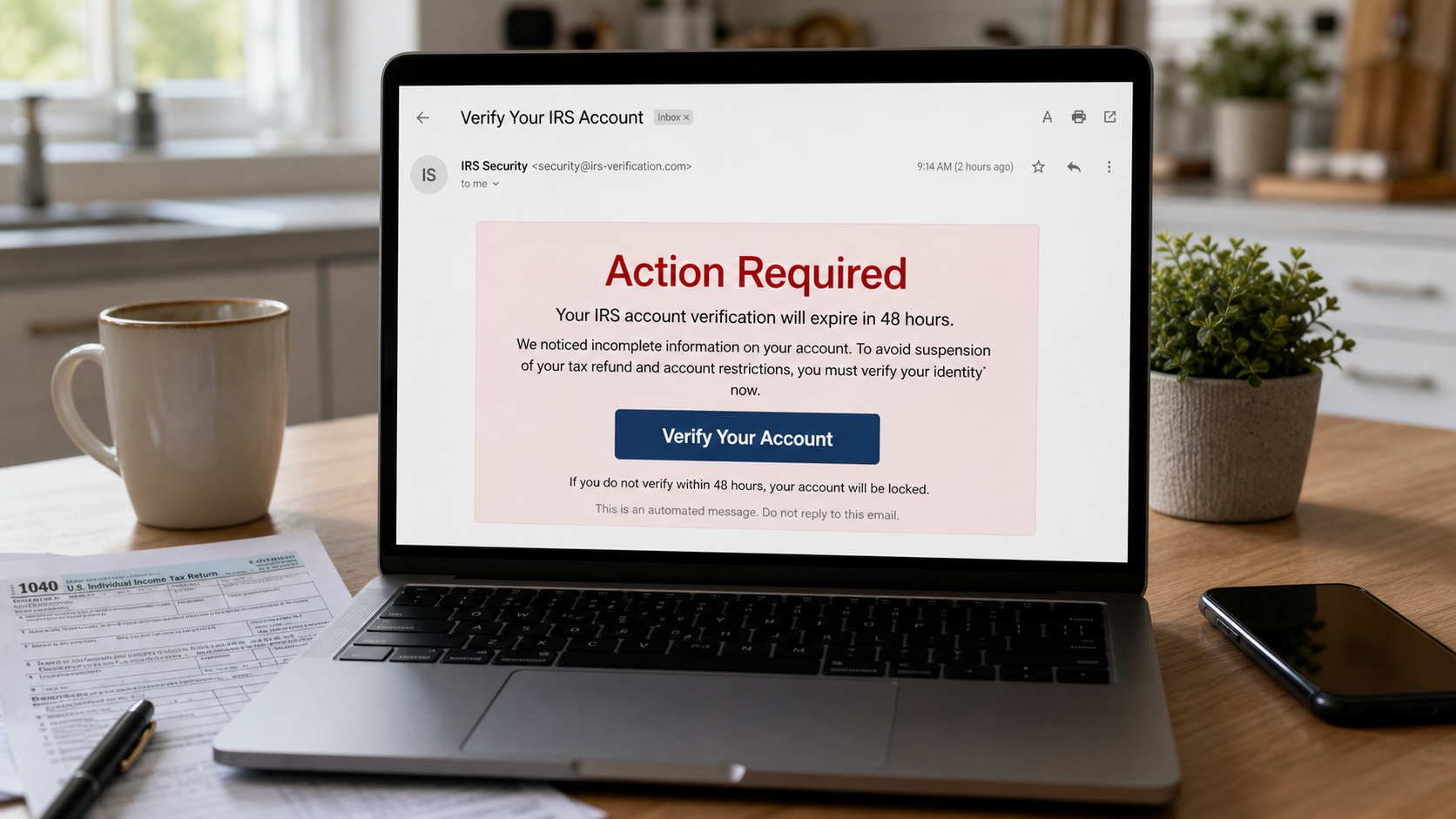
An unexpected message says your IRS account must be verified before a short deadline. It may mention an expiring identity check, a delayed refund, or a tax account that will be restricted unless you act.
The language sounds administrative, and the button looks like the quickest way to prevent a serious problem. That small moment of urgency is where the danger begins.
Overview
The warning borrows the authority of the IRS
The Verify Your IRS Account scam is a phishing campaign that impersonates the Internal Revenue Service. It arrives by email, text message, social media message, or occasionally a printed letter containing a QR code.
The message may claim that identity verification is incomplete, an online account will expire, a return has been flagged, or a refund cannot be released. A button invites the recipient to “Verify Your Account” or “Confirm Tax Information.”
The IRS does use identity-verification procedures in real cases, which makes the story more believable. The scam replaces that legitimate process with an unsolicited link, false deadline, and website controlled by criminals.
The destination is built to collect identity data
The link can open a page designed to resemble an IRS or ID.me sign-in screen. It may ask for an email address and password first, then request tax, identity, banking, or document information.
Information commonly requested includes:
- Full name, date of birth, and home address
- Social Security number or Individual Taxpayer Identification Number
- IRS account or ID.me credentials
- Bank account and routing numbers
- Credit or debit card details
- Photos of a driver’s license, passport, or tax form
- One-time security codes sent by email or text
Each screen can be presented as one more verification step. By the time the page displays an error or confirmation, the submitted data may already have been transmitted to the operator.
The stolen information can support several crimes
A complete identity package can be used for account takeover, fraudulent credit applications, tax-refund fraud, benefit fraud, or targeted impersonation. Bank details may lead to unauthorized ACH attempts or convincing follow-up calls.
Stolen email credentials are especially valuable because tax notices, password resets, financial statements, and saved documents may all be available in the inbox. The attacker can also use the account to impersonate the victim.
Some pages request a small “processing” payment or card check. The amount may be modest, but it gives criminals usable payment details and confirms that the victim is willing to continue.
What Real IRS Identity Verification Looks Like
The IRS can ask a taxpayer to verify identity or return information, but the process begins through specific official channels. A real case commonly involves a mailed notice or letter with an identifying number and instructions tied to IRS.gov.
Examples include Letter 5071C, Letter 5447C, Letter 5747C, Letter 6331C, or another notice related to identity and return verification. The exact response depends on the letter, so taxpayers should read the mailed document and use the address printed on IRS.gov.
The IRS says it does not send unsolicited email asking people to provide personal or financial information. It also advises recipients not to reply, click links, or open attachments in suspicious tax-related messages.
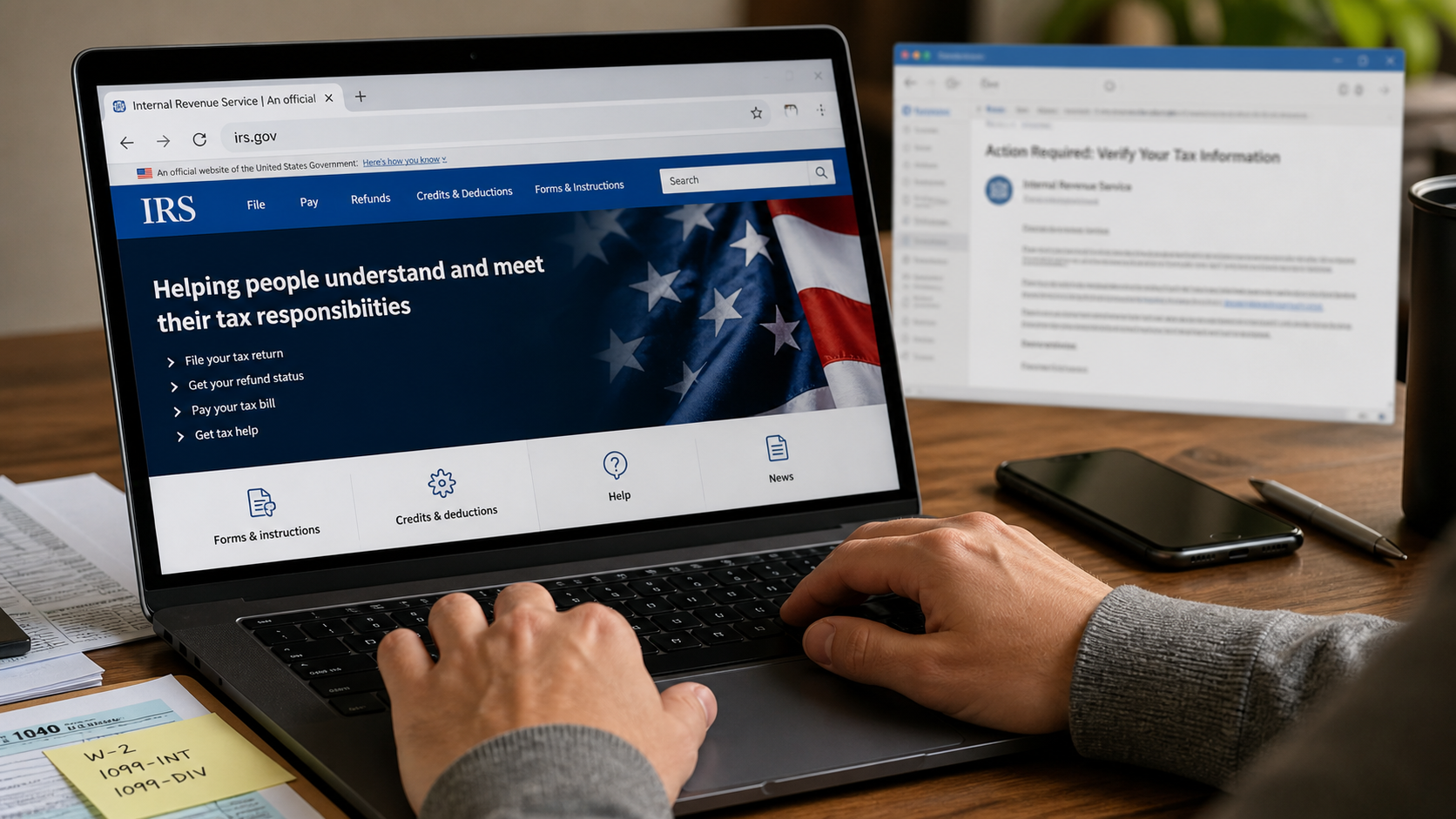
A taxpayer can type irs.gov into a browser and navigate to the online account or return-verification service. That independent route breaks the scammer’s control over the destination.
How the Verify Your IRS Account Scam Works
Step 1: The scammer chooses a believable tax concern
The message may arrive during filing season, after refund deadlines, or when tax news is receiving attention. Broad campaigns do not need to know the recipient’s real tax situation because almost every adult recognizes the IRS name.
The pretext can be adjusted to current events. One version mentions an expiring ID.me verification, another claims a refund is frozen, and another says a recent return contains inconsistent information.
Step 2: A deadline discourages independent checking
The recipient is given 24 or 48 hours to respond. The message may threaten account suspension, penalties, lost refund eligibility, or referral for enforcement if verification is not completed.
These consequences are written to feel immediate but remain vague. The sender wants the reader to click before checking mailed notices, signing into an official account, or asking a trusted tax professional.
Step 3: The link hides behind official-looking text
A button may display “IRS Account,” “Secure Verification,” or “Review Notice,” while its actual destination belongs to an unrelated domain. Shortened links and QR codes make the address harder to inspect.
The first page may use a government-style banner, lock icon, case number, and familiar colors. Those visual elements can be copied. The browser address remains a more useful clue than the page design.
Step 4: The fake portal collects login credentials
The site often begins with an email address and password. Some versions imitate ID.me because people recognize it as a real identity service used by government agencies.
When the victim submits the form, the page may claim the password was incorrect and request it again. That trick helps the attacker capture multiple password variants that may work on other accounts.
Step 5: The form expands into identity verification
Next, the victim is asked for an SSN, date of birth, address, filing status, prior-year income, refund amount, or tax-document details. The sequence makes each request feel like a logical continuation of the first login.
A document upload may request both sides of a driver’s license or a passport image. A selfie request can provide biometric material useful for defeating weak identity checks elsewhere.
Step 6: Banking details are framed as refund delivery
The page may claim that direct-deposit information must be confirmed before a refund can be released. Account and routing numbers, card data, or online-banking credentials are collected under that pretext.
Another variation requests a small payment for validation, document processing, or account reactivation. The IRS does not use an unexpected phishing page to collect such a fee.
Step 7: The victim sees a delay while the data is abused
After submission, the page may display “verification pending” or promise a response within several days. That quiet ending delays suspicion and gives the attacker time to test credentials or attempt account changes.
The victim may then receive calls from someone posing as an IRS agent, bank investigator, or identity specialist. Details submitted on the page allow the caller to sound unusually informed.
How to Verify an IRS Message Safely
Do not use the link, QR code, attachment, email address, or phone number in the suspicious message. Open a new browser window and type irs.gov yourself.
Check your IRS Online Account and review any physical mail you have received. A legitimate identity-verification request should correspond to a specific notice and official instructions.
If a letter appears suspicious, search its notice or letter number on IRS.gov. Use only contact details published on the official site or printed on a letter you independently confirmed.
The sender line is not decisive. A display name can say “Internal Revenue Service,” and spoofing can make parts of an email look authentic. Unsolicited demands for sensitive information remain the central warning.
Company, Address, and Fulfillment Checks
The government name does not identify the sender
An IRS name, eagle graphic, or tax reference can be copied into any email. The real identity must be established through the sending domain, mailed notice, official account, and independently reached government channel.
The destination address must end where expected
A page can place “IRS” anywhere in a subdomain or path. The registrable domain is what matters. If the verification does not occur on an official government or clearly documented partner domain, stop.
Support details supplied by the message are circular proof
A telephone number or email in the suspicious notice cannot verify that same notice. Search IRS.gov independently and use the contact method associated with the confirmed letter or service.
A real case should have a traceable notice
Legitimate tax matters have a notice number, tax period, official account history, or mailed record that can be independently checked. A generic deadline without those anchors deserves caution.
Why a Real Security Code Does Not Make the Caller Legitimate
A scammer who knows an email address or phone number may trigger a genuine password reset. The victim then receives a real one-time code from an authentic service while speaking to the criminal.
The caller may say the code confirms identity or cancels the verification attempt. In reality, reading it aloud can authorize the attacker’s login or password change.
Never share a one-time code with someone who contacted you unexpectedly. Enter it only into an official site or app that you opened yourself and only for an action you intentionally started.
Warning Signs That Deserve an Immediate Pause
No single design flaw is required for this scam to be dangerous. Some messages are badly written, while others use clean formatting and accurate tax vocabulary. Judge the contact by what it asks you to do and whether you initiated the process.
- The message arrived unexpectedly by email, text, or social media
- A refund, account, or identity check supposedly expires within hours
- The button leads somewhere other than an independently opened official service
- The form asks for an SSN, bank details, or identity documents all at once
- The sender discourages you from checking mailed notices or IRS.gov
- A caller asks for a password, one-time code, gift card, or remote access
Grammar is not a reliable test. Criminal groups can copy genuine wording, use translation tools, or reuse leaked correspondence. A polished page can still send every field to an attacker.
Likewise, a lock icon only means the connection to that particular site is encrypted. It does not prove the site belongs to the IRS or that the person collecting the information has a legitimate reason to receive it.
What to Do if You Have Fallen Victim to This Scam
- Stop submitting information. Close the page and end any call or chat. Do not return to the link to test it, correct details, or ask the sender to delete your information.
- Secure your email account first. Change the password from a trusted device, sign out unknown sessions, review forwarding rules and recovery details, and enable strong two-factor authentication.
- Protect IRS access. Visit IRS.gov directly, review your online account, and create an Identity Protection PIN if your SSN or tax information may have been exposed.
- Contact financial institutions. If you entered bank or card data, call the institution using a verified number. Ask about monitoring, card replacement, ACH blocks, transfer recalls, and disputes.
- Freeze or monitor your credit. Contact Equifax, Experian, and TransUnion if identity information or document images were shared. Review reports for unfamiliar inquiries or accounts.
- Scan the device. If you opened an attachment, installed software, or visited a suspicious page, run a full Malwarebytes scan to check for credential-stealing malware and unwanted remote-access tools.
- Reduce future malicious redirects. AdGuard can block many known phishing pages, harmful ads, and tracking redirects. Keep browser and operating-system protections enabled as well.
- Save and report evidence. Preserve the message, headers, URL, screenshots, documents requested, and information submitted. Follow the IRS instructions for reporting fake tax messages to phishing@irs.gov.
- Report identity theft when appropriate. Use IdentityTheft.gov for a recovery plan if personal information was stolen. Report financial fraud promptly to relevant institutions and authorities.
- Reject recovery offers. Do not pay strangers who claim they can remove your data, retrieve a refund, or speak to the IRS on a secret channel. That is often a second scam.
Frequently Asked Questions
Does the IRS ever ask people to verify their identity?
Yes, but a legitimate request is tied to an official process, often a mailed letter with specific instructions. An unsolicited email or text link should not be used.
Will an IRS online account expire after 24 or 48 hours?
A sudden deadline in an unexpected message is a phishing warning sign. Verify account status directly at IRS.gov instead of relying on the sender’s claim.
What if the message includes my real name?
A real name can come from public records, marketing databases, or a breach. Personalization makes a message more convincing but does not authenticate the sender.
Can opening the email alone steal my identity?
Usually the greater risk comes from clicking, downloading, replying, or submitting data. Still, avoid loading suspicious remote content and scan the device if an attachment was opened.
What if I entered information but did not press the final button?
Assume the page may have captured each field as it was entered. Take recovery steps based on every item typed, not only what appeared on the final screen.
Where should a fake IRS message be reported?
The IRS provides instructions for email, text, website, social media, phone, and mailed scams. Start at IRS.gov and follow the reporting method for the contact you received.
The Bottom Line
The Verify Your IRS Account scam turns a real concept, identity verification, into an urgent phishing path. Its purpose is to move you away from official channels and into a form controlled by criminals.
Do not click the message. Check mailed notices and open IRS.gov independently. If sensitive information was submitted, protect email, tax, credit, and financial accounts without waiting for suspicious activity to appear.








